9 Best PC Mounts for Standing Desks (November 2026)
The best standing desk PC mounts include the VIVO Under Desk and Wall Office PC for swivel access, the VIVO Dual Monitor Stand for a full workstation setup, and the JOY worker Under Desk PC Mount for for no-drill leg mounting.
On this page (4 sections)
The best standing desk PC mount for most setups is the VIVO Under Desk and Wall Office PC Mount, thanks to its adjustable frame, protective padding and 135 degree swivel. It suits standard towers where rear access and floor clearance both matter.
A tower on the floor can collect dust, attract knocks and make rear ports awkward to reach. Raising it under the desk keeps the machine closer to your other gear and leaves space for your feet and storage boxes.
The right holder still depends on your case width, case height and weight. Desk leg shape and the clearance left when the desk is raised can matter just as much as the tower itself.
For heavier towers, Mount-It! and monTEK support up to 66 lb with wider adjustment ranges. VIVO tops out at 22 lb, so it is better suited to lighter desktop cases.
No drill leg mounts suit a moving desk because the tower travels with the frame instead of staying behind on the floor. That can reduce cable strain during height changes, provided the cables have enough slack.
Measure your tower before you choose a mount. Width and height ranges vary widely, and the limits for leg mounts are stricter than they first appear.
If the tower is wide, ZUAVIALA reaches PC cases up to 11 in wide on a square leg. Mount-It! and monTEK go further on width, up to 11.8 in, for larger gaming and office cases.
If you also need to reorganize the rest of your setup, compare a best standing board for standing desk for movement breaks and a best standing desk privacy panel for a more private workstation. A PC mount fixes tower placement, but it does not solve every other space problem at a standing desk.
Think about airflow as well as access. An open frame or open sides help keep vents clear, while a swivel helps when you need to reach the back panel.
Check the desk itself next. A desktop mount needs enough thickness and overhang, while a leg mount needs a leg shape and size it can actually clamp onto.
Start with the case measurements, then check the desk, so you do not buy a holder that fits the tower but not the furniture.
Our picks at a glance
-
1

-
2
-
3

- 4
 Check it
ZUAVIALA Under Desk PC Mount for Standing
Best for wide tower cases - 5
 Check it
CoJewe Under Desk PC Mount No Drill
Best for fixed-size desk legs - 6
 Check it
Mount-It! Heavy Duty Under Desk PC Mount
Best for heavy towers - 7
 Check it
JOY worker Under Desk PC Mount with
Best for extra tower protection - 8
 Check it
TOPSKY Under Desk PC Mount No Drill
Best for standard rectangular towers - 9
 Best for large PC casesCheck it
The best standing desk PC mounts for different setups
The VIVO swivel mount is the easiest all around pick for a compatible tower. Mount-It! and monTEK suit larger and heavier cases with broader adjustment ranges.
Clamp on leg models make sense when your standing desk has a matching rectangular leg and you want no drill installation. The desk leg measurements decide whether those options will work at all.
A monitor stand is a different kind of upgrade. It frees desk space for screens, but it does not hold the tower itself.
Use case size, weight and leg shape as your first filters. Those three checks narrow this list faster than brand or style.
VIVO Under Desk and Wall Office PC: Best for swivel access
- 3.5 to 7.8 in adjustable width
- 11.5 to 20.5 in adjustable height
- 135-degree swivel
- 22 lb capacity
The adjustable frame fits many desktop towers and swivels 135 degrees for easier access to rear ports and cables. It can mount beneath a desk or on a wall.
Pros
- 135-degree swivel
- Protective padding
- Under-desk or wall mounting
Cons
- 22 lb capacity is lower than several heavy-duty picks
- Needs a desk overhang at least as wide as the PC
VIVO is the best standing desk PC mount for a standard desktop tower that needs easy rear access. Its frame adjusts from 3.5 to 7.8 in wide and 11.5 to 20.5 in high.
That range covers many compact and mid size towers, but it is narrower than the 66 lb options below. Measure width and height with cables and any side panels fitted, since extra bulk can change the fit.
The 135 degree swivel turns the tower toward you when you need to reach ports or check cables. It also helps during maintenance, when you want the rear panel closer instead of reaching under the desk.
Thick padding dots inside the holder help protect the case from scratches. They cushion the contact points where the frame meets the tower during daily use and desk movement.
This mount supports up to 22 lb and can attach beneath a desk that is at least 1 in thick. For a standing desk, the overhang must be at least as wide as the PC, measured from the desk frame supports to the outer edge.
Choose VIVO when rear access matters as much as floor clearance. Its lower capacity makes it less suitable for a heavy tower than the 66 lb options below.
Set it up with the desk at mid height first, then test cable slack through the full travel range.
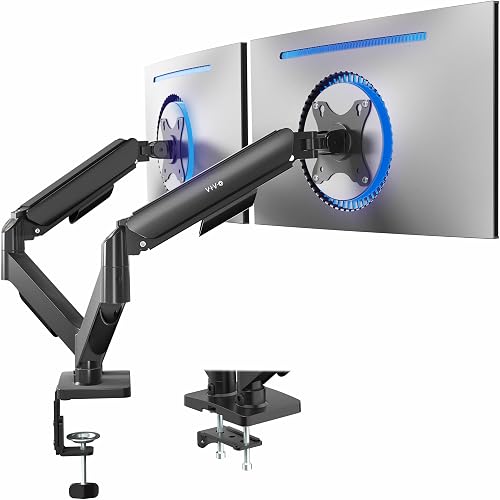
VIVO Dual Monitor Stand: Best for a full workstation setup
- Fits 17 to 32 in screens
- Supports 4.4 to 19.8 lb per screen
- 360-degree rotation
- C-clamp or grommet mounting
This is a workstation add-on rather than a tower holder, but it pairs well with a standing desk PC mount by freeing desk space for two screens.
Pros
- Fully adjustable arms
- Open-top VESA plates
- 1 USB 3.0 port and 2 multimedia ports
Cons
- Arms extend past the desk edge
- Does not hold a computer tower
The VIVO Dual Monitor Stand is the best companion pick for a standing desk PC mount when your setup uses two screens. It supports 17 to 32 in monitors weighing 4.4 to 19.8 lb each.
The screens need VESA 75x75 or 100x100 mounting patterns. Check the back of each monitor before you plan the setup, since the pattern decides whether the plates will fit.
Its arms tilt from +90 to -90 degrees, swivel 180 degrees and rotate 360 degrees. That range lets you angle one screen for a call or a document without moving the whole desk.
Open top VESA plates make slide on installation easier, while the spring adjustment helps position the screens without tools. You can set the height and angle, then lock the position for normal use.
The heavy duty C clamp fits desktops up to 3.1 in thick. An optional bolt through grommet mount fits tops up to 1.9 in thick, so desktop thickness decides which method suits your desk.
The arms extend past the desk edge, so check the rear clearance before installation. A shallow desk may leave less room behind the monitors than you expect.
This product does not hold a tower. It earns a place here because raising two screens can leave more usable room for the keyboard, cables and other desk equipment.
Pair it with an under desk tower holder for a cleaner floor. The tower stays below, the screens sit at eye level, and the desk surface stays open for work.
JOY worker Under Desk PC Mount for: Best for no-drill leg mounting
- Clamp-on installation
- Fits 5.9 to 9.8 in PC cases
- 44 lb capacity
- Works best with inverted legs
The clamp-on design attaches to a compatible standing desk leg without drilling. Silicone gaskets, thickened steel and a 44 lb capacity suit many standard towers.
Pros
- No drilling required
- 44 lb capacity
- C-clamp and clamp shelf included
Cons
- Not compatible with round legs
- Works best with inverted legs
The JOY worker clamp on mount is best for a no drill standing desk setup with a compatible inverted leg. It fits PC cases 5.9 to 9.8 in wide and supports up to 44 lb.
That capacity suits many standard towers that are too heavy for the VIVO mount. Still, weigh the case or check its listed weight before you order, since the margin above the limit matters.
Installation uses a clamp, so you can attach it to the desk leg without drilling the desktop. The mount travels with the leg as the desk rises and falls, which helps keep cables aligned.
The thickened steel frame and upgraded silicone gasket help keep the holder in place during normal desk movement. The gasket is the contact layer between mount and leg, so it plays a big role in grip.
This model is not compatible with round legs. Measure the leg and check the shape before ordering, because a clamp made for a flat leg face will not seat properly on a curve.
The C clamp and clamp shelf are included, along with installation accessories and a detailed guide. Choose it when your case is wider or heavier than the VIVO mount allows and your desk leg matches the design.
ZUAVIALA Under Desk PC Mount for Standing: Best for wide tower cases
- 4.92 to 11.42 in holder adjustment
- Fits 5 to 11 in PC cases
- 44 lb capacity
- Fits square desk legs
ZUAVIALA gives wide PC cases more room than several compact mounts. Its clamp fits square desk legs within specific measurements and uses anti-slip pads.
Pros
- Fits PC cases up to 11 in wide
- 44 lb capacity
- No-drill installation
Cons
- Does not fit round desk legs
- Desk leg measurements must match
ZUAVIALA is the best standing desk PC mount for a wider case on a square desk leg. Its holder adjusts from 4.92 to 11.42 in, fitting PC cases from 5 to 11 in wide.
The maximum load is 44 lb, which gives more headroom than lighter mounts. Wider gaming cases can be heavier than they look, so weight is worth checking alongside width.
The desk leg must measure 60 to 100 mm deep and 40 to 60 mm wide. It does not fit round legs, so these measurements should be part of your first check, before you compare case sizes.
Anti slip pads and transparent soft rubber pieces sit at key contact points. They help stop sliding and reduce marks on both the leg and the tower during height changes.
The clamp on design needs no drilling and keeps the tower attached to the leg as the desk changes height. That keeps the PC off the floor and away from dust, moisture and knocks.
Pick ZUAVIALA when case width is the main concern and your desk leg fits the stated range. During setup, tighten the clamp, place the tower, then test the full desk travel and watch for shift or tilt.
CoJewe Under Desk PC Mount No Drill: Best for fixed-size desk legs
- Three fixed leg sizes
- Fits 5.7 to 9.84 in PC cases
- 40 lb capacity
- Non-slip pads
CoJewe is a strong option when your desk leg matches one of its three fixed sizes. The open frame leaves airflow around a tower while the clamp holds up to 40 lb.
Pros
- 40 lb capacity
- Open-frame design
- 6-month guarantee
Cons
- Not universal
- Exact desk leg size must be selected
CoJewe is the best standing desk PC mount when your desk leg matches one of its fixed sizes exactly. It fits legs measuring 65x45 mm, 75x45 mm or 80x50 mm.
That fixed sizing is the main thing to understand. This is not a universal clamp that adjusts to any leg, so the exact measurement decides whether it fits your desk.
The holder fits PC cases from 5.7 to 9.84 in wide and supports up to 40 lb. That width range covers many standard towers, but the leg size is the stricter limit here.
Its open frame design leaves space around the tower, while non slip pads help reduce sliding and scratches. Open space also helps airflow around the case during long work sessions.
No drilling is required. Hardware and a detailed installation guide are included, and CoJewe provides a 6 month guarantee period.
This is a sensible choice when your desk uses one of the three supported leg sizes. It rewards a careful measurement and a clear match at the start.
It is a poor match when you cannot confirm the exact measurement, because choosing the wrong fixed size can prevent installation. Returns and delays are more likely when the leg size is guessed.
Use a tape measure on the leg itself, not the desk frame or the desktop. Note both dimensions, then compare them with the three listed sizes before you order.
Mount-It! Heavy Duty Under Desk PC Mount: Best for heavy towers
- 66 lb capacity
- 16.1 to 25.6 in height adjustment
- 7.1 to 11.8 in width adjustment
- Lifetime manufacturer warranty
Mount-It! has the highest stated capacity in this group. Its clamp fits desktops from 0.59 to 2.4 in thick, while the holder adjusts for larger tower sizes.
Pros
- 66 lb capacity
- All-steel construction
- Lifetime manufacturer warranty
Cons
- Requires a compatible desktop thickness
- Large adjustment range needs careful clearance checks
Mount-It! is the best standing desk PC mount for a heavy tower. Its all steel frame supports up to 66 lb, and the holder adjusts from 16.1 to 25.6 in high.
The width adjustment runs from 7.1 to 11.8 in, which covers many mid tower and full tower cases. That broad range means the same mount can suit a smaller office tower or a larger gaming case.
The clamp attaches to desktops from 0.59 to 2.4 in thick. Desktop thickness is the key check here, since the clamp needs a top it can grip without drilling.
The horizontal holder slides the tower in and out for maintenance without requiring you to loosen the clamp. That is practical when you need to reach a drive, a cable or a rear port.
Padded contact points protect the clamp surface and PC case. Open sides leave airflow around the tower, while the under desk position clears floor space for your feet or storage.
Mount-It! also includes a lifetime manufacturer warranty and US based product support. That coverage is a real difference in a category where shorter guarantees are common.
Choose it when weight and a broad adjustment range matter more than a smaller frame. The larger holder needs more clearance under the desk, especially at the lowest height.
Measure the case, the desktop thickness and the space below the desk. Those checks confirm that the tower fits and still clears the floor when the desk comes down.
JOY worker Under Desk PC Mount with: Best for extra tower protection
- Two adjustable protective arms
- Fits 5.9 to 9.8 in PC cases
- 44 lb capacity
- Clamp-on leg installation
This JOY worker version adds two adjustable arms to the bottom tray for extra tower support. It keeps the same no-drill clamp approach and 44 lb capacity.
Pros
- Two adjustable protective arms
- 44 lb capacity
- C-clamp and clamp shelf included
Cons
- Not compatible with round legs
- Works best with inverted legs
The JOY worker model with protective arms is the best standing desk PC mount for buyers who want extra support around the bottom tray. Its two adjustable extending arms add protection to a tower that fits the 5.9 to 9.8 in width range.
The arms extend the support at the base, where a tower can shift during desk movement. That extra contact can help keep the case settled when the desk rises or falls.
The thickened alloy steel frame supports up to 44 lb. That capacity matches the other JOY worker clamp on model, so the choice between them comes down to the added arms.
Like the other JOY worker clamp on model, it attaches without drilling and works best with inverted legs. The leg shape check comes first, since the mount cannot work on an unsupported leg design.
It is not compatible with round legs. A round leg gives the clamp no flat face to grip, so the mount would not sit safely even if the tower fits the width range.
The upgraded silicone gasket helps the mount stay in place, while the C clamp and clamp shelf are included. Installation uses a clamp, tightening and adjustment rather than desktop drilling.
Choose this version when the added arms fit your setup priorities. They suit buyers who worry about the tower sliding or shifting at the base.
If your desk leg is not compatible, the extra protection does not solve the basic fit problem. Measure the leg shape and size before you weigh the arm benefit.
TOPSKY Under Desk PC Mount No Drill: Best for standard rectangular towers
- 50 lb capacity
- Fits 6.89 to 11.22 in PC cases
- Three compatible leg sizes
- 3-year support
TOPSKY suits standard and mid-tower PCs when the desk leg matches one of three rectangular sizes. The reinforced steel frame supports up to 50 lb.
Pros
- 50 lb capacity
- No-drill installation
- 3-year support
Cons
- Not for round or irregular legs
- Not recommended for oversized full-tower cases
TOPSKY is the best standing desk PC mount for a standard rectangular tower when your desk leg matches one of three sizes. It fits 65x45 mm, 75x45 mm or 80x50 mm legs.
The capacity is 50 lb, which sits between the 44 lb clamp on models and the 66 lb heavy duty options. That middle ground suits many standard towers without needing the largest frame.
The adjustable holder fits PC cases from 6.89 to 11.22 in wide, with a recommended maximum height of 21.65 in. Width alone is not enough, since a tall case can exceed the recommended height even when it fits side to side.
TOPSKY does not recommend it for oversized full tower or extra wide gaming cases. Those larger cases are better matched to a mount with a higher height limit and a higher capacity.
Its no drill installation uses three steps: attach the clamp, place the tower and secure it. The reinforced steel frame uses top and bottom clamping to keep the PC stable during desk height changes.
Measure both the leg and the case before choosing TOPSKY. It does not fit rounded, oversized, irregular or non standard leg shapes, even when the tower itself is within the width range.
Leg shape and case size are separate checks. Passing one does not guarantee the other, so both measurements should be done before you order.
Once fitted, run the desk through its full range and watch the tower. The clamp should stay seated and the tower should not shift as the desk moves.
monTEK Under Desk PC Mount: Best for large PC cases
- 16.1 to 25.6 in height adjustment
- 7.1 to 11.8 in width adjustment
- 66 lb capacity
- 7-level height adjustment
monTEK is built for larger gaming and office towers that need a broad adjustment range. Reinforced steel, non-slip pads and a 66 lb capacity support heavier cases.
Pros
- 66 lb capacity
- 7-level height adjustment
- Fits many mid and full towers
Cons
- Large frame needs careful clearance planning
- 1-year warranty
monTEK is the best standing desk PC mount for a large gaming or office case. Its reinforced steel frame supports up to 66 lb.
The width adjustment runs from 7.1 to 11.8 in, with height adjustment from 16.1 to 25.6 in. Those ranges cover many mid tower and full tower cases that smaller mounts cannot hold.
Seven height levels make it easier to set the holder around a taller tower. Stepped adjustment can help you get a closer fit than a single fixed height, which reduces movement during desk travel.
Non slip protective pads help improve grip and reduce contact scratches on the PC case and desktop. The pads sit where the holder meets the tower, so they help with both stability and care over time.
The under desk position keeps the tower off the floor and leaves more room for feet, storage and cable routing. It also moves the tower away from dust, moisture and accidental knocks near floor level.
The broad frame needs clearance planning, especially at the desk's highest position. A large case under a raised desk can leave less room than expected for airflow and maintenance.
Choose monTEK when you need the same high capacity as Mount-It! with 7 level height adjustment. Its warranty is 1 year, while Mount-It! lists a lifetime manufacturer warranty.
That warranty gap is worth weighing if you plan to keep the desk for many years. Capacity and adjustment are similar, so support terms can decide between the two.
How to choose a standing desk PC mount
Start with the tower, then check the desk. The most useful measurements are case width, case height, case weight, desk-leg shape, desk-leg dimensions and clearance at the desk's highest position.
Match the mount to your PC case
A mount must hold the case securely without squeezing controls, vents or cables. VIVO fits 3.5 to 7.8 in widths, while ZUAVIALA reaches 11 in and Mount-It! and monTEK reach 11.8 in.
For a taller tower, compare the height range rather than width alone. Mount-It! and monTEK adjust from 16.1 to 25.6 in, while TOPSKY recommends a maximum PC height of 21.65 in.
Check weight capacity before installation
Choose a capacity above the tower's actual weight. The picks here range from VIVO's 22 lb limit to 40 lb, 44 lb, 50 lb and 66 lb options.
A mount that only matches the case weight leaves little room for uncertainty. If the tower is close to the limit, choose a higher-capacity model and verify that the desk or leg can support the added load.
Decide between desktop and leg mounting
Desktop mounting gives you more freedom when the desk leg shape is unusual. VIVO needs a desk or work surface at least 1 in thick and enough overhang.
Mount-It! fits desktops from 0.59 to 2.4 in thick, which suits a different range of tops. The overhang check still matters, since the tower must fit between the frame supports and the desk edge.
Leg mounting avoids drilling and keeps the tower aligned with a moving desk. The tower moves with the frame instead of lagging behind on the floor, which can help with cable strain.
The trade off is stricter compatibility. Several options only fit square or rectangular legs, and CoJewe and TOPSKY use fixed leg sizes.
Round legs are a common blocker for clamp on models.
Fixed sizes need exact measurement before you order. A leg that is close to a listed size may still not fit, since the clamp is made for that specific dimension.
Desktop mounts can suit desks with unusual legs, but they need their own checks. Thickness, overhang and clearance at the lowest desk height all decide whether the tower fits underneath.
Choose the mounting style that matches your desk first. That decision cuts the list down before you compare case width or weight capacity.
Plan cable slack and clearance
Move the desk through its full height range after installation, with the PC secured and cables connected. Check that cables do not pull tight, catch on the frame or press against ports.
The tower should also have room around it for airflow and maintenance. A swivel model such as VIVO can make rear access easier, while Mount-It! and monTEK use broad holders that need more clearance planning.
Standing desk accessories that complete the setup
A PC mount solves tower placement, but the rest of the workstation still affects how much room you have. A monitor arm, privacy panel and suitable chair can help you use the desk at different heights.
Think of the mount as one part of a system. Screen height, chair height and cable length all change when the desk moves between sitting and standing.
For sitting periods, compare the Best Desk Chair for Standing Desks if you switch between standing and seated work. The Best Office Chair For Standing Desk is another useful comparison when chair height and desk height need to work together.
A chair that adjusts well can make the seated position match the desk at its lower height. That helps when you move between the two positions through the day.
Keep cables long enough for the full range of desk travel, but avoid loose loops near moving parts. A cable that is too short will pull at the ports when the desk rises.
Recheck the mount after installation and keep the tower's vents clear. Dust builds faster when a case sits low, and clear vents help the machine run in its mounted position.
Plan cable routing before you tighten everything down. Run the desk up and down with cables connected, then adjust slack where it pulls tight.
Store boxes and foot rests with the tower position in mind, since an under desk tower can compete for the same floor space.
Verdict: which standing desk PC mount should you choose?
The VIVO Under Desk and Wall Office PC Mount is the best standing desk PC mount for most standard towers. It combines adjustable sizing, protective padding and a 135 degree swivel.
Pick it when your case is within 3.5 to 7.8 in wide and below 22 lb. Those limits keep it in standard tower territory rather than heavy gaming cases.
Choose Mount-It! or monTEK for a larger or heavier tower, with both supporting up to 66 lb. Their wider and taller adjustment ranges suit cases that the VIVO cannot hold.
Choose JOY worker, ZUAVIALA, CoJewe or TOPSKY when a no drill leg mount fits your desk measurements. Each one needs a specific leg shape or size, so measurement comes before preference.
For wide cases, ZUAVIALA reaches 11 in on a square leg. For fixed leg sizes, CoJewe and TOPSKY need an exact match among their listed options.
Before you order, measure the PC, desk leg and clearance at full desk height. Case width, case height and case weight are the tower checks that matter most.
That one check matters more than choosing the mount with the widest adjustment range. A broad range does not help if the leg shape is wrong or the tower is too heavy.
After fitting, test the desk through its full travel range. Watch cable slack, tower movement and floor clearance at both ends of the range.
Keep the vents clear and recheck clamp tightness after the first week. That routine keeps the setup stable as the desk moves day after day.
Our top 3 picks at a glance
-
1
-
2
-
3
Frequently asked questions
What is the best standing desk PC mount for most towers?
The VIVO Under Desk and Wall Office PC Mount is the best standing desk PC mount for many standard towers because its frame adjusts from 3.5 to 7.8 in wide and 11.5 to 20.5 in high. Its 135-degree swivel also makes rear ports easier to reach.
Measure your case and desk clearance before choosing it.
Should a PC mount attach to the desk or the desk leg?
A desk-mounted holder can work well when the desktop has enough thickness and overhang. A leg-mounted holder avoids drilling into the desktop and can keep the tower aligned with a moving standing desk.
Check the desk leg shape and measurements because several clamp-on models here do not fit round or irregular legs.
How much weight should a standing desk PC mount hold?
Choose a mount with a stated capacity above your tower's weight. The options here range from 22 lb on the VIVO swivel mount to 66 lb on Mount-It! and monTEK.
Leave room below the maximum rather than choosing a mount that only matches the case weight.
Can a standing desk PC mount reduce cable strain?
Yes, mounting the tower to the desk or desk leg lets it move with the standing desk instead of staying on the floor. That can reduce the distance cables must span during height changes.
Still check cable length, connector direction and slack at the highest and lowest desk positions.


