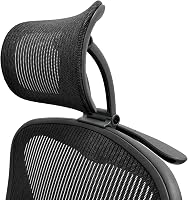
Steelcase Amia Chair Review: Worth It? (October 2026)
The Steelcase Amia suits you if you want adjustable seat depth, height and arms with Live Lumbar support. Check the seat fit and adjustment range against your body and desk before buying.
On this page (8 sections)
- The Steelcase Amia at a glance
- What does the Amia's Live Lumbar support do?
- How adjustable is the Amia seat and arm setup?
- Will the Amia seat feel comfortable for long work sessions?
- Amia vs. MUXX.STIL: which adjustment set fits you?
- Amia vs. Steelcase Gesture: which chair should you compare?
- What should you measure before buying the Amia?
- Is the Steelcase Amia worth choosing?
The Steelcase Amia chair suits you if you want adjustable seat and arm positions with Live Lumbar support. Its seat-depth adjustment and flexible front edge are useful fit points to consider before you buy.
We compared its features with two alternatives. Use this review to decide whether the Amia's adjustment range matches your body, desk and preferred sitting positions.
The Steelcase Amia at a glance
The Amia combines adjustable seat height and depth, four-way arms and Live Lumbar support. It ships fully assembled and includes hard floor casters.
Steelcase Gesture Office Chair: Best for a wide arm range

- 360-degree arms
- Full recline with three settings
- Upright back lock
- Contoured back
Compare the Gesture if a wide range of arm positions and recline settings are priorities. Its features differ from the Amia's seat-depth and flexible-edge emphasis.
Pros
- 360-degree arms
- Three recline settings
- Upright back lock
Cons
- Carpet floor wheels may not fit hard-floor needs
- Its 32.5 in depth deserves a fit check
Steelcase Amia Chair with Platinum Base: Best for seat adjustments

- Adjustable seat height and depth
- Height, width, pivot and depth adjustable arms
- Live Lumbar support
- Flexible front seat edge
A strong fit if you want several ways to tune the seat and arms, plus lumbar flex as you move. Check the chair's dimensions and make sure its seat shape suits you.
Pros
- Adjustable seat height and depth
- Four-way adjustable arms
- Live Lumbar flexes with movement
- Ships fully assembled
Cons
- The dimensions require a deliberate fit check
- Hard floor casters may not suit every floor
MUXX.STIL Office Chair: Best for a lower-profile desk chair

- Adjustable lumbar cushion
- Flip-up arms
- 3.74 in height adjustment
- 264 lb capacity
Consider this chair if flip-up arms and a stated height adjustment range matter to your desk setup. It requires assembly, so allow time to put it together.
Pros
- Arms flip up to save space
- Height adjustment range is stated
- Adjustable lumbar cushion
Cons
- Assembly required
- Lower stated weight capacity than the Amia
The Amia measures 24.8 x 26.6 x 42.5 in and weighs 29 lb. Check those dimensions against your desk space, doorway and movement area before ordering.
Who should consider the Amia?
Consider it if you want to adjust the seat depth and arm position rather than use a fixed setup. The flexible front edge and lumbar flexors are also relevant if you shift posture while working.
Think about the specific adjustments you'll use. A chair can offer many controls and still feel wrong if its seat depth or back shape doesn't suit you.
For a wider premium-chair comparison, see our Best Splurge Office Chair guide. If you're choosing a chair for an older adult, compare access and fit needs in Best Office Chair For Seniors.
What does the Amia's Live Lumbar support do?
The Amia's Live Lumbar flexes with movement to provide support as you recline and change posture. Steelcase describes flexors inside the backrest that contour to the spine.
This is a design feature, not a promise that the chair will relieve pain. If you have ongoing discomfort, consider advice from a health professional and focus on a setup that lets you sit comfortably.
The backrest is 18.9 in wide. That measurement may help you compare chair proportions, but it doesn't describe how the back will feel against your own body.
How adjustable is the Amia seat and arm setup?
The Amia offers seat-height and seat-depth adjustment, plus arms that adjust in height, width, pivot and depth. Use these controls to align the chair with your desk and preferred arm position.
Start by setting the seat height so your feet can rest comfortably on the floor or a footrest. Then adjust depth so the seat supports your thighs without pressing into the backs of your knees.
Set the arms to support relaxed shoulders while you work. If the armrests hit the desk edge or prevent you from moving close to the desk, check whether their range can solve that in your setup.
The Steelcase Gesture office chair review covers a different approach to arm movement, with 360-degree arms. Compare those options if arm positioning is a major part of your decision.
Will the Amia seat feel comfortable for long work sessions?
The Amia has a flexible front seat edge and adjustable seat depth, two features that let you tune how the seat meets your legs. Comfort still depends on your body, clothing, posture and how the seat fits you.
Use the seat-depth adjustment as a fit check rather than assuming it guarantees comfort. You should be able to sit back against the backrest while keeping a small gap behind your knees.
The chair has foam fill and a solid back. Those details describe construction, but they don't tell you how firm the seat will feel to you.
If you work from home, compare the chair's dimensions and adjustment points with the rest of your setup in our Best Office Chair For Home Office guide.
Amia vs. MUXX.STIL: which adjustment set fits you?
Choose the Amia for seat-depth adjustment and four-way arms; consider the MUXX.STIL if flip-up arms and a stated height-adjustment range are more useful. The MUXX.STIL has an adjustable lumbar cushion and a 264 lb capacity.
The MUXX.STIL measures 20.5 x 25.6 x 38.2 in and weighs 26.4 lb. It requires assembly, while the Amia ships fully assembled.
The MUXX.STIL's arms flip up 90 degrees to save space. That can matter if you need to slide a chair under a desk, though you should check the chair dimensions and desk clearance.
The Amia is weight tested and warranted up to 400 lb. Compare capacity as one factor, alongside fit and adjustments, and review current warranty terms before buying.
Amia vs. Steelcase Gesture: which chair should you compare?
Choose the Amia if seat depth and a flexible front edge lead your checklist; compare the Gesture if you want 360-degree arms and three recline settings. The Gesture also has an upright back lock and a contoured back.
The Gesture is Graphite Gray and has wheels for carpet floors. Confirm the wheel type suits your floor before choosing it.
Our Steelcase Gesture vs Leap V2 comparison explains how the Gesture differs from another Steelcase chair. For a separate model-generation question, read Steelcase Leap vs Leap V2: What Changed?.
What should you measure before buying the Amia?
Measure the chair footprint, desk clearance and delivery path before ordering. The Amia is 24.8 in deep, 26.6 in wide and 42.5 in high.
Check that the chair can move freely without striking walls, drawers or nearby furniture. Also account for space to recline and turn, rather than measuring only the area beneath the desk.
The Amia includes hard floor casters. If you use carpet, check whether another caster option is available for your configuration.
Is the Steelcase Amia worth choosing?
The Amia is worth considering if its seat-depth, seat-height and arm adjustments address your fit questions. Its Live Lumbar and flexible seat edge add features to compare against your preferred support and sitting position.
Pick the Amia if you want those seat adjustments and a chair that arrives assembled. For another office chair comparison, see Herman Miller Embody vs Logitech Embody.
Pick the MUXX.STIL if flip-up arms matter more, or compare the Gesture if its arm movement and recline settings fit your needs better.
For a more direct overview of another Steelcase option, see our Steelcase Series 2 Air review. Check dimensions and floor compatibility before you buy.
Frequently asked questions
Is the Steelcase Amia chair adjustable?
Yes. The Amia has adjustable seat height and depth, plus arms that adjust in height, width, pivot and depth.
Its Live Lumbar flexes as you move, and the front seat edge is flexible.
Check that these adjustment points match your posture and desk height.
Does the Steelcase Amia come assembled?
The Amia Chair with Platinum Base ships fully assembled, so there is no assembly step to plan for. You will still need to clear a path to its intended spot and confirm the chair's dimensions fit your desk area before delivery.
How does the Amia compare with the Gesture?
The Amia emphasizes seat-depth adjustment, a flexible front edge and adjustable Live Lumbar. The Gesture has 360-degree arms, a full recline range with three settings and an upright back lock.
Choose based on which adjustments matter more for your sitting habits.
What should I check before buying a Steelcase Amia?
Check the Amia's 24.8 x 26.6 x 42.5 in dimensions, the seat-depth adjustment and whether its arms can fit under or around your desk. Also confirm the included hard floor casters suit your floor and review Steelcase's current warranty terms before ordering.