9 Best Desktop Standing Desk Converters (November 2026)
The best desktop standing desk converters include the VIVO Manual Height Adjustable Standing Desk Converter for most dual-monitor desks, the Vari Pro Plus 36 Standing Desk Converter for no-assembly setup, and the VIVO Standing Desk Converter for a wide manual surface.
On this page (6 sections)
- The best desktop standing desk converters for different setups
- How do you choose a desktop standing desk converter?
- How should you set up a standing desk converter?
- More guides on this topic
- Which desktop standing desk converter should you buy?
- Measure your desk, check the lift type you prefer, and choose the width that leaves room for cables. That simple order will narrow the list faster than comparing every specification.
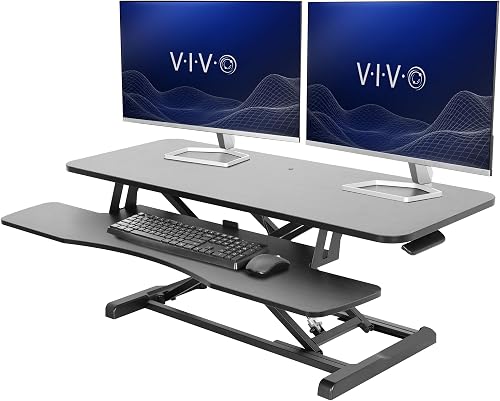
The best desktop standing desk converter for most people is the VIVO Manual Height Adjustable Standing Desk Converter. It turns an existing fixed desk into an adjustable workstation with a 31.5 x 15.7 inch top, a moving keyboard tray and a 4.5 to 20 inch height range.
That appeal is practical for anyone who already likes their desk and does not want to replace it. You can sit for focused writing, then stand for calls, without moving monitors or rebuilding the whole setup.
A converter is useful when you want sit-stand flexibility without replacing your entire desk. If you use a standing desk frame, see covers for standing desk legs.
The 31.5 inch width is a sensible middle ground for many home offices. It leaves room for two monitors on the raised surface and a keyboard and mouse on the tray below.
Start by checking the available width and depth, then compare the surface capacity with the combined weight of your monitors, laptop and accessories. Measure the fixed desk before you order, because the riser needs its own footprint.
Height matters as much as width in daily use. A range up to 20 inches helps taller users raise the screen enough, while the lower settings suit seated work on a standard desk.
The keyboard tray that rises with the top also helps keep your arms at a comfortable angle. That two-tier layout separates input devices from screens, which can make a crowded desk feel cleaner.
For broader desk planning, see our home office desk buying guide. If you use a laptop as your main screen, compare these picks with the best standing desk converter for laptop.
Manual lifting will suit most people who change position a few times a day. It keeps the setup simpler than an electric model, and it avoids needing a power connection near the desk.
Think about care as well as setup. Wipe the black surface with a soft cloth, check that tray fixings stay secure, and keep cables clear of the lift path so movement stays smooth.
Our picks at a glance
-
1
 Best for most dual-monitor desks
VIVO Manual Height Adjustable Standing Desk Converter
9.7/10 our score
See it on Amazon -
2
 Best for no-assembly setup
Vari Pro Plus 36 Standing Desk Converter
9.6/10 our score
See it on Amazon -
3
- 4
 Check it
TechOrbits Black 32 in Standing Desk Converter
Best for a monitor stand included - 5
 Check it
FLEXISPOT Standing Desk Converter 36" Desk Riser
Best for a steel spring lift - 6
 Check it
SANODESK 42" Extra Large Standing Desk Converter
Best for an extra-wide keyboard tray - 7
 Check it
FITUEYES Height Adjustable Standing Desk 32” Wide
Best for a two-level compact setup - 8
 Check it
VERSADESK PowerPro 40 Inch Electric Standing Desk
Best for electric multi-monitor lifting - 9
 Check it
JOY worker 32" Standing Desk Converter
Best for a white desktop riser
The best desktop standing desk converters for different setups
The VIVO Manual Height Adjustable Standing Desk Converter is the strongest all-purpose choice, while the other models fit specific needs such as electric lifting, extra width, a supplied monitor stand or a white finish.
Our score weighs specs, features and buyer feedback against what you're shopping for. The products below are listed from highest score to lowest.
VIVO Manual Height Adjustable Standing Desk Converter: Best for most dual-monitor desks
- 31.5 x 15.7 in surface
- 33 lb desktop capacity
- 4.5 to 20 in height range
- Keyboard tray included
This VIVO riser gives a fixed desk a manual sit-stand setup with room for dual monitors. Its keyboard tray moves with the top surface.
Pros
- Dual-monitor surface
- 20 in maximum height
- Minimal assembly
Cons
- Manual lifting
- Keyboard tray is narrower than the desktop
The VIVO Manual Height Adjustable Standing Desk Converter suits a typical home office with one or two monitors. Its 31.5 x 15.7 inch black top gives a dual-monitor setup a practical working area, while the keyboard tray measures 31.3 x 11.8 inches and raises with the surface.
The lift moves from 4.5 to 20 inches. That range covers a seated position on many desks and gives taller users more room to set the screen and keyboard at a comfortable height.
The desktop supports up to 33 lb, and the keyboard tray supports the keyboard and mouse area separately. The alloy steel frame and black finish give this riser a straightforward look for a fixed desk.
Setup is limited to placing the riser on the desk and attaching the keyboard tray. Choose it when you want a manual desktop standing desk converter with a wide tray and dual-monitor capacity.
Vari Pro Plus 36 Standing Desk Converter: Best for no-assembly setup
- 36 x 12.25 in upper tier
- Two-tier workspace
- Spring-assisted lift
- Fully assembled
The Vari Pro Plus 36 arrives assembled and separates monitors from the keyboard and mouse on a lower deck. Its spring-assisted lift suits frequent sitting and standing changes.
Pros
- Fully assembled
- Wide monitor tier
- Two-tier layout
Cons
- Manual lift
- Upper tier is 12.25 in deep
The Vari Pro Plus 36 is the best fit when you want a fully assembled converter with a separate monitor tier and keyboard deck. Its upper tier measures 36 x 12.25 inches, giving two monitors a wide but relatively shallow platform.
The two-tier workspace keeps the keyboard and mouse on the lower deck. That layout can make it easier to keep the screens farther back while leaving the lower area for typing and small accessories.
The shallow upper tier is the main trade-off to consider. It suits monitors and slim stands well, but deeper equipment or bulky speakers may need a different layout.
Its spring-assisted rowing lift, dual handles and stability bars are built around manual height changes. The metal frame has a laminated finish, and no assembly is required before placing it on an existing desk.
Because it arrives assembled, it suits people who want to start using it straight away. Place it on a stable desk, check the base fits, and arrange cables before you load the screens.
Choose Vari if setup time matters most or if you prefer a dedicated upper monitor shelf. For monitor-arm planning, read our guide to a standing desk converter with monitor mount.
VIVO Standing Desk Converter: Best for a wide manual surface
- 42 x 15.7 in surface
- 33 lb desktop capacity
- 4.5 to 20 in height range
- Wide keyboard tray
The 42 inch VIVO gives dual-monitor users more horizontal room than the smaller VIVO. It uses a manual lift and includes a keyboard tray that rises with the top.
Pros
- 42 in width
- 20 in maximum height
- 33 lb desktop capacity
Cons
- Needs a wide supporting desk
- Manual adjustment
The VIVO Standing Desk Converter is the better VIVO choice when a 32 inch surface feels too narrow. Its 42 x 15.7 inch top gives dual monitors more side-to-side room, with a 42 x 11.8 inch keyboard tray below.
That extra width helps when you run a laptop beside an external monitor, or two screens with a notebook and small accessories nearby. It also gives you more choice about where to place each item.
The height range is 4.5 to 20 inches, matching the smaller VIVO's maximum height. The desktop supports up to 33 lb, while the keyboard tray supports up to 4.4 lb.
The alloy steel frame and black finish give it a plain look that suits most desks. The manual lift is straightforward, though it will ask more effort than an electric riser when the surface is fully loaded.
This model uses a manual lift and includes a keyboard tray that rises with the top. Assembly is required, with instructions included, so plan time to attach and organize the riser before your first work session.
Pick it for a wide monitor or laptop-and-monitor setup. Measure the fixed desk first because a 42 inch converter needs more width than the compact models.
TechOrbits Black 32 in Standing Desk Converter: Best for a monitor stand included
- 31.5 in wide work area
- 4.3 to 19.7 in height range
- Pneumatic lift
- Dual monitor stand and keyboard tray
TechOrbits combines a 31.5 inch desktop with a dual monitor stand and keyboard tray. Its pneumatic lift adjusts from 4.3 to 19.7 inches.
Pros
- Dual monitor stand included
- Pneumatic lift
- Mostly assembled
Cons
- Particle board work surface
- Requires keyboard tray setup
The TechOrbits Black 32 in Standing Desk Converter is a good match when you want a dual monitor stand included with the riser. Its 31.5 inch wide work area leaves room for a computer or laptop, dual monitors, keyboard, mouse and speakers.
The pneumatic lift adjusts from 4.3 to 19.7 inches. Squeeze the handle and use your weight to set the height, then confirm the desk is stable before loading your equipment.
The work surface uses particle board, and the frame is aluminum. The included components are a dual monitor stand and keyboard tray, but you attach the tray with the supplied tools during setup.
Choose TechOrbits when the included monitor stand matters more than a 20 inch maximum height. It is also a practical option for a study room or smaller home office where a 32 inch class surface fits better.
For another space-saving workstation, compare folding computer desks for small spaces.
FLEXISPOT Standing Desk Converter 36" Desk Riser: Best for a steel spring lift
- 36 in desktop
- 33 lb top capacity
- 4.4 lb keyboard tray capacity
- Mechanical spring system
The FLEXISPOT 36 inch riser uses a mechanical spring system and reinforced steel frame. It gives a dual-monitor setup a standard-width surface with room for accessories.
Pros
- Mechanical spring lift
- 33 lb top capacity
- Keyboard tray included
Cons
- Manual adjustment
- Almost assembled, not fully assembled
The FLEXISPOT Standing Desk Converter 36" Desk Riser suits users who want a mechanical spring system rather than a gas lift. Its 36 inch rectangular surface supports up to 33 lb, and the keyboard tray supports up to 4.4 lb.
The 36 inch width sits between compact 32 inch risers and extra-wide 42 inch models. It gives dual monitors breathing room without needing an unusually large fixed desk underneath.
The reinforced metal frame and thickened square tubes are designed around stability at different heights. The spring lift adjusts manually, so it works best when you change positions several times during the day rather than every few minutes.
A mechanical spring avoids the air leakage concerns sometimes linked to gas springs. That can suit people who plan to keep the riser for daily use over a long period.
The riser is almost assembled. You attach the keyboard tray, then place the converter on your existing desk and arrange the laptop, monitors and accessories.
Choose it for a standard dual-monitor setup with extra width beyond a 32 inch model. For brand-specific comparisons, see the best FlexiSpot standing desk converters.
SANODESK 42" Extra Large Standing Desk Converter: Best for an extra-wide keyboard tray
- 41.7 x 16.3 in top tier
- 34.6 x 12.2 in keyboard tray
- 4.7 to 19.6 in height range
- 33 lb main-tier capacity
SANODESK gives large setups a 42 inch surface and a 34.6 inch keyboard tray. Its mechanical spring lift suits users who want broad two-tier space.
Pros
- Largest keyboard tray here
- 42 in surface
- 33 lb main-tier capacity
Cons
- Requires tray assembly
- Manual adjustment
The SANODESK 42" Extra Large Standing Desk Converter is the best choice here for a broad keyboard area. Its top tier measures 41.7 x 16.3 inches, while the keyboard tray measures 34.6 x 12.2 inches.
That tray width is the standout feature for people who use a full-size keyboard and mouse. It keeps input devices comfortable even when the upper tier is busy with two monitors.
The 4.7 to 19.6 inch height range gives the large riser a useful sit-stand span. The main tier supports up to 33 lb, and the reinforced metal frame is built around a mechanical spring lift.
The deeper top tier, at 16.3 inches, also gives more front-to-back space than shallower models. That can help with monitor stands, laptops and speakers placed on the same surface.
Assembly means attaching the keyboard tray with the included screws and your own screwdriver. The two-tier layout leaves room for dual monitors on top and a full-size keyboard and mouse below.
Choose SANODESK when horizontal space and tray width matter more than a fully assembled setup. If your desk is unusually wide, compare it with our guide to the best large standing desk converter.
FITUEYES Height Adjustable Standing Desk 32” Wide: Best for a two-level compact setup
- 31.5 x 15.7 in top surface
- 4.3 to 19.8 in height range
- 33 lb load capacity
- Dual gas spring force
FITUEYES fits a 32 inch class workspace while supporting single monitors, dual monitors or a laptop and monitor setup. Its two-level design includes a keyboard tray.
Pros
- 33 lb load capacity
- Two-level design
- 19.8 in maximum height
Cons
- Manual adjustment
- Pedestal base uses desk depth
The FITUEYES Height Adjustable Standing Desk 32” Wide fits buyers who want a compact two-level workstation with a broad height range. Its top surface is 31.5 x 15.7 inches, with room for a single monitor, dual monitors or a laptop and monitor.
The compact width makes it easier to fit on a smaller fixed desk than a 40 or 42 inch converter. The depth still gives enough room for a monitor stand and a laptop, as long as the arranged weight stays within the limit.
The dual gas spring force adjusts the surface from 4.3 to 19.8 inches. Its 33 lb load capacity covers the stated monitor and accessory setups, while the included keyboard tray forms the second level.
The two levels help separate screens from the keyboard and mouse. That can improve posture, because the monitor can sit higher while the keyboard stays lower and closer.
The black metal riser has a pedestal base and weighs 27 lb. Measure both desk width and depth because the base uses space behind and below the raised work surface.
Choose FITUEYES for a compact converter that reaches nearly 20 inches. If you need a narrower overall setup, compare the dimensions with our guide to the best compact standing desk converter.
VERSADESK PowerPro 40 Inch Electric Standing Desk: Best for electric multi-monitor lifting
- Push-button electric lift
- 40 in width
- 80 lb load capacity
- Built-in USB port and grommet holes
The VERSADESK PowerPro 40 is the electric choice for a multi-monitor workstation. It supports up to 80 lb and includes a USB port, keyboard tray and three grommet holes.
Pros
- 80 lb capacity
- Push-button lift
- Triple-monitor support
Cons
- Monitor arms sold separately
- Heavier electric design
The VERSADESK PowerPro 40 is the best desktop standing desk converter when push-button adjustment and high capacity are priorities. Its 40 inch width supports up to 80 lb, making it the clear choice here for heavier multi-monitor equipment.
The electric lift moves the split-level workstation without manual lifting. The design includes a keyboard tray, built-in USB charging port and three grommet holes for cable routing and optional monitor-arm setup.
The PowerPro supports dual monitors or up to 3 monitors plus a laptop. Monitor arms and monitors are not included, so plan those parts separately when measuring the final workstation.
Choose it when you change height often or need more capacity than manual risers provide. For powered alternatives, compare electric standing desk converters.
The electric design adds a motor and power connection, but the push-button control can make repeated changes easier.
JOY worker 32" Standing Desk Converter: Best for a white desktop riser
- 31.5 x 15.7 in top tier
- 4.9 to 19.3 in height range
- 28.6 lb top capacity
- Removable keyboard tray
JOY worker offers a white two-tier riser with a removable keyboard tray. Its 31.5 inch surface suits a lighter single-monitor or dual-monitor arrangement.
Pros
- White finish
- Removable keyboard tray
- Minimal assembly
Cons
- 28.6 lb top capacity
- Lower maximum height than several picks
The JOY worker 32" Standing Desk Converter suits a lighter setup where a white desktop fits your room better than a black one. Its 31.5 x 15.7 inch top supports up to 28.6 lb, with a removable 24.4 x 11.8 inch keyboard tray.
The white finish can make a small workspace feel brighter and less crowded. It also pairs well with light-coloured desks, while the black models in this list may suit darker rooms.
The riser adjusts from 4.9 to 19.3 inches. Its engineered wood frame and white finish create a two-tier workstation for a monitor, laptop or dual-monitor arrangement within the stated capacity.
The 28.6 lb limit is lower than the 33 lb models, so check your monitor and laptop weights carefully. Keep the heaviest items on the main tier and lighter accessories lower down.
Assembly is limited to a 2-step keyboard tray installation. The lower tier supports up to 4.4 lb, so keep heavier devices on the main surface and use the tray for a keyboard and mouse.
Choose JOY worker when finish, removable tray design and a lighter load matter most. It is less suitable for heavy multi-monitor equipment than the VERSADESK or the 33 lb models.
How do you choose a desktop standing desk converter?
Choose a desktop standing desk converter by surface size, total load, height range and lift type. The best fit is the one that holds your equipment while placing the screen and keyboard at usable seated and standing heights.
How much surface space do you need?
A 31.5 inch surface works for a compact monitor or laptop setup and can support dual monitors when the layout is planned carefully. The 36 inch models add side-to-side room, while the 40 and 42 inch options suit wider screens, more accessories or multi-monitor workstations.
For a corner setup, review the best standing desk converter for corner desk. Corner desks can limit how far a deep riser moves toward you, even when the width is sufficient.
How much weight should the converter hold?
Add the weight of your monitors, laptop, keyboard, speakers and other items that will stay on the raised surface. Leave room below the stated limit instead of treating the maximum as a target.
Most manual picks here support 33 lb on the main surface. JOY worker supports 28.6 lb, while VERSADESK supports 80 lb for heavier dual- or triple-monitor equipment.
Is a keyboard tray important?
A keyboard tray helps keep the keyboard lower than the monitor surface, especially on a two-tier converter. It also keeps the main desktop available for screens and accessories.
Tray designs vary. VIVO and SANODESK provide wide trays, JOY worker has a removable tray, and Vari uses a lower deck rather than a narrow pull-out tray.
For more tray-focused options, see the best standing desk converter with keyboard tray.
Should you choose manual or electric adjustment?
Choose manual lifting for a simpler setup and electric lifting when you change height often or carry heavier equipment. The VERSADESK PowerPro 40 is the only electric model in this group, while the others use manual, pneumatic, gas spring or mechanical spring systems.
Manual lift types differ in feel as much as in principle. A spring-assisted model can feel smoother with a loaded surface, while a gas spring model may need less holding force during adjustment.
Electric lifting removes the physical effort of raising the riser. That matters if you switch between sitting and standing many times, or if your monitors are heavy.
Our guide to the best manual standing desk converter covers manual designs in more detail. If you want a brand-focused comparison, see the best Vari standing desk converter and best Rocelco standing desk converter guides.
How should you set up a standing desk converter?
Place the converter on a stable fixed desk, check that the base fits within the desk surface and keep the lift path clear. Attach any keyboard tray or required components before loading monitors and other equipment.
Measure the desk in both directions before you lift the riser into place. A converter that overhangs the edge can feel less steady and may make cable routing harder.
Set the monitor so you can look forward without bending your neck, then place the keyboard and mouse where your shoulders can stay relaxed. Change positions during the day instead of standing continuously.
Small adjustments during the first week help you find a height that works for both sitting and standing. Note the settings you use, so you can return to them quickly.
Keep the lift path clear of cables, bags and other items on the desk. Route power and display cables with a little slack, so they do not pull as the surface moves.
A converter does not replace a suitable chair. If you alternate between positions, compare the best desk chair with adjustable height or the best computer chair with adjustable height.
Consider your feet and floor as well. Standing for long periods can be tiring, so a mat or supportive footwear may help, and regular movement breaks still matter.
When you finish for the day, lower the riser to a safe height and tidy the surface. That habit makes the next session easier and keeps the mechanism clear of clutter.
More guides on this topic
- Best Standing Desk Converters for Dual Monitors
Which desktop standing desk converter should you buy?
Choose the VIVO Manual Height Adjustable Standing Desk Converter for the best balance of 33 lb capacity, a 20 inch height range, dual-monitor space and a moving keyboard tray. Pick Vari if you want a fully assembled two-tier model, or the wide VIVO if your desk has room for a 42 inch surface.
The VIVO 32 inch model will suit most desks without dominating them. Its tray and top move together, so the keyboard and screens keep a consistent relationship as you change height.
Choose VERSADESK PowerPro 40 for electric lifting, triple-monitor support and an 80 lb capacity. Pick SANODESK for the widest keyboard tray, TechOrbits for an included dual monitor stand, or JOY worker for a white 32 inch riser with a lighter load.
Each of those picks solves a different problem. SANODESK suits wide input devices, TechOrbits suits people who want a monitor stand in the box, and JOY worker suits a lighter, brighter workspace.
The FLEXISPOT and FITUEYES are worth shortlisting if you prefer a spring lift or a compact two-level design. Both reach close to 20 inches and support dual-monitor layouts within their stated limits.
Before you decide, weigh your monitors, laptop and accessories together. That total should sit comfortably below the stated capacity, not right at the maximum.
For single-screen workstations, compare the best single monitor standing desk converter. Taller users should also check the height range in our guide to the best standing desk converter for tall people, while dual-monitor buyers can compare electric standing desk converters for 2 monitors and options for a standing desk converter for 3 monitors.
Measure your desk, check the lift type you prefer, and choose the width that leaves room for cables. That simple order will narrow the list faster than comparing every specification.
Our top 3 picks at a glance
-
1
Best for most dual-monitor desks
VIVO Manual Height Adjustable Standing Desk Converter
9.7/10 our score
See it on Amazon -
2
Best for no-assembly setup
Vari Pro Plus 36 Standing Desk Converter
9.6/10 our score
See it on Amazon -
3
Frequently asked questions
What is the best desktop standing desk converter?
The VIVO Manual Height Adjustable Standing Desk Converter is the best desktop standing desk converter for most dual-monitor users. Its 31.5 x 15.7 inch surface supports up to 33 lb, the height range reaches 20 inches, and the keyboard tray moves with the top.
Can a standing desk converter hold 2 monitors?
Yes, several desktop standing desk converters here are designed around dual-monitor setups. VIVO, Vari, TechOrbits, FLEXISPOT, SANODESK and FITUEYES all offer surfaces or descriptions suited to dual monitors, but you should still compare total monitor weight with the stated capacity.
How deep should a desktop standing desk converter be?
The converters here range from 12.25 to 16.3 inches in their main work areas. Measure the available desk depth, then allow room for the riser's base, keyboard position and cable movement before choosing a model.
Are electric standing desk converters better?
Electric converters are easier to raise at the push of a button, while manual models avoid a motor and usually keep the setup simpler. The VERSADESK PowerPro 40 is the electric option here, with an 80 lb capacity and a 40 inch width.
How do I choose a desktop standing desk converter?
Choose by monitor count, total equipment weight, desk width, height range and lift type. A 31.5 inch surface suits a compact setup, 36 to 42 inches gives more room, and an electric model makes frequent height changes easier.


