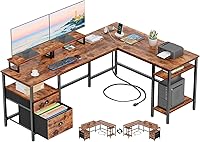
Electric Standing Desk with PC Mount Guide
Choose an electric standing desk with a PC mount by matching the tower size, total weight and cable length to the desk's height range and lifting capacity. Measure the PC case first, add the mount and cables to the weight, and confirm the desk still clears the floor and ceiling at its lowest and highest settings.
On this page (12 sections)
- How does a PC mount change what you should buy?
- How do you measure your PC tower before you choose?
- How much lifting capacity do you need with a PC on board?
- What height range do you need for sitting and standing?
- How do you keep cable clearance through height changes?
- How do you stop wobble when a PC mount is in use?
- What desk size works best for a PC mount setup?
- How do you set up and use the mount safely each day?
- Which chair and posture setup pairs well with a PC mount desk?
- What are the trade-offs of each PC mount style?
- How do you check the mount, frame and controls before you buy?
- What mistakes should you avoid with a PC mount desk?
Choose an electric standing desk with PC mount by matching tower size, total weight and cable slack to the desk's height range. Measure the PC case first, add the mount and cables to the weight, and confirm the desk clears the floor and ceiling at both ends of travel.
A PC mount can mean a fixed tray, a clamp bracket, a shelf under the top, or a swing arm. Each type changes how the tower sits, how much desk space you keep, and how cables move when you raise or lower the top.
This guide uses evidence from amazon and bing searches and focuses on tower fit, lifting capacity, and cable clearance. It is a guide to help you choose the right type for your setup.
How does a PC mount change what you should buy?
A PC mount changes the desk you need because it adds weight, depth and a fixed height point. A tower that fits on a static desk may not fit on a moving one if the tray is too low or too narrow.
Fixed trays hold the PC in one position and keep cables short. Clamp brackets attach to the edge and can swing the tower in or out.
Under-top shelves free desk space but reduce legroom. Swing arms let you pull the PC closer for ports and cleaning.
Check whether the mount is included or sold separately. Some desks ship with a tray, while others need a bracket that clamps to the frame.
Confirm the clamp size works with your top thickness.
Ask how the PC will be removed for maintenance. A tray with a strap or side rail often feels safer than an open shelf.
Rule: choose the mount type first, then choose a desk with enough depth, capacity and cable room for that type.
How do you measure your PC tower before you choose?
Measure your PC tower before you choose because case height, width and depth decide tray size and clearance. Measure the case with cables and plugs attached, not just the metal shell.
Record three numbers. Height tells you if the tower can sit under the top without touching the floor at the lowest setting.
Width tells you if the bracket or tray can hold the case without squeezing fans. Depth tells you if the tower sticks past the front or back edge.
Weigh the full tower if you can. Add the weight of the mount, cables, a docking station and any battery backup you plan to store nearby.
Note where the power button and front ports sit. A tower mounted sideways may put ports where you cannot reach them.
How do you check tower fit in a tray or bracket?
Check tower fit by comparing the tray opening with the case in the orientation you will use it. Leave a small gap around the case so air can move and the bracket can tighten without bending the panel.
Measure the tray width, depth and side height. Then measure the case in the same orientation.
If the case is wider than the tray, it needs a bracket or shelf instead.
Check side panel access. A mount that blocks the opening panel makes upgrades harder.
Rule: pick a mount with at least 1 in of extra width and depth beyond the case in its mounted orientation.
How much lifting capacity do you need with a PC on board?
Lifting capacity must cover the desk top, the mount, the PC and the gear you add later. Add the weight of the top, the PC, the mount, monitors, arms and cables, then keep a safety margin below the rated limit.
Buyers often mention a desk that lifts well when empty but slows or strains with a full tower, two monitors and a laptop.
Think about future gear. A second monitor, a printer, a storage bin or a UPS can add weight fast.
If you plan to add gear, choose a higher capacity frame now.
Check whether the capacity is for the whole desk or just the frame. Some makers state a total load, while others state a frame load that assumes a certain top weight.
Rule: keep your estimated total load at least 25 percent below the desk's rated capacity when a PC mount is involved.
What height range do you need for sitting and standing?
Height range decides whether the desk works for sitting, standing and your chair height. Measure the height of your desk top at your preferred sitting position and at your preferred standing position, then choose a desk that covers both with room to spare.
Most electric desks travel about 24 to 50 in, but exact numbers vary. A short user may need a lower minimum to keep feet flat in a chair.
A tall user may need a higher maximum to stand without raising shoulders.
A PC mount under the top reduces the effective height above the floor. If the tower hangs below the top, it can hit your knees, a chair arm or the floor at the lowest setting.
Check the height with the mount installed, not just the bare top. Put the PC in the mount, lower the desk to its minimum, and confirm the tower clears the floor and any footrest.
Rule: choose a desk whose minimum height works with your chair and whose maximum height works for standing with the PC mounted.
How do you keep cable clearance through height changes?
Cable clearance is the hidden problem with a PC mount. Cables must have enough slack to stretch from the lowest to the highest position without pulling plugs or bending sharp angles.
Measure the distance from the PC ports to the floor outlet, to the monitor and to the power strip at the top. Add extra length for the full travel of the desk.
Leave a loop rather than a straight line.
Use a cable tray under the top to hold a power strip and slack. The strip should move with the desk so plugs do not yank when it rises.
Run cables along the back edge and down one leg with clips. Avoid a path that crosses a lifting column.
A cable that catches on the column can cause noise, uneven movement or a stopped desk.
How do you route cables for a tower on a tray?
Route cables for a tray mount by keeping the longest cables on the moving side of the desk. Put the power strip under the top, not on the floor, so the PC cord moves with the desk.
Leave a service loop behind the tower. The loop gives the cable room to extend when the desk rises and to fold when it lowers.
Tape or clips should hold the loop in place without making it rigid.
Keep signal cables away from the power strip where you can. Heat and tight bends can lead to flicker or dropped connections over time.
Rule: if a cable pulls tight at either end of travel, add at least 6 in of slack or move the power strip onto the desk.
How do you stop wobble when a PC mount is in use?
Wobble comes from a tall load, a narrow base and a PC that sits high or off to one side. Keep the PC low and close to a lifting column when you can, and keep monitors centered over the frame.
Check the desk width and depth. A wider top and deeper feet usually feel steadier.
A narrow top with a tower hanging off one end can feel less stable.
Secure the PC so it cannot shift. A strap, side rail or non-slip pad helps the tower stay put during height changes.
Set the desk to a height you use most and note how it feels. Some desks feel firm at sitting height but less firm at full standing height.
Rule: place the PC within the desk footprint and as close to a leg as the mount allows, and avoid a side mount that sticks far past the edge.
What desk size works best for a PC mount setup?
Desk size must hold the top gear, the PC mount and your arms at the same time. Choose a top wide enough for monitors and a deep enough for the PC mount without pushing the tower into your knees.
A 48 in by 30 in top suits many solo setups, while a larger top suits dual monitors plus a tower.
Measure your wall and chair space before you choose width. Tape the outline on the floor and sit at it.
Think about PC position. A tower on the right side needs width on that side.
A tower under the top needs depth and legroom. A tower on a side bracket needs clearance behind the desk.
If you work in a small room, our best small electric standing desk guide shows how compact tops handle the same checks. If you need room for dual monitors and a tower, see our best large electric standing desk guide for larger tops.
Rule: pick the smallest top that holds your monitors, mount and arm space with 6 in to spare on each side of the PC.
How do you set up and use the mount safely each day?
Safe daily use starts with a short check before you move the desk. Confirm the PC is secure, cables are free and nothing sits under the tower before you press the height button.
Move the desk in short steps the first time you test a new height. Watch the cables and the tower as it travels.
Stop if you hear strain or see a cable bend sharply.
Keep the PC vents clear. Dust the mount and the case with a dry cloth.
Make sure papers, cloths and storage boxes do not block the intake or exhaust sides.
For a full walkthrough of controls and presets, our flexispot standing desk how to use guide explains the basic steps that apply to many electric frames.
Rule: test each new height slowly with the PC mounted, and fix cable routing before you use presets.
Which chair and posture setup pairs well with a PC mount desk?
A PC mount desk still needs a chair that fits your height range. Choose a chair with a seat height that matches your sitting desk height, so your feet stay flat and your shoulders relax.
Our Best Desk Chair for Standing Desks guide covers seat depth, arm height and support for people who switch positions. A second view is in our Best Office Chair For Standing Desk guide, which focuses on office use.
Keep the PC mount from forcing a bad reach. If the tower is on the right, do not twist to reach ports all day.
Move the mount or add a front USB hub at the top edge.
If you have ongoing pain, talk with a doctor or a qualified professional. This guide does not give medical advice.
Rule: set the chair first, then set the sitting desk height, and only then fix the PC mount position.
What are the trade-offs of each PC mount style?
Each mount style trades desk space, access and stability. A fixed tray is simple and stable, a side bracket saves top space, an under-top shelf frees the top but cuts legroom, and a swing arm gives access but adds movement.
A fixed tray suits a tower that rarely moves. It holds the PC in one place and keeps cables short.
It can block side panel access if the tray walls are high.
A side bracket suits users who want the top clear. It can place the tower outside the desk footprint, which saves width but may add wobble and cable stretch.
An under-top shelf suits a tower that must stay under the top. It frees the surface but reduces knee room.
Measure the shelf depth against your chair and footrest.
Our home office desk guide helps you compare desk types before you add a mount. Our best electric adjustable standing desk roundup shows frames with different height ranges and capacities.
Rule: choose the mount that keeps the PC stable and reachable in your seated position, even if it uses more top space.
How do you check the mount, frame and controls before you buy?
Check three areas before you buy: the mount hardware, the frame and the controls. Confirm the mount fits your top thickness, the frame fits your floor space and the controls let you save sitting and standing heights.
Read the mount details. Note clamp range, tray size, strap or rail design and whether the PC can slide in from the side.
Check the weight limit for the mount itself, not just the desk.
Check the frame. Note height range, foot depth, noise rating if given and whether the crossbar leaves room for a cable tray.
Check the controls. A simple pad with up and down buttons works, but presets help you return to the same heights.
A display that shows height can help you match chair and monitor positions.
Rule: buy only when the mount size, frame height range and control features all match your measured needs on paper.
What mistakes should you avoid with a PC mount desk?
The most common mistake is buying for the empty desk and then adding a heavy tower. Do not ignore the weight of the top, the mount and future gear when you compare capacity.
A second mistake is tight cables. A tidy desk at one height can fail at another.
Test the full travel with the PC mounted before you drill, clamp or hide cables.
A third mistake is a tower that blocks vents or panels. Check airflow and access in the mounted position.
A fourth mistake is forgetting legroom. An under-top tray can hit knees or a chair.
Sit at the desk at the lowest height with the PC in place.
Electric standing desk with PC mount buyers should measure twice and buy once. Tower fit, lifting capacity and cable clearance decide success more than brand or style.
Rule: if any check fails on paper, such as capacity, clearance or legroom, choose a different mount or a larger desk before you order.