9 Best Standing Desk with Drawers (November 2026)
The best standing desks with drawers include the FEZIBO Standing Desk 48 × 24 Inch for compact everyday setups, the Veken 55 Inch Large Electric Standing Desk for wide shared workspaces, and the ErGear 48 X 24 Inch Height Adjustable for maximum height presets.
On this page (4 sections)
The best standing desk with drawers for most home offices is the SHW 55 x 28 Electric Height Adjustable Standing Desk w/Drawer. Its wide surface, built-in drawer, cable tray, grommets and 3 memory presets keep both the work area and the height routine organized.
That balance is what makes it a sensible starting point for many buyers. The 55 by 28 inch top gives you room for two monitors, a laptop, notebooks and the small tools you use every day without crowding each item together.
The drawer sits within reach rather than on the surface, so pens, chargers and paper clips stay close but out of your main work zone. That small change can make a busy desk feel calmer, especially when you share the room with other furniture or storage.
Choose FLEXISPOT if a one-piece desktop and USB charging matter most. Its design suits people who want a cleaner top, fewer visible seams and power close to where they sit or stand.
Pick OffiGo for an L-shaped corner setup with 4 drawers, or WINAZ when you need a smaller mobile desk for laptop work. Those choices suit very different rooms, so the right pick depends on whether corner storage or portability matters more to you.
A drawer adds useful storage, but it also changes how you plan legroom, cable routes and monitor placement. You need to check that your knees clear the drawer when seated and that cables still move freely when the desk rises.
For broader desk advice, start with this home office desk buying guide. It can help you compare surface size, frame strength and features before you narrow the choice to a model with drawers.
Height range matters just as much as storage. Electric desks let you move between sitting and standing during the day, but the lowest and highest settings still have to suit your chair, monitor and body.
Memory presets make that routine easier to repeat. Save a sitting height and a standing height once, then return to them with a button press instead of guessing each time.
Capacity is another detail to check early. Your monitors, PC, books and drawer contents all add weight, so stay within the stated limit for the desk you choose.
Drawer type also changes daily use. A shallow pull-out drawer suits flat supplies, while fabric drawers can hold bulkier items but may need more care to keep their shape.
Measure your room before you decide. Check the footprint at its smallest and largest height, plus the space your chair needs behind the desk.
The best choice is the one that fits your supplies, your room and your work habits together. Storage should support your workflow, not force you to work around it.
Our picks at a glance
-
1
 Best for compact everyday setups
FEZIBO Standing Desk 48 × 24 Inch
9.7/10 our score
See it on Amazon -
2
 Best for wide shared workspaces
Veken 55 Inch Large Electric Standing Desk
9.6/10 our score
See it on Amazon -
3
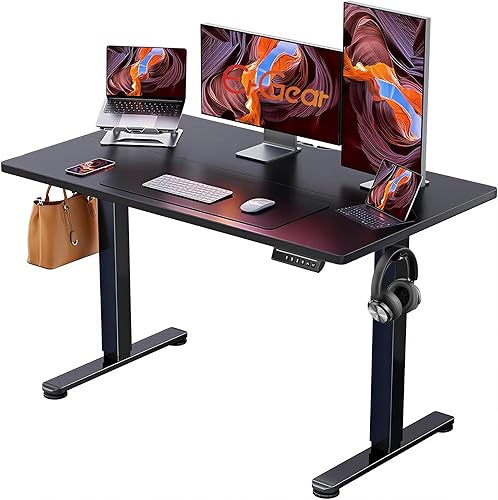 Best for maximum height presets
ErGear 48 X 24 Inch Height Adjustable
9.6/10 our score
See it on Amazon
- 4
 Check it
SHW 55 x 28 Electric Height Adjustable
Best for built-in desk storage - 5
 Check it
FLEXISPOT Comhar 48" Electric Standing Desk with
Best for hidden storage and charging - 6
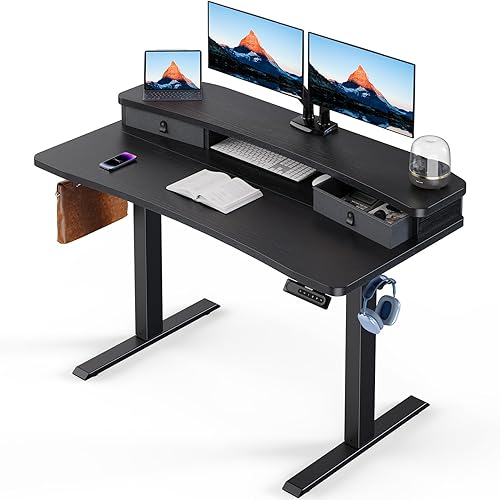 Check it
HUANUO 48″ x 24″ Electric Standing Desk
Best for monitor-mount users - 7
 Check it
AODK 55 Inch Standing Desk with Drawers
Best for built-in power and lighting - 8
 Check it
OffiGo 63 Inch L Shaped Electric Standing
Best for corner storage capacity - 9
 Check it
WINAZ Rolling Standing Desk Adjustable Height with
Best for mobile laptop work
The best standing desks with drawers for different setups
The best standing desk with drawers depends on how much storage, desktop width and height control you need. We compared the stated dimensions, adjustment ranges, drawer layouts, power features and workspace designs for this group.
That comparison matters because two desks with similar width can suit very different users. One may favor hidden storage and charging, while another may favor a plain top where you add your own organizers.
We looked at how each design handles daily sitting and standing use. Electric height adjustment, memory presets and frame construction all affect how often and how smoothly you can change position.
Storage was checked in practical terms as well as in count. A single well placed drawer can work well for basic supplies, while multiple drawers suit a wider range of office items.
Workspace design also affects monitor placement and cable routing. Depth, rear edges, cable trays and built-in power can shape whether your setup feels tidy or crowded.
Our score weighs specs, features and buyer feedback against what you're shopping for. The products appear from highest score to lowest score.
Use the ranking as a starting point rather than a final decision. Read the details for each pick and match them to your room size, equipment and storage habits.
A lower ranked desk may still suit you if its layout fits a corner or a mobile laptop setup better. The score cannot measure your floor plan or your preferred monitor arrangement.
Check height range against your own sitting and standing posture. The desk should let your keyboard sit at a comfortable level without forcing your shoulders up or your wrists into an awkward angle.
Also check capacity before adding heavy equipment. Monitors, arms, PCs and stored items all count toward the limit stated for each model.
Keep the comparison focused on stated facts from the product data. That makes it easier to judge trade-offs without relying on claims that do not apply to your setup.
The sections that follow break down size, storage, power and setup so you can choose with more confidence.
FEZIBO Standing Desk 48 × 24 Inch: Best for compact everyday setups
- 28.3 to 46.5 in electric height range
- 3 memory presets
- 176 lb capacity
- Maple laminated desktop
The FEZIBO combines a compact 48 x 24 in work surface with electric height adjustment, 3 memory presets and a reinforced steel frame.
Pros
- 176 lb capacity
- 3 memory presets
- Headphone hook included
Cons
- Two-piece desktop
- Only one included hook
Veken 55 Inch Large Electric Standing Desk: Best for wide shared workspaces
- 55.12 in desktop
- 28.3 to 46.5 in electric height range
- Memory presets
- Cable management
Veken gives shared work areas a wide desktop and electric sit-stand adjustment, though its storage is limited to organization accessories rather than drawers.
Pros
- Wide 55 in surface
- Cable clip included
- 2 headphone hooks
Cons
- No built-in drawers
- Two-board desktop
ErGear 48 X 24 Inch Height Adjustable: Best for maximum height presets
- 28.35 to 46.46 in electric height range
- 4 memory presets
- 176 lb capacity
- Alloy steel frame
ErGear suits users who want a smaller standing desk footprint with 4 saved heights and a steel frame built for daily adjustment.
Pros
- 4 memory presets
- 176 lb capacity
- Low-VOC materials
Cons
- No stated drawer dimensions
- Assembly required
SHW 55 x 28 Electric Height Adjustable: Best for built-in desk storage
- 55 x 28 in desktop
- Single built-in drawer
- Cable tray and grommets
- 3 memory presets
SHW is the strongest drawer-focused choice for a broad work surface, with a built-in drawer, hooks, cable control and adjustable floor levellers.
Pros
- Built-in drawer
- 55 x 28 in work surface
- Cable tray and grommets
Cons
- 110.2 lb capacity
- Partial assembly
FLEXISPOT Comhar 48" Electric Standing Desk with: Best for hidden storage and charging
- 28.9 to 46.5 in electric height range
- Built-in pull-out drawer
- USB charging ports
- 4 height presets
FLEXISPOT pairs a one-piece maple and white desktop with a pull-out drawer, USB charging, child lock and 4 programmable heights.
Pros
- One-piece desktop
- Built-in drawer
- USB Type-A and Type-C charging
Cons
- 100 lb capacity
- 38.7 kg item weight
HUANUO 48″ x 24″ Electric Standing Desk: Best for monitor-mount users
- 2 desktop drawers
- Open storage cubicle
- 27.5 to 46.4 in height range
- 4 preset heights
HUANUO is built around organized monitor setups, with 2 drawers, an open cubicle, 4 height presets and a rear edge designed for a C-clamp mount.
Pros
- 2 drawers
- C-clamp mount compatible
- 4 preset heights
Cons
- Assembly required
- Basic drawer glide mechanism
AODK 55 Inch Standing Desk with Drawers: Best for built-in power and lighting
- 2 fabric drawers
- Keyboard tray and monitor shelf
- 3 outlets and 2 USB ports
- 20 LED light modes
AODK combines drawers with a monitor shelf, keyboard tray, built-in outlets, USB ports, cable management and LED lighting.
Pros
- 2 fabric drawers
- Built-in outlet and USB ports
- Monitor shelf
Cons
- 21.25 in depth
- Assembly required
OffiGo 63 Inch L Shaped Electric Standing: Best for corner storage capacity
- L-shaped 63 in workspace
- 4 fabric drawers
- Reversible side board
- 3 outlets, USB and Type-C ports
OffiGo is the storage-heavy corner option, adding 4 fabric drawers, a reversible side board and charging ports to an L-shaped desk.
Pros
- 4 fabric drawers
- L-shaped corner layout
- USB and Type-C ports
Cons
- Requires more floor planning
- 31.5 in stated item depth
WINAZ Rolling Standing Desk Adjustable Height with: Best for mobile laptop work
- 27.9 to 41.3 in manual height range
- 4 casters with brakes
- 2 fabric drawers and shelf
- Side storage bag and 2 hooks
WINAZ works for portable laptop use beside a couch, bed or chair, with wheels, 5 fixed heights, 2 fabric drawers and a storage shelf.
Pros
- Mobile design
- 2 drawers and shelf
- Brakes on wheels
Cons
- Manual adjustment
- 41.3 in maximum height
| Product | Best for | Size | Height range | Capacity | Our score |
|---|---|---|---|---|---|
| FEZIBO Standing Desk 48 × 24 Inch | compact everyday setups | 47.2 W x 23.6 D in | 28.3 to 46.5 in | 176 lb | 9.7 |
| Veken 55 Inch Large Electric Standing Desk | wide shared workspaces | 55.12 W x 23.64 D in | 9.6 | ||
| ErGear 48 X 24 Inch Height Adjustable | maximum height presets | 47.2 W x 23.6 D in | 9.6 | ||
| SHW 55 x 28 Electric Height Adjustable | built-in desk storage | 110.2 lb | 9.4 | ||
| FLEXISPOT Comhar 48" Electric Standing Desk with | hidden storage and charging | 100 lb | 9.3 | ||
| HUANUO 48″ x 24″ Electric Standing Desk | monitor-mount users | 48 W x 24 D in | 9.0 | ||
| AODK 55 Inch Standing Desk with Drawers | built-in power and lighting | 55 W x 21.25 D in | 8.5 | ||
| OffiGo 63 Inch L Shaped Electric Standing | corner storage capacity | 8.2 | |||
| WINAZ Rolling Standing Desk Adjustable Height with | mobile laptop work | 39.4 W x 18.9 D in | 8.1 |
How to choose a standing desk with drawers
The right desk should fit your room at its lowest and highest settings, not just fit the open desktop area. Teachers planning a classroom workstation can compare standing desks for teachers.
Measure the floor footprint first, then check the height range against your chair, keyboard and standing posture.
Which height range suits your work?
Electric adjustment makes frequent sitting and standing changes easier. FEZIBO and Veken adjust from 28.3 to 46.5 in, while SHW covers 28 to 45 in and WINAZ uses 5 manual height settings from 27.9 to 41.3 in.
If more than one person uses the desk, memory presets are useful. ErGear stores 4 preferred heights, while FLEXISPOT, HUANUO and SHW offer 4, 4 and 3 preset positions respectively.
For general height and surface guidance, compare these best height-adjustable standing desks. A sit-stand desk can support position changes, but it should not force you to stand continuously.
This guide to is a standing desk better for you covers the practical trade-offs.
How many drawers do you need?
One drawer may be enough for pens, notebooks and small accessories. SHW offers one drawer with adjustable compartments, while FLEXISPOT has a pull-out drawer with a stated 23.6 x 11.2 x 2 in interior.
Two drawers give you more separation. HUANUO has 2 desktop drawers plus an open storage cubicle, and AODK has 2 fabric drawers, a keyboard tray and a monitor shelf.
OffiGo has the most drawer storage here with 4 fabric drawers. WINAZ adds 2 fabric drawers, a shelf, a side storage bag and 2 hooks, but its manual height range and smaller top make it better for mobile laptop work than a large monitor setup.
Do you need a shelf as well as drawers?
A shelf can raise a monitor or create another place for small items, while drawers keep supplies out of sight. AODK includes a full-sized monitor shelf, and HUANUO has an open storage cubicle beside its 2 drawers.
If open storage suits your workflow, compare these best standing desks with shelves. The shelf should not block your monitor view or make it difficult to reach the keyboard at your preferred sitting height.
How much desktop space is enough?
A 48 x 24 in desk works well for a laptop, one monitor and everyday supplies. Students choosing a sit-stand homework setup can compare standing desks for students.
That size suits smaller rooms where a wider desk would block walkways or compete with shelves. It still leaves room for a keyboard, mouse, notebook and a drink, provided you keep extra storage in the drawers.
FEZIBO, ErGear, FLEXISPOT and HUANUO fit this general size range, though their storage and top designs differ. Some favor a clean surface, while others add drawers, cubicles or charging to use the space more fully.
For a laptop only workflow, a compact desk can feel open rather than cramped. You can place the laptop to one side and use drawers for chargers, stationery and other items that would otherwise spread across the top.
A 55 in surface gives more room for multiple monitors, speakers or a writing area. Veken and AODK use 55 in widths, while SHW adds extra depth with its 55 x 28 in desktop.
Extra width helps when monitor stands take up space at each end. It also gives you room to spread out papers or a second device without pushing your keyboard to the edge.
Extra depth helps in a different way. It lets you set a monitor farther back, keep a keyboard at a comfortable reach and still have space in front for notes or a notebook.
OffiGo takes a different approach with a 63 in L-shaped layout and reversible 15 in side board. Compare L-shaped desks with drawers and shelves for similar corner storage.
The L shape can turn wasted corner space into useful work area. It also separates zones, so one side can hold monitors while the return holds supplies or a printer.
It suits a corner, but measure the return side and walking path before choosing it. The desk must clear doors, radiators, shelves and the space you need to pull out your chair.
For compact rooms, compare corner desks for small spaces. Those guides can help you judge whether an L shape will improve flow or make the room feel tighter.
For a gaming setup, compare this guide to the best standing desk for gaming. Gaming gear can use more depth and cable space than a simple laptop workstation.
That extra depth matters for larger monitors, PC towers, consoles and accessories. Plan where each item will sit at both sitting and standing height before you commit to a smaller top.
Drawer count should match the items you actually store. One drawer suits pens and notebooks, while two or more drawers help separate cables, paper and accessories by type.
Check drawer dimensions when they are stated. A shallow drawer may hold flat items well but struggle with taller bottles, boxes or bulky chargers.
Shelf placement needs the same care as drawer placement. A shelf should raise a monitor to a good viewing height without blocking your view or crowding your keyboard.
Cable features only help if you use them from the start. Route power and data cables through trays or clips before you add monitors, so the moving frame does not tug on connections.
Power features can reduce trips to a wall outlet. Built-in outlets and USB ports keep chargers close, but you still need a clear route for the desk power cable to the wall.
Think about care as well as purchase. Wipe laminated surfaces with a soft cloth, tighten fixings if needed and keep drawer runners free from dust for smooth daily use.
Match the desk to your work, not just to the largest available top. A right sized surface with well planned storage often feels better than a wide desk with nowhere to put daily items.
Which power and cable features matter?
Power features reduce the need to reach behind the desk, but they also add more components to plan around. AODK has 3 outlets and 2 USB ports, while OffiGo has 3 outlets, 1 USB port and 1 Type-C port.
FLEXISPOT includes USB charging ports and a child lock. Veken includes cable management, and SHW adds a cable tray and desktop grommets.
Keep cables long enough for the desk's full height range. Route them so the moving frame does not pull on plugs, and leave space behind the desk for inspection and cleaning.
AODK and OffiGo are the most direct choices when built-in power matters. For more options, see these electric standing desks with power outlets.
Setup and daily use tips
Measure the assembled footprint before opening boxes, especially for a 63 in L-shaped desk. Keep the desktop clear while testing the full height range, and check that drawers, cables and monitor arms do not hit nearby walls or shelves.
That first check saves time and prevents damage. Move the desk into position, raise and lower it slowly, and watch every side for contact with furniture or fittings.
Use the memory buttons for a comfortable sitting height and a standing height that keeps your keyboard and screen easy to use. Change position gradually through the day rather than treating the highest setting as automatically better.
Start with short standing periods if you are new to sit-stand work. Your feet, legs and lower back need time to adjust, and comfort matters more than reaching a particular height.
Balance heavier equipment across the desktop. Stay within the stated capacity, which ranges from 100 lb on FLEXISPOT to 176 lb on FEZIBO and ErGear.
Place heavier items toward the center or over the frame where possible. Avoid stacking books or boxes at one corner, where the load can make lifting less smooth.
Drawer placement affects legroom. Keep frequently used items in the drawer closest to your seated position, but avoid overloading a drawer or blocking your knees with a keyboard tray.
Test your seating position with the drawer closed and open. You should be able to type, use a mouse and move your feet without repeated contact with the drawer front.
Cables need slack for the full range of movement. Leave a gentle loop behind the desk so plugs are not pulled tight when the top reaches its highest point.
Keep the under desk area clear for cleaning and inspection. Dust and stray items can collect there, and a quick check helps you spot loose clips or frayed cables early.
If you use a desk chair between standing periods, compare the best desk chair for standing desks and the best office chair for standing desk guides. The chair and desk should work as one setup, with enough room for your knees and feet.
Chair height and desk height must be set together. A chair that suits you at the lowest desk setting may feel wrong when you stand and use a footrest or different posture.
Set up monitors so you can keep a neutral neck position at both heights. A monitor arm or riser can help, but check that it does not add too much weight or block drawer access.
Use hooks and cable clips for items you use daily. Headphones, chargers and spare cables stay tidy when they have a fixed place rather than resting on the work surface.
Keep drawers organized by use, not by size alone. Put daily supplies where your hand falls naturally, and store occasional items farther away to reduce clutter.
Wipe the desktop regularly and check fixings after the first weeks of use. Small adjustments early can keep the desk stable and quiet during daily movement.
If the desk is shared, label the memory presets for each user. That saves time when you swap seats and helps everyone return to a comfortable height quickly.
Do not rush the height change. Let the desk move at its own pace, keep hands clear of the frame and stop if cables or drawers snag.
A calm setup routine makes sit-stand use easier to sustain. Measure, balance, route cables and adjust in small steps, then review the layout after a week of real work.
Which standing desk with drawers should you buy?
Choose the SHW 55 x 28 Electric Height Adjustable Standing Desk w/Drawer if you want the best balance of desktop space, drawer storage and cable control. Choose FLEXISPOT for a one-piece desktop with USB charging, HUANUO for 2 drawers and C-clamp support, or OffiGo when a corner layout and 4 drawers solve your storage problem.
Those choices cover the main needs in this group. SHW suits a broad work surface, FLEXISPOT suits hidden storage and charging, HUANUO suits monitor mount users and OffiGo suits corner storage.
For small mobile work, choose WINAZ. Its wheels and manual height settings suit laptop use beside a couch, bed or chair, where a fixed electric desk may be too large.
If you want a workstation that can fold away, see folding computer desks. A folding design suits temporary workspaces, while a standing desk with drawers suits a fixed room where you work most days.
For a compact electric desk without built-in drawers, FEZIBO or ErGear can still work if you use separate storage nearby. A drawer unit, shelf or desktop organizer can fill the gap without changing the desk itself.
That approach works best when you already own storage that fits your room. It avoids paying for drawers you may not use, while keeping the electric height adjustment that matters for daily movement.
A standing desk with drawers is most useful when its storage matches your daily supplies and its full height range fits your room. Measure first, then choose the drawer layout and surface width that support the way you actually work.
Check the details that often decide long term comfort. Height range, drawer access, cable routing, monitor placement and capacity all affect whether the desk feels easy to use after the first week.
Think about who will use the desk and how often. A shared desk benefits from memory presets and clear storage zones, while a single user can focus on one preferred sitting and standing setup.
Plan for care as well as assembly. Keep the surface clean, check fixings now and then and leave space behind the desk so cables and the frame can be inspected.
If your room allows it, a wider top with a single drawer can keep work and storage separate without crowding your legs. If space is tight, a compact desk with separate storage may work better.
Choose the layout you will use every day, not the one that looks best in a photo. The right desk should make sitting, standing and storing supplies feel natural from the start.
Our top 3 picks at a glance
-
1
Best for compact everyday setups
FEZIBO Standing Desk 48 × 24 Inch
9.7/10 our score
See it on Amazon -
2
Best for wide shared workspaces
Veken 55 Inch Large Electric Standing Desk
9.6/10 our score
See it on Amazon -
3
Best for maximum height presets
ErGear 48 X 24 Inch Height Adjustable
9.6/10 our score
See it on Amazon
Frequently asked questions
What is the best standing desk with drawers?
The SHW 55 x 28 Electric Height Adjustable Standing Desk w/Drawer is the best standing desk with drawers for a broad work area and built-in organization. It has a single drawer, 3 memory presets, a cable tray, grommets, hooks and adjustable floor levellers.
Choose FLEXISPOT for a one-piece desktop and USB charging, or HUANUO for 2 drawers and C-clamp monitor-mount support.
Are standing desk drawers useful?
Standing desk drawers keep small supplies close without using the main work surface. They suit notebooks, stationery and other daily items that you want within reach while changing between sitting and standing.
Check the drawer type and interior size because a shallow pull-out drawer, fabric drawer and file-style drawer hold different items.
How much space do standing desks with drawers need?
Measure the desk footprint, chair clearance and the space needed for the desktop to rise. The picks here range from the 39.4 x 18.9 in WINAZ to the 63 in L-shaped OffiGo.
Also check wall, shelf and monitor-arm clearance before assembly.
Can a standing desk with drawers hold two monitors?
Many can, but the answer depends on desktop width, depth, monitor stands and the desk's stated capacity. The Veken and SHW offer 55 in wide surfaces, while HUANUO is designed for a C-clamp monitor mount.
Measure your monitor bases or arm clamps before choosing.


