7 Best Wireless Vertical Mice for Small Hands (November 2026)
The best wireless vertical mouse for small hands include the Anker 2.4G Wireless Ergonomic Mouse for simple plug-and-play use, the TECKNET Ergonomic Mouse for switching between devices, and the Logitech Lift Vertical Ergonomic Wireless Mouse for small to medium hands.
On this page (9 sections)
- Our top picks for small hands
- How the best wireless vertical mouse for small hands was compared
- What hand size should you measure before you buy?
- Which connection is best for a vertical mouse for small hands?
- How do DPI and buttons affect daily use?
- Battery type: rechargeable or disposable?
- Will a vertical mouse feel different at first?
- Which vertical mouse should you buy for Mac or Windows?
- Verdict: pick the best wireless vertical mouse for small hands by your setup
The best wireless vertical mouse for small hands is the Anker 2.4G Wireless Ergonomic Mouse, because its compact 120 x 62.8 x 74.8 mm vertical shape and simple 2.4G USB receiver fit daily desktop use without extra pairing steps. If you want Bluetooth and device switching, the TECKNET Ergonomic Mouse gives more connection options.
If weight matters most, the Logitech Lift is lighter at 125 g.
Small hands need a mouse that does not force a stretch across the buttons. A frame that feels too long can make the scroll wheel harder to reach and the thumb rest less useful.
Our score weighs specs, features and buyer feedback against what you are shopping for. We compared size, angle, DPI, battery type, connection and button layout across these 7 models.
Our picks at a glance
-
1
 Best for simple plug-and-play use
Anker 2.4G Wireless Ergonomic Mouse
9.7/10 our score
See it on Amazon -
2
-
3
 Best for small to medium hands
Logitech Lift Vertical Ergonomic Wireless Mouse
9.4/10 our score
See it on Amazon
- 4
 Check it
ProtoArc EM11 NL Wireless Ergonomic Mouse
Best for hand lengths under 7.5 in - 5
 Check it
Perixx PERIMICE-719 Right-Handed Wireless Mini Vertical Mouse
Best for mini vertical size - 6
 Check it
TECKNET Ergonomic Wireless Mouse 2.4G Vertical Mouse
Best for small and medium hands on 2.4G - 7
 Check it
Luhaso Ergonomic Vertical Wireless Mouse
Best for lightweight travel use
Our top picks for small hands
The Anker leads for simple wireless use, while the other models trade size, weight, battery type and connection in different ways. Read the trade-off under each pick so you can match the mouse to your desk and devices.
Anker 2.4G Wireless Ergonomic Mouse: Best for simple plug-and-play use
- Right-hand vertical shape
- 120 x 62.8 x 74.8 mm
- 2.4G USB receiver
- 800/1200/1600 DPI
- 2 AAA batteries not included
- 18-month warranty
A right-hand vertical mouse with a compact frame and straightforward 2.4G connection for daily desktop work.
Pros
- Compact vertical shape
- Three DPI settings
- USB receiver stored in mouse
Cons
- Uses 2 AAA batteries not included
- Not Bluetooth
The Anker suits right-handed users who want a vertical mouse that connects through a USB receiver and stays out of the way. Its 120 x 62.8 x 74.8 mm frame is compact enough for smaller hands, yet the shape still gives a clear vertical grip.
The 2.4G connection uses the included USB receiver, which is stored in the bottom of the mouse.
DPI settings of 800, 1200 and 1600 let you slow the cursor for careful work or raise it for faster screen movement. That range covers spreadsheets, browsing and general office tasks.
Side buttons for next and previous pages help with web use, though key click sounds are unavoidable.
It runs on 2 AAA batteries that are not included, so you will need spares at home. Anker says it enters power-saving mode after 8 minutes of inactivity and wakes with a press of a main button.
Against the rechargeable models here, the Anker asks more battery upkeep. In return, you get the simplest connection in this group and an 18-month warranty.
It is a strong first pick if you use one computer and prefer a receiver over Bluetooth.
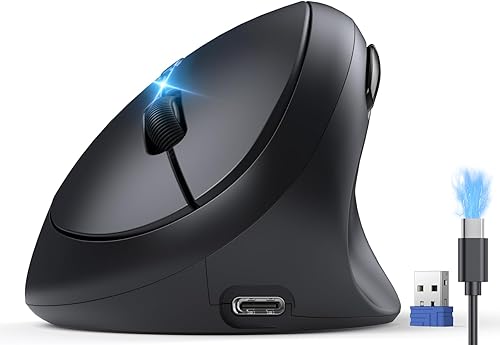
TECKNET Ergonomic Mouse: Best for switching between devices
- Bluetooth 5.0/3.0 and USB-A
- 52 degree vertical angle
- 600mAh rechargeable battery
- 800 to 4800 DPI in 6 levels
- Switch between 3 devices
- Type-C charging cable
A rechargeable vertical mouse for small and medium hands with Bluetooth, USB-A and switching between 3 devices.
Pros
- Bluetooth and USB-A options
- Rechargeable 600mAh battery
- Wide DPI range
Cons
- Forward and back buttons not available on Mac
- Heavier long-term carry than lighter picks
The TECKNET suits small to medium hands when you switch between a laptop, desktop or tablet during the day. Its 52 degree vertical angle keeps the hand in a handshake position, and TECKNET says it fits S/M hands.
You can connect by Bluetooth 5.0/3.0 or by the included USB-A receiver.
A 600mAh rechargeable battery removes disposable batteries from the routine. TECKNET says 1.5 hours of charging gives up to 2 months of use, and a Type-C cable is included.
That makes it easier to keep one mouse charged for work and travel.
DPI adjusts across 6 levels from 800 to 4800, so you can use a lower setting for detail work and a higher setting for faster movement. Six buttons include side-mounted forward and back buttons for browsing.
Those side buttons are not available on Mac, so Mac users should weigh that limit.
Compared with the Anker, this model adds Bluetooth, device switching and rechargeable power. The trade-off is a broader feature set that may be more than a single-desk user needs.
It is the better choice when you move between devices often.
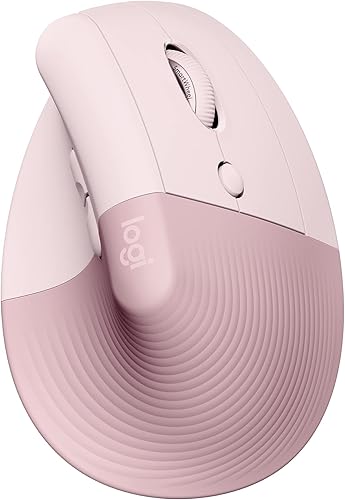
Logitech Lift Vertical Ergonomic Wireless Mouse: Best for small to medium hands
- 57 degree vertical shape
- 108 x 70 x 71 mm
- 125 g
- Bluetooth Low Energy and Logi Bolt USB
- 4000 DPI adjustable
- 1 AA battery, up to 24 months
A light 125 g vertical mouse made for small to medium right hands, with Bluetooth or Logi Bolt connection.
Pros
- Light at 125 g
- Small 108 x 70 x 71 mm frame
- Long AA battery life
Cons
- Uses 1 AA battery
- Fewer DPI steps than TECKNET
The Logitech Lift suits small to medium right hands when weight and a clean desk matter. At 108 x 70 x 71 mm and 125 g, it is one of the smallest and lightest models here.
Its 57 degree vertical shape supports a more natural forearm posture during long sessions. A softly textured grip and snug thumb rest help the hand settle on the frame.
Connection is by Bluetooth Low Energy or Logi Bolt USB, with support for Windows, macOS, iPadOS, Chrome OS and Linux. It connects with up to 3 devices and lets you switch between them.
Tracking is 4000 DPI and fully adjustable.
It uses 1 AA battery, included, with battery life up to 24 months. The Logi Bolt USB receiver is also included.
The trade-off is disposable battery use instead of a rechargeable cell.
Against TECKNET, the Lift is lighter and smaller for a compact desk. Against Anker, it adds Bluetooth.
Choose it if a light mouse for small hands that moves between devices matters most.
ProtoArc EM11 NL Wireless Ergonomic Mouse: Best for hand lengths under 7.5 in
- 58 degree vertical design
- For hand lengths under 7.5 in
- Dual Bluetooth and 2.4G USB-A
- Connect up to 3 devices
- 500mAh rechargeable battery
- 1000/1600/2400 DPI
A 58 degree vertical mouse for small to medium hands, with rechargeable power and connection to up to 3 devices.
Pros
- Designed for hands under 7.5 in
- Rechargeable 500mAh battery
- Multi-device connection
Cons
- Scroll wheel and side buttons are not silent
- 270 g weight
The ProtoArc EM11 NL suits users whose hand length is under 7.5 in and who want a clear size target before buying. ProtoArc says to measure your hand first to confirm the fit.
Its 58 degree vertical design keeps the forearm and wrist in a more natural position during long office sessions. The frame measures 5.43 x 2.72 in.
A natural grip helps you keep control without reaching across a larger shell.
It connects to up to 3 devices through dual Bluetooth and 2.4G USB-A, with one-click switching between laptop, desktop or tablet. A USB-C charging cable is included for the built-in 500mAh battery.
ProtoArc says it gives up to 100 hours of use after about 2 hours of charging.
DPI settings are 1000, 1600 and 2400 for optical tracking. Back and forward buttons help with documents and websites.
Silent left and right buttons suit shared spaces, though the scroll wheel and side buttons are not silent.
At 270 g, it is heavier than the Logitech Lift and Luhaso. That weight suits a fixed desk more than daily travel.
Choose it when the under 7.5 in guidance and multi-device connection matter most.
Perixx PERIMICE-719 Right-Handed Wireless Mini Vertical Mouse: Best for mini vertical size
- Mini vertical design
- For hand lengths under 7.5 in
- 4.92 x 2.44 x 3.03 in
- 800/1200/1600 DPI
- 2.4 GHz wireless, up to 30 ft
- Requires 2 AAA alkaline batteries not included
A mini right-handed vertical mouse for small to medium hands, with quiet main clicks and 3 DPI levels.
Pros
- Mini frame for small hands
- Quiet left and right buttons
- 30 ft operating range
Cons
- Buttons are not programmable
- Requires 2 AAA batteries not included
The Perixx PERIMICE-719 suits small to medium hands when a mini vertical frame is the priority. It is designed for hand lengths under 7.5 inches, and Perixx asks you to measure before ordering.
The listed dimensions are 4.92 x 2.44 x 3.03 inches.
Its vertical shape keeps the wrist in a neutral, upright position for long hours of work. A soft rubber-coated surface gives a secure grip for extended use.
DPI adjusts across 800, 1200 and 1600 for precise optical tracking. Back and forward buttons help with web browsing, though the buttons are not programmable.
Back and forward buttons are not supported on macOS.
Connection is stable 2.4 GHz wireless with up to 30 ft operating range and plug-and-play setup. It requires 2 AAA alkaline batteries that are not included.
Silent left and right buttons reduce noise, while the scroll wheel and side buttons are not silent.
Perixx notes first-time users may need 1 to 2 weeks to adapt. Choose it for the mini size and quiet main clicks, especially for a single Windows desktop.
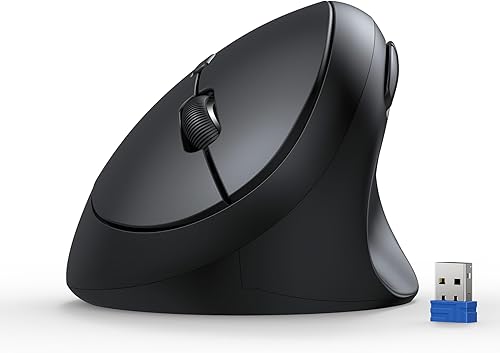
TECKNET Ergonomic Wireless Mouse 2.4G Vertical Mouse: Best for small and medium hands on 2.4G
- 52 degree angle
- 4.13 x 2.55 in
- 2.4GHz wireless, up to 32 ft
- 4800/3200/2400/1600/800 DPI
- Silent click design
- Forward and back buttons
A compact 2.4G vertical mouse for small and medium hands, with silent clicks and 5 DPI settings.
Pros
- Compact 4.13 x 2.55 in shape
- Silent click design
- Wide DPI range
Cons
- Side buttons not supported on Mac OS
- Forward and back buttons are not silent
The TECKNET 2.4G Vertical Mouse suits small and medium hands when you want a compact shape with silent clicks and a wide DPI range. Its rounded shape has no sharp corners.
The listed product size is 4.13 x 2.55 in.
The ergonomic angle is 52 degrees to the tabletop, which puts the hand in a natural handshake position. That can help during prolonged office work.
Five DPI settings run from 800 to 4800, in steps of 4800, 3200, 2400, 1600 and 800. That range lets you match cursor speed to the task.
Optical tracking is described as smooth on most surfaces.
Connection uses 2.4GHz wireless with a USB receiver and a range up to 32 ft, with no drivers needed. Forward and back buttons help with browsing, though side buttons are not supported on Mac OS.
The silent click design reduces click noise by more than 99 percent, while forward and back buttons are not silent.
Compared with the Bluetooth TECKNET model, this one keeps the connection simpler and more single-device. The trade-off is no Bluetooth and no rechargeable battery claim.
It fits a fixed 2.4G desktop setup where quiet clicks matter.
Luhaso Ergonomic Vertical Wireless Mouse: Best for lightweight travel use
- 57 degree handshake design
- 86 g
- Type-C rechargeable
- 800/1200/1600 DPI
- 2.4G plug-and-play
- Silent micro switches
A lightweight 86 g vertical mouse for small and medium hands, with Type-C rechargeable power and 2.4G connection.
Pros
- Light at 86 g
- Type-C rechargeable
- Quiet clicks
Cons
- No Bluetooth option
- Fewer DPI levels than TECKNET
The Luhaso suits small and medium hands when you want a light mouse for home, office or travel. At 86 g, it is the lightest model in this group.
Luhaso says the compact shape gives a secure grip and places thumb side controls within easy reach.
Its 57 degree handshake design keeps the hand in a natural posture during long hours of computer work. That vertical angle is at the higher end of this group, similar to the Logitech Lift.
A lighter frame can feel easier to move across a desk or carry in a bag.
Power comes from a built-in rechargeable battery with a Type-C charging cable included. That removes constant AA battery replacements from the routine.
Luhaso lists the model as rechargeable and includes a charging cable for daily office, home or study use.
Connection is instant 2.4G plug-and-play through a USB receiver, with no complicated pairing steps. It also lists USB-A and USB-C receiver options in the product details.
DPI settings are 800, 1200 and 1600, and silent micro switches reduce sound by over 90 percent.
The trade-off is a narrower DPI range than TECKNET and no Bluetooth option. Choose Luhaso when low weight, rechargeable power and quiet clicks matter more than multi-device switching.
How the best wireless vertical mouse for small hands was compared
We compared these 7 models on fit first, then on connection, battery, DPI and noise. Size and hand-length guidance mattered most, since a vertical mouse that feels too large defeats the purpose for small hands.
We checked vertical angle across the group, from 52 degrees on the TECKNET models to 58 degrees on the ProtoArc. A steeper angle can feel more upright, while a lower angle may feel closer to a traditional mouse.
Connection split the group into 2.4G-only models and Bluetooth models that can switch between devices. If you use one computer, 2.4G is often enough.
If you use several, Bluetooth can reduce receiver swapping.
Battery type was the next split. Some models use AAA or AA batteries, while others use a built-in rechargeable cell with a Type-C cable.
We weighed convenience against upkeep, since a rechargeable mouse still needs charging.
DPI range helped separate office use from more precise screen work. The TECKNET models go up to 4800 DPI, while Anker, Perixx and Luhaso top out at 1600 DPI.
Noise mattered for shared spaces. Several models use silent main buttons, while others note that scroll wheels or side buttons are not silent.
What hand size should you measure before you buy?
Measure your hand length from the base of your palm to the tip of your middle finger. That number helps you judge models that target hands under 7.5 in.
Hand lengths under 7.5 in
The ProtoArc EM11 NL and Perixx PERIMICE-719 both state a target of hand lengths under 7.5 in. That gives you a concrete check before you order.
If your hand is close to that limit, compare the listed dimensions as well.
Small to medium hands
The Logitech Lift and Luhaso describe their fit as small to medium hands. That wording is broader, so use the listed size and weight to judge whether the frame will feel compact on your desk.
Right-hand fit
Every model here is right-handed in the data provided. If you are left-handed, this group may not match your grip.
A vertical mouse for small hands still needs to match the hand you use most.
Which connection is best for a vertical mouse for small hands?
Choose 2.4G if you use a desktop or a laptop with a free USB port. The receiver plugs in and the mouse is ready, which suits a fixed desk where you rarely move between machines.
Bluetooth for laptops and tablets
Bluetooth suits devices without a free USB port and can reduce cable clutter. The TECKNET Ergonomic Mouse supports Bluetooth 5.0/3.0, and the Logitech Lift supports Bluetooth Low Energy.
Switching between 3 devices
The TECKNET Ergonomic Mouse and ProtoArc EM11 NL both support switching between 3 devices. That can help if you split work between a laptop, desktop and tablet.
USB receiver storage and range
Anker stores its 2.4G USB receiver in the bottom of the mouse, which helps when you travel with it. Perixx lists up to 30 ft range, while the second TECKNET lists up to 32 ft.
Those ranges cover a normal desk, but a receiver still needs a free port.
How do DPI and buttons affect daily use?
DPI controls how far the cursor moves for a given hand movement. Lower settings suit careful work, while higher settings suit larger screens and faster movement.
DPI ranges in this group
Anker, Perixx and Luhaso offer 800, 1200 and 1600 DPI. ProtoArc offers 1000, 1600 and 2400 DPI.
The TECKNET models go up to 4800 DPI, with 6 levels on the first model and 5 on the second.
Side buttons for browsing
Forward and back buttons help you move through web pages without using the scroll wheel as much. TECKNET and Perixx note limits on Mac, so check that detail if you use a Mac.
Programmable buttons
Perixx states that its buttons are not programmable. Logitech describes customizable buttons on the Lift, with shortcuts assigned through Logi Options+ software for Windows and macOS.
If you rely on custom shortcuts, that difference matters.
Battery type: rechargeable or disposable?
Rechargeable models suit users who want to avoid buying disposable batteries. The TECKNET Ergonomic Mouse has a 600mAh battery, the ProtoArc has a 500mAh battery, and Luhaso includes a Type-C charging cable.
Disposable batteries
Anker needs 2 AAA batteries that are not included, Perixx needs 2 AAA alkaline batteries that are not included, and Logitech includes 1 AA battery. Disposable batteries can last a long time, but you need spares when they run out.
Charging time and use
TECKNET says 1.5 hours of charging gives up to 2 months of use. ProtoArc says about 2 hours of charging gives up to 100 hours of use and up to 200 days of standby.
Power-saving modes
Anker enters power-saving mode after 8 minutes of inactivity and wakes with a press of a main button. That can help a mouse you use in short bursts through the day.
It also means the first click after idle time may wake the mouse.
Will a vertical mouse feel different at first?
Yes, a vertical mouse changes your hand position compared with a flat mouse. Your wrist and forearm sit at a different angle, so the first few days may feel unfamiliar.
Perixx says most users adapt within 1 to 2 weeks. Luhaso estimates about 3 to 7 days to adjust.
Those ranges give a realistic window rather than a promise of instant comfort.
Give yourself time to learn the button layout and scroll feel. Use a lower DPI setting at first if the cursor feels too fast.
Keep your elbow and forearm supported and avoid pressing your wrist into the desk.
If discomfort continues, check your desk height and chair setup as well. Our guide to ergonomic keyboard and mouse options can help you see how the mouse fits with the rest of your setup.
A best office chair for small spaces guide can also help if your seat height affects how your arm rests.
Which vertical mouse should you buy for Mac or Windows?
Most models here list support for Windows and Mac, but the details differ by button function. That matters if you use side buttons for browsing or custom shortcuts.
Mac use
TECKNET notes that forward and back buttons are not available on Mac for its Bluetooth model. The second TECKNET says side buttons are not supported on Mac OS.
Perixx says back and forward buttons are not supported on macOS. Logitech lists macOS support for the Lift.
Windows use
Windows users get the fullest use of side buttons across most models here. Anker lists Windows 10 support, with the receiver as the main connection.
TECKNET lists Windows 11/10/8/7/XP for its Bluetooth model.
Gaming or general work
If you want a vertical shape but mainly use office tasks, most models here fit that use. If you compare with a best vertical mouse for gaming list, check DPI range and button layout first.
For a broader small-hand view, our best vertical mouse for small hands guide covers wired and wireless options together.
For a larger frame comparison, our best ergonomic vertical mouse guide covers models with a different size focus. If you use an Apple laptop, our best vertical mouse for mac guide may help you check Mac-specific button limits.
If your hands are larger than average, our best vertical mouse for large hands guide covers that fit instead.
Verdict: pick the best wireless vertical mouse for small hands by your setup
Pick the Anker 2.4G Wireless Ergonomic Mouse if you want the simplest wireless setup for one right-handed desktop. Its compact frame, 3 DPI levels and receiver storage make it easy to use each day, though it needs 2 AAA batteries.
Pick the TECKNET Ergonomic Mouse if you switch between devices and want rechargeable power. Bluetooth 5.0/3.0, USB-A and switching between 3 devices give it more flexibility than the 2.4G-only models.
Pick the Logitech Lift if weight and small frame size matter most. At 125 g and 108 x 70 x 71 mm, it is a strong choice for small to medium right hands and compact desks.
Pick the ProtoArc EM11 NL if your hand length is under 7.5 in and you want a clear fit target. Its 58 degree design and multi-device connection suit a fixed desk with several machines.
Pick the Perixx PERIMICE-719 if you want a mini vertical mouse with quiet main clicks. Its under 7.5 in target and 800/1200/1600 DPI settings suit simple Windows desktop work.
Pick the second TECKNET model if you want silent clicks and a wide DPI range on 2.4G. Its 4.13 x 2.55 in shape and 800 to 4800 DPI range suit small and medium hands at a fixed desk.
Pick the Luhaso if you travel or move between rooms and want the lightest option. At 86 g with Type-C rechargeable power, it is easy to carry, though it lacks Bluetooth and a wide DPI range.
For a true small-hand fit, measure your hand length first, then match the connection to the devices you use most.
Our top 3 picks at a glance
-
1
Best for simple plug-and-play use
Anker 2.4G Wireless Ergonomic Mouse
9.7/10 our score
See it on Amazon -
2
-
3
Best for small to medium hands
Logitech Lift Vertical Ergonomic Wireless Mouse
9.4/10 our score
See it on Amazon
Frequently asked questions
What size vertical mouse fits small hands best?
A vertical mouse for small hands should feel secure without forcing your fingers to stretch. Look for a compact frame, a thumb rest that matches your hand, and a vertical angle near 52 to 58 degrees.
Measure your hand length first, since some models target hands under 7.5 in.
Is Bluetooth or 2.4G better for a wireless vertical mouse?
Bluetooth suits laptops and tablets that lack a free USB port, while 2.4G with a USB receiver suits desktops and older laptops. Some models offer both, which helps when you switch between a laptop and a desktop.
Choose the connection you will use most often.
Do I need a rechargeable vertical mouse or disposable batteries?
Rechargeable models remove the need to buy disposable batteries and often include a Type-C cable. Disposable battery models can run for months but need replacement batteries.
Pick based on whether you prefer charging by cable or swapping batteries.
How long does it take to adjust to a vertical mouse?
Many users need a short adjustment period when moving from a flat mouse to a vertical shape. The Perixx notes most users adapt within 1 to 2 weeks, while Luhaso estimates about 3 to 7 days.
Your hand position will feel different at first.
Can I use a vertical mouse on Mac and Windows?
Most models here list both Mac and Windows support, but side buttons may not work on Mac. TECKNET and Perixx note that forward and back buttons are not available or not supported on Mac.
Check that detail if side buttons matter to you.