Herman Miller Aeron Classic vs Remastered: Which Is Better? (November 2026)
The Aeron Remastered updates the Classic's mesh, lumbar support and controls. Choose based on which support features and adjustments you want, and confirm the chair's model before buying accessories.
On this page (6 sections)
The Aeron Remastered updates the Classic's mesh, lumbar support and controls. In this Herman Miller Aeron vs Remastered comparison, the practical choice depends on which support features and adjustments suit your body and work habits.
The Classic Aeron has an even mesh weave and a back joint with exposed screws. The Remastered uses zoned mesh and a smooth triangular joint, and it often has 2 lower-back pads.
Those visible details also matter when choosing accessories. A Classic-only headrest won't fit the Remastered, so check the chair version before ordering.
 Best for Classic Aeron owners
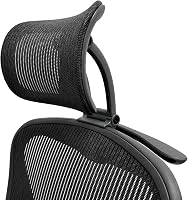
ERGOKING Headrest for Herman Miller Classic Aeron
 Best for Remastered in graphite
Engineered Now The Original Headrest for The Herman
Herman Miller Aeron vs Remastered: what changed?
The Remastered refreshes the mesh, lower-back support and controls while keeping the Aeron's recognizable frame shape. The Classic uses an even mesh weave; the Remastered has zoned mesh.
The chair's back joint is another clue. Exposed screws behind the seat point to a Classic, while the Remastered has a smooth triangular joint.
Lower-back support differs as well. Remastered chairs often have 2 lower-back pads, while the Classic support configuration is different.
The controls were updated as part of the redesign. Check the exact chair's adjustment options before choosing, especially if you rely on a particular recline or tension setting.
How do you identify your Aeron version?
Look at the mesh and the joint behind the seat to distinguish a Classic from a Remastered. A chair bought new before late 2016 is generally a Classic, but visible details are a useful check when its age is unknown.
A Classic has an even mesh pattern and exposed screws at the joint. The Remastered has zoned mesh and a smooth triangular joint.
Don't rely on the color or size alone. When a replacement part or headrest is involved, confirm its stated compatibility with your exact chair version.
Which Aeron support system fits your back?
Choose the chair whose lumbar support and adjustment range match the support you prefer. The Remastered's common configuration includes 2 lower-back pads, while the Classic has its own support setup.
Aeron fit also depends on size and how you sit. Consider whether the chair supports your back without forcing you into one position, and whether you can reach the controls from your normal seated posture.
The Remastered's zoned mesh changes how the back is divided into support areas. That design difference may affect how the chair feels, but it doesn't guarantee that one version will feel better to every person.
If you are also comparing a different Herman Miller design, our Herman Miller Aeron vs Embody comparison looks at the choice between those chair models. For another update within the brand, see Herman Miller Mirra vs Mirra 2.
How do the controls compare?
The Remastered updates the Aeron's controls, so compare the adjustments you actually use before deciding. Recline, tilt and tension settings affect how you position the chair during focused work and breaks.
Think about your routine: do you sit upright for typing, lean back to read, or change positions often? A control is useful only if its range and placement work for you.
When buying used, operate each adjustment and check that it moves as expected. Ask for the chair's size and configuration, and inspect the mechanism for damage or missing parts.
Can you add a headrest to either Aeron?
Yes, but match the headrest to the Aeron version because some models fit only the Classic or Remastered. The ERGOKING headrest below is made for Classic Aerons and specifically excludes the Remastered.
The Engineered Now options below are described for Remastered chairs. The graphite and Onyx versions have H3 and H4 size choices, while the H6 has a one-size design with a wider support surface.
A headrest changes how you can rest your head and neck, but it is not necessary for everyone. Check the chair fit and the accessory's model compatibility before buying.
For a broader view of the updated chair, read our Herman Miller Aeron Remastered review. If you're weighing several premium seating options, see our Best Splurge Office Chair guide.
Which version is easier to buy used?
A used chair is easier to assess when you can verify its version, size, support parts and controls in person. The Aeron's name alone doesn't confirm its age or configuration.
Check the mesh pattern and joint behind the seat first. Then test the adjustment controls and look for cracks, loose parts, damage to the mesh or signs that a component is missing.
Ask the seller for the chair size and any service history they know. Confirm the measurements against your desk and body, and account for the space needed to move the chair.
Is the Aeron Classic or Remastered better for you?
Choose the Classic if its fit and support setup meet your needs; choose the Remastered if you prefer its updated mesh, support options and controls. The right choice comes down to fit and the adjustments you will use.
If buying an accessory, identify the chair version before ordering. If the comparison is between the Remastered and a different chair style, use the Aeron vs Embody guide to compare those designs.
Pick the Classic for the even mesh and its support setup, or the Remastered for zoned mesh and updated controls. Check size, adjustment function and accessory compatibility on the exact chair before you decide.
Frequently asked questions
How can you tell a Classic Aeron from a Remastered Aeron?
A Classic Aeron has an even mesh weave and an exposed-screw joint behind the seat. A Remastered chair has zoned mesh and a smooth triangular joint, and it often has 2 lower-back pads.
Check those details before ordering model-specific accessories.
What changed on the Aeron Remastered?
The Remastered update changed the mesh and support system, including its lumbar support options and adjustment controls. The Classic and Remastered also have visible frame differences, so identify the exact version before buying a headrest or replacement part.
Does a Classic Aeron headrest fit a Remastered Aeron?
No. The ERGOKING Classic Aeron headrest is specified for Classic chairs in sizes A, B and C, and it does not fit the Remastered.
Choose an accessory specifically described for your Aeron version, then confirm its size and color.
Which Aeron version should you choose?
Choose the Classic if its fit, support and available adjustment options suit your body and desk routine. Consider the Remastered if you want its updated mesh, lumbar support choices and controls.
Try each configuration in person if you can, since fit depends on your body and sitting position.