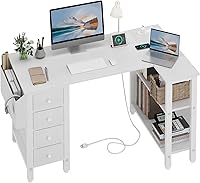
How to Choose an L-Shaped Desk and Vanity Combo
The best l shaped desk and vanity combo separates computer work from grooming while fitting the corner safely. Measure both walls, plan power and lighting, then choose surfaces and storage that keep each task clear.
On this page (9 sections)
- How should you divide an L-shaped desk between work and grooming?
- How do you choose the vanity side of an L-shaped desk?
- Should you add a height-adjustable surface?
- When is a full electric standing desk a better fit?
- What measurements should you check before buying?
- How should you organize an L-shaped desk and vanity combo?
- What style works best in a shared corner?
- Which chair and support details matter?
- What is the final buying rule for an l shaped desk and vanity combo?
The best l shaped desk and vanity combo divides the corner into two clear zones: one for computer work and one for grooming. This split helps each activity keep its own space while still using a small room well.
Measure both walls first, then plan the chair path, mirror position, lighting and cable route before choosing furniture. Those steps can prevent a setup that looks fine on paper but feels cramped in daily use.
An L shape can keep two activities close without forcing every item onto one straight surface. That matters in a bedroom corner or small home office where a single long desk may not fit both needs.
The setup works only when the computer side stays clear enough for focused work and the vanity side has room for daily grooming. If either side is too shallow, screens and grooming tools will soon compete for the same space.
Start by marking the wall lengths on the floor with tape. This simple check shows where the chair will sit and whether the inside corner leaves enough room to turn.
Next, note where power outlets sit on each wall. A computer side without nearby power often leads to long cords crossing the vanity area, which can create both clutter and risk.
Lighting deserves the same early thought as measurements. Place the mirror where room light can reach your face without reflecting directly into a monitor or laptop screen.
Think about how you will enter the space each day. A desk arranged for work first may place the vanity in a spot that is awkward to reach when you are getting ready.
Consider who will use the setup and when. A shared room may need the computer zone clear during the day and the vanity zone easy to tidy at night.
Keep daily items in mind rather than every item you own. The goal is a calm corner where each side supports one main routine without constant rearranging.
Storage should sit close to the side it serves. Work supplies belong near the computer, while makeup and care items belong near the mirror and light.
Avoid placing liquids beside keyboards or power strips. A small tray on the vanity side can contain bottles and make spills easier to clean.
Leave a clear path for cleaning behind and beneath the desk. Vacuuming or wiping dust around legs and cables is much harder if furniture is pushed tight to every wall.
For basic desk measurements and layout ideas, start with our home office desk guide. If you want a full L-shaped workstation, compare the best L shaped desks for home office.
Use those guides to check depth, chair clearance and outlet placement before you commit to a shape. A little planning at this stage saves a much harder rearrangement later.
How should you divide an L-shaped desk between work and grooming?
Put the computer on the section with the best power access, then use the return for the vanity unless your lighting or wall layout suggests the opposite. Each side should have one main job, with shared items kept in a small central area.
The work side usually needs space for a monitor or laptop, keyboard, mouse and writing tools. The vanity side needs room for a mirror, lighting and the items you use most often.
Keep liquids, creams and loose grooming items away from electronics. A tray or small organizer can define the vanity zone, while a drawer or mobile storage unit can keep work supplies from spreading across both surfaces.
Think about chair movement before buying. The inside corner can become a tight turning point, especially if the desk has deep panels or storage beneath it.
What should go on the computer side?
The computer side should hold the equipment you use for your longest sessions. Leave enough open surface to move a mouse, write notes and set down a phone without pushing items into the corner.
A simple open desk can make this easier because your legs and chair have more room beneath it. The SHW Mission 55-Inch Home Office Computer Desk has a 55 in wide by 24 in deep work surface, an engineered wood top and a powder-coated steel frame.
Its 50 kg / 110.2 lb weight capacity gives you a clear limit for the items placed on that surface. The 28 in height is fixed, so pair it with seating that lets your arms rest comfortably while you work.
The black finish and mission-inspired shape can suit a shared home office and vanity corner. Its open underside leaves space for mobile storage or an ergonomic chair, but it does not provide a built-in drawer for small work items.
How do you choose the vanity side of an L-shaped desk?
Choose the vanity side by measuring your mirror, lighting and most-used grooming items together. The right surface is wide enough to stay usable after those items are placed, with a clear area for your hands and chair.
A vanity corner benefits from easy cleaning and controlled cable placement. Keep a light source where it does not cast a strong shadow across your face, and avoid routing cords across the area where you place liquids.
If your corner has limited wall space, use the shorter return for grooming and the longer section for work. If the window or room light favors one wall, place the mirror where you can use that light without blocking the computer screen.
Storage matters more than decoration. Open shelves can keep items visible, while a separate drawer unit can reduce clutter on both surfaces.
Compare L-shaped desks with drawers and shelves if you want that storage built into the desk.
Should you add a height-adjustable surface?
Add height adjustment when you want to change the computer position during the day or share the setup with people of different heights. A converter is useful when the existing desk already fits the corner, while a full electric desk needs more room and assembly.
The VIVO Manual Height Adjustable Standing Desk Converter has a 31.5 in by 15.7 in top, a keyboard tray that raises with the surface and an adjustment range from 4.5 in to 20 in. If you need to position a display too, see standing desk converters with monitor mounts.
Its desktop supports up to 33 lb, so check the combined weight of the equipment you plan to place on it. The manual lift design moves straight upward, which makes the space above the desk important.
The converter is 32 in class and has a black steel design. It can help separate the computer height from the fixed vanity area, but the raised platform also changes the visual balance of a shared corner.
For a larger setup with more organization, see our guide to an l shaped standing desk with storage.
When is a full electric standing desk a better fit?
Choose a full electric desk when the computer surface itself needs powered height adjustment and the corner has room for a complete workstation. Compare height-adjustable L-shaped desks for corner layouts with powered adjustment.
A full desk changes the main work surface, while a converter changes only the platform placed on an existing desk.
The ErGear 48 X 24 Inch Height Adjustable Electric Standing Desk has a 47.2 in wide by 23.6 in deep desktop, a height range from 28.35 in to 46.46 in and 4 memory presets.
Its alloy steel frame and aerospace-grade lifting columns are designed for the desk's adjustable structure. Assembly is required, and the desk includes tools and instructions for setup.
This option can suit a work zone that needs frequent height changes while the vanity remains at a fixed height. Measure the full footprint and check that the moving surface will not strike a mirror, shelf or wall-mounted light.
The electric frame adds controls and moving parts to the work side. If your priority is a simple corner with one fixed surface, a standard desk may be easier to arrange.
What measurements should you check before buying?
Measure the two wall lengths, available depth and chair clearance before choosing an L-shaped desk or combining separate pieces. Record the shortest wall, the corner position, nearby doors and the location of outlets.
Check these measurements:
- Wall length for each side of the L.
- Desk depth on the computer and vanity sides.
- Space for the chair to pull out and turn.
- Clearance for drawers, doors and cabinet access.
- Mirror height and the path of any light cord.
- Outlet locations and cable length.
- Room for cleaning behind and beneath the desk.
Do not assume that two surfaces will meet neatly in the corner. Baseboards, uneven walls and leg placement can leave a gap or reduce usable depth.
If the room has a narrow walkway, compare the clearance with a desk that includes a privacy panel. Our guide to an l shaped desk with a privacy panel explains how that feature changes the feel of a shared workspace.
How should you organize an L-shaped desk and vanity combo?
Organize the setup by frequency of use. A desk with dresser drawers can provide extra storage for supplies near the vanity area.
Keep daily computer and grooming items within reach, place occasional supplies in storage, and leave the inside corner for items that do not need constant access.
Use one visual boundary between the zones. That boundary might be the inside corner, a tray, a lamp or a small organizer.
The goal is to stop cables, brushes and papers from blending into one pile.
A fixed desk such as the SHW gives you an open base for mobile storage. The VIVO converter adds a raised work platform, while the ErGear provides a full electric work surface.
Each choice changes how much of the corner remains available for grooming.
Keep the vanity side easy to wipe and avoid placing liquids above keyboard or monitor equipment. Clean spills promptly and route cords away from areas where containers may tip.
What style works best in a shared corner?
Choose a style that supports the room rather than competing with both uses. In a shared corner, simple lines often work better than ornate details because the space must serve two routines.
A simple black frame and wood surface can connect a home office with a grooming area. That mix feels orderly during work hours and still looks calm when the computer is closed.
Separate lighting and storage make the purposes feel intentional. A work lamp on one side and a mirror light on the other can signal a change of activity without adding walls or screens.
A vintage-inspired room may benefit from warmer finishes and decorative storage. Warm tones can suit wooden floors and soft furnishings, especially when the corner sits beside a bed or seating area.
See our guide to a vintage l shaped desk if the furniture needs to match an existing style. Matching the room style helps the desk feel chosen for the space rather than borrowed from another room.
Colour should work across both zones, not just one. If the computer side uses black metal parts, a dark frame or dark storage on the vanity side can tie the corner together.
Finish choice also affects care. Wood surfaces can warm a room visually, while powder-coated or painted metal can be easier to wipe and less likely to show light marks.
Avoid adding decorative pieces that take up surface space. A plant or frame may look pleasant, but it can push grooming bottles or notebooks into the work zone over time.
The safest design choice is a clear surface with enough open space beneath it. Open space keeps the corner feeling larger and leaves room for a chair, a stool or a mobile storage unit.
Visual simplicity also makes it easier to see when papers or grooming items are crossing into the wrong zone. A tidy boundary keeps cables, brushes and papers from blending into one pile.
Think about the view from the doorway as well. A cleaned work side and a contained vanity side will look balanced even when the room is small.
Do not let style hide practical needs such as cable routing and cleaning access. A beautiful corner still needs outlet access, a chair path and room to wipe surfaces.
If the room has a window, check glare before choosing a mirror position. A mirror that reflects a bright window can make both grooming and screen work harder.
Choose storage that matches the finish but stays separate by function. Work storage should not invite makeup, and vanity storage should not invite cables or chargers.
Small changes can refresh the corner later without replacing furniture. New lighting, a tray or a different chair cover can shift the mood while the layout stays the same.
Which chair and support details matter?
Choose a chair that fits beneath the computer surface and leaves the vanity side easy to reach. If the chair is too wide or too tall, turning between zones will feel awkward.
The seat height should let your elbows stay near desk height without forcing your shoulders upward. That position matters most on the computer side, where you may sit for long stretches.
Check the depth under the desk before you choose seating. Deep panels, fixed drawers or storage boxes can reduce leg room and push the chair too far from the surface.
For a complete seating decision, read how to choose an ergonomic office chair. If the chair lacks lower-back support, our guide to choosing a lumbar pillow for an office chair covers the fit questions to consider.
A vanity stool may suit the grooming side better than a large office chair. A compact stool can tuck neatly under the surface and leave more floor space for the computer chair.
A chair with casters can make switching between zones easier, but it also needs enough floor space to move safely. Test the turning circle before you buy, especially in a corner with a door nearby.
Casters can also roll into cables or a rug edge if the floor layout is tight. Keep the chair path clear of power strips and storage boxes so movement stays smooth.
A mat can protect the floor and define the working area without adding storage to the corner. It also gives casters a more even surface and can reduce noise on hard floors.
Consider foot support if the desk height is fixed. A low footrest can help when your feet do not rest flat on the floor at the chosen seat height.
Armrest height matters just as much as seat height. Armrests that are too high can lift your shoulders, while armrests that are too low may leave your wrists unsupported.
Try the chair with your actual desk surface and monitor setup. A chair that feels fine in a shop may sit too close or too far once legs, cables and storage are in place.
Keep the vanity side reachable without standing in an awkward twist. If you must turn sharply from the work chair, a smaller stool or a repositioned mirror may help.
Support details should suit short and long sessions. A chair for quick grooming checks can be simpler than one used for hours of computer work.
Finally, check that the chair does not block the inside corner. The corner is often where cables, bins and cleaning tools collect, so keep it accessible.
What is the final buying rule for an l shaped desk and vanity combo?
Choose a fixed open desk when you want a simple computer surface with flexible space below. That choice suits a corner where you want mobile storage, an ergonomic chair or a lower visual profile.
Choose a converter when the existing desk fits and you only need adjustable computer height. A converter can add standing options without replacing the vanity surface or changing the whole corner layout.
Choose the ErGear when the full work surface needs electric adjustment and saved positions. That option suits a work zone where height changes are part of the daily routine and the room has space for a complete desk frame.
For every l shaped desk and vanity combo, measure both walls, reserve one side for each activity and plan power before buying. Those three steps set the limits for every later choice.
The best setup is the one that keeps grooming items clear of electronics while leaving the computer side usable throughout the day. Storage, lighting and chair space should support that separation.
If the corner is narrow, favour a simpler fixed surface and careful storage. A smaller footprint can make daily movement safer and cleaning easier.
If you work long hours, give more thought to chair fit and screen height. Comfort on the computer side often matters more than extra surface on the vanity side.
If grooming is your main morning routine, protect that side first. Mirror light, reachable storage and a clear sitting spot will shape the rest of the layout.
Recheck the cable route after furniture is placed. Cords should stay away from liquids, chair wheels and walkways, with enough slack for movement.
Clean spills promptly and keep bottles on a tray. Small habits protect both the surface finish and the electronics nearby.
Do a final test before you settle the arrangement. Sit, stand, turn and reach for daily items in both zones to see where friction remains.
Buy only after that test confirms the corner works in real use. A setup that passes daily use, not just a photo, is the right fit for the room.
Frequently asked questions
How do I set up an l shaped desk and vanity combo?
Place the computer work zone on the wider or better-lit side, then reserve the return for grooming. Measure both walls, leave room for your chair, keep liquids away from electronics, and use separate storage so makeup, tools and work supplies do not crowd the same surface.
Can a regular l-shaped desk work as a vanity?
A regular l-shaped desk can work as a vanity when one section has enough depth for your mirror, light and daily items. Check the surface material, cable route and cleaning needs before placing grooming products beside a computer, monitor or power strip.
How much space should a vanity side need?
The vanity side needs enough depth for the mirror, lighting and items you use without pushing them into the work zone. Measure your largest items first, then keep a clear area for your arms and chair.
The exact space depends on your mirror and grooming routine.
Is a standing desk useful in a desk and vanity setup?
A standing desk can help when you want to change working height without replacing the whole desk. A converter sits on an existing surface, while an electric standing desk changes the main work height.
Choose based on available space, lifting method and the height range you need.