Sihoo Doro C300 Pro Review: Worth It? (October 2026)
The SIHOO Doro C300 Pro suits shoppers who want adaptive lumbar support, adjustable seat depth and multi-direction armrests. Compare the original with the C300 Pro V2 options, since their listed features differ.
On this page (10 sections)
- The SIHOO Doro C300 Pro at a glance
- What do the C300 Pro adjustments offer?
- How do the original and V2 compare?
- Which C300 Pro version should you choose?
- What should you check for fit?
- Is the C300 Pro a good choice for reclining?
- Does the mesh and seat suit long work sessions?
- What is the C300 Pro warranty?
- How does the C300 Pro fit into a desk setup?
- Is the SIHOO Doro C300 Pro worth considering?
The SIHOO Doro C300 Pro is an ergonomic chair with adaptive lumbar support, adjustable seat depth and 6D armrests. It suits shoppers who want multiple adjustments for sitting and reclining, while the C300 Pro V2 versions add 8D armrests and offer different configurations.
The biggest decision is which model matches your needs. The original has three recline angles of 105°, 120° and 135°; the V2 versions use 105°, 125° and 135° recline positions, and one includes a footrest.
The SIHOO Doro C300 Pro at a glance
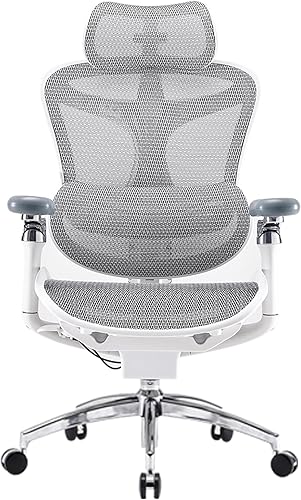
The original C300 Pro stands out for adaptive lumbar support and 6D armrests. Its seat depth, backrest position and recline angle also adjust, giving you several points to tune for your setup.
SIHOO Doro C300 Pro Ergonomic Office Chair: Best for adjustable reclining support
- Adaptive lumbar support
- 6D armrests
- Seat depth adjustment
- Three recline angles
The original C300 Pro combines adaptive lumbar support with seat depth adjustment, a movable backrest and 6D armrests. It fits buyers who want several ways to tune the chair for work and reclining.
Pros
- Seat depth adjusts
- Armrests move in several directions
- Backrest has four height positions
Cons
- Check fit in person if possible
- Armrest adjustments may take time to dial in
SIHOO describes the lumbar support as moving with you, and the armrests as coordinating with the backrest during recline. Those features may appeal if you change position often, but fit still depends on your body and how you set up the chair.
Who should consider the C300 Pro?
Consider it if you want seat depth adjustment and armrests that move in multiple directions. The backrest has four adjustable positions and can move up or down by 2.36 in, which gives you another way to align the support.
You may prefer a simpler chair if you don't expect to adjust the headrest, backrest, seat depth and armrests. More adjustment is useful only when you take time to set each part to a comfortable position.
What do the C300 Pro adjustments offer?
The C300 Pro's adjustments target seat fit, upper-body support and recline. Use the seat depth to match your leg length, then set the backrest and armrests around your working posture.
The original model's armrests adjust up and down, forward and backward, in and out, rotate, and flip up. SIHOO lists movement ranges for these adjustments, so you can compare them with how you position your elbows at your desk.
The 3D headrest moves up and down, forward and back, and rotates. This allows you to adjust its position around your neck rather than relying on a fixed pad.
The backrest has four positions. It can move up and down by 2.36 in, and the frame is described as flexible from side to side as you move your upper body.
How do the original and V2 compare?
The original C300 Pro has 6D armrests, while the V2 versions have 8D armrests and a different set of recline positions. Compare model details carefully because “C300 Pro” appears in the names of more than one configuration.
| Feature | C300 Pro | C300 Pro V2 with footrest | C300 Pro V2 |
|---|---|---|---|
| Armrests | 6D | 8D | 8D |
| Recline positions | 105°, 120°, 135° | 105°, 125°, 135° | 105°, 125°, 135° |
| Seat depth adjustment | Yes | Yes | Yes |
| Headrest | Adjustable 3D | Adjustable 3D superwide | Adjustable 3D superwide |
| Footrest | Not specified | Included in name | Not specified |
| Color shown | Ash Gray | Jet Black | Black |
Choose the original if its 6D armrests and 120° middle recline position match your preferences. The V2 may be a better fit if you want 8D armrests, and the footrest version is the one to compare if you want that added feature.
The SIHOO Doro C300 review covers the related C300 model, which can help you decide whether the Pro's added adjustments matter for your setup.
Which C300 Pro version should you choose?
Choose the C300 Pro V2 with footrest if having a footrest is part of your plan for reclining. It also has 8D armrests, adjustable seat depth and a 3D superwide headrest.
SIHOO Doro C300 Pro V2 Ergonomic Office: Best for a footrest option

- C300 Pro V2
- Footrest
- 8D armrests
- Three recline angles
This C300 Pro V2 version includes a footrest and 8D armrests. Consider it if you want a leg-rest option for reclining alongside seat depth and height adjustments.
Pros
- Footrest included
- 8D armrests
- Seat depth adjusts
Cons
- V2 features differ from the original C300 Pro
- Confirm the exact version and included parts
The V2 chair without a footrest is another option if you want its 8D armrests and adaptive support features. Its listed configuration includes an adjustable headrest and seat depth.
SIHOO Doro C300 Pro V2 Ergonomic Office: Best for a simpler V2 setup

- C300 Pro V2
- 8D armrests
- Adjustable headrest
- Three recline angles
This V2 option has adaptive lumbar support, adjustable headrest and 8D armrests. It may suit shoppers comparing the V2 configuration without a footrest.
Pros
- Adjustable headrest
- 8D armrests
- Seat depth adjusts
Cons
- Confirm the exact configuration before buying
- Armrest settings may need careful adjustment
The two V2 product names are very similar, so compare the specific version and included components before ordering. If you are also weighing the brand's other models, our best SIHOO ergonomic office chair guide compares options by the features that matter to different shoppers.
What should you check for fit?
Check seat depth, backrest height and armrest placement against your body and desk. A chair can have many adjustments and still feel wrong if its seat is too long or the armrests don't align with your work surface.
For seat depth, sit with your back against the backrest and check for space behind your knees. Your feet should rest on the floor or a footrest, and the seat shouldn't press into the back of your legs.
Set the armrests so your shoulders can relax and your elbows stay near your sides while typing. If they hit the desk edge or force your arms outward, adjust their height and width or consider whether the chair fits your desk.
If you want a different price tier or a more familiar adjustment set, see our SIHOO M18 review. For a direct model comparison, read SIHOO M18 vs M57.
Is the C300 Pro a good choice for reclining?
The C300 Pro offers three stated recline positions, and its 6D armrests are designed to move with the backrest. That makes reclining part of its feature set, alongside its adjustable seat and backrest.
The original's positions are 105°, 120° and 135°. The V2 models use 105°, 125° and 135°, and SIHOO describes their mechanism as adjusting resistance to the user's weight.
Recline angle alone doesn't tell you how a chair will feel. Your desk work, preferred posture and how much you want to lean back all matter, so try the adjustment sequence and check whether the chair supports your arms in each position.
Does the mesh and seat suit long work sessions?
The C300 Pro uses breathable mesh fabric and an enlarged seat cushion. These details may suit shoppers who prefer a mesh chair and want more seat area than a compact design provides.
The product information calls the seat wider and says its depth adjusts, but it doesn't provide a seat width measurement for this original model. If you need a precise fit, confirm the dimensions that matter to you before choosing.
The V2 descriptions also emphasize mesh and adaptive support, but their materials and included components differ by configuration. Match the exact version to the features you want instead of assuming every C300 Pro has the same setup.
What is the C300 Pro warranty?
SIHOO states that the original C300 Pro includes free product parts during a three-year warranty period from purchase. The V2 product information describes a 36-month warranty and a 30-day return policy.
Warranty terms can vary by region and configuration, so review the current terms for the exact chair before buying. Keep purchase details and contact the brand if you need to confirm coverage or replacement parts.
The V2 description says it meets BIFMA, SGS and TÜV standards. The original model's information also lists certifications and standards; these are product claims, not a substitute for checking warranty coverage or your fit.
How does the C300 Pro fit into a desk setup?
The C300 Pro's armrests and recline positions matter most when you match it to your desk. Set the chair height so your arms reach the keyboard without lifting your shoulders, then check that the armrests clear the desktop.
Lighting also affects a work area. Our BenQ ScreenBar Pro review looks at a monitor light option if you are improving your desk setup alongside a chair.
Before settling on a layout, check the chair's width and depth against the space where it will sit. Leave room to recline, move the armrests and get in and out without hitting nearby furniture.
Is the SIHOO Doro C300 Pro worth considering?
The SIHOO Doro C300 Pro is worth considering if you want adaptive lumbar support, adjustable seat depth and multi-direction armrests. Pick the original for 6D armrests and a 120° recline position, or compare the V2 versions for 8D armrests and the footrest option.
If you want a more direct choice between other SIHOO models, use the SIHOO M18 vs M57 comparison to see which adjustment set better fits your needs.
Frequently asked questions
What is the difference between the SIHOO Doro C300 Pro and C300 Pro V2?
The original C300 Pro has 6D armrests and reclines to 105°, 120° and 135°. The C300 Pro V2 options described here have 8D armrests and recline to 105°, 125° and 135°; one version includes a footrest.
Check the exact configuration before choosing.
Does the SIHOO Doro C300 Pro have adjustable seat depth?
Yes, the C300 Pro has adjustable seat depth. The V2 versions also include seat depth adjustment.
Use it to match the seat to your leg length, then check that you can sit with your feet supported and without pressure behind your knees.
How do the C300 Pro armrests adjust?
The original C300 Pro has 6D armrests that move in several directions, including height, forward and backward, width, rotation and flip-up movement. The C300 Pro V2 versions have 8D armrests.
Confirm the model name and configuration when comparing options.
Is the SIHOO Doro C300 Pro suitable for taller users?
The original C300 Pro has an enlarged seat cushion, adjustable seat depth and a backrest that moves up and down. SIHOO describes it as more suitable for taller users, but individual fit depends on your body and desk.
Compare the adjustments with your measurements.


