Vertical Mouse vs Trackball: Which Should You Choose? (November 2026)
Choose a vertical mouse for a handshake-style grip, or a trackball for stable wrist movement and limited desk space. Your hand size, pointer habits and desk layout decide which design fits better.
On this page (9 sections)
- Vertical mouse vs trackball: what is the main difference?
- Which design suits your hand and wrist position?
- Which is better for a small or crowded desk?
- Which option is easier for everyday pointer control?
- Which connection type fits your computer?
- How do the 4 products compare?
- Which is easier to maintain?
- Can a trackball replace a vertical mouse for work?
- What should you choose?
Choose a vertical mouse for a handshake-style grip, or a trackball for stable wrist movement and limited desk space. In a vertical mouse vs trackball comparison, your hand position, pointer habits and available desk space matter more than the shape alone.
A vertical mouse changes the angle of your hand while you move the whole device. A trackball keeps the body in place while your thumb or fingers move the pointer.
This guide compares both designs for office work, small desks, long computer sessions and shared setups. For a broader look at pointing devices, see our guide to ergonomic keyboard and mouse choices.
The choice often comes down to what feels natural through a full day at a desk. If rotating your hand into a handshake style grip reduces the strain you notice with a flat mouse, a vertical model may suit you better.
It still uses the familiar pattern of moving the device and clicking the buttons, so switching between computers or using a mouse away from your main desk can stay simple.
A trackball suits people who want to keep their wrist and arm more stable while they work. You roll the ball to move the pointer, which means the device can stay in one place even when the desk surface is crowded.
That can help on a narrow desk, in a small office or in a shared workspace where notebooks, cables and other accessories take up room.
Hand size and control style also matter when you compare the two designs. A vertical mouse relies on the same moving motion as a standard mouse, but with your palm turned to a different angle.
A trackball asks for a new steering motion, and precise control may take practice at first, especially if you are used to moving the whole mouse across the surface.
Desk height, screen position and keyboard placement affect comfort with either option. A mouse that forces your shoulder forward or makes you grip tightly can feel awkward, even if the shape is meant to be ergonomic.
Keep your wrist relaxed, avoid pressing hard on the buttons and take regular breaks during long sessions.
Think about where you will use the device most often. A vertical mouse works well when there is enough clear surface to move across.
A trackball works well when the surface is limited or when you want the pointer to stay responsive without repeated arm movement.
Your work habits can help you decide which trade off fits better. If familiarity matters most, a vertical mouse may be the easier step from a standard mouse.
If stationary control and limited space matter more, a trackball may be worth the adjustment period.
Neither design suits every wrist or every desk setup. The best choice is the one that matches your hand, your pointer habits and the space you have to work each day.

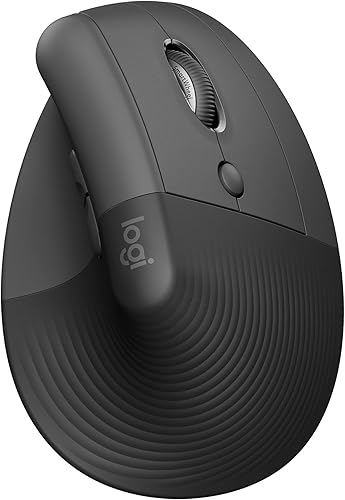 Best for small to medium right hands
Logitech Lift Vertical Ergonomic Wireless Mouse
Vertical mouse vs trackball: what is the main difference?
A vertical mouse changes wrist and forearm position, while a trackball reduces arm movement. Keyboard shape also affects wrist position; see our Logitech ERGO K860 review.
If a key is damaged, see our Logitech ERGO K860 key replacement guide. That difference affects how you steer, how much desk space you need and how quickly the device feels familiar.
A vertical mouse has an upright body that encourages a handshake-style grip. You still move the mouse across the desk, but your palm and forearm sit at a different angle.
A trackball stays in one place. You roll a ball with your thumb or fingers to move the pointer, so the desk surface matters less.
Neither design guarantees comfort. A poor fit, a tight grip, a high cursor speed or a desk that forces your shoulder forward can make either option feel awkward.
Which design suits your hand and wrist position?
Pick a vertical mouse if changing your grip feels more useful than reducing movement. Pick a trackball if you want your wrist and arm to stay mostly still.
The vertical mouse shape can reduce the need to turn your palm flat against the desk. For setup and controls, see using Logitech Lift mouse.
The Logitech Lift uses a 57-degree shape, a textured grip and a thumb rest, and it is designed for small to medium right hands.
The Anker vertical mouse is also right-handed and uses a vertical ergonomic structure. It offers 800, 1200 and 1600 DPI settings, so you can adjust pointer sensitivity as you get used to the shape.
A trackball gives you a different type of control. The Logitech Ergo M575S uses thumb control, while the ProtoArc EM02 lets you use a flat 0-degree or tilted 15-degree position.
If you want more choices for this design, our guide to the best ergonomic trackball mouse compares trackball features by use.
Which is better for a small or crowded desk?
A trackball is usually the better choice when you have little clear desk space. Its body stays in place, so you don't need a long path for repeated pointer movements.
This matters on a narrow desk, a shallow keyboard tray or a workspace crowded by notebooks and accessories. You can position the trackball where your hand rests and roll the ball without moving the device.
A vertical mouse still needs room to travel. You may need to lift and reposition it when the pointer reaches the edge of the available surface.
The Logitech M575S is built around this stationary style. Its thumb control lets you move the cursor without moving your hand, and it can be used on any surface.
The ProtoArc EM02 also suits tight setups. Its 0-degree and 15-degree positions let you choose between a flat body and a slightly raised angle.
Which option is easier for everyday pointer control?
A vertical mouse usually feels closer to a standard mouse, while a trackball asks you to learn a new steering motion. The better choice depends on whether familiarity or reduced arm movement matters more.
With a vertical mouse, you move the whole device and use the buttons in a familiar way. The Anker includes next and previous buttons for web browsing, while the Logitech Lift has customizable buttons and a SmartWheel.
A trackball separates pointer movement from body movement. You can keep the device still while rolling the ball, but precise control may take practice.
ProtoArc recommends starting at 200 or 400 DPI for first-time trackball use, then raising the setting as control improves. The M575S reaches up to 2000 DPI, while the EM02 offers 200, 400, 800, 1200 and 1600 DPI settings.
If you play games, pointer speed and control style matter even more. See our guide to the best trackball mouse for gaming before choosing a trackball for that workflow.
Which connection type fits your computer?
Choose by the ports and devices you use every day. Bluetooth is useful when you want to avoid a receiver, while a USB receiver can be a straightforward option for a desktop or laptop with an open port.
The Anker uses 2.4 GHz wireless through a USB receiver. It needs 2 AAA batteries, which aren't included, and the receiver is stored in the bottom of the mouse.
The Logitech Lift connects through Bluetooth Low Energy or a Logi Bolt USB receiver. It includes 1 AA battery and supports Windows, macOS, iPadOS, Chrome OS and Linux according to its product information.
The M575S also connects through Bluetooth or the included Logi Bolt receiver. It uses 1 included AA battery and supports Windows and macOS.
The ProtoArc EM02 offers 2.4 GHz wireless or Bluetooth, includes a USB receiver and USB-C charging cable, and works with Android, Mac OS and Windows. Its forward and backward buttons aren't compatible with Mac OS.
For Apple-focused buying advice, see our guide to the best trackball mouse for Mac.
How do the 4 products compare?
The Anker and Logitech Lift are the vertical mouse choices, while the M575S and ProtoArc EM02 are the trackball choices. Each fits a different desk routine.
Anker 2.4G Wireless Ergonomic Mouse
The Anker is a practical choice if you want a vertical design without Bluetooth setup. It enters power-saving mode after 8 minutes of inactivity and wakes when you press the left or right button.
Its 120 x 62.8 x 74.8 mm dimensions create a taller shape than a standard flat mouse. The right-hand design matters, so left-handed users should skip it.
The 2 AAA batteries aren't included. Also, key click sounds are unavoidable, which may matter in a shared office, library or quiet room.
Logitech Lift Vertical Ergonomic Wireless Mouse
The Lift is the stronger vertical choice when hand size and quiet operation are priorities. Its textured grip, thumb rest and 57-degree angle support a more upright hand position.
It uses 1 AA battery and has a stated battery life of up to 24 months. The mouse also supports connection through Bluetooth Low Energy or a Logi Bolt USB receiver.
The Lift suits people who want vertical ergonomics while keeping familiar mouse movement. It may not fit larger hands as well as a bigger vertical model.
Logitech Ergo M575S Wireless Bluetooth Trackball Mouse
The M575S is the clearest pick when you want to stop moving the mouse body across the desk. For more compact options, see our trackball mice for small hands guide.
Its sculpted shape supports the hand, while the thumb rolls the trackball.
It offers up to 18 months of battery life from 1 included AA battery. Bluetooth and Logi Bolt give you 2 connection paths, and the mouse supports Windows and macOS.
Trackball control takes some adjustment. Keep the ball clean, use a comfortable thumb position and change cursor speed gradually rather than forcing fast movements on the first day.
ProtoArc EM02 Wireless Trackball Mouse
The EM02 is useful when you want to change the angle of the trackball body. Its flat and tilted positions let you compare 2 hand postures without changing to a different pointing device.
It includes a USB-C charging cable, USB receiver, user manual and trackball mouse. ProtoArc gives it 5 DPI settings and says a full charge provides 90 days of standby time.
The forward and backward buttons don't work with Mac OS. Dust can also affect trackball movement, so clean the ball and its 3 white rollers if control becomes sticky or uneven.
Which is easier to maintain?
A vertical mouse usually has simpler surface care, while a trackball needs occasional ball and roller cleaning. Maintenance is not difficult, but the trackball has more moving parts exposed to dust and skin oil.
Wipe either mouse with a suitable dry or lightly damp cloth, following the care guidance for the device. Keep food, dust and loose debris away from the buttons and tracking area.
For a trackball, remove the ball when cleaning is needed and clear the rollers gently. Do not ignore a sticky feel, since dirt can make precise pointer control harder.
A vertical mouse still needs attention around the scroll wheel and buttons. If a wireless mouse behaves erratically, check its battery, receiver position and nearby USB devices before changing your hand position.
Can a trackball replace a vertical mouse for work?
Yes, a trackball can replace a vertical mouse for many desk workflows, but the control motion will feel different. People who switch should expect a short adjustment period.
A vertical mouse keeps the standard move-and-click pattern. That can help if you switch between computers or regularly use a mouse away from your main desk.
A trackball is better suited to a fixed workstation where the device can stay in one place. It can also help when the desk surface is too small for repeated mouse movement.
If your main concern is upper-body alignment, your mouse is only one part of the setup. Use our guide on How to Choose an Ergonomic Office Chair? to check seat height, arm support and screen position.
A lumbar pillow for an office chair may also change how you sit, but it doesn't replace a proper desk height or a relaxed mouse grip.
What should you choose?
Choose a vertical mouse if you want a familiar pointer motion with a more upright hand position. Choose a trackball if you want to reduce arm movement, save desk space or keep the device stationary.
Choose the Anker if you want a right-handed vertical mouse with adjustable DPI and a 2.4 GHz USB receiver. Choose the Logitech Lift if you want a 57-degree shape, quiet clicks and Bluetooth or Logi Bolt connection for a small to medium right hand.
Choose the Logitech M575S if stable thumb control and broad surface flexibility matter most. Choose the ProtoArc EM02 if you want adjustable trackball angles, USB-C charging and 5 DPI settings.
If you prefer a particular brand, our guide to the best Kensington trackball mouse can help you compare another trackball family.
The best vertical mouse vs trackball choice is the one that matches your movement pattern. Pick vertical when grip angle is your priority, and pick trackball when stationary control and desk space matter more.
Frequently asked questions
Is a vertical mouse better than a trackball?
A vertical mouse may suit you better if you want your hand rotated into a handshake-style grip while moving the mouse across the desk. A trackball may suit you better if you want to keep your wrist and arm stable, work in a small area or use a pointing device on surfaces where mouse movement is awkward.
Which is better for wrist pain, a vertical mouse or trackball?
Neither design is best for every wrist. A vertical mouse changes hand angle, while a trackball reduces the need to move your arm.
Use a relaxed grip, keep your wrist neutral and take breaks.
For ongoing pain, ask a qualified health professional for advice.
Is a trackball harder to learn than a vertical mouse?
A trackball usually has the larger learning curve because your thumb or fingers control the pointer instead of moving the whole mouse. ProtoArc says many users adapt within 1 to 2 weeks.
Start with a lower DPI setting, then raise it as the movement feels more natural.
Do vertical mice take up more desk space?
A vertical mouse needs room to move across the desk, even though its upright body may feel compact in your hand. A trackball needs less clear surface because the pointer moves when you roll the ball.
This makes a trackball useful on a crowded or narrow desk.


