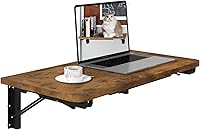
How to Choose a Wall Mounted Desk for Dual Monitors
Pick a desk deep and strong enough for two monitors before you fix anything to the wall: check desktop depth, bracket capacity and stud location first, then set monitor height and distance for comfort.
On this page (11 sections)
- How much desk depth do you need for two monitors?
- What width suits side by side monitors?
- How strong must the brackets and wall be?
- Where should you mount the desk for monitor height?
- How far back should dual monitors sit?
- Which folding desk suits compact dual monitor setups?
- How do you install a wall mounted desk safely?
- How do you route cables for two monitors?
- What are the trade-offs of each desk here?
- How do you keep a folding desk steady day to day?
- Which should you pick for dual monitors?
A wall mounted desk with dual monitors works only when the surface, brackets and wall are sized for two screens first. Start with desktop depth, mounting strength and monitor placement, then choose the desk.
Dual screens add width, weight and cable clutter. A compact folding table can suit small monitors and light gear, but it may leave no room for a wide keyboard once two stands sit on it.
Depth is the first limit to check. Monitor stands need space at the back, a keyboard needs space at the front, and your forearms need room between them.
If those needs overlap, you will sit too close or push the keyboard toward the edge.
Width is the second limit to check. Two screens side by side take more room than most people expect once you include the gap between them.
Add space for a mouse or notebook, or the setup will feel crowded from the start.
Weight is the third limit to check. Monitors, stands, a laptop, a keyboard and everyday items add up quickly.
A desk that looks strong enough may still be close to its limit once the full load is on it.
The wall fixing matters as much as the desktop. A folding desk depends on brackets holding firm under load and staying level over time.
The right fixing for drywall may not suit brick or cement, so wall type should shape your choice.
We compared three folding models below against that test. Each has a different depth and capacity, and each suits a different kind of dual monitor setup.
One model suits small screens mounted off the desk, where depth matters less. Another suits deeper desk stands, where front to back room matters more.
The third suits a wider pair, where clear wall space matters most.
Who it suits depends on how you work. If you use compact screens and light gear, a smaller surface may be enough.
If you use larger desktop monitors, you will need more depth, more width and a stronger fixing.
Set up also matters. Mark eye level and elbow height before you drill, and check where studs or solid fixing points sit.
A good position on paper can fail if the wall cannot take the brackets where you need them.
Care in daily use is simple. Keep the load within the stated limit, check screws from time to time, and fold the desk gently rather than letting it drop.
That habit helps hinges, brackets and fixings last longer.
The trade off is clear. A folding desk saves floor space, but it gives you a fixed height and a smaller surface than a full desk.
It suits focused dual monitor work best when the screens, keyboard and wall have all been measured first.
How much desk depth do you need for two monitors?
You need enough depth for monitor stands, a keyboard and your forearms at the same time. A shallow shelf often forces screens too close or leaves under 6 in for a keyboard.
Measure each monitor with its stand in place. Add the depth of a keyboard and allow space behind it for cables.
If the total fills the whole surface, you will push the keyboard toward the edge.
Small laptop screens or compact monitors can sit on a narrower desk. Larger desktop monitors need more front-to-back room to keep a comfortable viewing distance.
How desktop depth changes monitor distance
Depth controls how far the screen front sits from your eyes. A deeper desk lets you place a stand near the back and keep the keyboard in front.
A shallow desk, such as 11.8 in deep, leaves little choice. You may need a wall-mounted monitor arm to move screens off the desk surface.
Check whether you plan to use desk stands or wall mounts for the screens. Moving the monitors to the wall can free desk depth for work.
Rule: measure monitors, stands and keyboard together, and reject any desk that leaves no spare depth.
What width suits side by side monitors?
Width must fit both screens with a small gap between them, plus room for a keyboard centered below. Narrow desks suit small screens, while wide desks suit larger pairs.
Place your two monitors side by side on paper or tape first. Measure the combined width, then add space for a mouse, notebook or phone.
A desk under 24 in wide will struggle with two standard desktop monitors and a full keyboard. It may suit two small laptops used as screens, or one monitor with a secondary display.
Consider whether you want the screens at the same height. Different monitor sizes can look uneven and may need stacked books or adjustable stands.
Our home office desk guide covers width and layout for a full workstation, so compare those needs before choosing a folding model.
Rule: pick a desk at least as wide as both monitors plus your keyboard, with space to spare.
How strong must the brackets and wall be?
The desk, brackets and wall must together hold both monitors, the desk itself and everything on it.
Weight capacity is the first check, and the wall fixing is the second. A desk can be rated for a set load and still fail if it is fixed into a weak part of the wall.
Add the weight of both monitors, stands, keyboard, laptop, books and accessories. Leave a margin rather than matching the limit exactly.
Do not forget chargers, a notebook, a mug, or a small printer that often ends up on the desk. Those items add steady weight and also spread load across the surface.
Monitors vary a lot in weight. A compact screen on a light stand is not the same load as a larger desktop monitor with a wide base.
Weigh or check each item before you add them together.
The shape of the load matters too. Weight placed near the front edge pulls harder on brackets than weight placed near the wall.
Keep heavier items close to the back where the brackets support them best.
Wall type matters as much as the number on the box. TEAMIX says its table should go on cement, brick or drywall, while GOYLSER warns that drywall needs support strips so both brackets screw into a solid fixing.
Drywall needs care because the board alone is not a strong fixing point for a loaded desk. Studs give a more reliable hold, and support strips can spread the load across a wider fixing area.
Cement and brick need different fixings from drywall. Using the wrong screws or anchors can leave brackets loose even if the desk itself is strong.
Match the fixing method to the wall before you drill.
Never fix a loaded desk into hollow drywall alone. Use studs, suitable anchors or support strips, and follow the fixing method for your wall.
Check both brackets, not just one. A desk with one firm bracket and one weak bracket will tilt, wobble and put extra strain on the boards and hinges.
Test the fixing before you load the desk. Press down firmly on the surface and check for movement, creaking or any sign that screws are pulling away from the wall.
If the desk is also used for dining, laundry or other tasks, remember that other loads come and go. A setup that suits monitors in the morning may later hold books, tools or folded clothes.
Keep a margin for real life. People lean on desks, place bags on them, or add a second device later.
That extra margin helps the desk stay steady instead of sitting at its limit every day.
Choose brackets and fixings rated above your total for your wall type. That simple check makes a dual monitor setup safer, quieter and easier to keep level over time.
Where should you mount the desk for monitor height?
Mount height should put the top of the screens at or just below eye level when you sit. Too high forces you to look up, and too low forces you to look down.
Sit in your chair first and mark your eye height on the wall. The desk surface should sit just below elbow height for comfortable typing.
For dual monitors, keep both screen centers at a similar height. If one screen is larger, center the pair so the main screen sits straight ahead.
A fixed folding desk cannot change height once installed. If you need different heights for sitting and standing, consider a wall mounted desk with adjustable height instead.
Rule: mark eye level and elbow height on the wall before drilling, and set the desk to match your seated position.
How far back should dual monitors sit?
Set each screen about an arm's length away, adjusted so text stays clear without leaning. Distance depends on screen size and your eyesight.
Start with screens roughly 20 to 30 in from your eyes, then move them in small steps. You should read text without leaning forward or squinting.
Keep both screens at a similar distance. If one sits much closer, it will look larger and may pull your attention to one side.
Angle the outer edges of the pair slightly toward you. This can reduce glare and keep both screens in view without turning your head.
Pair the desk with a chair that lets you sit at a steady distance. Our Best Office Chair For Dual Monitor Desk Setup guide can help you match seating to screen layout.
Rule: adjust stand depth until both screens sit at a similar distance and you can read without leaning.
Which folding desk suits compact dual monitor setups?
A compact folding desk suits dual monitors only when the screens are small or mounted off the desk. Depth and width decide whether two stands can share the surface.
The TEAMIX model gives a 23.6 by 11.8 in workspace and folds to 2 3/8 in thick. TEAMIX says it holds up to 80 lb and uses heavy-duty steel supports with a thickened wood board.
That size suits a laptop plus a small monitor, or two compact screens on wall mounts. It leaves little room for two large stands and a full keyboard.
The MM MELISEN model runs 23.6 in deep by 15.7 in wide and folds to 3.1 in thick. MM MELISEN says it supports up to 300 lb with its upgraded mounting hardware, which gives more margin for heavier gear.
Solid wood construction also suits repainting or staining, according to MM MELISEN. That can help the desk match a room if you plan to finish it to suit your space.
The GOYLSER model is listed at 35 by 20.5 in, with a 20.5 in depth. That extra depth gives more room for monitor stands and a keyboard, but the wider surface needs a wider clear wall.
GOYLSER supplies a spirit level to help keep brackets level during mounting. Level brackets matter because a slight tilt can make a folding desk feel unstable.
Rule: match the desk depth to your monitor stands first, and use wall-mounted screens if depth is limited.
How do you install a wall mounted desk safely?
Install into studs or suitable anchors, level both brackets, and test the fixings before loading the desk.
Measure and mark bracket positions with a level. GOYLSER includes a spirit level for this step, and TEAMIX includes accessory kits with an Allen wrench and screwdriver.
Check the wall type before you drill. Drywall may need support strips or anchors, while cement and brick need different fixings.
Fix one bracket, check it holds, then fix the second. Do not load the desk until both brackets sit level and firm.
Assembly time varies. TEAMIX says assembly usually takes an adult a few minutes with the included instructions and tools.
How do you route cables for two monitors?
Plan cable routes before you mount the screens, so power and display cables do not pull on the desk. Loose cables add weight and can make a folding desk drag.
Run cables down the wall behind the desk where possible. Keep excess cable slack so the desk can fold without bending cords at a sharp angle.
Use cable clips or ties away from the folding joint. Avoid routing cables through the fold line, where repeated bending can damage them.
Leave room for a power strip or surge protector if you need more outlets. Many dual monitor setups need power for two screens, a laptop, lights and chargers.
If storage matters, a desk with drawers can hold chargers and cables out of sight. See our best wall mounted desk with drawers guide for that option.
Rule: route cables down the wall with slack for folding, and keep them clear of the fold joint.
What are the trade-offs of each desk here?
Each desk trades depth, width and capacity in a different way, so match the trade-off to your screens. No single model suits every dual monitor pair.
TEAMIX is the most compact of the three. Its 11.8 in depth suits small screens or wall-mounted monitors, and its 80 lb capacity suits lighter gear.
MM MELISEN gives 23.6 in of depth for stands and a keyboard. Its solid wood build and higher stated capacity suit heavier setups, but its 15.7 in width limits two wide monitors.
GOYLSER gives the widest surface at 35 in and 20.5 in depth. That suits two desk stands better, but it needs more clear wall space and careful fixing into solid support.
Consider storage if your desk must also hold office supplies. Our best wall mounted desk cabinets guide covers models that add enclosed storage above the desk.
For shelving beside the desk, see best wall mounted desk with shelves. Shelves can hold books and accessories without using desk depth.
Rule: choose compact for small screens, deeper for desk stands, and wider only if your wall can take it.
How do you keep a folding desk steady day to day?
Check fixings, wipe the surface and fold the desk gently to keep brackets and hinges in good shape. Small checks prevent a desk from loosening over time.
Wipe the surface with a dry cloth. TEAMIX lists wiping with a dry cloth as its care instruction, which suits light dust and spill cleanup.
Check bracket screws every few months, especially after moving the desk or loading it with heavier gear. Tighten loose fixings before they work the wall.
Fold the desk down when not in use to save floor space. All three models fold flat, with TEAMIX at 2 3/8 in thick and MM MELISEN at 3.1 in thick when folded.
Lift the board smoothly rather than dropping it. Rounded corners on the TEAMIX model help reduce bumps, and a slow fold protects hinges and fixings.
If you need chairs that suit long sessions at a folding desk, compare our Best Desk Chair for Multiple Monitors guide. A supportive chair matters as much as desk height.
Rule: check screws, wipe with a dry cloth and fold without forcing the joint.
Which should you pick for dual monitors?
Pick depth and capacity for your actual monitors, then fix the desk into the strongest part of your wall. That choice decides whether two screens feel comfortable or cramped.
Choose the GOYLSER model if you need 20.5 in of depth and 35 in of width for two stands, and your wall can take a wide fixing.
Choose the MM MELISEN model if you want deeper reach and a higher stated capacity in a narrower footprint, and your screens will fit its 15.7 in width.
Choose the TEAMIX model if space is tight, your screens are small or wall-mounted, and you want the thinnest fold at 2 3/8 in thick.
For a wider choice of floating styles, see our best floating wall mounted desk roundup. It compares more shapes for small rooms.
Measure your monitors, keyboard and wall first. Then pick the desk that leaves room for both screens without crowding your work surface.
Frequently asked questions
Can a wall mounted desk hold two monitors?
Yes, if the desktop depth, bracket capacity and wall type suit the total weight of both monitors plus keyboard and other gear. Check that both screens fit side by side without crowding and that the mount point lands on studs or suitable anchors.
How deep should a desk be for dual monitors?
Depth depends on monitor size and your viewing distance. A deeper surface gives more room for stands and a keyboard, while a shallow shelf may force the screens too close.
Measure your monitors and keyboard together before you choose.
Can I mount dual monitors directly on the wall instead?
You can, but you still need a desk surface for keyboard, mouse and work items. Many people pair a wall-mounted folding desk with a separate monitor arm or stand so screen height can change without moving the desk.
What wall type is best for a wall mounted desk?
Solid walls and studs give the most reliable fixing. Drywall needs the right anchors or fixing into studs, and hollow sections should be avoided for heavy loads.
Check the wall before installation, not after.