8 Best Electric Standing Desk Converters for Dual Monitors (November 2026)
The best electric standing desk converter dual monitor include the FLEXISPOT 32" Motorized Standing Desk Converter for compact dual monitor desks, the VERSADESK PowerPro 36 Inch Electric Corner Standing for corner desks, and the VERSADESK PowerPro 48 Inch Electric Standing Desk for wide multi monitor setups.
On this page (8 sections)
- Electric standing desk converters for dual monitors, ranked by fit
- How the electric dual monitor converters compare
- What size converter do you need for two monitors?
- How much weight will your dual monitor setup add up to?
- Electric lift or spring lift for dual monitors?
- Which extras are worth paying for?
- How do you set up and care for a converter safely?
- Our verdict on the best electric standing desk converter for 2 monitors
The best electric standing desk converter 2 monitors for most desks is the FLEXISPOT 32" Motorized Standing Desk Converter, because it fits two monitors on a standard desk, lifts 55 lb and sets up in minutes. The VERSADESK PowerPro 48 inch wins for wider multi monitor desks, and the PowerPro 36 inch corner model wins when your desk sits in a corner.
An electric converter matters for dual monitors because the load is heavy. You change height with a button instead of lifting two screens by hand, and the motion stays smoother through the range.
That matters more with two monitors than with one.
Start by measuring your desk and your monitors. Width decides which models fit, depth decides whether the keyboard tray will crowd your chair, and total weight decides whether a 33 lb model will work or whether you need a 55 lb or 80 lb frame.
If you want a permanent setup instead, see how to choose a wall-mounted desk for dual monitors.
Our home office desk guide covers the desk underneath the converter. Our best desktop standing desk converter guide compares manual and electric types if you are still deciding between them.
Our picks at a glance
-
1
 Best for compact dual monitor desks
FLEXISPOT 32" Motorized Standing Desk Converter
9.7/10 our score
See it on Amazon -
2
 Best for corner desks
VERSADESK PowerPro 36 Inch Electric Corner Standing
9.5/10 our score
See it on Amazon -
3
 Best for wide multi monitor setups
VERSADESK PowerPro 48 Inch Electric Standing Desk
9.4/10 our score
See it on Amazon
- 4
 Check it
FLEXISPOT 40" Electric Standing Desk Converter
Best for laptop plus dual monitors - 5
 Check it
SANODESK 42" Extra Large Standing Desk Converter
Best for extra large manual lifts - 6
 Check it
Rocelco 37.4" Electric Standing Desk Converter with
Best for built in power outlets - 7
 Check it
SANODESK 35" Electric Standing Desk Converter
Best for smaller electric setups - 8
 Check it
AVLT Electric Standing Desk Converter for Triple
Best for triple monitor rigs
Electric standing desk converters for dual monitors, ranked by fit
Our score weighs specs, features and buyer feedback against what you're shopping for. The ranking below puts the most versatile dual monitor picks first, then covers corner, wide, manual and triple monitor options.
FLEXISPOT 32" Motorized Standing Desk Converter: Best for compact dual monitor desks
- 32 x 16.3 in desktop
- 5.7 to 19.7 in lift range
- 55 lb total limit
- Wide keyboard tray included
A compact electric riser that fits two monitors and a laptop on a standard desk, with one touch control and almost no assembly.
Pros
- Fits compact desks
- Strong 55 lb limit
- Quick setup
Cons
- 32 in width is tight for very wide monitor pairs
- Keyboard tray needs attaching
The FLEXISPOT 32 inch suits a standard desk with two monitors and a laptop. Its 32 x 16.3 in desktop holds the screens on top, while the 34.6 in keyboard tray keeps typing space separate from monitor space.
The lift range runs from 5.7 to 19.7 in with one touch control. That covers most chair and desk heights, and the smooth motion helps when you switch between sitting and standing through the day.
The 55 lb limit counts both tiers, with 44 lb on the desktop and 11 lb on the tray. Weigh your monitors, stands, laptop and keyboard before you assume it fits, because heavy arms use capacity fast.
Setup is simple. FLEXISPOT says it arrives nearly fully assembled, and you attach the keyboard tray without tools.
The U shaped surface also leaves room at the back for cables.
Trade off: at 32 in wide, two large monitors plus a laptop can feel tight. If your screens are wide, the 40 inch FLEXISPOT below gives more room on the same lift system.
VERSADESK PowerPro 36 Inch Electric Corner Standing: Best for corner desks
- 36 x 31 in corner desktop
- 80 lb limit
- Push button electric lift
- Built in USB charging port
A corner shaped electric converter with high weight capacity, LED lighting and USB charging for dual monitors in a corner workstation.
Pros
- Uses corner space well
- 80 lb capacity
- USB charging and LED light
Cons
- Corner shape will not suit a straight desk
- Monitor arms sold separately
The VERSADESK PowerPro corner model suits a corner desk that wastes space in the middle. Its 36 x 31 in corner desktop wraps into the corner and gives two monitors room to angle toward you.
The carbon steel frame supports up to 80 lb. That headroom matters for dual monitors on arms, a laptop and a full keyboard and mouse set, with less wobble at full height.
Push button height adjustment keeps changes quiet and smooth. A child safety lock helps in family homes, and the maker backs the frame with a lifetime warranty.
Built in extras change daily use. USB charging keeps a phone topped up, LED ambient lighting adds light at the edge, and grommet holes help route cables for a cleaner desk.
Trade off: the corner shape only helps if your desk is actually a corner desk. On a straight desk, the 48 inch PowerPro gives a simpler, wider surface for the same 80 lb capacity.
VERSADESK PowerPro 48 Inch Electric Standing Desk: Best for wide multi monitor setups
- 48 in wide desktop
- 80 lb limit
- Push button electric lift
- Built in USB charging port
The widest straight option here, built for two or three monitors plus a laptop, with cable management and a child safety lock.
Pros
- Very wide desktop
- 80 lb capacity
- Good cable management
Cons
- Needs a deep, wide desk below
- Monitor arms sold separately
The VERSADESK PowerPro 48 inch suits a wide desk with two or three monitors. Its 48 in desktop gives each screen space to breathe, with room for a laptop beside them or a notebook in front.
The 80 lb limit is the joint highest here. Carbon steel construction and a sled base help keep the surface steady at standing height, which matters when you type while standing.
Push button electric lift moves the whole workstation at once. You do not need to lift monitors by hand, and the child safety lock prevents accidental movement in shared spaces.
Cable management is a real benefit at this width. Three grommet holes let you route power and display cables down the back, and USB charging on the surface reduces clutter.
Trade off: you need a desk that is at least 48 in wide and deep enough for the converter footprint. Check our best standing desk converter for 2 monitors guide if your desk is narrower than that.
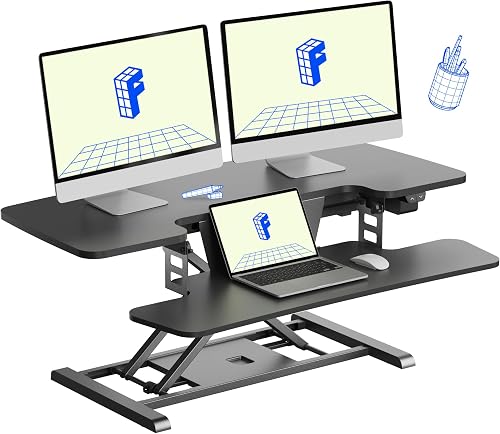
FLEXISPOT 40" Electric Standing Desk Converter: Best for laptop plus dual monitors
- 40 x 16.3 in desktop
- 5.7 to 19.7 in lift range
- 55 lb total limit
- Wide keyboard tray included
An 8 in wider version of the top pick, giving more room for two monitors beside a laptop without changing the lift or weight limit.
Pros
- More width than the 32 in model
- Same 55 lb limit
- Simple one touch control
Cons
- 40 in width needs a larger desk
- No built in USB charging
The FLEXISPOT 40 inch suits a laptop plus dual monitor setup. Its 40 x 16.3 in desktop adds 8 in over the 32 inch model, which helps when a laptop sits beside two screens.
The lift range matches the smaller model at 5.7 to 19.7 in. One touch control makes it easy to return to the same sitting and standing heights each time.
The 55 lb limit is split the same way, with 44 lb on the desktop and 11 lb on the keyboard tray. That suits most dual monitor pairs, but check heavy monitor arms against the total.
The wide 34.6 in keyboard tray holds a full keyboard and mouse, or a laptop, without crowding the monitors above. Setup follows the same nearly assembled pattern.
Trade off: the extra width needs a larger desk below, and there is no built in USB charging like the VERSADESK models. If width is your main need, this is a clean upgrade from the 32 inch pick.
SANODESK 42" Extra Large Standing Desk Converter: Best for extra large manual lifts
- 42 in desktop
- 4.7 to 19.6 in lift range
- 33 lb main tier limit
- Spring lift, no motor
An extra wide riser with a spring lift instead of a motor, suited to lighter dual monitor setups where you do not need powered movement.
Pros
- Wide 42 in surface
- No power needed
- Spring lift avoids motor noise
Cons
- Lower 33 lb limit
- Manual effort to lift
The SANODESK 42 inch suits lighter dual monitor setups where you do not need a motor. Its 41.7 x 16.3 in top tier fits two monitors with room to spare, and the 34.6 x 12.2 in tray fits a full keyboard and mouse.
The lift uses a patent pending mechanical spring system instead of a motor or gas spring. You move it by hand, so it needs no outlet and makes no motor noise.
The range runs from 4.7 to 19.6 in, which covers most sitting and standing heights. The spring action is described as smooth and steady, with consistent tension over time.
Weight limits are the key check. The main tier supports 33 lb and the tray supports 4.4 lb, so weigh your monitors and stands first.
Heavy arms will not fit this limit.
Trade off: manual lifting with two monitors takes more effort than pressing a button. If your setup is heavy or you switch heights often, an electric model above will suit you better.
For a best standing desk converter for laptop style setup with lighter gear, this wide surface is easier to manage.
Rocelco 37.4" Electric Standing Desk Converter with: Best for built in power outlets
- 37.4 x 15.75 in desktop
- 4.7 to 19.7 in lift range
- 33 lb limit
- 4 AC outlets and 2 USB ports
An electric riser with power built into the desktop, so two monitors, a laptop and chargers can move without extra power strips.
Pros
- 4 AC outlets on the desktop
- Large keyboard tray
- Tablet and phone slot
Cons
- Lower 33 lb lift limit
- Single tier surface for some users
The Rocelco 37.4 inch suits desks where power access is a problem. Its 37.4 x 15.75 in work surface holds two monitors, and power is built into the desktop itself.
Four AC outlets and two USB ports sit on the top tier. That means monitors, a laptop and chargers can ride up and down with the converter, instead of stretching cords from a wall outlet below.
The electric lift range runs from 4.7 to 19.7 in with smooth up and down motion at the touch of a button. The full size 31.8 x 11.8 in keyboard tray holds a keyboard or laptop plus a mouse.
A 10.5 in wide slot on the surface holds a tablet or phone upright. A rear grommet hole helps with cable management and optional monitor arm installation.
Trade off: the lift limit is 33 lb, the lowest electric limit here. Heavy dual monitor arms can exceed that fast, so this pick works best with lighter monitors and stands.
The single level design also gives less separation between screens and keyboard than two tier models.
SANODESK 35" Electric Standing Desk Converter: Best for smaller electric setups
- 35 in class desktop
- 4.9 to 19.7 in lift range
- 44 lb limit cited for lift
- Wide keyboard tray included
A smaller electric converter for two monitors or a laptop and monitor pair, with a U shaped surface and flush lower tray.
Pros
- Compact footprint
- Flush tray at low height
- Ready to use out of the box
Cons
- Tighter width than 40 in models
- Weight figures vary by spec
The SANODESK 35 inch suits a smaller desk with two monitors or a laptop and monitor pair. Its dual tier design puts screens on the upper desktop and keyboard or laptop on the lower tray.
The electric lift runs from 4.9 to 19.7 in at the push of a button. SANODESK says the motor lifts 44 lb, which sits between the 33 lb models and the 55 lb FLEXISPOT picks.
The tray sits flush with the desktop at its lowest height. That helps wrist position when you are sitting, because your keyboard is not perched high above the desk.
The U shaped main surface leaves space for a laptop and supports a three screen setup in some layouts. Setup is simple, with the keyboard tray to attach after unboxing.
Trade off: the width is tighter than the 40 and 42 in models, so two large monitors plus a laptop may crowd the top tier. Check our best single monitor standing desk converter guide if you only run one screen, because a smaller converter may fit your desk better.
AVLT Electric Standing Desk Converter for Triple: Best for triple monitor rigs
- 28.3 x 15.7 in desktop
- 3.9 to 23.6 in lift range
- 55 lb limit
- 3 height memory presets
A triple monitor electric riser with memory heights and a tall lift range, built for three screens up to 32 in with VESA mounts.
Pros
- Supports triple monitors
- 3 memory presets
- Tall 23.6 in maximum height
Cons
- Narrow desktop for straight dual setups
- Assembly instructions included
The AVLT suits triple monitor rigs more than straight dual monitor desks. Its 28.3 x 15.7 in desktop is narrow, but it supports three monitors up to 32 in on VESA mounts.
The motorized lift runs from 3.9 to 23.6 in, the tallest range here. That helps taller users and higher desks, and it gives more options for monitor height above the keyboard tray.
Memory function stores up to three height presets. You can set one height for sitting and one for standing, then return to each with a button press instead of adjusting by eye.
An integrated timer reminds you to stand, and cable management keeps cords organized as the riser moves. The base supports up to 55 lb with a counterbalanced design.
Trade off: the narrow desktop makes AVLT a specialist pick. For a normal dual monitor desk, the wider FLEXISPOT and VERSADESK models give more work surface.
Choose AVLT when three screens matter more than desktop width.
How the electric dual monitor converters compare
The FLEXISPOT models win on compact fit and simple controls, the VERSADESK models win on width, weight capacity and built in power, and the Rocelco wins on outlets. The SANODESK 42 inch is the only manual pick, so it trades lifting effort for no power use.
| Product | Best for | Desktop size | Lift range | Weight limit | Our score |
|---|---|---|---|---|---|
| FLEXISPOT 32" Motorized Standing Desk Converter | compact dual monitor desks | 32 x 16.3 in | 5.7 to 19.7 in | 55 lb | 9.7 |
| VERSADESK PowerPro 36 Inch Electric Corner Standing | corner desks | 36 x 31 in | 80 lb | 9.5 | |
| VERSADESK PowerPro 48 Inch Electric Standing Desk | wide multi monitor setups | 48 in wide | 80 lb | 9.4 | |
| FLEXISPOT 40" Electric Standing Desk Converter | laptop plus dual monitors | 40 x 16.3 in | 5.7 to 19.7 in | 55 lb | 9.3 |
| SANODESK 42" Extra Large Standing Desk Converter | extra large manual lifts | 41.7 x 16.3 in | 4.7 to 19.6 in | 33 lb main tier | 8.9 |
| Rocelco 37.4" Electric Standing Desk Converter with | built in power outlets | 37.4 x 15.75 in | 4.7 to 19.7 in | 33 lb | 8.8 |
| SANODESK 35" Electric Standing Desk Converter | smaller electric setups | 34.6 in wide class | 4.9 to 19.7 in | 44 lb | 8.5 |
| AVLT Electric Standing Desk Converter for Triple | triple monitor rigs | 28.3 x 15.7 in | 3.9 to 23.6 in | 55 lb | 8.3 |
We compared desktop width, depth, lift range, weight limit, frame material and included extras across all eight models. Width ranged from 28.3 in on the AVLT to 48 in on the VERSADESK PowerPro.
Weight limits ranged from 33 lb to 80 lb, and that spread matters more than any single feature.
We checked specs against the needs of a dual monitor user. A converter that fits two monitors on paper can still crowd a laptop, a keyboard and a notebook in daily use.
Depth and tray width decided several rankings, not just headline width.
We also looked at setup. Most electric models arrive nearly assembled, while the AVLT includes assembly instructions and the SANODESK 42 inch needs screws for the tray.
We noted warranty and safety details where the maker states them, such as the VERSADESK lifetime frame warranty and child safety lock.
Our scores weigh specs, features and buyer feedback against what you're shopping for. We do not test products hands on.
We research specs and buyer patterns, then rank by fit for a best electric standing desk converter 2 monitors search.
What size converter do you need for two monitors?
The best electric standing desk converter 2 monitors for your desk is the smallest one that fits both monitors with space left over. Measure each monitor with its stand, add a gap between them, and compare that total to the desktop width.
32 to 36 inch widths
A 32 in desktop suits two standard monitors on a compact desk. The FLEXISPOT 32 inch is the top pick here because it keeps a separate keyboard tray below the screens.
The VERSADESK corner model at 36 x 31 in suits corner desks in the same size class.
40 to 48 inch widths
A 40 to 48 in desktop suits two monitors plus a laptop, or two larger monitors with space for a notebook. The FLEXISPOT 40 inch, SANODESK 42 inch and VERSADESK 48 inch cover this range.
Wider models need a deeper desk below, so measure depth before you order.
Depth and keyboard tray fit
Depth decides whether your keyboard sits too far from your body. A tray that slides out toward you keeps elbows near your sides.
Check that the tray will not hit chair arms at your usual sitting height.
How much weight will your dual monitor setup add up to?
The right converter is the one whose limit sits above your total setup weight with margin left. Add both monitors, both stands or arms, a laptop, a keyboard, a mouse and any books or printers on the top tier.
33 lb models
The SANODESK 42 inch and Rocelco 37.4 inch both lift 33 lb. They suit lighter monitors on simple stands.
Heavy monitor arms can use most of that budget on their own, so weigh your arms before you choose either model.
55 lb models
The FLEXISPOT 32 inch, FLEXISPOT 40 inch and AVLT all support 55 lb. That covers most dual monitor pairs with standard stands and a laptop.
It is a safer middle ground if you plan to add arms later.
80 lb models
Both VERSADESK PowerPro models support 80 lb. That headroom suits heavy arms, three monitors or a laptop plus accessories.
If you are unsure of your total weight, this extra capacity removes the guesswork.
Electric lift or spring lift for dual monitors?
An electric lift is better for heavy dual monitor setups and frequent height changes. You press a button and the load moves without effort from your arms or back.
The motor also holds height smoothly through the range.
A spring lift, like the SANODESK 42 inch, needs no outlet and makes no motor noise. It works well for lighter monitors, but you supply the lifting force each time.
With two screens plus a laptop, that effort adds up through the day.
Memory presets help both types of users. The AVLT stores three heights, while other models rely on you returning to the same spot by feel.
If you share a desk with another person, presets save time each morning.
Which extras are worth paying for?
Built in power, cable management and safety locks change how clean your desk looks and feels in daily use. They do not change lift capacity, so weigh them after size and weight limits are settled.
USB charging and AC outlets
The VERSADESK models include USB charging, and the Rocelco includes four AC outlets plus two USB ports. Power on the moving surface stops cords from stretching and tugging as height changes.
That matters more with two monitors, because each screen needs its own power and display cable.
Cable management and monitor arms
Grommet holes on the VERSADESK and Rocelco models help route cables down the back. Monitor arms are sold separately on the VERSADESK models, so check whether your arms clamp to the converter or to the desk below.
Arms save desktop space, but they add weight to the lift total.
Safety locks and lighting
A child safety lock on the VERSADESK models prevents accidental height changes in family homes. LED ambient lighting on the corner model adds light at the desk edge.
These extras suit shared and family workspaces more than a solo office.
How do you set up and care for a converter safely?
A safe setup starts with a level desk, a stable base and cables with enough slack to move through the full height range. Place the converter centered on the desk, then add monitors before you add smaller items.
Set up in the right order
Attach the keyboard tray first, then place monitors on the top tier, then add the keyboard and mouse. Plug in power and display cables last, and leave slack so cords do not pull tight at maximum height.
Test the full range empty before you load it with laptops and books.
Keep the load balanced and within limits
Center weight on the desktop and keep the heaviest items low and near the middle. Stay under the stated limit for each tier, not just the total.
Wipe the surface with a soft cloth, keep the lift area clear of papers, and check screws or tray clips from time to time.
Pair it with the right chair
A converter changes monitor height, but your chair still decides elbow and knee position. Our best office chair for dual monitor desk setup guide covers seat height and arm clearance.
Our best desk chair for standing desks guide helps if you plan to stand for long stretches.
Our verdict on the best electric standing desk converter for 2 monitors
Pick the FLEXISPOT 32 inch if you want the best electric standing desk converter 2 monitors for a standard desk, because it balances width, 55 lb capacity and simple setup. Pick the VERSADESK PowerPro 48 inch if your desk is wide and your monitors are heavy.
Pick the corner PowerPro if your desk sits in a corner.
Pick the FLEXISPOT 40 inch if a laptop sits beside two monitors and you need more width. Pick the Rocelco if you need outlets on the moving surface.
Skip the manual SANODESK 42 inch if your setup weighs more than 33 lb or you change heights often.
Measure your desk width, depth and total equipment weight before you order. Then match those three numbers to the size, lift range and limit in this guide, and you will get a converter that fits your dual monitor desk without crowding your chair or overloading the lift.
Our top 3 picks at a glance
-
1
Best for compact dual monitor desks
FLEXISPOT 32" Motorized Standing Desk Converter
9.7/10 our score
See it on Amazon -
2
Best for corner desks
VERSADESK PowerPro 36 Inch Electric Corner Standing
9.5/10 our score
See it on Amazon -
3
Best for wide multi monitor setups
VERSADESK PowerPro 48 Inch Electric Standing Desk
9.4/10 our score
See it on Amazon
Frequently asked questions
How wide should a desk converter be for two monitors?
Measure your two monitors side by side, then leave space for a small gap between them and for a notebook or drink. Most dual monitor users need at least 32 in, and 40 to 48 in gives more breathing room.
Check the depth of your desk below as well, because a deep converter can push your keyboard too far forward.
How much weight can an electric converter lift?
Add the weights of both monitors, their stands or arms, a laptop, a keyboard and any books or printers on the top tier. Stay under the stated limit with some margin left.
The models here range from 33 lb to 80 lb, so heavy monitor arms can rule out the lighter picks.
Do I need a motor for a standing desk converter?
A motor helps if your monitors are heavy or you change height often, because you press a button instead of lifting the load. A spring or gas lift can work well for lighter setups and needs no power outlet.
Choose electric for heavy dual monitor rigs, and manual for lighter, simpler desks.
Will a converter fit on my existing desk?
Measure the desk surface for width and depth, and check clearance above for shelves, cabinets or windows. A converter adds height, so your monitors will sit higher even at the lowest setting.
Allow room for the keyboard tray to slide out toward you without hitting your chair arms.
What height range do I need?
Look for a range that lets your elbows stay near keyboard height when sitting and when standing. Most models here cover about 5 to 20 in, which suits standard desk and chair heights.
Taller users or high desks may want the AVLT range up to 23.6 in.