9 Best Ergonomic Keyboard Trays (November 2026)
The best ergonomic keyboard trays for desks include the BONTEC Under Desk Keyboard Tray for most desks, the HUANUO Under Desk Keyboard Tray for height and tilt adjustment, and the KEPUTAIER Computer Keyboard Stand with Wrist Rest for on-desk wrist support.
On this page (9 sections)
- Our best ergonomic keyboard trays for different desks
- Best ergonomic keyboard tray options compared side by side
- How we compared these keyboard trays
- What size keyboard tray for ergonomic keyboard do you need?
- How much height adjustment does an ergonomic keyboard tray need?
- Clamp-on or screw-in: which ergonomic keyboard tray mount fits your desk?
- Do you need tilt, swivel and storage extras?
- How do you install and care for a keyboard tray?
- Which ergonomic keyboard tray should you buy?
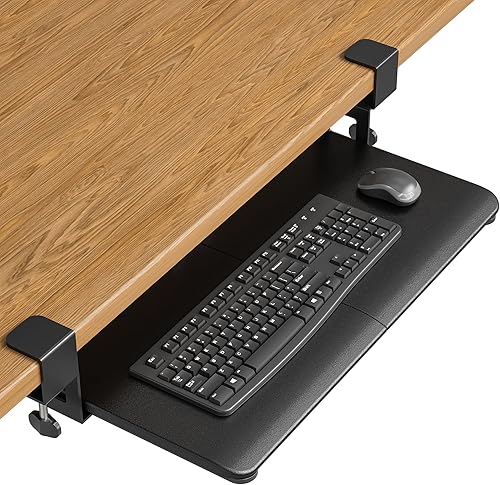
The best ergonomic keyboard tray for most people is the BONTEC Under Desk Keyboard Tray, because its wide 25.6 x 11.8 inch platform fits a standard keyboard and mouse and its C-clamps mount without drilling.
Our score weighs specs, features and buyer feedback against what you are shopping for.
A keyboard tray changes where your hands sit, not just where your keyboard sits.
Lowering the keyboard can keep your elbows near your body and your wrists flatter, while tilt can reduce wrist extension.
The right tray depends on your desk shape, your keyboard size and how much motion you want.
Start with What Is Proper Desk Ergonomics? if you have not set your chair and monitor yet, because a tray works best as part of a full setup.
For keyboard and mouse pairing, our ergonomic keyboard and mouse guide covers the other half of the equation.
Our picks at a glance
-
1
-
2
 Best for height and tilt adjustment
HUANUO Under Desk Keyboard Tray
9.6/10 our score
See it on Amazon -
3
 Best for on-desk wrist support
KEPUTAIER Computer Keyboard Stand with Wrist Rest
9.5/10 our score
See it on Amazon
- 4
 Check it
Zontera Ergonomic Mouse & Keyboard Tray Under
Best for thick desktops - 5
 Check it
EUREKA ERGONOMIC Keyboard Tray Height Adjustable
Best for full motion adjustment - 6
 Best for proven under-desk tracksCheck it
- 7
 Check it
Kensington Keyboard Tray Under Desk
Best for oversize keyboards - 8
 Check it
VIVO Black Clamp-on 23” to 30” x
Best for adjustable width - 9
 Check it
Klearlook Upgraded Ergonomic Keyboard Tray Under Desk
Best for built-in storage extras
Our best ergonomic keyboard trays for different desks
The BONTEC leads for everyday use, while the HUANUO and EUREKA models win on adjustment range.
The KEPUTAIER stand is the only on-desk option here, so it suits renters who cannot add an under-desk tray.
BONTEC Under Desk Keyboard Tray: Best for most desks
- 25.6 x 11.8 inch platform
- No-drill C-clamp mount
- Fits desks up to 1.97 inches thick
- Supports up to 11 lb
A broad pull-out platform that frees desk space and drops your keyboard below desktop height, with a simple clamp mount.
Pros
- Spacious 25.6 x 11.8 inch surface
- No drilling required
- Slides under desk when not in use
Cons
- Needs 31.3 inches of width underneath
- Not for curved or beveled desk edges
BONTEC suits anyone with a standard flat desk who wants the most platform space for the least fuss.
Its 25.6 x 11.8 inch surface is the deepest here, so a full-size keyboard, mouse and wrist rest sit side by side without crowding.
The C-clamp mount fits desks up to 1.97 inches thick and needs no drilling, which makes it a good pick for rented desks.
Protective pads help stop scratches, and BONTEC says the mount supports up to 11 lb.
That 11 lb limit covers most keyboard and mouse pairs, but you should weigh larger gaming setups before you load the tray.
You must check fit before ordering.
BONTEC requires at least 31.3 inches of width and 11.8 inches of depth underneath, and it will not work with curved, beveled or rounded edges or crossbars underneath.
Large gaming keyboards, vertical mice and split ergonomic keyboards may not fit well.
The engineered wood platform feels broader than the 25 inch trays here, which helps if you use a wrist rest every day.
Against the HUANUO, this tray trades tilt and height adjustment for a simpler slide in and out motion.
Choose BONTEC for a clean, spacious pull-out platform, and choose an adjustable tray if you switch between sitting and standing.
HUANUO Under Desk Keyboard Tray: Best for height and tilt adjustment
- 25 x 9.84 inch slide-out tray
- 6.3 inches of height adjustment
- Tilt from 6 degrees up to 22 degrees down
- Swivels 180 degrees left and right
A fully adjustable tray for sitting and standing setups, with swivel and tilt for wrist-neutral typing angles.
Pros
- Wide height, tilt and swivel range
- Fits keyboards up to 17.3 x 5.5 inches
- Tucks under desk to free space
Cons
- Needs clear space for swivel and slide
- Knob must be tightened before typing
HUANUO suits people who change posture through the day or share a desk with a second screen.
Its 6.3 inches of height adjustment moves from sitting to standing, so one tray can serve both positions without a second mount.
The tray swivels 180 degrees left and right and tilts from 6 degrees up to 22 degrees down.
That range helps you face a corner desk or a side monitor without moving your chair, and negative tilt can keep wrists closer to neutral.
It fits keyboards up to 17.3 x 5.5 inches plus mouse space, and the included wrist rest adds support.
That keyboard limit is a useful check, because a wider keyboard will eat the mouse area on this 25 x 9.84 inch tray.
HUANUO says installation takes a few simple steps with all hardware included, and the tray tucks fully under the desk when you are done.
The trade-off is clearance.
You need no crossbar under the desk, or 14.17 inches from the edge to the crossbar, and at least 25 inches of side clearance.
Tighten the knob before typing, or the tray can shift as you work.
KEPUTAIER Computer Keyboard Stand with Wrist Rest: Best for on-desk wrist support
- Raised keyboard stand with wrist rest
- Memory foam wrist support
- Non-slip PU base
- Fits membrane, capacitive and mechanical keyboards
A compact on-desk riser that lifts your keyboard and adds a cushioned wrist rest, without any desk modification.
Pros
- No installation needed
- Soft memory foam wrist rest
- Non-slip base holds position
Cons
- Raises rather than lowers keyboard height
- Takes space on top of the desk
KEPUTAIER suits people who want wrist support without changing their desk at all.
This is an on-desk keyboard stand, not an under-desk drawer, so it lifts your keyboard slightly and adds a memory foam wrist rest in front of it.
The wrist rest uses extra thick memory foam with a massage bump design.
KEPUTAIER says the bumps help relieve wrist fatigue and keep the wrist comfortable, while the foam rebounds quickly instead of collapsing flat.
A non-slip PU base grips the desktop so the stand stays put while you type.
That base matters most on smooth desks, where a plain foam rest can drift during long sessions.
It fits membrane, capacitive and mechanical keyboards, so you do not need to measure a specific model before choosing it.
The cover is listed as plastic with memory foam fill, and the maker calls it breathable, stain resistant and sweat proof for daily use.
The trade-off is height direction.
Unlike the under-desk trays here, this stand raises your keyboard rather than lowering it.
It also takes space on top of your desk, which can be a problem on small surfaces.
Choose it for a simple wrist-support upgrade, not for freeing desk space.
Zontera Ergonomic Mouse & Keyboard Tray Under: Best for thick desktops
- 20 x 11.8 inch board
- Extends up to 7.8 inches from desk edge
- Adjustable C-clamps up to 2.76 inches thick
- Built-in back baffle
A clamp-on under-desk tray built for thicker desktops, with a back baffle to stop your keyboard sliding.
Pros
- Fits desks up to 2.76 inches thick
- Back baffle keeps keyboard in place
- Smooth extension and retraction
Cons
- Needs 25.9 inches clamp to clamp
- Smaller board than full-width trays
Zontera suits owners of thick desks that defeat most clamp-on trays.
Its adjustable C-clamps fit desktops up to 2.76 inches thick, which is thicker than BONTEC and most rivals in this group.
The board measures 20 x 11.8 inches, and the full length including clamps is 25.9 inches.
That size holds a keyboard, mouse and small accessories, and the tray extends up to 7.8 inches from the desk edge for a stable typing platform.
A built-in back baffle stops your keyboard sliding forward when the tray tilts or moves.
Zontera says the upgraded slide mechanism extends and retracts smoothly, and the thick non-slip pads on the clamps help prevent scratches.
That extension length is shorter than the VIVO clamp-on model, so tall users should check their reach before they commit.
The trade-off is width.
At 20 inches, the board is narrower than the 25 inch trays here, so wide split keyboards may crowd the mouse.
You also need 25.9 inches from clamp to clamp, so measure your desk front before you order.
EUREKA ERGONOMIC Keyboard Tray Height Adjustable: Best for full motion adjustment
- 25 x 9.13 inch sliding platform
- 5.8 inches of height adjustment
- 360 degree horizontal rotation
- Tilt up to 43 degrees vertically
A full-motion drawer that pulls forward, rotates and tilts, so you can angle your keyboard to your screen.
Pros
- 360 degree rotation and wide tilt
- Includes wrist rest and mouse pad
- Fits desks with beams underneath
Cons
- Lower 6.6 lb weight capacity
- Needs a 19.69 x 39.5 x 29.1 inch desk area
EUREKA ERGONOMIC suits people who want the widest range of motion in one tray.
It rotates 360 degrees horizontally and tilts up to 43 degrees vertically, so you can pull it forward, swing it sideways and angle it for your arms.
Height adjustment covers 5.8 inches, which helps match the tray to your chair height and elbow position.
The 25 x 9.13 inch platform fits most keyboards and mice, and the pull-out tray can also hold a small laptop or tablet when you need it.
A soft wrist rest stops the keyboard slipping when tilted, and the mouse pad gives a smooth tracking surface.
EUREKA says the tray supports 6.6 lb and suits wood, MDF and similar desktop materials, with a minimum desktop thickness of 0.71 inch.
That material limit is easy to miss, because plastic, stone and glass desktops are listed as not compatible.
The trade-off is space and load.
You need a desk at least 19.69 x 39.5 x 29.1 inches, and the 6.6 lb limit is lower than BONTEC.
Plastic, stone and glass desktops are not compatible.
VIVO Black Under Desk 25 x 10: Best for proven under-desk tracks
- 25 x 10 inch tray
- 14.25 inch sliding track
- 5 inches of height adjustment
- Full side to side rotation
A long-established under-desk tray with a wide sliding track and height adjustment for a lower typing position.
Pros
- Long 14.25 inch track
- Height adjustment and rotation
- All mounting hardware included
Cons
- Needs 14.25 inches from edge to crossbar
- Spacer bracket needed on some height adjustable desks
VIVO suits buyers who want a long-proven track design with parts support.
The 14.25 inch track is long, so the 25 x 10 inch tray slides forward and back with room to set your reach.
Height adjustment covers 5 inches, and the tray rotates side to side for angled typing.
Supportive rubber padding and gel wrist padding add cushioning at the front edge, which many buyers mention when they type for long stretches.
All mounting hardware is included for fast assembly.
VIVO says the minimum recommended desktop thickness is 5/8 inch, and the total tray weight is 10 lb, so check that your desk can carry that load underneath.
That weight is the tray alone, before your keyboard and mouse are added, so a light desktop may flex or sag over time.
The trade-off is crossbar clearance.
You need 14.25 inches between the desktop edge and any crossbar.
On a height adjustable desk, a spacer bracket is needed over the frame crossbar, and that adapter is not included.
Kensington Keyboard Tray Under Desk: Best for oversize keyboards
- 24.5 x 11.75 inch tray
- SmartFit height system
- Integrated wrist rest and mouse pad
- Cable management
An extra-wide drawer sized for oversize and ergonomically shaped keyboards, with cable management built in.
Pros
- Fits oversize and split keyboards
- Extra-wide mousing area
- TAA compliant
Cons
- Needs 31 to 33 inches of width
- 16 inch depth eats knee space
Kensington suits people with oversize or ergonomically shaped keyboards.
Its 24.5 inch tray is sized for large keyboards, with room beside it for a wrist rest, mouse and mouse pad in the integrated mousing area.
The SmartFit system lets you mount the drawer at your optimal keyboarding height to match your comfort color.
That preset approach is simpler than fine tilt adjustment, and it helps repeatable setups in shared offices.
Cable management is built in, which keeps wires from dragging as the drawer slides.
The drawer glides in and out, and the extra width means split keyboards do not crowd your mouse.
Kensington lists the tray as extra-wide at 26 inches outside, with an inner drawer of 24.5 inches, so check both numbers against your keyboard.
The trade-off is size underneath.
Total installation width runs 31 to 33 inches, and total depth is 16 inches.
That is a large footprint under your desk, so shorter users may lose knee room.
Measure your clearance before you commit to this width.
VIVO Black Clamp-on 23” to 30” x: Best for adjustable width
- Adjustable from 22.5 to 30 inches wide
- 2.4 inches of height adjustment in 5 set points
- C-clamps up to 3.4 inches thick
- Extends up to 8.5 inches from desk edge
A clamp-on tray that widens or narrows to suit your keyboard and mouse layout, with set-point height steps.
Pros
- Width adjustable from 22.5 to 30 inches
- Fits very thick desks up to 3.4 inches
- Includes mouse pad and wrist rests
Cons
- Not for desks with beveled edges
- 28.5 to 36 inches including clamps
VIVO suits people who cannot agree on one tray width.
This clamp-on model adjusts from 22.5 to 30 inches wide, so you can narrow it for a compact keyboard or widen it for a full layout with mouse.
Height adjustment gives 2.4 inches across 5 set points, which is less range than HUANUO but easier to repeat.
The tray extends up to 8.5 inches from the desk edge and holds up to 11 lb, with a wrist pad, mouse pad and mouse wrist rest included.
C-clamps fit desks up to 3.4 inches thick, the thickest limit in this group.
VIVO says the tray is 22.5 x 30 x 11 inches, or 28.5 to 36 inches including clamps, and it splits into two parts for setup.
That split design groups the keyboard section and the mouse section, which can help left and right handed layouts.
The trade-off is edge shape.
This tray does not work with beveled edges, so check your desk front closely.
The width adjustment also changes how far the tray sits from the desk, from 8.8 to 10 inches, so test your reach after changing it.
Klearlook Upgraded Ergonomic Keyboard Tray Under Desk: Best for built-in storage extras
- 24.4 x 10 inch tray
- Height and tilt adjustment
- Phone holder, headset hook and storage drawer
- Faux leather mouse area and wrist rest
An under-desk tray with storage extras including a phone holder, headset hook and a small drawer.
Pros
- Phone holder and headset hook
- Storage drawer for small items
- Adjustable height and tilt
Cons
- Fits only desks 0.59 to 1.38 inches thick
- Needs 16.5 inches of under-desk space
Klearlook suits people who like storage built into the tray itself.
The 24.4 x 10 inch platform adds a phone holder, headset hook and storage drawer, plus a faux leather mouse area and wrist rest.
Height and tilt adjust so you can set your preferred typing angle, and the tray slides out smoothly for work and slides back for storage.
Klearlook says the design supports proper wrist alignment for long typing or gaming sessions.
The tray is aimed at home offices, corporate desks and gaming setups where small items pile up.
A drawer for cables or earbuds and a hook for a headset can keep the desktop clear without a separate organizer.
The faux leather mouse area is a change from the plain surfaces on most rivals here, and it pairs with the wrist rest at the front edge.
The trade-off is desk fit.
Desktop thickness must be between 0.59 and 1.38 inches, and you need at least 16.5 inches of under-desk space with no edge frames.
That narrow thickness range rules out many thick desks that BONTEC or Zontera can handle.
Best ergonomic keyboard tray options compared side by side
The table below compares platform size, adjustment and desk fit, so you can spot the trade-off in one pass.
Use it after reading the quick picks, not instead of measuring your desk.
| Product | Best for | Platform size | Desk thickness | Weight limit | Our score |
|---|---|---|---|---|---|
| BONTEC Under Desk Keyboard Tray | most desks | 25.6 x 11.8 in | Up to 1.97 in | 11 lb | 9.7 |
| HUANUO Under Desk Keyboard Tray | height and tilt adjustment | 25 x 9.84 in | 9.6 | ||
| KEPUTAIER Computer Keyboard Stand with Wrist Rest | on-desk wrist support | 9.5 | |||
| Zontera Ergonomic Mouse & Keyboard Tray Under | thick desktops | 20 x 11.8 in | Up to 2.76 in | 9.4 | |
| EUREKA ERGONOMIC Keyboard Tray Height Adjustable | full motion adjustment | 25 x 9.13 in | 9.3 | ||
| VIVO Black Under Desk 25 x 10 | proven under-desk tracks | 25 x 10 in | 9.0 | ||
| Kensington Keyboard Tray Under Desk | oversize keyboards | 24.5 x 11.75 in | 8.8 | ||
| VIVO Black Clamp-on 23” to 30” x | adjustable width | Up to 3.4 in | 8.4 | ||
| Klearlook Upgraded Ergonomic Keyboard Tray Under Desk | built-in storage extras | 24.4 x 10 in | 0.59 to 1.38 in | 8.0 |
How we compared these keyboard trays
We compared specs, features and buyer feedback against what an ergonomic keyboard tray searcher wants: a lower, adjustable place to type that fits their desk.
Scores reflect adjustment range, platform size, mount fit and storage extras.
We checked desk thickness limits, width and depth needs, crossbar clearance and weight limits for each model.
We also noted which trays include a wrist rest, mouse pad or storage, and which need extra parts such as a spacer bracket.
We did not test these trays, and we make no medical claims.
A tray may help you set a more comfortable position, but ongoing pain deserves a check with a doctor or ergonomist.
What we left out and why
We left out chair mounted and lap trays because they solve a different desk problem.
We also left out on desk risers with no wrist support, because they do not lower your hands.
That focus keeps the list to under desk drawers, clamp on boards and one on desk stand for renters.
What size keyboard tray for ergonomic keyboard do you need?
Most standard keyboards fit a 25 inch wide tray with about 10 inches of depth.
Measure your keyboard from left to right, then add your mouse and a wrist rest for your real width.
Standard keyboards
A 25 x 10 inch tray like VIVO or HUANUO fits most standard keyboards with room for a mouse.
BONTEC adds depth at 11.8 inches, which helps if your wrist rest needs space.
Split and oversize keyboards
Kensington's 24.5 x 11.75 inch tray is built for oversize and split models.
Its extra width keeps the mouse clear of a wide keyboard layout.
Compact keyboards
Zontera's 20 inch board suits compact keyboards and smaller mice.
Check that your keyboard plus mouse pair fits within 20 inches before you choose it.
Depth matters as much as width for compact setups.
A tray that is only 9 inches deep can force your wrist rest to overhang the front edge.
Measure from the back of your keyboard to the front of your wrist rest, then add an inch for movement.
How much height adjustment does an ergonomic keyboard tray need?
Height adjustment matters if your chair height puts your elbows above or below desk level.
A lower tray can bring your hands closer to a relaxed elbow angle.
Sitting all day
Five inches of adjustment, as on VIVO, is enough for most seated setups.
Set the tray so your forearms sit roughly level without reaching up.
Sitting and standing
HUANUO gives 6.3 inches and EUREKA gives 5.8 inches, which suits desks that change height.
Test the full range before you mount, because cables and knees can limit the low end.
Tilt for wrist position
Negative tilt, where the back of the keyboard sits lower, can reduce wrist extension for some typists.
HUANUO tilts down to 22 degrees, while EUREKA tilts to 43 degrees.
More tilt is not always better, because a steep angle can make keys harder to reach.
Start with a small tilt, then increase it only if your wrists still bend upward at the end of a long day.
Clamp-on or screw-in: which ergonomic keyboard tray mount fits your desk?
Clamp-on trays fix to the front edge with C-clamps and need no drilling.
Screw-in trays mount to the underside with a track and need a flat, clear underside.
Clamp-on trays
BONTEC, Zontera and the VIVO clamp-on model use C-clamps.
They suit renters, but they need a flat straight edge and enough thickness for the clamps to grip.
Screw-in track trays
VIVO, Kensington and EUREKA mount underneath with tracks or brackets.
Measure from the desk edge to any crossbar, and check side clearance for rotation.
Desk edge shapes to avoid
Curved, beveled and rounded edges cause fit problems for clamp-on models.
If your desk edge is shaped, a track-mounted tray or an on-desk stand may fit better.
For step-by-step mounting, see how to add a keyboard tray to a desk.
If you prefer a tray that sits on top, compare best keyboard tray on top of desk options before you decide.
Do you need tilt, swivel and storage extras?
Adjustment extras change how you type, while storage extras change how tidy your desk feels.
Neither is required, but both can be worth paying for in the right setup.
Tilt and swivel
Swivel helps corner desks and multi-monitor setups.
HUANUO swivels 180 degrees, and EUREKA rotates 360 degrees, so both let you turn the keyboard toward a side screen.
Wrist rest and mouse pad
HUANUO, EUREKA and Kensington include a wrist rest, and several include a mouse pad.
Check whether a rest is included or sold separately before you compare value.
Storage drawers and hooks
Klearlook adds a phone holder, headset hook and storage drawer.
That mix suits gaming desks, but it adds weight under your desk.
If you want a tray that works with your chair instead, look at best keyboard tray on chair designs for a different mount style.
How do you install and care for a keyboard tray?
Installation is simple if you measure first.
Check desk thickness, edge shape and under-desk clearance, then follow the maker instructions for your mount type.
Before you mount
Measure width and depth underneath, and confirm legs, crossbars and storage drawers clear the slide path.
Our best keyboard tray stand guide covers raised stands, while best keyboard tray for lap covers portable options.
After you mount
Tighten clamps or knobs fully, then test the tray with your keyboard and mouse before you type for a full day.
Keep cables loose enough that the tray can slide without pulling.
Ongoing care
Wipe the platform and wrist rest with a damp cloth, and check clamp pads for scratches or wear.
A best keyboard and mouse tray with a washable pad can make cleaning easier.
Check best keyboard tray bumpers if your tray rattles, and best keyboard tray brackets if a track mount needs replacement parts.
For a wall setup, see best wall mount keyboard tray.
Which ergonomic keyboard tray should you buy?
Pick BONTEC if you have a standard flat desk and want the most space with the simplest mount.
Pick HUANUO if you need height, tilt and swivel for sitting and standing work.
Pick VIVO clamp-on if your keyboard width changes or your desk is very thick.
Pick KEPUTAIER if you want wrist support on top of the desk with no mounting at all.
Overall, the best ergonomic keyboard tray is the one that fits your desk, your keyboard and your chair height today.
Measure first, choose the mount second, and add tilt or storage only if you will use it.
For chair pairing, our Best Ergonomic Office Chair guide helps you set the seat height that makes a tray work best.
Our top 3 picks at a glance
-
1
-
2
Best for height and tilt adjustment
HUANUO Under Desk Keyboard Tray
9.6/10 our score
See it on Amazon -
3
Best for on-desk wrist support
KEPUTAIER Computer Keyboard Stand with Wrist Rest
9.5/10 our score
See it on Amazon
Frequently asked questions
What size ergonomic keyboard tray do I need?
Most standard keyboards and mice fit a 25 inch wide tray with about 10 inches of depth. Measure your keyboard plus mouse side by side, then add room for a wrist rest.
Wider split or oversize keyboards need an extra-wide tray, while compact keyboards can use a narrower board.
Will a keyboard tray fit my desk?
Check desk thickness, edge shape and under-desk clearance before you order. Clamp-on trays need a flat straight edge, while track-mounted trays need room from the edge to any crossbar.
Measure width, depth and thickness, and confirm legs and support beams clear the slide path.
Do I need to drill holes for a keyboard tray?
No, clamp-on trays use C-clamps and need no drilling. Track-mounted trays screw into the underside of the desk.
If you rent or want to keep the desk unchanged, choose a clamp-on model and check its maximum desk thickness.
Can a keyboard tray help wrist comfort?
A tray can lower your keyboard and let you set tilt, so your shoulders stay relaxed and wrists sit closer to neutral. It works best when your chair height and monitor height are set first.
Pair the tray with an ergonomic keyboard and mouse for a full setup change.


