9 Best Keyboard Trays with Wrist Rests (November 2026)
The best keyboard tray with wrist rest include the VIVO Black Clamp-on 27 x 11 in for freeing desk space, the BONTEC Under Desk Keyboard Tray for no-drill installs, and the HUANUO Under Desk Keyboard Tray for tilt and swivel.
On this page (8 sections)
- Our top keyboard trays with wrist rests explained
- How we compared these keyboard tray wrist rest picks
- Which keyboard tray with wrist rest fits your desk?
- How much adjustment do you need?
- What size tray fits your keyboard and mouse?
- How do you install and use a tray day to day?
- Common mistakes with a keyboard tray wrist rest
- Verdict: the best keyboard tray with wrist rest for you
The best keyboard tray with wrist rest for most desks is the VIVO Black Clamp-on 27 x 11 in, because it combines a large platform with a smooth slide-out that lowers your keyboard below the desktop. If you want more angle control, the HUANUO adds tilt and swivel.
If you cannot mount anything under your desk, the KEPUTAIER desktop stand is the simpler fix.
A keyboard tray with wrist rest combines two ideas in one place. The tray moves your keyboard and mouse to a lower, closer position.
The wrist rest gives your palms a padded edge to rest on between keystrokes. If you prefer less cushioning, see these thin keyboard wrist rests.
Together they help you keep a more neutral wrist posture during long sessions.
Our score weighs specs, features and buyer feedback against what you are shopping for. We compared tray size, adjustment range, mounting type and wrist support across all nine picks.
If you are still choosing your keyboard itself, start with our ergonomic keyboard and mouse guide. It explains sizes and layouts before you measure for a tray.
Our picks at a glance
-
1

-
2
-
3

- 4
 Check it
KEPUTAIER Computer Keyboard Stand with Wrist Rest
Best for desktop riser comfort - 5
 Check it
Haonon Computer Keyboard Stand with Wrist Rest
Best for storage tray - 6
 Best for posture adjustmentCheck it
- 7
 Check it
Kensington Keyboard Tray Under Desk
Best for extra-wide keyboards - 8
 Check it
Mount-It! Under Desk Keyboard Tray with Wrist
Best for bolted stability - 9
 Best for lift-to-adjustCheck it
Our top keyboard trays with wrist rests explained
The top picks split into three groups. Clamp-on trays need no drilling.
Bolted trays feel fixed. Desktop stands sit on top and need no install at all.
Each group suits a different desk and a different renter or owner situation.
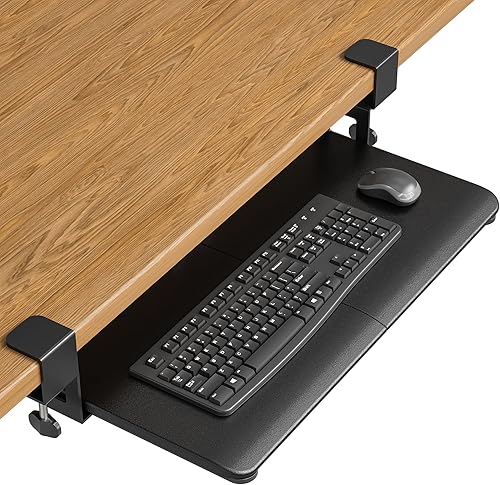
VIVO Black Clamp-on 27 x 11 in: Best for freeing desk space
- 27 x 11 in tray, 32.5 in with clamps
- Slides out 8.5 in
- Holds up to 11 lb
- C-clamps for desks up to 1.25 in thick
A wide clamp-on tray that puts your keyboard and mouse below the desktop and slides out for a lower typing angle.
Pros
- Frees desktop space
- Smooth slide in and out
- No drilling required
Cons
- Needs 32.5 in of desk edge
- Not for beveled edges
This VIVO tray suits people who want the most desktop space back without drilling. It holds your keyboard, mouse and small accessories below the desktop, then slides out 8.5 in from the desk edge when you type.
The tray is 27 x 11 in, or 32.5 in long including the clamps. That means you need a clear 32.5 in of desk edge before you order.
It holds up to 11 lb and fits desks up to 1.25 in thick.
Smooth sliding tracks let you tuck it fully under the desk when you are done. VIVO says the angle helps relieve stress on wrists and shoulders, which matches the goal of a lower typing position.
The alloy steel build and 10.45 lb item weight suggest a solid frame for daily slide use. The 12.5 in slide-under depth matters, because the tray needs that depth to clear the desk edge when stored.
The trade-off is fit. It needs a level underside, a clean square edge and no beveled edges.
Check those points first, and compare our best clamp on keyboard tray picks for similar no-drill options.
BONTEC Under Desk Keyboard Tray: Best for no-drill installs
- 25.6 x 11.8 in platform
- C-clamps fit desks up to 1.97 in thick
- Holds up to 11 lb
- Slides under desk when not in use
A clamp-on pull-out platform made for standard keyboards and mice, with clear fit checks before you order.
Pros
- No drilling
- Thicker desks supported
- Spacious platform
Cons
- Needs 31.3 in width under desk
- Not for curved or beveled edges
BONTEC suits standard keyboards and mice in a home office or gaming setup. The platform is 25.6 x 11.8 in, which gives a little more depth than many tray designs.
It installs with sturdy C-clamps and fits desks up to 1.97 in thick. That thicker limit helps on desks that other clamp-on trays cannot grip.
Protective pads help prevent scratches and improve grip.
The tray pulls out when you need it and slides beneath the desk after use. It supports up to 11 lb, so check the weight of a large keyboard before you load it.
The engineered wood surface and 9.83 lb item weight keep the platform lighter than some steel trays. The 11.8 in depth also means your mouse and wrist rest need to share that space, so measure your usual layout first.
The trade-off is clearance. You need at least 31.3 in of width and 11.8 in of depth under the desk.
It will not work with curved, beveled or rounded edges, or with crossbars underneath.
HUANUO Under Desk Keyboard Tray: Best for tilt and swivel
- 25 x 9.84 in tray with wrist rest
- Swivels 180 degrees
- Tilts 6 degrees up and 22 degrees down
- 6.3 in height adjustment
A slide-out tray with a wrist rest, swivel and tilt for corner desks and multi-monitor setups.
Pros
- Wide tilt range
- Height adjustment for sitting or standing
- Fits keyboards up to 17.3 in wide
Cons
- Needs crossbar clearance
- Tighten knob before typing
HUANUO suits corner desks and multi-monitor setups where you turn your keyboard to face different screens. It swivels 180 degrees left and right without moving your chair.
Tilt runs 6 degrees up and 22 degrees down, which gives you a wide range for a wrist-neutral angle. Height adjustment is 6.3 in, so it can move with you from sitting to standing.
The tray is 25 x 9.84 in and fits keyboards up to 17.3 x 5.5 in plus mouse space. The included wrist rest adds comfort at the front edge.
Item weight is listed at 10 lb for the tray itself.
That 7.48 in lowest connector height is important for standing desk users. It tells you how low the tray can sit before the hardware gets in the way of your legs or chair.
The trade-off is fit checks. Confirm no crossbar under the desk, or allow 14.17 in clearance from the desk edge to the crossbar.
Desk sides need at least 25 in clearance, or 35.4 in if you rotate the tray. See also our best keyboard tray corner desk guide for corner layouts.
KEPUTAIER Computer Keyboard Stand with Wrist Rest: Best for desktop riser comfort
- Memory foam wrist support
- Massage bump design
- Non-slip PU base
- Fits membrane, capacitive and mechanical keyboards
A desktop stand that raises and angles your keyboard, with a soft memory foam pad for your wrists.
Pros
- No installation
- Soft memory foam pad
- Non-slip base
Cons
- Takes desktop space
- No under-desk storage
KEPUTAIER suits people who cannot or do not want to mount a tray. This is a desktop keyboard stand with a wrist rest, not an under-desk drawer.
The wrist support uses extra thick memory foam with quick rebound. A massage bump design runs along the pad, and the PU base is non-slip so the stand stays put on the desktop.
It fits membrane keyboards, capacitive keyboards and mechanical keyboards. You can adjust the keyboard position on the holder to match your comfort.
The 0.83 kg weight makes it easy to move between desks or put away when you need the surface. The breathable, sweat proof and stain resistant finish also matters for a pad your wrists touch for hours each day.
The trade-off is space. It sits on top of your desk, so it does not free desktop area like a slide-out tray.
It is best when your desk is already high enough and you just want a better angle and a soft pad.
Haonon Computer Keyboard Stand with Wrist Rest: Best for storage tray
- 16.9 x 7.9 x 2 in stand
- 16.9 x 4.3 in palm rest
- Storage tray underneath
- 6 non-slip rubber bumps
An acrylic riser with a wide wrist rest and a tray underneath for small desk items.
Pros
- Storage tray built in
- Wide palm rest
- Fits many keyboard sizes
Cons
- Only 2 in high
- Uses desktop area
Haonon suits people who like a clear acrylic riser with storage. The stand measures 16.9 x 7.9 x 2 in, with a palm rest of 16.9 x 4.3 x 1.4 in.
A storage tray underneath holds small items like a Magic Keyboard, mouse, AirPods and office supplies. That helps keep the desktop tidy while the keyboard sits at a raised angle.
The base has 6 non-slip rubber bumps plus 2 anti-slip pads. The wrist rest uses soft, breathable PU leather over high-quality acrylic brackets.
For a natural material alternative, compare wooden keyboard wrist rests.
The polished acrylic finish and 0.96 kg weight keep the stand light enough to shift for cleaning. The 2 in height is a gentle lift, which suits people who want a slight tilt rather than a full under-desk drop.
The trade-off is height. At 2 in, this is a gentle rise rather than a full ergonomic lift.
It fits mechanical, standard, thin, Magic and mini keyboards, but oversize keyboards need a size check.
VIVO Black Under Desk 25 x 10: Best for posture adjustment
- 25 x 10 in tray
- Slides on 14.25 in track
- 5 in height adjustment
- Rubber wrist padding
An under-desk tray with full rotation and height adjustment to help you set a more neutral typing position.
Pros
- Height and rotation control
- Slides fully under desk
- Fits most keyboards and mice
Cons
- Needs 14.25 in clearance to crossbar
- Spacer may be needed on adjustable desks
This VIVO tray suits people who want simple under-desk mounting with posture adjustment. The tray is 25 x 10 in and fits most keyboards and mice.
It slides forward and back on a 14.25 in long track. You need 14.25 in between the desktop edge and any crossbar.
Minimum desktop thickness is 5/8 in.
Supportive rubber padding runs along the front, and the tray offers full side-to-side rotation plus 5 in of height adjustment. That range helps you set a more ergonomic position.
The 12.25 lb item weight and rubber material type show this is a substantial tray that needs a desk able to support the under-mounted load. All mounting hardware is included, which speeds assembly on a standard desk.
The trade-off is desk types. On a height adjustable desk you may need a spacer bracket for the track to fit over the frame crossbar, sold as MOUNT-SPACER01 and not included.
Kensington Keyboard Tray Under Desk: Best for extra-wide keyboards
- 24.5 in inner drawer, 26 in outer
- Integrated wrist rest and mouse pad
- SmartFit height settings
- Cable management
An extra-wide drawer with a wrist rest and mouse pad, sized for oversize and ergonomic keyboards.
Pros
- Extra-wide tray
- Mouse pad included
- Cable management
Cons
- Needs 31 to 33 in install width
- Needs 16 in depth
Kensington suits oversize and ergonomically shaped keyboards. The inner drawer is 24.5 in wide, with a 26 in outer drawer, so there is room for a wrist rest, mouse and mouse pad alongside the keyboard.
The SmartFit System lets you set your keyboarding height quickly by matching a color. The drawer includes an integrated mousing area with a wrist rest and mouse pad, plus cable management.
Total installation width is 31 to 33 in including mounting arms. Total depth is 16 in, so measure desk clearance before purchasing.
The 5 lb item weight is lighter than many full trays here, which helps when the drawer slides in and out. The metal or heavy-duty plastic enclosure and included USB cable also matter if you want a tidier cable route.
The trade-off is space. This is one of the widest installs here, so it needs a desk with room underneath.
For daily use, the extra width is the main benefit if your keyboard is large.
Mount-It! Under Desk Keyboard Tray with Wrist: Best for bolted stability
- Slides out 15 in
- Gel wrist pad and padded mouse platform
- 5.5 in height, +20 to -25 degree tilt, 360 degree swivel
- Steel bracket with screws
A bolted under-desk tray with gel wrist support and a long slide-out reach for a lower, closer typing angle.
Pros
- Very stable mounted platform
- Long 15 in reach
- Left or right mouse platform
Cons
- Wood or MDF desks only
- Requires screws
Mount-It! suits wood or MDF desks where you want a fixed, bolted platform. It mounts with a steel bracket and included screws, not clamps.
The tray slides out 15 in on a 17.25 in steel track, then tucks completely under the desk. That long reach gives room for a keyboard, mouse and your wrists.
A soft gel wrist pad runs along the tray, and the 7 x 9.25 in mouse platform has its own padded support. The mouse platform mounts on either side for left or right handed setups.
One locking knob adjusts height up to 5.5 in, tilt from +20 to -25 degrees, and swivel a full 360 degrees. The 20.5 x 11 in tray size and 12.85 lb item weight reflect a full-size platform built for daily use.
The trade-off is desk material: it is for wood or MDF only, not glass, metal or crossbar desks. A lifetime manufacturer warranty and US-based support also set it apart from shorter terms in this group.
3M Keyboard Tray: Best for lift-to-adjust
- Lift to adjust height +4.5 / -6 in
- Tilt +10 / -15 degrees
- Gel wrist rest and Precise mouse pad
- Swivels 360 degrees, 23 in track
A sturdy wood platform with a gel wrist rest and mouse pad that adjusts with a simple lift.
Pros
- Simple lift adjustment
- Sturdy wood platform
- Mouse pad moves left or right
Cons
- Older design
- Check desk clearance before install
3M suits people who like a simple lift to adjust. You lift the platform to change height by +4.5 / -6 in from the mounting surface, and tilt by +10 / -15 degrees.
The all-in-one wood platform helps minimize bounce while typing and mousing. It includes a leatherette covered gel wrist rest and a Precise mouse pad that positions right or left.
The platform swivels left and right 360 degrees and stores completely under the desk on a 23 in track. 3M backs the arm with a lifetime warranty, the platform for five years and the gel wrist rests for one year.
The 10.55 lb item weight and wood build help explain the steady feel during typing. The leatherette gel rest is also easy to clean, which matters for a part that sits under your wrists each day.
The trade-off is age and fit. This is a long-running design, so confirm your desk has a flat mounting surface and enough clearance before you install it.
How we compared these keyboard tray wrist rest picks
We compared tray size, mounting, adjustment and wrist support across all nine models. We looked at clamp-on, bolted and desktop stand designs because each solves a different desk problem.
Clamp-on trays like the VIVO and BONTEC need no drilling. Bolted trays like the Mount-It! feel more fixed.
Desktop stands like the KEPUTAIER and Haonon need no install at all.
Overall, our best keyboard and mouse tray guide covers the wider category. This post narrows the focus to models with a wrist rest built in or included.
What the specs tell you about daily use
Tray dimensions in inches do not always match useful space. A 25 in tray may lose several inches to clamps, arms or a mouse platform.
That is why inner drawer width, platform depth and track length matter more than the headline size alone.
Load limits here cluster around 11 lb for clamp-on models, which covers most keyboards and mice but leaves less room for heavy gaming keyboards. Item weight also matters, because a tray that slides out adds its own weight to the mount and to your desk edge.
Adjustment ranges need the same careful reading. Height adjustment of 5 in or more helps sitting and standing users, while tilt ranges decide whether you can flatten the tray or raise the back edge.
Swivel only helps if your desk leaves room for the tray to rotate without hitting legs or crossbars.
| Product | Best for | Tray size | Desk thickness | Load | Our score |
|---|---|---|---|---|---|
| VIVO Black Clamp-on 27 x 11 in | freeing desk space | 27 x 11 in | Up to 1.25 in | Up to 11 lb | 9.7 |
| BONTEC Under Desk Keyboard Tray | no-drill installs | 25.6 x 11.8 in | Up to 1.97 in | Up to 11 lb | 9.7 |
| HUANUO Under Desk Keyboard Tray | tilt and swivel | 25 x 9.84 in | 9.6 | ||
| KEPUTAIER Computer Keyboard Stand with Wrist Rest | desktop riser comfort | 9.5 | |||
| Haonon Computer Keyboard Stand with Wrist Rest | storage tray | 9.4 | |||
| VIVO Black Under Desk 25 x 10 | posture adjustment | 25 x 10 in | 9.0 | ||
| Kensington Keyboard Tray Under Desk | extra-wide keyboards | 8.8 | |||
| Mount-It! Under Desk Keyboard Tray with Wrist | bolted stability | 20.5 x 11 in | 8.3 | ||
| 3M Keyboard Tray | lift-to-adjust | 8.0 |
For a closer look at adjustable designs, see our best keyboard trays adjustable under desk roundup. It focuses on height and tilt range rather than wrist pads.
Which keyboard tray with wrist rest fits your desk?
The best keyboard tray with wrist rest depends first on your desk edge and underside. A flat, square edge with a clear underside suits clamp-on models.
A wood or MDF top with screw access suits bolted models.
Clamp-on trays for renters and no-drill setups
Clamp-on trays attach with C-clamps and need no drilling. The VIVO fits desks up to 1.25 in thick.
The BONTEC fits up to 1.97 in thick.
Both need a level underside and no beveled edge. Measure the desk edge length first, since the VIVO needs 32.5 in and the BONTEC needs 31.3 in of width.
Bolted trays for a fixed setup
Bolted trays use screws into the underside. The Mount-It! is built for wood or MDF desks only.
That makes it a poor choice for glass, metal or crossbar desks.
If you own your desk and want the most stable feel, a bolted tray often wins. If you rent, stay with clamps.
Desktop stands when you cannot mount anything
A wrist rest with keyboard stand sits on top of your desk. The KEPUTAIER and Haonon both raise your keyboard at a gentle angle.
These stands work on any desk, including curved desks where clamp-on trays fail. See our best keyboard tray for curved desk guide for curved-edge options.
How much adjustment do you need?
More adjustment helps you match the tray to your chair and desk height. Less adjustment is simpler if your setup is already close.
Height, tilt and swivel ranges to compare
Height adjustment in this group runs from 5 in on the VIVO MOUNT-KB03B to 6.3 in on the HUANUO. The Mount-It! offers 5.5 in.
Tilt matters for wrist angle. The HUANUO tilts 6 degrees up and 22 degrees down.
The Mount-It! tilts +20 to -25 degrees. The 3M tilts +10 / -15 degrees.
Swivel helps multi-monitor users. The HUANUO swivels 180 degrees.
The Mount-It! and 3M swivel 360 degrees.
When simple is better
If your chair height and desk height already work, a fixed or simple tray may be enough. The BONTEC and VIVO clamp-on trays focus on slide-out ease rather than complex angles.
Too many adjustments can also mean more to loosen and tighten. Set it once, then leave it there.
What size tray fits your keyboard and mouse?
Tray width decides whether your keyboard, mouse and wrist rest fit side by side. Depth decides whether your wrists have room at the front edge.
Standard keyboards and mice
Most trays here are about 25 in wide. The HUANUO fits keyboards up to 17.3 in wide plus mouse space.
The VIVO 25 x 10 fits most keyboards and mice.
The BONTEC platform is 25.6 x 11.8 in, which is good for standard keyboards and mice. Check oversized keyboards and vertical mice before you order.
Oversize and ergonomic keyboards
The Kensington inner drawer is 24.5 in wide and fits oversize and ergonomically shaped models. That extra width also leaves room for a mouse pad.
Split ergonomic keyboards can be wider than standard models. Measure your keyboard width and depth, then add space for your mouse.
How do you install and use a tray day to day?
Good setup takes a few minutes and saves weeks of wobble. Measure first, mount second, adjust third.
Measure before you order
Check desk thickness, edge shape and underside clearance. Clamp-on models need a flat underside with no crossbars in the clamp area.
For slide-out trays, measure from the desk edge to any crossbar. The VIVO MOUNT-KB03B needs 14.25 in.
The HUANUO needs 14.17 in, or 16.22 in for full slide-under.
Set chair height first
Your chair should let your elbows sit near your keyboard height. Lower the tray until your wrists feel neutral, not bent up or down.
Tighten knobs and clamps before you type. A loose tray will bounce and move, which defeats the purpose of the wrist rest.
Care and cleaning
Wipe the wrist rest and tray surface with a damp cloth. Gel pads and leatherette surfaces need gentle cleaning to keep them fresh.
Check clamp tightness and screws every few months. A tray that shifts during use needs a re-check of its mount.
Common mistakes with a keyboard tray wrist rest
Most problems come from fit, not from the tray concept itself. A short check before you order avoids the most common returns.
Buying without measuring the underside
Crossbars, support beams and legs often block slide-out trays. The BONTEC, VIVO and HUANUO all need a clear underside.
Measure width, depth and edge-to-crossbar distance. Allow extra room if you plan to rotate the tray.
Expecting a wrist rest to fix pain on its own
A wrist rest can help you keep a neutral position, but it does not fix chair height, screen height or typing habits. People with ongoing pain should see a clinician.
Use the rest lightly, as support between keystrokes, not as a place to press your wrists down constantly.
Choosing tilt without checking mouse space
Tilt and swivel can push your mouse to the edge of a narrow tray. The Mount-It! mouse platform and Kensington mouse pad help here.
If you use a large mouse, check tray depth and mouse platform size before you buy.
Verdict: the best keyboard tray with wrist rest for you
Pick the VIVO Black Clamp-on 27 x 11 in if you want the most desk space back with no drilling. It is wide, slides out 8.5 in and fits desks up to 1.25 in thick.
Pick the BONTEC if your desk is thicker than 1.25 in. Its clamps fit desks up to 1.97 in thick, with a 25.6 x 11.8 in platform.
Pick the HUANUO if you need tilt, swivel and height adjustment. It suits corner desks and multi-monitor setups, and includes a wrist rest.
Pick the KEPUTAIER or Haonon desktop stand if you cannot mount under your desk. They add a raised angle and soft wrist support with no install.
Pick the Mount-It! if you own a wood or MDF desk and want a bolted, fixed feel. Its 15 in slide-out and gel wrist pad are strong points.
Pick the Kensington if your keyboard is oversize or ergonomic. Its 24.5 in inner drawer leaves room for a mouse pad and wrist rest.
Start with your desk measurements, then choose the mounting type. That order will lead you to the right tray faster than comparing features alone.
If neck and shoulder comfort is also a concern, our Best Desk Chair with Neck Rest and Best Computer Chair with Neck Rest guides pair well with a lower keyboard position.
Our top 3 picks at a glance
-
1
-
2
-
3
Frequently asked questions
Does a keyboard tray with wrist rest help wrist comfort?
A tray with wrist rest can help many people keep wrists in a more neutral position by lowering the keyboard. The effect depends on your chair height, desk height and how you adjust tilt.
If pain persists, see a clinician.
Can I use a keyboard tray on a standing desk?
Yes, if the tray allows enough height adjustment and your desk frame leaves clearance for the track. Measure the distance from the desk edge to any crossbar, and check the lowest connector height before you order.
Clamp-on or bolted keyboard tray: which is better?
Clamp-on trays need no drilling and suit rental desks, while bolted trays feel more fixed in daily use. Clamp-on models need a flat, square desk edge and a clear underside.
Bolted models need wood or MDF and screw access.
How much space does a tray need under the desk?
Most trays here need about 25 to 33 in of width and 12 to 16 in of depth under the desk. VIVO and BONTEC clamp-on models need at least 32.5 in and 31.3 in of width respectively.
Measure before you buy.
Will a tray fit my keyboard and mouse?
Standard trays around 25 in wide fit most keyboards up to about 17 in wide plus a mouse. Oversize, split and vertical-mouse setups need extra checks.
The Kensington extra-wide drawer and the Mount-It! mouse platform give more room for those cases.


