5 Best Clamp-On Keyboard Trays (November 2026)
The best clamp-on keyboard trays include the VIVO Black Clamp-on 27 x 11 in for most desks, the VIVO Black Extra Large Clamp-on 34 x 11 in for wide keyboards, and the AX WABER Keyboard Tray Under Desk Pull Out for thicker desktops.
On this page (6 sections)
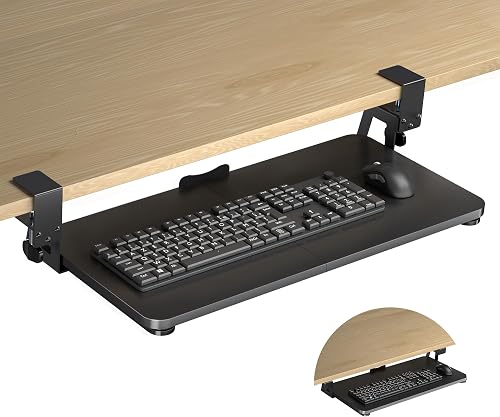
The best clamp on keyboard tray for most desks is the VIVO Black Clamp-on 27 x 11 in. It combines a 26.8 x 11 in tray, an 11 lb capacity, an 8.5 in maximum extension and a no-drill C-clamp setup for desktops up to 1.25 in thick.
Choose the extra-large VIVO when you need a wider work surface. Pick AX WABER for a thicker desktop, XINLEI for a deep tray with 2 mounting methods, or suptek when desk width is limited.
A clamp-on tray attaches at the front edge of a desk instead of using screws through the desktop. Follow these steps to add a keyboard tray when you are ready to install one.
That makes it useful for renters, finished desks and work surfaces where drilling is undesirable, but the edge still needs enough clear, level space for the clamps.
If you also need help choosing input devices, see our guide to an ergonomic keyboard and mouse. For a fixed under-desk installation, compare these picks with the best keyboard trays adjustable under desk.
Our picks at a glance
-
1

-
2
 Best for wide keyboards
VIVO Black Extra Large Clamp-on 34 x 11 in
9.6/10 our score
See it on Amazon -
3
 Best for thicker desktops
AX WABER Keyboard Tray Under Desk Pull Out
9.5/10 our score
See it on Amazon
- 4
 Check it
XINLEI Keyboard Tray Under Desk Large C-Clamp
Best for flexible mounting - 5
 Check it
suptek Small Keyboard Tray Under Desk Pull
Best for small desks
The best clamp on keyboard trays for different desks
The best clamp on keyboard tray depends on your available edge width, desktop thickness and the size of your keyboard and mouse. Measure those 3 points before choosing a model.
We compared the stated tray dimensions, clamp spans, desk thickness limits, capacity and slide ranges. Our score weighs specs and features against what you need from a removable keyboard tray.
| Product | Best for | Tray size | Clamp span | Desk thickness | Our score |
|---|---|---|---|---|---|
| VIVO Black Clamp-on 27 x 11 in | most desks | 26.8 x 11 in | 32.5 in total | Up to 1.25 in | 9.7 |
| VIVO Black Extra Large Clamp-on 34 x 11 in | wide keyboards | 33.9 x 11 in | 39.4 in total | Up to 1.25 in | 9.6 |
| AX WABER Keyboard Tray Under Desk Pull Out | thicker desktops | 27.3 x 8.3 in | 32.5 in total | Up to 1.9 in stated in clamp details | 9.5 |
| XINLEI Keyboard Tray Under Desk Large C-Clamp | flexible mounting | 25.6 x 11.8 in | 30 in total | Up to 1.63 in with C-clamps | 9.2 |
| suptek Small Keyboard Tray Under Desk Pull | small desks | 20 x 11.8 in | 24.2 in total | Up to 1.57 in | 9.0 |
VIVO Black Clamp-on 27 x 11 in: Best for most desks
- 26.8 x 11 in tray
- 32.5 in total clamp span
- 11 lb capacity
- 8.5 in maximum extension
The 27 in VIVO gives most users a useful keyboard and mouse surface without taking as much desk width as the extra-large model. Its C-clamps attach without drilling when the desktop has a level underside and square edge.
Pros
- 11 lb capacity
- Slides out for storage
- Hardware and instructions included
Cons
- Not for beveled edges
- Needs 32.5 in of clear desk width
The VIVO Black Clamp-on 27 x 11 in is the best starting point for most desks because its size balances working room and installation space. The tray measures 26.8 x 11 in, while the clamps make the total span 32.5 in.
It holds up to 11 lb and extends up to 8.5 in from the desk edge. That gives you room for a keyboard, mouse and other small accessories without leaving the tray permanently in front of your knees.
The smooth tracks let you slide the tray under the desk when it is not in use. The C-clamps attach without drilling, and the package includes hardware and assembly instructions.
Check your desk before choosing it. The desktop must be no more than 1.25 in thick, and the clamp area needs a level underside with no crossbars or other supports.
The tray is not compatible with beveled edges.
This is the right fit when you want a standard-size removable tray and have at least 32.5 in of clear width. If you need more room from front to back, compare it with the best clamp on adjustable keyboard tray.
VIVO Black Extra Large Clamp-on 34 x 11 in: Best for wide keyboards
- 33.9 x 11 in tray
- 39.4 in total clamp span
- 11 lb capacity
- 8.5 in maximum extension
The extra-large VIVO is the better fit when a wide keyboard, mouse and small accessories need more side-to-side room. It needs nearly 40 in of clear desk width between the clamps.
Pros
- Largest tray in this group
- 11 lb capacity
- Slides under the desk when not in use
Cons
- Needs 39.4 in of desk width
- Not for beveled edges
The VIVO Black Extra Large Clamp-on 34 x 11 in is the wide-desk choice. Its 33.9 x 11 in tray gives more side-to-side room for a wide keyboard, mouse and small accessories than the 27 in VIVO.
The total clamp span is 39.4 in, so the desk needs nearly 40 in of clear width at the installation edge. It holds up to 11 lb and extends up to 8.5 in from the edge.
Like the smaller VIVO, it slides under the desk when you need the desktop clear. Its adjustable C-clamps attach without drilling and fit desktops up to 1.25 in thick.
The main trade-off is installation space. A large tray is useful only when both clamps can sit on a clean, square edge with a level underside.
It is not compatible with beveled edges.
Choose this model for a wide keyboard or for users who want more lateral room around the mouse. For more detail on the brand's clamp-on range, see the best VIVO clamp on keyboard tray guide.
AX WABER Keyboard Tray Under Desk Pull Out: Best for thicker desktops
- 27.3 x 8.3 in tray
- 32.5 in total clamp span
- 11 lb capacity
- 5.7 in maximum extension
AX WABER stands out for its clamp range, which reaches thicker desktops than the VIVO models. Its narrower 8.3 in tray depth and shorter 5.7 in extension suit users who want a compact pull-out surface.
Pros
- No drilling required
- 11 lb capacity
- Adjustable position after installation
Cons
- Not for beveled edges
- Needs clear clamp space at the desk edge
AX WABER is the best match when your desktop is thicker than the VIVO limit. Its clamp details state support for desks up to 1.9 in thick, while the tray measures 27.3 x 8.3 in and the total clamp span is 32.5 in.
The tray holds up to 11 lb and extends up to 5.7 in from the desk edge. That shorter extension can suit a workspace where you want the keyboard closer to the desk rather than far in front of it.
AX WABER is designed for a no-drill setup with adjustable clamps. Its stated installation guidance also calls for a regular desktop board, clear clamp space and a desk at least 33 in wide.
The narrower 8.3 in tray depth gives less front-to-back room than the VIVO and XINLEI options. Measure your keyboard and mouse together if you prefer to keep both on the tray.
Avoid this model where reinforcing tubes, other edge obstructions or a beveled bottom edge block the clamps. It is a practical choice when desktop thickness is the main problem.
XINLEI Keyboard Tray Under Desk Large C-Clamp: Best for flexible mounting
- 25.6 x 11.8 in tray
- 30 in total clamp span
- 12.24 in slide-in range
- 7.75 in pull-out range
XINLEI combines a deep 11.8 in tray with a shorter 30 in clamp span, which can help when desk width is limited. It also offers C-clamp and screw mounting methods for different desk setups.
Pros
- Deepest tray here
- 2 mounting methods
- Back baffle helps stop the keyboard
Cons
- Thicker desktops reduce keyboard clearance
- Screw mounting changes the desk
XINLEI is the flexible mounting pick because it offers both C-clamp and screw mounting. Its tray measures 25.6 x 11.8 in, and the total length including clamps is 30 in.
The deeper tray gives more front-to-back room for a keyboard and mouse than the VIVO trays. A back baffle helps prevent the keyboard from sliding backward, while the metal sliding rail lets the tray move in up to 12.24 in and out up to 7.75 in.
The C-clamps fit desktops up to 1.63 in thick. XINLEI also lists a total height of 4.45 in with thicker desktops reducing keyboard clearance, so check the space below your desk before installation.
The screw option can suit some thicker desks and gives a neater table surface, but it changes the desk. Use the clamp method when you want the tray to remain removable.
Choose XINLEI when you value a deep tray and more mounting flexibility. If your desk is narrow, the 30 in total span may be easier to place than the wider VIVO models.
suptek Small Keyboard Tray Under Desk Pull: Best for small desks
- 20 x 11.8 in tray
- 24.2 in total clamp span
- 11 lb capacity
- Dual steel C-clamps
The suptek is the smallest pick for a compact desk or a small keyboard and mouse. Dual steel C-clamps, non-slip pads and an edge stopper support a no-drill setup.
Pros
- Smallest tray footprint
- 11 lb capacity
- No drilling required
Cons
- Does not fit desks over 1.57 in thick
- Less room for wide keyboards
The suptek Small Keyboard Tray Under Desk Pull is the best choice for a compact desk. Its 20 x 11.8 in tray and 24.2 in total clamp span take up less edge width than every other pick here.
It holds up to 11 lb with dual steel C-clamps. Non-slip pads help protect the desk, and an edge stopper helps keep the keyboard from falling when you push the tray back.
The updated slide system lets the tray pull out and push under the desk. That makes it useful when the same desk needs to switch between typing and another task.
The main limit is size. A wide keyboard may leave little room for the mouse, so measure both items together before choosing the 20 in tray.
The desk must be no more than 1.57 in thick. Choose suptek when installation space is tight or your keyboard is small, and choose a larger model when you need more room beside the keyboard.
For more ergonomic tray options, compare ergonomic keyboard trays.
How do you choose a clamp keyboard tray size?
Choose the tray by measuring the keyboard and mouse together, then leave enough room for your hands and any small accessories. If a padded wrist rest is a priority, compare keyboard trays with wrist rests.
A 20 in tray suits compact setups, while the 25.6 in, 26.8 in and 27.3 in trays give more working width.
The 33.9 in VIVO is for users who need a wide surface. It also needs a 39.4 in clamp span, so a large tray can be harder to install than a smaller one even when the desktop itself is wide.
Tray depth matters too. The VIVO models are 11 in deep, AX WABER is 8.3 in, XINLEI and suptek are 11.8 in.
More depth can help keep the mouse on the tray, but it also changes how far the tray sits under your legs.
For more compact options, compare the best small clamp keyboard tray.
What desk edge works with a clamp-on keyboard tray?
A clamp-on tray needs a clean, square desk edge with smooth upper and lower surfaces. The underside must be level, and the clamp area must be clear of crossbars, reinforcing tubes and other supports.
That level underside matters because a C-clamp pulls the tray up from below. If the underside slopes, dips or is blocked, the clamp cannot meet the desktop evenly and the tray may sit loose.
Beveled edges are a common problem. VIVO and AX WABER specifically exclude beveled edges, and a rounded or angled edge can stop any C-clamp from sitting flat enough to secure the tray.
Measure the desk thickness at the exact mounting point, not only at the back or side. The limits differ: 1.25 in for VIVO, 1.9 in in AX WABER's clamp details, 1.63 in for XINLEI and 1.57 in for suptek.
Desks are not always uniform, as a desktop can be thicker near a frame or thinner near the front edge. Measure where the clamp will actually sit.
Check the whole clamp span before you buy, not just one side. The VIVO 27 in model needs 32.5 in from clamp to clamp, while the extra-large VIVO needs 39.4 in.
AX WABER also needs 32.5 in from clamp to clamp, XINLEI needs 30 in in total, and suptek needs 24.2 in. Those spans are easy to overlook when the tray itself looks smaller.
Look under the desk for crossbars, metal frames or cable trays before assembly. A support just behind the front edge can block a clamp even when the top surface looks clear.
Moving the tray further along the edge may help, but only if the new spot still has a level underside. Keep the clamp contact surfaces clean and dry when you fit the tray.
Tighten each clamp in small turns and check the tray after each round. That helps both sides share the load instead of one clamp carrying the tray at an angle.
The trade-off is that a removable tray depends on the desk edge it grips. A screw-mounted tray can hold to a wider range of edges, but it leaves holes and is harder to move.
For renters or finished desks, measure thickness, span and underside clearance at the exact spot before you order. If the edge has a bevel, thick support or uneven underside, choose a different mounting method or a different desk.
Once fitted, slide the tray in and out with your keyboard and mouse in place and make sure it stays level. Do not rely on it for daily typing until that check passes.
Are no-drill keyboard trays easy to remove?
No-drill clamp trays are generally easier to remove than screw-mounted trays because the desk does not need holes. Loosen the clamps evenly, support the tray as it comes free and store the hardware where it will not be lost.
That ease is one reason clamp trays suit renters and finished desks. You can move the tray to another desk or store it when the workspace changes, without filling screw holes later.
Installation still needs care. Tighten the clamps firmly without forcing them, make sure the tray sits level and check that the keyboard does not slide when you pull the tray out.
Firm does not mean forced, and over-tightening can stress the clamp or the desktop edge. Small, even turns give a more balanced hold than one hard pull on a single side.
Support the tray with one hand while you loosen the last clamp. A tray that drops can knock the keyboard or catch on legs and modesty panels.
Store the clamps, screws and instructions together after removal. Loose hardware is easy to misplace, and a missing part can stop you from fitting the tray on another desk.
For care, wipe the tray and tracks with a dry cloth and check the clamp pads for dust. A light clean now helps the tray slide smoothly the next time you fit it.
Check the clamp contact points for marks after removal. Clamp trays are made to attach without causing damage, but a clean desk and even tightening help keep that true.
Test the level again before every re-fit, especially after moving desks. The same tray can sit differently on a new edge, so do not assume the old setting will work.
XINLEI is the exception in this group because it offers a screw mounting method as well as C-clamps. Use the screw method only when you accept a more permanent change to the desk.
The screw option can suit thicker desktops and gives a neater table surface. It also means the tray is no longer a simple lift-off fit for moving between desks.
Choose clamps when removability matters more than mounting flexibility. Choose screws only when the desk is yours to change and the clamp limit is the main barrier.
Ease of removal also depends on the desk edge you used. A level, square edge with no supports under it should release more cleanly than a tight or blocked clamp spot.
If a clamp sticks, loosen it further before you pull or twist the tray. Forcing it can scratch the edge or bend the tray, which defeats the point of a no-drill design.
After removal, run your hand along the underside of the desk edge and check for dust lines or pad marks. Note the span and thickness that worked and avoid the support or bevel that caused trouble.
How should you set up a clamp-on keyboard tray?
Set the tray height so your elbows stay close to your sides and your wrists remain as straight as possible. Then adjust your chair and monitor because moving the keyboard below the desk changes the relationship between your hands, shoulders and screen.
Keep the clamp area clear before assembly. A desk edge that looks open from above may have a support bar underneath, and that can prevent the clamp from closing evenly.
Slide the tray in when you need more desktop space. Keep the keyboard and mouse within the tray's stated capacity, and do not use an overhanging setup as a substitute for measuring the available surface.
If your feet no longer rest comfortably after lowering the keyboard, review the Best Under Desk Footrest options and the guide on Do You Need an Under Desk Footrest?.
Which clamp-on keyboard tray should you buy?
The VIVO Black Clamp-on 27 x 11 in is the best clamp on keyboard tray for most desks because it offers a useful tray size, 11 lb capacity and 32.5 in clamp span.
Its tray measures 26.8 x 11 in, which suits a keyboard, mouse and other small accessories. It extends up to 8.5 in from the edge and slides under the desk when not in use.
That balance makes it a good first choice for a standard desk. You get a removable surface without needing the wider 39.4 in span of the extra-large VIVO.
Pick the extra-large VIVO when you need a wider keyboard area and have 39.4 in of clear edge space. Its 33.9 x 11 in tray gives more side-to-side room for a wide keyboard.
Choose AX WABER when a thicker desktop rules out the VIVO models. Its clamp details state support for desks up to 1.9 in thick, with a 27.3 x 8.3 in tray and 32.5 in clamp span.
That model suits users who want a shorter 5.7 in extension and a more compact pull-out surface. Measure your keyboard and mouse together because the 8.3 in depth gives less front-to-back room.
Choose XINLEI for a deeper tray and 2 mounting methods. Its 25.6 x 11.8 in tray gives more depth, and the total length including clamps is 30 in.
XINLEI also suits desks up to 1.63 in thick with C-clamps, while the screw option can suit some thicker desktops. Thicker desktops reduce keyboard clearance, so check the space below the desk.
Pick suptek when the desk is small or your keyboard setup needs no more than 20 in of tray width. Its 20 x 11.8 in tray and 24.2 in clamp span take up less edge width.
The suptek holds up to 11 lb with dual steel C-clamps and fits desks up to 1.57 in thick. It suits a compact keyboard and mouse, but a wide keyboard may leave little room.
Base the final choice on 3 checks that matter in daily use. Measure the clamp span, the desk thickness at the mounting point and the keyboard and mouse together.
If your edge is beveled, blocked underneath or too thick for the model, do not force the fit. A different tray or mounting method will work better than a loose clamp.
If you use a split layout, the best mechanical split keyboard guide can help you plan the keyboard before you choose the tray.
Set the tray so your wrists stay neutral and your elbows stay close to your sides. Then check that your chair and monitor still work with the lower typing position.
Our top 3 picks at a glance
-
1
-
2
Best for wide keyboards
VIVO Black Extra Large Clamp-on 34 x 11 in
9.6/10 our score
See it on Amazon -
3
Best for thicker desktops
AX WABER Keyboard Tray Under Desk Pull Out
9.5/10 our score
See it on Amazon
Frequently asked questions
What is the best clamp on keyboard tray for most desks?
The VIVO Black Clamp-on 27 x 11 in is the strongest general choice here because its 26.8 x 11 in tray holds a keyboard, mouse and small accessories, while its 32.5 in clamp span fits many larger desks. Confirm that your desk is no more than 1.25 in thick and has a square, unobstructed edge.
Do clamp-on keyboard trays damage a desk?
Clamp-on trays avoid drilling, but the clamp contact points still need careful setup. Use the supplied pads where included, tighten the clamps evenly and confirm that the desktop has a smooth upper and lower surface.
A beveled edge, crossbar or uneven underside can prevent a secure fit.
How thick can a desk be for a clamp keyboard tray?
The maximum varies by model. The VIVO trays fit desks up to 1.25 in thick, XINLEI reaches 1.63 in with its C-clamps, suptek reaches 1.57 in and AX WABER states a maximum of 1.9 in in its clamp details.
Measure the desktop before choosing.
Are clamp-on keyboard trays good for ergonomic typing?
They can put the keyboard closer to your body and let you choose a lower typing position than the desktop. The products here also slide out or under the desk when not in use.
Keep your wrists neutral and adjust your chair and monitor so the new tray height works with the rest of your setup.


