Logitech Wave Keys and Lift Combo Review: Worth It? (November 2026)
The Logitech Wave Keys and Lift Combo is the best fit for small to medium hands seeking a matched ergonomic keyboard and vertical mouse. Choose a full-size Logitech combo if you prefer a familiar layout or an ambidextrous mouse.
On this page (10 sections)
- Logitech Wave Keys and Lift Combo review at a glance
- What makes the Wave Keys and Lift different?
- What do the alternative Logitech combos offer?
- Wave Keys and Lift versus MK345 and MK540
- How should you set up the Wave Keys and Lift?
- Is the Wave Keys and Lift Combo easy to use every day?
- What are the main drawbacks?
- How does it compare with the Logitech Wave Keys MK670?
- Can this combo help with wrist comfort?
- Final verdict: is the Logitech Wave Keys and Lift Combo worth choosing?
The Logitech Wave Keys and Lift Combo is the strongest choice here for a matched ergonomic keyboard and vertical mouse, especially for small to medium hands. Its wavy keyboard, cushioned memory foam palm rest and 57° Lift mouse angle give it a different purpose from Logitech's traditional full-size wireless sets.
Compare ergonomic keyboard and mouse combos if you want to weigh matched sets.
The main trade-off is that the Lift mouse is right-handed and the keyboard is not a full-size 104-key model. If you want a familiar number pad or an ambidextrous mouse, the MK345 and MK540 are more suitable alternatives.
Logitech Wave Keys and Lift Combo review at a glance
The Logitech Wave Keys and Lift Combo combines a wavy ergonomic wireless keyboard with a right-handed vertical mouse. Logitech says the design supports a more natural hand, wrist and forearm position, while the Lift mouse's 57° shape promotes a more natural forearm posture.
Logitech Wave Keys & Lift Vertical Mouse: Best for matched ergonomic comfort

- Wavy ergonomic keyboard
- 57° vertical mouse
- Memory foam palm rest
- Bluetooth Low Energy and Logi Bolt
A matched ergonomic set for people who want a wavy keyboard and vertical mouse in one purchase. The Lift mouse suits small to medium hands and uses a right-handed shape.
Pros
- Keyboard and mouse are designed as a matched pair
- Cushioned memory foam palm rest
- Vertical mouse promotes a more natural forearm posture
- Supports Bluetooth Low Energy and Logi Bolt
Cons
- Lift mouse is right-handed
- Vertical mouse may require an adjustment period
- Not a full-size keyboard
The keyboard uses plunger key switches for a tactile, discreet typing feel and has a cushioned memory foam palm rest. The mouse has a softly textured grip, a snug thumb rest, whisper-quiet clicks and a SmartWheel that adjusts scrolling speed to your flicks.
This is a comfort-focused set rather than a standard keyboard and mouse bundle. It suits a home or office desk where the keyboard and mouse are used for long work sessions and the buyer wants both devices to follow the same ergonomic idea.
Who should choose the Wave Keys and Lift Combo?
Choose it if you want one matched purchase that changes both your typing position and mouse grip. It is also a good fit if you have small to medium hands and prefer a right-handed mouse.
The combo may not suit you if you need a full-size number pad, want an ambidextrous mouse or prefer a completely familiar keyboard layout. A vertical mouse can also feel unusual at first because your hand approaches the controls differently from a traditional mouse.
The ergonomic keyboard and mouse buying guide explains how keyboard shape, palm support and mouse orientation work together.
What makes the Wave Keys and Lift different?
The Wave Keys keyboard uses a wavy design intended to support natural hand, wrist and forearm alignment. Its cushioned memory foam palm rest gives your wrists a place to rest while you type, so the keyboard focuses on posture and contact points rather than only wireless convenience.
The Lift mouse stands at a 57° vertical angle. Logitech describes this shape as a way to promote a more natural forearm posture, with the thumb rest and textured grip helping your hand stay in position.
The right-handed shape matters. The Wave Keys keyboard can work across the listed PC, Mac, laptop and personal computer hardware platforms, but the Lift mouse is built around right-hand use.
The combo supports Bluetooth Low Energy technology and a Logi Bolt USB receiver. That gives you two connection approaches, depending on whether your computer supports Bluetooth or you prefer a USB receiver.
How does it compare with other ergonomic keyboard and mouse combos?
The best wireless ergonomic keyboard and mouse combos are useful if you want to compare matched wireless sets by layout, mouse shape and connection method. The Wave Keys and Lift stands out because its keyboard and mouse both use an ergonomic form rather than pairing a standard keyboard with a conventional mouse.
A split design is a different path. The best split keyboard and mouse combos may suit buyers who want more separation between the hands, while Wave Keys keeps the keyboard as one connected wavy unit.
For another Wave Keys option, see the Logitech Wave Keys MK670 review. Compare the exact keyboard and mouse combination before choosing between Logitech packages.
What do the alternative Logitech combos offer?
The Logitech MK345 Full Size Wireless Keyboard and Mouse Combo is the most familiar option in this group. It has a 104-key QWERTY keyboard, an integrated palm rest, media keys and a compact right-handed mouse.
Logitech MK345 Full Size Wireless Keyboard and: Best for familiar full-size typing

- 104-key QWERTY layout
- Integrated palm rest
- 2.4 GHz wireless connection
- Right-handed mouse
A traditional full-size wireless combo with an integrated palm rest, media keys and a compact right-handed mouse. It fits buyers who value a familiar keyboard more than an ergonomic mouse shape.
Pros
- Full-size layout includes media keys
- Integrated palm rest
- 2.4 GHz connection reaches up to 10 m
- Batteries are included
Cons
- Mouse is not vertical
- Mouse is right-handed
- USB receiver connection
The MK345 uses 2.4 GHz wireless connectivity with a single included USB-A Nano Receiver. Logitech gives the keyboard battery life of up to 3 years and the mouse battery life of 18 months, with batteries included.
This set is a better match if you want a normal full-size layout and don't need a vertical mouse. Its keyboard is described as quiet and spill-resistant, which may be useful for a general home or office desk.
The Logitech MK540 Full Size Advanced Wireless Keyboard and Mouse Combo also uses a 104-key QWERTY layout, but its mouse has an ambidextrous shape with soft rubber side grips. That makes it the most flexible choice for a shared desk or users who switch hands.
Logitech MK540 Full Size Advanced Wireless Keyboard: Best for ambidextrous mouse use
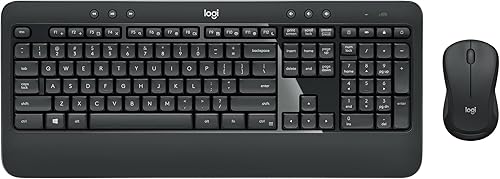
- 104-key QWERTY keyboard
- Integrated palm rest
- Ambidextrous mouse
- USB Unifying receiver
A full-size wireless set with a quiet keyboard, adjustable tilt legs and an ambidextrous mouse. It suits shared desks or users who want a more traditional mouse shape.
Pros
- Ambidextrous mouse works for either hand
- Full-size keyboard has a number pad
- Adjustable tilt legs
- Keyboard is spill-resistant
Cons
- Mouse is not vertical
- USB receiver connection
- Keyboard and mouse are larger than the compact ergonomic option
The MK540 keyboard has a palm rest, adjustable tilt legs, essential hotkeys and a spill-resistant design. It uses a USB receiver and works with Windows 7, 8, 10 or later and Chrome OS.
The keyboard and mouse are battery powered. Logitech gives the keyboard battery life of up to 36 months and the mouse battery life of up to 18 months.
Wave Keys and Lift versus MK345 and MK540
The right choice depends on which part of the desk setup matters most: ergonomic shape, familiar typing or mouse flexibility.
| Feature | Wave Keys and Lift | MK345 | MK540 |
|---|---|---|---|
| Keyboard shape | Wavy ergonomic design | Full-size QWERTY | Full-size QWERTY |
| Number of keys | Not stated in the product details | 104 | 104 |
| Palm support | Cushioned memory foam palm rest | Integrated palm rest | Integrated palm rest |
| Mouse shape | 57° vertical, right-handed | Compact, right-handed | Ambidextrous |
| Connection | Bluetooth Low Energy and Logi Bolt | 2.4 GHz USB-A Nano Receiver | USB Unifying receiver |
| Main fit | Ergonomic paired setup | Familiar full-size typing | Full-size typing with either-hand mouse use |
The Wave Keys and Lift has the clearest ergonomic purpose. The MK345 is the simplest choice for a standard full-size layout, while the MK540 adds an ambidextrous mouse and adjustable keyboard tilt legs.
Scores reflect how well each set fits its intended use, based on specs, features and buyer feedback. Our score weighs specs, features and buyer feedback against what you're shopping for.
How should you set up the Wave Keys and Lift?
Start with the keyboard centered in front of you and keep the palm rest close enough that your wrists can rest without reaching forward. The wavy design is meant to guide your hand position, but the desk height and chair position still affect how your arms meet the keys.
Place the Lift mouse beside the keyboard on the right-hand side. Its vertical shape works best when your hand can settle around the grip without pressing hard through the wrist or thumb.
Let your hand adjust gradually to the vertical mouse. The goal is a relaxed grip, not squeezing the mouse to keep it upright.
Use Logi Options+ to customize your workflow. The product data lists this app as the place to customize the setup, and it also identifies the SmartWheel as a way to adjust scrolling speed to the pace of your flicks.
Keep the keyboard, mouse and receiver within a sensible desk arrangement. A neat setup reduces reaching and helps you keep both devices in the position that feels natural.
Is the Wave Keys and Lift Combo easy to use every day?
The keyboard is designed for quiet, tactile typing, while the Lift mouse uses whisper-quiet clicks. That combination may suit a shared office or home workspace where loud key and mouse sounds are distracting.
The memory foam palm rest is a central part of the keyboard design. Use it as a support surface rather than leaning heavily into it while your shoulders or elbows are out of position.
The combo includes 2 AAA batteries for the keyboard and 1 AA battery for the mouse. Keep the receiver stored safely if you switch between Bluetooth and Logi Bolt connections.
Compatibility is broad, but the operating system version still matters. The listed support includes Windows 10, Windows 11 or later, macOS 12 or later, ChromeOS, Linux and iPadOS 15 or later.
What are the main drawbacks?
The biggest limitation is the Lift mouse's right-handed design. Left-handed users need a different mouse, and people who share a desk may prefer the ambidextrous MK540.
The second trade-off is the keyboard layout. The Wave Keys product data does not identify it as a 104-key full-size keyboard, so buyers who rely on a standard number pad should compare the MK345 and MK540 first.
The vertical mouse shape also changes the way you control the pointer. That may be the right change for your posture goals, but it is less familiar than the traditional mouse shapes in the alternatives.
Finally, the score does not mean the combo suits every user. It reflects the match between the product's ergonomic features and this review's search intent, not a promise of comfort for every hand or desk.
How does it compare with the Logitech Wave Keys MK670?
Both comparisons should start with the exact included keyboard and mouse rather than the family name alone. Logitech uses similar product naming across wireless ergonomic sets, so check the model, connection method, mouse orientation and included components.
The Wave Keys and Lift Combo is identified here as model 920-013610 and includes the Wave Keys ergonomic keyboard, Lift ergonomic mouse, batteries and Logi Bolt USB receiver. Those details help separate it from other Wave Keys packages.
If you are comparing the two sets for a new desk, focus on whether you want the Lift's 57° vertical mouse and whether your hand size and right-hand use match it. The Logitech Wave Keys MK670 review gives you a direct place to compare the other model's package details.
Can this combo help with wrist comfort?
The Wave Keys and Lift Combo is designed around ergonomic positioning, but it cannot promise a medical result. Logitech describes the keyboard and mouse as designed, tested and approved according to criteria set by leading ergonomists.
Use the 57° mouse angle, wavy keyboard and memory foam palm rest as setup features, not as a cure for pain. If you have ongoing wrist, hand or arm symptoms, ask a qualified health professional for advice.
A comfortable setup also depends on your chair, desk height, screen position and work breaks. Keep your shoulders relaxed, avoid pressing down through the wrist and adjust the layout if you find yourself reaching.
Final verdict: is the Logitech Wave Keys and Lift Combo worth choosing?
The Logitech Wave Keys and Lift Combo is the best pick when you want one ergonomic keyboard and vertical mouse set, especially for small to medium hands and right-handed use. Its wavy keyboard, memory foam palm rest, 57° Lift mouse and dual connection options give it the clearest comfort-focused design here.
Choose the MK345 if you want a familiar 104-key keyboard with a traditional right-handed mouse. Choose the MK540 if you want a full-size keyboard and an ambidextrous mouse.
For the most direct decision, pick Wave Keys and Lift for ergonomic shape, MK345 for straightforward full-size typing or MK540 for either-hand mouse use.
Frequently asked questions
Is the Logitech Wave Keys and Lift Combo good for small hands?
The Logitech Wave Keys and Lift Combo is designed for small to medium hands, and its Lift mouse has a softly textured grip and snug thumb rest. Because the mouse is right-handed and vertically shaped, check that your hand can rest comfortably on the grip before choosing it.
What is included with the Logitech Wave Keys and Lift Combo?
The combo includes the ergonomic keyboard, ergonomic mouse, 2 AAA batteries for the keyboard, 1 AA battery for the mouse and a Logi Bolt USB receiver. It supports Bluetooth Low Energy technology as well as the receiver connection.
Is the Logitech Wave Keys and Lift Combo compatible with Mac?
The Logitech Wave Keys and Lift Combo supports PC and Mac hardware platforms. Its operating system list includes macOS 12 or later, Windows 10 and 11 or later, ChromeOS, Linux and iPadOS 15 or later.
Should you choose Wave Keys and Lift or a full-size Logitech combo?
Choose Wave Keys and Lift if a wavy keyboard, cushioned palm rest and 57° vertical mouse match your comfort goals. Choose the MK345 or MK540 if you want a familiar 104-key layout, with the MK540 offering an ambidextrous mouse and the MK345 offering a right-handed traditional mouse.


