8 Best Wireless Ergonomic Keyboards (November 2026)
The best wireless ergonomic keyboards include the Arteck Split Ergonomic Keyboard with Palm Rest for long typing days on a budget, the Logitech Wave Keys Ergonomic Wireless Keyboard with for switching between devices, and the Logitech Ergo K860 Wireless Ergonomic Split Keyboard for a curved split frame.
On this page (10 sections)
- How to choose the best wireless ergonomic keyboard for you
- The best wireless ergonomic keyboards for comfort and control
- How the best wireless ergonomic keyboards stack up
- Which wireless ergonomic keyboard layout fits your hands?
- Is Bluetooth or 2.4G wireless better for this keyboard type?
- What should you know about wrist rests and tilt?
- How do battery and backlight choices affect daily use?
- Which wireless ergonomic keyboard suits office, gaming and special needs?
- How should you set up and care for a wireless ergonomic keyboard?
- Final verdict on the best wireless ergonomic keyboard
The best wireless ergonomic keyboard for most people is the Arteck Split Ergonomic Keyboard with Palm Rest, because it combines a split layout with a cushioned palm rest and a rechargeable battery that lasts 6 months at 2 hours per day. If larger key legends are easier to read, compare large print wireless keyboards.
If you type on several devices, the Logitech Wave Keys is a better fit.
If you want a true split frame, the Logitech Ergo K860 stands out.
We compared 8 wireless options on layout, wrist support, connection type, battery, tilt and desk size.
A full ergonomic keyboard and mouse guide helps if you also need a mouse.
Our picks at a glance
-
1
 Best for long typing days on a budget
Arteck Split Ergonomic Keyboard with Palm Rest
9.7/10 our score
See it on Amazon -
2
 Best for switching between devices
Logitech Wave Keys Ergonomic Wireless Keyboard with
9.6/10 our score
See it on Amazon -
3
 Best for a curved split frame
Logitech Ergo K860 Wireless Ergonomic Split Keyboard
9.5/10 our score
See it on Amazon
- 4
 Check it
ULSOU Wireless Keyboard And Mouse Combo
Best if you want a keyboard and mouse set - 5
 Check it
TECKNET Wireless Ergonomic Keyboard Rechargeable
Best for split layout with Bluetooth - 6
 Check it
EAYBLLY 2.4G Wireless Ergonomic Keyboard
Best for a built-in phone holder - 7
 Check it
COLIKES Wireless Ergonomic Keyboard
Best for backlit quiet typing - 8
 Check it
ProtoArc EK01 Plus Backlit Bluetooth Ergonomic Keyboard
Best for backlit multi-device use
How to choose the best wireless ergonomic keyboard for you
The best wireless ergonomic keyboard depends on your layout preference first.
Split frames separate left and right hands.
Wave frames curve the rows to follow your fingers.
Both aim for a natural wrist position, but they feel different.
Connection comes next.
Bluetooth helps with laptops and tablets.
A 2.4G receiver suits a desktop.
Several picks here offer both.
Battery style matters too.
Rechargeable models save on disposable batteries.
Battery-powered models can run for years.
Backlight use changes battery life on every backlit pick.
The best wireless ergonomic keyboards for comfort and control
Each pick below solves a different desk problem.
Read the trade-off line before you choose, because size and connection type often matter more than extra keys.
Arteck Split Ergonomic Keyboard with Palm Rest: Best for long typing days on a budget
- Split design with cushioned wrist and palm rest
- 2.4G USB wireless with nano receiver
- Rechargeable battery, 6 months on one charge at 2 hours per day
- 102 keys, QWERTY layout
A split layout and cushioned palm rest help wrists and forearms stay in a natural position. The rechargeable battery and plug-in receiver keep setup simple.
Pros
- Split layout for natural wrist position
- Cushioned wrist and palm rest
- Rechargeable, 6 months per charge at stated use
Cons
- Windows layout, some keys differ on Mac
- 2.4G only, no Bluetooth in the data
The Arteck suits Windows desktop and laptop users who type for long stretches and want a clear split.
Its split design helps position wrists and forearms in a natural, relaxed position.
A soft cushioned wrist rest supports your wrist and forearm while you type.
Setup is simple.
You insert the nano USB receiver, stored at the back of the keyboard, into your computer and use it at once.
The USB-C cable is for charging.
The receiver works up to 33 feet or 10 meters.
Battery life is a key reason this ranks first.
Arteck says the rechargeable lithium battery lasts 6 months on a single charge, based on 2 hours of non-stop use per day.
Hotkeys and media keys keep common functions close.
The trade-off is connection and layout.
This is a 2.4G model for Windows, with 102 keys in QWERTY.
Arteck notes some keys and functions will differ on Mac.
It also measures 16.5 inches wide, so check desk space first.
Logitech Wave Keys Ergonomic Wireless Keyboard with: Best for switching between devices
- Wave-shaped keys and cushioned memory foam palm rest
- Bluetooth or Logi Bolt receiver
- Easy-Switch between 3 devices
- Up to 3 years battery life
Wave Keys places hands, wrists and forearms in a natural typing position. Bluetooth and Easy-Switch let you move between a laptop, tablet and phone.
Pros
- Compact wave shape
- Memory foam palm rest
- Bluetooth plus receiver, 3-device switching
Cons
- No split frame
- Battery life depends on included batteries
Wave Keys suits laptop users who switch between a computer, tablet and phone.
Its wavy design places your hands, wrists and forearms in a natural typing position.
A cushioned palm rest with memory foam gives more wrist support.
Connection is flexible.
You can use Bluetooth or the Logi Bolt receiver.
Easy-Switch lets you move between up to 3 devices.
Logitech lists compatibility with Windows, macOS, iPadOS and ChromeOS.
Battery life is another strength.
Logitech says up to 3 years using the included batteries.
You can also personalize shortcuts in the Logi Options+ app to save time.
The keyboard is ergo-certified by United States Ergonomics.
The trade-off is shape.
Wave Keys is compact at 14.8 inches wide, but it is not a split keyboard.
If you want a split frame, the Logitech ERGO K860 review covers that alternative in detail.
If you prefer wrist rests, our best ergonomic keyboard no wrist rest guide covers the opposite choice.
Logitech Ergo K860 Wireless Ergonomic Split Keyboard: Best for a curved split frame
- Curved split keyframe and pillowed wrist rest
- Tilt legs at 0, -4 and -7 degrees
- Bluetooth or USB receiver
- Two-year battery life, full-size layout
The K860 uses a curved split frame to reduce wrist bending and a pillowed rest for support. Adjustable tilt helps keep a natural posture seated or standing.
Pros
- True split keyframe
- Pillowed wrist rest with memory foam
- Adjustable tilt legs
Cons
- Large footprint at 17.95 in wide
- Heavier at 2.6 lb
The Ergo K860 suits typists who want a curved split keyframe and strong wrist support.
Its sloping design helps reduce muscle strain on wrists and forearms.
The pillowed wrist rest uses memory foam and offers 54 per cent more wrist support than a standard keyboard without a palm rest.
Tilt legs offer 0, -4 and -7 degrees.
That range helps keep wrists in a natural posture whether you sit or stand.
Scooped Perfect Stroke keys match fingertip shape for confident typing.
Connectivity covers both paths.
You can connect with the USB receiver or Bluetooth.
Logitech says the keyboard is certified by United States Ergonomics to improve posture and lower muscle strain.
It has a full-size layout with an integrated numpad.
The trade-off is size and weight.
At 17.95 inches wide and 2.6 pounds, it takes more desk space than Wave Keys.
It also runs on 2 AAA batteries.
For a closer look at key feel and layout, see our best ergonomic full size keyboard picks.
ULSOU Wireless Keyboard And Mouse Combo: Best if you want a keyboard and mouse set
- Wave keys with wrist rest and adjustable stand
- Wireless optical mouse included
- One 2.4G receiver for both devices
- Auto sleep after inactivity
This combo pairs a wave keyboard with wrist rest to a contoured mouse on one receiver. It suits Windows and Mac users who want both devices together.
Pros
- Keyboard and mouse on one receiver
- Adjustable stand for typing height
- Dual system layout switch
Cons
- Batteries not included
- Mouse shape is for the right hand
ULSOU suits buyers who want a keyboard and mouse in one box.
The wave keyboard has a wrist rest and an adjustable stand.
The mouse has a contoured shape for your right hand, with forward and back controls.
One 2.4GHz USB receiver connects both devices.
The receiver is located on the back of the mouse.
ULSOU says the signal reaches up to 33 feet or 10 meters without delays.
Plug-and-play means no software download is required.
Power saving is built in.
The keyboard enters sleep after 30 seconds of inactivity.
The mouse enters sleep after 15 minutes.
Each device needs 1 AA battery, and batteries are not included.
The trade-off is right-hand mouse shape and battery cost.
You also give up Bluetooth switching.
If you type in a shared office, our best quiet keyboard for office guide helps you compare quieter picks.
TECKNET Wireless Ergonomic Keyboard Rechargeable: Best for split layout with Bluetooth
- Split layout with curved key arrangement
- Dual-density memory foam wrist rest
- Bluetooth 5.0 plus 2.4GHz dongle, up to 4 devices
- 500mAh rechargeable, 200 hours continuous use
TECKNET combines a split layout with a dual-density wrist rest and four tilt angles. Bluetooth pairing memory helps your hands rest at shoulder width.
Pros
- Split layout and curved keys
- Four tilt angles
- Bluetooth plus dongle, 4 devices
Cons
- Workman layout listed in specs
- 36-month warranty needs registration
TECKNET suits users who want a split layout plus Bluetooth.
Its curved key arrangement follows the natural arc of your fingers.
Hands rest at shoulder-width distance, which helps maintain a neutral wrist posture.
The wrist rest uses two layers.
A high-density bottom layer stops your wrist sinking.
A slow-rebound memory foam top layer spreads pressure.
Four-stage feet offer 0, 1.2, 3 and 6.2 degrees of tilt.
Connection covers up to 4 devices.
Bluetooth 5.0 has pairing memory for up to 3 devices.
A USB dongle adds a fourth path.
A single shortcut key switches between screens without re-pairing.
Battery specs are strong on paper.
The 500mAh rechargeable battery charges in 4 hours and gives up to 200 hours of continuous use.
The trade-off is layout and warranty terms.
The spec list shows a Workman layout, and the 36-month warranty needs registration.
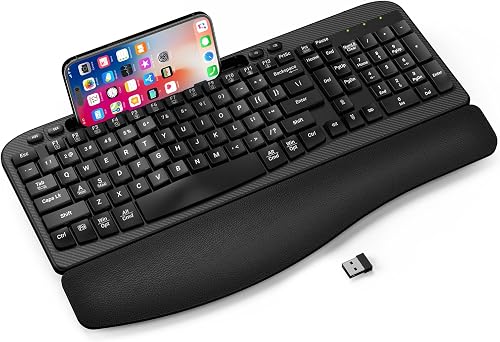
EAYBLLY 2.4G Wireless Ergonomic Keyboard: Best for a built-in phone holder
- Wave keys with 3-layer memory foam wrist rest
- 7.28 in phone holder
- 2.4G plug-and-play with USB-C adapter
- Adjustable tilt at 8 and 12 degrees
Wave keys and a memory foam rest support long typing sessions. The holder keeps a phone upright for meetings or classes without extra desk gear.
Pros
- Built-in phone holder
- USB-C adapter included
- Windows, Mac and Chrome OS support
Cons
- 1 AA battery not included
- Fixed 2.4G connection
EAYBLLY suits home office users who keep a phone at their desk.
Wave-shaped keys follow a natural hand posture.
A 3-layer memory foam wrist rest supports long typing sessions.
The built-in holder fits a 7.28-inch slot for smartphones and small tablets.
You can place a phone upright or sideways for video meetings and online classes.
That removes the need for a separate stand.
Connection is 2.4G plug-and-play up to 33 feet, with no driver needed.
A USB-C adapter is included for Windows, Mac OS and Chrome OS.
Tilt legs offer 8 and 12 degrees.
The trade-off is power and connection choice.
It runs on 1 AA battery, which is not included.
It also lacks Bluetooth for direct tablet pairing.
If a number pad matters for spreadsheets, see our best ergonomic wireless keyboard with number pad guide.
COLIKES Wireless Ergonomic Keyboard: Best for backlit quiet typing
- Wave keys with silent membrane keys
- Leather wrist rest and adjustable legs
- 15 RGB lighting effects, 3 brightness levels
- 2500mAh rechargeable battery
Silent membrane keys and a soft wrist rest suit shared or late-night desks. RGB lighting adds visibility in low light, and the battery recharges over USB-C.
Pros
- Silent keys for quiet spaces
- Backlit with adjustable brightness
- Rechargeable over USB-C
Cons
- Backlight shortens battery life
- No Bluetooth listed
COLIKES suits people who type in low light or want quiet keys.
Wave keys, silent membrane keys and a soft wrist rest reduce wrist fatigue.
Adjustable legs help you set a comfortable angle.
Backlighting has 15 effects, including breathing, wave, gradient and static modes.
You get 5 backlight modes and 3 brightness levels.
A switch at the top and FN+PgDn control lighting.
Battery life depends on backlight use.
The 2500mAh rechargeable battery charges in about 5 hours over USB-C.
COLIKES says backlight off gives 277 days at 3 hours per day.
With backlight on, it lasts 10 days.
The backlight turns off after 90 seconds and sleep starts after 3 minutes.
The trade-off is connection.
This is a 2.4G model, with no Bluetooth listed.
It also has a 12-month warranty.
For quieter shared desks, our best quiet ergonomic wireless keyboard picks focus on low-noise keys.
ProtoArc EK01 Plus Backlit Bluetooth Ergonomic Keyboard: Best for backlit multi-device use
- Curved split frame with cushioned wrist rest
- White LED backlight, 3 brightness levels
- Bluetooth and 2.4G, up to 3 devices
- 2000mAh rechargeable battery
A curved split frame and scooped keys help typing feel natural. Bluetooth and 2.4G let you switch between a laptop, tablet and desktop.
Pros
- Split frame with 3 tilt angles
- Backlight with 3 levels
- 3-device switching
Cons
- Full size takes more desk space
- No wired mode
ProtoArc EK01 Plus suits users who want backlighting plus multi-device switching.
A curved split frame reduces strain on wrists and forearms.
Scooped keys fit fingertips for natural typing.
The wrist rest is cushioned with support foam and memory foam.
ProtoArc says it provides 54 per cent more support.
Four tilt feet give you three angles for sitting or standing work.
You can pair up to 3 devices with Bluetooth and 2.4G USB.
A key press switches between a laptop, tablet and computer.
The 2000mAh rechargeable battery is 4 times the capacity of the EKM01 Plus set, according to ProtoArc.
Backlighting affects battery life.
ProtoArc lists 12 to 13 hours on High, 18 to 20 on Medium, 34 to 36 on Low, and 90 to 100 days with backlight off.
The trade-off is size and limits.
It is full size with 117 keys, takes more desk space, and cannot connect by wire.
If Bluetooth is your priority, see our best ergonomic keyboard bluetooth wireless guide.
How the best wireless ergonomic keyboards stack up
Our score weighs specs, features and buyer feedback against what you're shopping for.
We checked split versus wave layouts, wrist rest type, tilt options, connection types, battery claims and size.
We did not test these keyboards.
| Product | Best for | Connectivity | Size | Keys | Our score |
|---|---|---|---|---|---|
| Arteck Split Ergonomic Keyboard with Palm Rest | long typing days on a budget | 2.4G USB wireless | 16.5 x 9.6 x 1.02 in | 102 | 9.7 |
| Logitech Wave Keys Ergonomic Wireless Keyboard with | switching between devices | Bluetooth, Logi Bolt USB | 14.8 x 8.62 x 1.18 in | 9.6 | |
| Logitech Ergo K860 Wireless Ergonomic Split Keyboard | a curved split frame | Bluetooth, USB receiver | 17.95 x 9.17 x 1.89 in | 9.5 | |
| ULSOU Wireless Keyboard And Mouse Combo | if you want a keyboard and mouse set | 2.4G USB, one receiver | 9.5 | ||
| TECKNET Wireless Ergonomic Keyboard Rechargeable | split layout with Bluetooth | Bluetooth 5.0, 2.4GHz USB | 104 | 9.0 | |
| EAYBLLY 2.4G Wireless Ergonomic Keyboard | a built-in phone holder | 2.4G wireless, USB-C adapter | 16.57 x 9.01 x 1.37 in | 104 | 8.8 |
| COLIKES Wireless Ergonomic Keyboard | backlit quiet typing | 2.4G USB wireless | 8.5 | ||
| ProtoArc EK01 Plus Backlit Bluetooth Ergonomic Keyboard | backlit multi-device use | Bluetooth, 2.4G USB | 117 | 8.3 |
Split models help hands sit farther apart.
Arteck, K860, TECKNET and ProtoArc use split frames.
Wave models curve the rows instead.
Wave Keys, ULSOU, EAYBLLY and COLIKES use that shape.
Wrist rests differ too.
K860 and ProtoArc stress more wrist support.
TECKNET uses dual-density foam.
EAYBLLY uses 3-layer memory foam.
Arteck uses a cushioned palm rest.
Connection splits the group.
Bluetooth picks switch devices well.
That groups Wave Keys, TECKNET and ProtoArc.
Receiver-only picks suit a single desktop.
That groups Arteck, ULSOU, EAYBLLY and COLIKES.
Battery claims need context.
Arteck states 6 months at 2 hours per day.
Wave Keys states up to 3 years with included batteries.
Backlit picks lose battery life fastest when the light stays on.
Which wireless ergonomic keyboard layout fits your hands?
A split layout suits most wrist pain shoppers, while a wave layout suits people who want a familiar full-size feel.
Split frames separate the keys at the center.
That lets shoulders stay relaxed.
Split layouts for natural wrist position
Arteck, K860, TECKNET and ProtoArc use split frames.
K860 adds a curved keyframe and tilt legs.
TECKNET adds four tilt angles and Bluetooth.
Split layouts need more desk width.
K860 is the widest pick here at 17.95 inches.
Measure your desk before you order.
If you have hand pain, our best ergonomic keyboard for carpal tunnel guide gives more detail.
Wave layouts for a familiar feel
Wave Keys, ULSOU, EAYBLLY and COLIKES curve the rows.
That shape follows finger arcs without a center split.
Wave Keys is the most compact pick here.
Wave layouts often feel closer to a standard keyboard.
That can ease the learning curve.
If your hands are small, our best ergonomic keyboard for small hands guide helps you compare fit.
Is Bluetooth or 2.4G wireless better for this keyboard type?
Bluetooth is better for laptops and tablets, while 2.4G is better for a single desktop.
Bluetooth connects without a receiver.
That keeps a laptop USB port free.
Wave Keys switches between 3 devices with Easy-Switch.
TECKNET pairs by Bluetooth and adds a dongle path.
ProtoArc switches between 3 devices with Bluetooth and 2.4G.
Receiver-only picks keep things simple.
Arteck, ULSOU, EAYBLLY and COLIKES use plug-and-play receivers.
ULSOU uses one receiver for both keyboard and mouse.
Range claims are similar across the group.
Several makers state up to 33 feet or 10 meters.
Keep the receiver in a clear line of sight for the most stable signal.
What should you know about wrist rests and tilt?
A cushioned wrist rest helps you rest between keystrokes, but it should not be a place to press hard.
Memory foam rests spread pressure.
Hard rests can create pressure points.
K860 offers a pillowed rest with memory foam.
TECKNET uses dual-density foam.
EAYBLLY wraps 3-layer memory foam in soft material.
Wave Keys uses a memory foam palm rest.
Tilt angles change wrist position.
K860 offers 0, -4 and -7 degrees.
TECKNET offers 0, 1.2, 3 and 6.2 degrees.
EAYBLLY offers 8 and 12 degrees.
ProtoArc offers three angles.
Test tilt in small steps.
A small angle often feels better than a steep one.
Pair tilt with a chair that supports your forearms.
Our best ergonomic office chair guide helps you match seat height to desk height.
How do battery and backlight choices affect daily use?
Rechargeable batteries save money over time, while backlighting trades battery life for visibility.
Check how you type first.
Daytime users may not need backlighting at all.
Arteck gives a 6-month estimate at 2 hours per day.
TECKNET gives 200 hours of continuous use from 500mAh.
COLIKES gives 277 days with backlight off and 10 days with backlight on at 3 hours per day.
ProtoArc gives separate hours for each brightness level.
Sleep modes help too.
ULSOU sleeps the keyboard after 30 seconds.
COLIKES turns off backlight after 90 seconds.
ProtoArc sleeps after 60 minutes.
If you use AA batteries, keep spares at your desk.
ULSOU needs 1 AA per device.
K860 needs 2 AAA batteries.
Wave Keys uses included batteries with up to 3 years of life.
Which wireless ergonomic keyboard suits office, gaming and special needs?
Office users should prioritize quiet keys and device switching, while gamers should check layout and switch feel.
Shared offices need low noise.
Silent membrane keys help in that setting.
COLIKES uses silent membrane keys for office and library use.
K860 has quiet keys with a full-size layout.
Wave Keys uses membrane keys with a palm rest.
For office desks, our best ergonomic office keyboard guide compares models built for work.
For gaming, our best ergonomic keyboard for gaming guide covers switch and layout needs.
For arthritis, key force and key spacing matter more than backlighting.
Our best ergonomic keyboard for arthritis guide covers that angle.
For a deeper ergonomic look, our what is an ergonomic office chair guide explains how chair height affects wrist position.
How should you set up and care for a wireless ergonomic keyboard?
Place the keyboard so your elbows stay near your sides and your wrists stay straight.
Use tilt legs to set a small angle.
Keep the receiver close enough for a stable signal.
Clean a wrist rest with a dry cloth.
Memory foam rests can trap skin oils over time.
Check the maker care notes before you use water or spray.
Store the receiver safely.
Arteck and ULSOU store theirs in the keyboard or mouse.
COLIKES stores its receiver on top.
Losing a receiver can make a wireless keyboard unusable.
Charge rechargeable models before the battery runs flat.
USB-C charging is common here.
Arteck, TECKNET, COLIKES and ProtoArc all recharge over USB-C.
If a key stops working, our logitech ergo k860 key replacement guide helps K860 owners.
For a model choice between two Logitech designs, our logitech wave keys vs wave keys for business guide helps you compare features.
Final verdict on the best wireless ergonomic keyboard
Pick Arteck for split comfort on a Windows desktop, Wave Keys for multi-device switching, and K860 for a curved split frame with tilt legs.
Each pick keeps wrists and forearms in a more natural position.
Choose ULSOU if you want a mouse included.
Choose TECKNET if you want split layout plus Bluetooth.
Choose EAYBLLY if a phone holder helps your workflow.
Choose COLIKES or ProtoArc if backlighting matters in low light.
Measure your desk width before you order a split model.
Then match connection type to your devices.
That simple check prevents most returns.
Our top 3 picks at a glance
-
1
Best for long typing days on a budget
Arteck Split Ergonomic Keyboard with Palm Rest
9.7/10 our score
See it on Amazon -
2
Best for switching between devices
Logitech Wave Keys Ergonomic Wireless Keyboard with
9.6/10 our score
See it on Amazon -
3
Best for a curved split frame
Logitech Ergo K860 Wireless Ergonomic Split Keyboard
9.5/10 our score
See it on Amazon
Frequently asked questions
What makes a wireless ergonomic keyboard different from a standard one?
A wireless ergonomic keyboard usually adds a split or wave layout, a wrist rest and adjustable tilt. Those shapes help hands, wrists and forearms stay in a more natural position during long typing sessions.
Is Bluetooth or 2.4G better for an ergonomic keyboard?
Bluetooth suits laptops, tablets and phones and avoids a USB receiver. A 2.4G receiver often suits a desktop that stays in one place.
Many picks here offer both, so check which devices you use most.
How long should a rechargeable ergonomic keyboard battery last?
It depends on backlight use and daily typing time. Arteck states 6 months at 2 hours per day, while ProtoArc gives separate estimates for each backlight level.
Treat those as maker estimates for your own pattern.


