8 Best Freestanding Triple Monitor Stands (November 2026)
The best freestanding triple monitor stands include the VIVO Triple LCD LED Computer Monitor Desk Stand for most 13 to 30 inch desks, the WALI Triple Monitor Stand for 13 to 27 inch setups with a grommet option, and the Triple Monitor Stand for precise screen alignment.
On this page (10 sections)
- Our best freestanding triple monitor stand picks, by screen size
- How the best freestanding triple monitor stand picks compare side by side
- How we compared these stands
- What screen sizes should you buy for a triple monitor desk stand?
- How much weight should each arm hold?
- Freestanding base or desk clamp: which should you pick?
- What tilt, swivel and rotation ranges do you need?
- How do you set up and care for a triple monitor stand?
- More guides on this topic
- Which freestanding triple monitor stand should you buy?
The best freestanding triple monitor stand for most desks is the VIVO STAND-V003E, because it covers the widest common range here, three screens from 13 to 30 inches, and holds up to 10.0 kg on each arm. Our score weighs specs, features and buyer feedback against what you're shopping for.
A freestanding triple monitor stand is a desk mount that holds three screens on a base that sits on your desktop. For a simpler one-screen lift, see wooden monitor risers.
It needs no desk clamp and no grommet hole.
That makes it a good fit for glass desks, desks without a free edge, and desks where you do not want to drill.
Start with screen size and weight per arm. Those two numbers decide which of these eight stands can hold your exact monitors.
Then check tilt, swivel and rotation ranges for your viewing habits.
If you also use a laptop with your desktop screens, our guide to a triple monitor stand for laptop setups explains how to mix one laptop screen with two monitors. For a portable way to raise that laptop, see our folding laptop stands.
For a different mounting style, our guide to computer monitor arms covers single and dual arm options.
Our picks at a glance
-
1
-
2
 Best for 13 to 27 inch setups with a grommet option
WALI Triple Monitor Stand, Free Standing for 13-27 inch Screens, up to 22lbs
9.6/10 our score
See it on Amazon -
3
 Best for precise screen alignment
Triple Monitor Stand, Full Motion Arm Fits up to 27 inch
9.4/10 our score
See it on Amazon
- 4
 Check it
PUTORSEN Freestanding Triple Monitor Stand, Up to 49 in, Holds 44 lbs
Best for a large center screen - 5
 Check it
monTEK Freestanding Triple Monitor Stand for 17-32 in Screens, 22 lbs Each
Best for 17 to 32 inch screens - 6
 Best for three ultrawide screensCheck it
- 7
 Check it
Dardoo Sim Racing Triple Monitor Stand with for 24-32 Inch Display 3 Screen
Best for round tube sim racing cockpits - 8
 Check it
Marada Sim Racing Triple Monitor Stand with Wheels for 24-32 inch Displays
Best for a mobile sim racing rig
Our best freestanding triple monitor stand picks, by screen size
VIVO STAND-V003E is the best all round pick for 13 to 30 inch screens. WALI suits 13 to 27 inch screens when you want a grommet option.
PUTORSEN B0GF223SD8 and VIVO STAND-V300FG suit ultrawide layouts. The Dardoo and Marada stands suit sim racing, not a standard office desk.
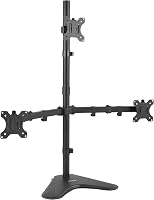
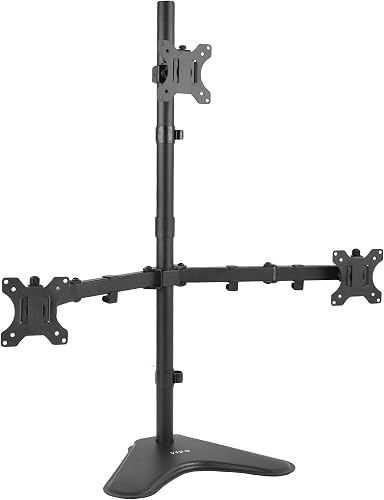
VIVO Triple LCD LED Computer Monitor Desk Stand, Free Standing Heavy Duty Fully Adjustable Mount for 3 Screens up to 30 inches STAND-V003E: Best for most 13 to 30 inch desks
- Holds 3 monitors 13 to 30 in, 10.0 kg each
- VESA 75x75mm or 100x100mm
- Tilt +15 to -15 degrees, 360 swivel and rotation
- 40.0 x 27.9 cm padded base
- Steel and aluminum, detachable cable clips
A heavy duty freestanding stand for three 13 to 30 inch screens, with height adjustment on the center pole and portrait or landscape use.
Pros
- Wide 13 to 30 inch range
- Large padded base
- Full swivel and rotation
- Detachable cable clips
Cons
- Tilt range is only +15 to -15 degrees
- Do not pull monitors far forward or back unless bolted down
VIVO STAND-V003E suits a three monitor office or gaming desk with screens from 13 to 30 inches. It holds up to 10.0 kg per arm, which is 17.6 lb, and fits VESA 75x75mm or 100x100mm holes.
The base measures 40.0 x 27.9 cm and has padding on the bottom to protect the desk. VIVO warns not to pull monitors too far forward or back unless the stand is bolted down, because that can cause stability issues.
Keep the screens close to the center of the base.
Arms give +15 to -15 degrees of tilt, 360 degrees of swivel and 360 degrees of rotation. You can run portrait or landscape screens.
Height adjusts along the center pole. Detachable cable clips sit on the arms and center pole.
It uses steel and aluminum and VIVO backs it with a 3 year warranty. Trade off: tilt is narrower than some rivals here, and the base takes a large footprint.
If you want a mapped brand overview first, see our best VIVO triple monitor stand guide.
WALI Triple Monitor Stand, Free Standing for 13-27 inch Screens, up to 22lbs: Best for 13 to 27 inch setups with a grommet option
- Fits 13 to 27 in, up to 22 lb per arm
- VESA 75x75mm or 100x100mm, detachable plates
- 16 in height pole, center tilt +/-15 degrees
- Side tilt +/-90 degrees, swivel and 360 rotation
- Free standing V-base plus 4 in grommet base for 0.3 to 2.4 in desks
A freestanding triple stand with wide side tilt for reading angles, plus a grommet base when you want a fixed desk mount.
Pros
- Side monitors tilt +/-90 degrees
- Free standing or grommet use
- 16 in height pole
- Cable guides on the arms
Cons
- Capped at 27 inch screens
- Center tilt is limited to +/-15 degrees
WALI suits a 13 to 27 inch triple setup where side screens need strong tilt for reading. Each arm holds up to 22 lb and plates fit VESA 75x75mm or 100x100mm.
The stand gives two mounting options. The free standing V-base sits on any desktop.
The 4 inch grommet base fits desks from 0.3 to 2.4 inches thick. That second option helps if you move screens forward a lot.
A 16 inch height pole adjusts screen height. The center monitor tilts +/-15 degrees.
Side monitors tilt +/-90 degrees, swivel, and rotate 360 degrees from landscape to portrait. Cable guides run along the arms.
Trade off: it caps at 27 inches, so it will not fit 30 or 32 inch screens. For larger screens, look at the VIVO and monTEK picks.
For side by side 27 inch layouts, also see our best triple monitor stand for 27 inch monitors.
Triple Monitor Stand, Full Motion Arm Fits up to 27 inch: Best for precise screen alignment
- Supports 3 screens up to 27 in, 22 lb per arm
- VESA 75x75 and 100x100
- Tilt +35 to -35 degrees, 180 swivel, 360 rotation
- VESA plates adjust up to 0.4 in
- Weighted base plus grommet base for 0.39 to 2.36 in desks
A full motion triple stand with fine height adjustment on each VESA plate, so the three screens line up without gaps.
Pros
- 0.4 in fine height adjustment per plate
- Wide +35 to -35 degree tilt
- Weighted base or grommet mount
- Removable cable covers
Cons
- Capped at 27 inch screens
- Swivel is 180 degrees, not full 360
This PUTORSEN stand suits buyers who care about lining up three screens with no gaps. It supports three screens up to 27 inches and 22 lb per arm, with VESA 75x75 and 100x100 plates.
Each VESA plate adjusts up to 0.4 inch in height. That fine adjustment helps when three monitors sit at slightly different heights out of the box.
Arms give +35 to -35 degrees of tilt, 180 degrees of swivel and 360 degrees of rotation for landscape or portrait use.
The weighted base works freestanding on a flat desk. A grommet base also fits desks from 0.39 to 2.36 inches thick for extra security.
Removable cable covers hide power and video cords along the arms.
Trade off: swivel stops at 180 degrees, unlike full 360 degree rotation on other picks. It also caps at 27 inches.
For arm based layouts instead of a desk stand, compare our best triple monitor arms guide.
PUTORSEN Freestanding Triple Monitor Stand, Up to 49 in, Holds 44 lbs: Best for a large center screen
- Center arm up to 49 in, 4.4 to 44 lb
- Side gas spring arms up to 35 in, 26.4 lb each
- VESA 75x75 and 100x100
- Tilt +/-45 degrees, swivel +/-90 degrees, 360 rotation
- V-base freestanding, cast aluminum, removable cable management
Built around a large center display up to 49 inches, with smaller side screens on gas spring arms and a freestanding V-base.
Pros
- Large 49 in center capacity
- Gas spring side arms
- Wide tilt and rotation
- Cast aluminum base and arms
Cons
- Check your center monitor weight before ordering
- Side screens are capped at 35 in
PUTORSEN B0GF223SD8 suits a desk built around one large center screen. The center arm takes a monitor up to 49 inches and from 4.4 to 44 lb.
The two side gas spring arms take screens up to 35 inches and up to 26.4 lb each.
All three arms fit VESA 75x75mm and 100x100mm. Check your center monitor specs before you order, because a 49 inch screen can sit near the top of the weight range.
Movement covers tilt of +/-45 degrees, swivel of +/-90 degrees and 360 degrees of rotation. Gas spring arms make side screen moves lighter.
The V-base sits directly on the desktop for freestanding use.
The base and arms use cast aluminum. Removable cable management hides wires behind the mount.
Trade off: side screens cap at 35 inches, and the center weight limit needs a careful check. For curved center screens, read our best triple monitor stand for curved monitors guide.
monTEK Freestanding Triple Monitor Stand for 17-32 in Screens, 22 lbs Each: Best for 17 to 32 inch screens
- Fits 17 to 32 in, up to 22 lb per arm
- VESA 75x75 or 100x100
- Tilt -45 to +45 degrees, swivel -90 to +90 degrees, 360 rotation
- V-shaped base, quick release VESA plates
- Integrated cable organizers
A freestanding triple stand for 17 to 32 inch screens, with wide tilt and swivel ranges and quick release VESA plates.
Pros
- Covers 17 to 32 inch screens
- Wide tilt range
- Quick release VESA plates
- Cable organizers
Cons
- Starts at 17 in, so smaller screens are not listed
- No grommet option in the data
monTEK suits 17 to 32 inch screens, which covers many 24, 27 and 32 inch desk setups. Each arm holds up to 22 lb and fits VESA 75x75mm or 100x100mm holes.
Tilt runs from -45 to +45 degrees. Swivel runs from -90 to +90 degrees.
Rotation is 360 degrees, so portrait use is easy. That wide tilt range helps tip side screens in toward you.
The V-shaped base keeps the stand freestanding on the desk. Quick release VESA plates make monitor changes faster.
Integrated cable organizers keep wires tidy behind the screens.
Trade off: the range starts at 17 inches, so it is not listed for smaller screens. There is also no grommet option in the data.
For 32 inch side by side layouts, see our best triple monitor stand for 32 inch monitors.
VIVO Pneumatic Arm Triple Ultrawide Monitor Desk Stand for Up to 49 inch Screens with Tempered Glass Base, Holds 3 Ultra Wides Up to 33 lbs Each, Black, STAND-V300FG: Best for three ultrawide screens
- Fits 3 ultrawides: 1 up to 49 in and 2 up to 38 in
- 5.5 to 33 lb per arm, VESA 75x75 or 100x100
- Tilt +55 to -25 degrees, 180 swivel, 360 rotation
- Pneumatic height adjustment
- Tempered glass base, detachable VESA plates
A freestanding stand for three ultrawide screens, with pneumatic height adjustment and a tempered glass base.
Pros
- Three ultrawide layout
- Pneumatic height adjustment
- Wide +55 to -25 degree tilt
- Detachable VESA plates
Cons
- Do not pull screens too far forward or back
- Side screens capped at 38 in
VIVO STAND-V300FG suits three ultrawide screens, a layout most desk stands cannot hold. It fits one screen up to 49 inches in the center and two screens up to 38 inches on the sides.
Each arm holds from 5.5 to 33 lb and fits VESA 75x75mm or 100x100mm. Pneumatic arms counterbalance screen weight for height adjustment.
Tilt runs +55 to -25 degrees, with 180 degrees of swivel and 360 degrees of rotation.
The tempered glass base supports large monitors. VIVO warns not to pull screens too far forward or back, because that can cause stability issues.
Cables route through the arms and cable clips.
Trade off: ultrawide screens are heavy, so check each screen weight before you order. If your center screen is curved, check our best triple monitor stand for curved monitors guide before you choose this one.
Dardoo Sim Racing Triple Monitor Stand with for 24-32 Inch Display 3 Screen: Best for round tube sim racing cockpits
- Supports 3 screens 24 to 32 in, or 1 screen 24 to 65 in
- VESA 75x75 to 400x200
- Adjustable height and angle
- Flange structure, non-slip pads
- Fits Dardoo round tube racing cockpits
A sim racing triple screen stand made for Dardoo round tube cockpits, with adjustable height and angle for 24 to 32 inch screens.
Pros
- Made for round tube cockpits
- Wide VESA range
- Single large screen option
- Non-slip pads
Cons
- Only fits Dardoo round tube cockpits
- Does not fit curved screen monitors
Dardoo suits sim racing with a Dardoo round tube cockpit. It holds three screens from 24 to 32 inches, or one large screen from 24 to 65 inches.
VESA holes range from 75x75mm to 400x200mm, which covers a wider set of screens than most desk stands here. Height and angle adjust for a racing viewing position.
The flange structure and non-slip pads help keep the rig steady during use. A guide and accessories for installation are included.
Important limits: it only fits Dardoo round tube racing cockpits, and it does not fit curved screen monitors. That makes it a niche pick, not a general desk stand.
For a floor based option instead, see our triple monitor stand floor guide.
Marada Sim Racing Triple Monitor Stand with Wheels for 24-32 inch Displays: Best for a mobile sim racing rig
- Supports three 27 or 32 in displays
- 360 swivel casters with locking brakes
- A-frame base
- Multi-position height and angle adjustment
- VESA 75x75 to 400x400 patterns
A wheeled sim racing triple stand with an A-frame base and locking casters, made to move and then lock in place.
Pros
- Locking casters for mobility
- A-frame base for stability
- Multi-position adjustment
- Wide VESA range
Cons
- Capped at 32 in displays
- Wheeled base needs floor space to lock and store
Marada suits sim racing and flight simulator rigs that need to move. It holds three identical 27 or 32 inch displays, and the listing covers 24 to 32 inch displays.
360 degree swivel casters with locking brakes let you roll the rig into place, then lock it. The A-frame base spreads weight toward the center to reduce tipping risk and wobble.
Multi-position holes on the pole and VESA mounts allow height and angle changes for each screen. Tilt adjusts per screen for alignment.
The stand uses high strength steel and fits VESA 75x75 to 400x400 patterns with a mounting kit. Trade off: a wheeled rig needs floor space to store and lock.
For portrait stacks instead, see our best monitor arm for stacked monitors guide.
How the best freestanding triple monitor stand picks compare side by side
The table below puts screen size, weight per arm and base type next to each other. Use it to rule out stands that cannot fit your screens before you read the details.
How we compared these stands
We compared screen size ranges, weight limits per arm, VESA patterns, tilt and swivel ranges, base size and base type. We also checked which stands offer a grommet option and which are built only for sim racing.
We did not test these stands hands on. This page is research based, and maker claims are labeled with the brand name.
Buyer patterns are noted as buyer reports, not as our own findings.
A freestanding stand only works if your screens fit both the size range and the weight limit. A 27 inch screen that weighs more than 22 lb will not fit a 22 lb arm, even if the size looks right.
We also checked cable management, because three screens mean at least three power and video cables. Clips, guides and covers affect how clean the desk looks day to day.
What screen sizes should you buy for a triple monitor desk stand?
Most office desks here use 24 to 32 inch screens. That is why 27 inch and 32 inch ranges dominate this list.
Check each arm, not just the title size.
A stand listed as 13 to 27 inches will not safely hold 30 inch screens. A stand listed as 17 to 32 inches will not list support for smaller screens.
Match the range to your exact monitor size.
13 to 27 inch screens
WALI and PUTORSEN B0FV1L7BGN both cap at 27 inches. They suit matched 24 or 27 inch monitors.
See our best triple monitor stand for 27 inch monitors for more detail on that size.
13 to 30 inch screens
VIVO STAND-V003E covers 13 to 30 inches and holds 10.0 kg per arm. That extra top end helps if one screen is larger than the other two.
17 to 32 inch screens
monTEK covers 17 to 32 inches at 22 lb per arm. That makes it a fit for 32 inch side screens.
For a full size guide, see our best triple monitor stand for 32 inch monitors.
Ultrawide and large center screens
PUTORSEN B0GF223SD8 takes a center screen up to 49 inches. VIVO STAND-V300FG takes one up to 49 inches and two up to 38 inches.
Those are different jobs from three matched office screens.
How much weight should each arm hold?
Weight per arm matters more than total capacity. Three heavy screens can overload each arm even when the base looks strong.
Most stands here hold 22 lb per arm. VIVO STAND-V003E holds 10.0 kg each, which is about the same range.
Check your monitor spec sheet for its weight.
Light office monitors
If each screen is well under 22 lb, WALI, PUTORSEN B0FV1L7BGN and monTEK all leave room to spare. You can focus on tilt and base size instead.
Heavy ultrawide screens
Ultrawide screens can approach 33 lb or more. VIVO STAND-V300FG allows 5.5 to 33 lb per arm.
PUTORSEN B0GF223SD8 allows up to 44 lb on the center arm and 26.4 lb on each side arm.
Sim racing screens
Dardoo and Marada use wider VESA patterns for larger gaming screens. Check the VESA pattern and the screen weight together, because a large screen can exceed one or the other.
Freestanding base or desk clamp: which should you pick?
A freestanding base sits on the desk. A clamp grips the desk edge.
A grommet mount bolts through a desk hole. Each style fits a different desk.
Freestanding bases need a flat desk with enough depth for the base. VIVO STAND-V003E needs space for a 40.0 x 27.9 cm base.
Smaller V-bases take less depth but check stability with large screens.
When freestanding is the better choice
Choose freestanding if your desk is glass, has no free edge, or you rent and cannot drill. You can also move the whole stand to another desk without tools on the desk itself.
When a grommet option helps
WALI and PUTORSEN B0FV1L7BGN also include a grommet base. That adds a fixed anchor if you pull screens forward often.
WALI fits desks 0.3 to 2.4 inches thick. PUTORSEN fits 0.39 to 2.36 inches.
When you need a floor stand instead
If your desk cannot hold the base, a floor stand moves the weight to the floor. Our triple monitor stand floor guide covers that option.
What tilt, swivel and rotation ranges do you need?
Tilt tips a screen up or down. Swivel turns it left or right.
Rotation turns landscape to portrait. You need enough range to angle side screens in toward you.
Center screens usually need only small tilt. Side screens need more tilt and swivel to face you at an angle.
Portrait screens need full 360 degree rotation.
Center screen movement
WALI and VIVO STAND-V003E give the center screen about +/-15 degrees of tilt. That is enough for most center screens, which sit straight ahead.
Side screen movement
WALI side screens tilt +/-90 degrees. PUTORSEN B0GF223SD8 gives +/-45 degrees of tilt and +/-90 degrees of swivel. monTEK gives -45 to +45 degrees of tilt and -90 to +90 degrees of swivel.
Portrait and vertical layouts
All eight stands here offer rotation for portrait use. If you want a dedicated vertical setup, also check our triple vertical monitor mount guide and our best dual vertical monitor mount list.
For single portrait arms, see our best monitor arm vertical mount guide.
How do you set up and care for a triple monitor stand?
Set up starts with the base on a flat desk. Place it back from the edge so screens do not hang past the desk.
Tighten arms before you mount screens.
Mount screens with the VESA screws that fit your monitor holes. Most stands here use 75x75mm or 100x100mm.
Sim racing stands use wider patterns up to 400mm.
Step by step setup
Assemble the pole and base first. Attach VESA plates to each monitor.
Lift each monitor onto its arm and lock the plate. Adjust height, then tilt and swivel.
Route cables last.
Daily care
Wipe arms and the base with a dry cloth. Check screws and joints every few months.
A loose joint can let a screen drift down over time.
Safety checks
Do not pull screens far forward or back on a freestanding base. VIVO gives that warning for STAND-V003E and STAND-V300FG.
Keep screen weight within the per arm limit at all times.
More guides on this topic
- Best Triple Monitor Stands for 27 Inch Monitors
- Best Triple Monitor Stands for 32 Inch Monitors
- How to Choose a Triple Vertical Monitor Mount
- Best Dual Vertical Monitor Mounts
- Best Monitor Arms for Stacked Monitors
- Best Monitor Arms for Portrait Displays
Which freestanding triple monitor stand should you buy?
Pick VIVO STAND-V003E if you have 13 to 30 inch screens and want the strongest all round desk stand here. Pick WALI if your screens are 13 to 27 inches and you want a grommet option.
Pick PUTORSEN B0FV1L7BGN if you need fine height alignment.
Pick PUTORSEN B0GF223SD8 for a large center screen up to 49 inches. Pick VIVO STAND-V300FG for three ultrawide screens.
Pick monTEK for 17 to 32 inch screens.
Pick Dardoo only for a Dardoo round tube cockpit. Pick Marada if your sim rig needs wheels and locking brakes.
For a different mounting style, compare our computer monitor arms guide and our best monitor arms for 3 monitors list.
If you sit at a standing desk, pair your stand choice with a chair that fits that height. Our best desk chair for standing desks and best office chair for standing desk guides cover that next step.
Then check our triple monitor stand for laptop guide if you plan to add a laptop screen to the setup.
Our top 3 picks at a glance
-
1
-
2
Best for 13 to 27 inch setups with a grommet option
WALI Triple Monitor Stand, Free Standing for 13-27 inch Screens, up to 22lbs
9.6/10 our score
See it on Amazon -
3
Best for precise screen alignment
Triple Monitor Stand, Full Motion Arm Fits up to 27 inch
9.4/10 our score
See it on Amazon
Frequently asked questions
What is a freestanding triple monitor stand?
A freestanding triple monitor stand is a desk stand that holds three screens on a base that sits on the desk. It does not clamp to the desk edge or need a grommet hole.
You place the base on a flat desktop, mount three screens on its arms, and adjust height, tilt and rotation for your view.
How much weight can a triple monitor stand hold?
Check the weight limit for each arm, not just the total. Most stands here hold 22 lb per arm, while the VIVO STAND-V003E holds 10.0 kg each and the PUTORSEN ultrawide model holds up to 44 lb on the center arm.
Weigh or check each screen before you order, and keep all three screens within the per arm limit.
What screen sizes fit a freestanding triple monitor stand?
Screen size ranges vary a lot. WALI and the PUTORSEN full motion model cover 13 to 27 inches, VIVO STAND-V003E covers 13 to 30 inches, and monTEK covers 17 to 32 inches.
Ultrawide layouts are different.
PUTORSEN B0GF223SD8 takes a center screen up to 49 inches with side screens up to 35 inches.
Do I need a desk clamp for a freestanding stand?
No. A freestanding stand sits on the desk on its own base, so you do not need a clamp, a grommet hole or a drilled hole.
Some models also include a grommet base as a second option.
WALI and PUTORSEN B0FV1L7BGN list both freestanding and grommet use, which can add stability if you pull screens forward often.
Can a freestanding triple stand hold three ultrawide monitors?
Only some models are built for that. VIVO STAND-V300FG fits one screen up to 49 inches and two up to 38 inches, with 5.5 to 33 lb per arm.
PUTORSEN B0GF223SD8 fits a center screen up to 49 inches and side screens up to 35 inches.
Check both screen size and weight for each arm before you buy.