9 Best Monitor Arms for 3 Monitors (November 2026)
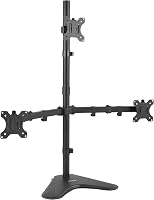
The best monitor arms for 3 monitors include the WALI Adjustable Single Monitor Arm for 13-34 inch Screens for a center screen add-on, the ErGear Dual Monitor Arm for fast tool-free setup, and the HUANUO FlowLift™ Pro Monitor Arm for 13–32" Screens for set and forget viewing.
On this page (17 sections)
- Best monitor arms for 3 monitors, ranked for triple setups
- WALI Adjustable Single Monitor Arm for 13-34 inch Screens, up to 26.4 lbs
- ErGear Dual Monitor Arm
- HUANUO FlowLift™ Pro Monitor Arm for 13–32" Screens
- WALI Adjustable Dual Monitor Arm for 13-32 inch Screens, 22 lbs per Arm
- ErGear Dual Monitor Stand up to 33 inches Screen
- HUANUO TitanLift Heavy Duty Monitor Arm
- MOUNTUP Dual Monitor Stand for Desk
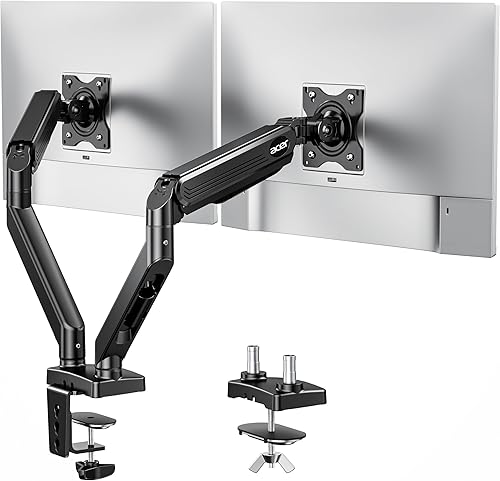
- Acer Dual Monitor Arm
- NB SmooVex™ Monitor Arm
- How these monitor arms for 3 monitors compare
- Can a monitor arm 3 monitors setup work on a small desk?
- How many arms do you need for a 3 monitor desk mount?
- What weight limit do you need for three screens?
- Single arm, dual arm or triple stand: which fits your desk?
- How do you set up and care for a triple arm system?
- Verdict: best monitor arms for 3 monitors
The best monitor arms for 3 monitors are a dual arm for the side screens plus a single arm for the center, because that gives you adjustable alignment for each display. You can also use an ultrawide center arm with two smaller side screens if your main display is large.
Three screens need more desk clearance than two. Lifting the displays frees space below for a keyboard, notebook or docking station.
It also lets you set each screen at eye level, which helps reduce neck strain during long work blocks.
Our score weighs specs, features and buyer feedback against what you're shopping for. We compared screen size, weight limits, VESA patterns, extension, height range and desk thickness limits across these picks.
Our picks at a glance
-
1
 Best for a center screen add-on
WALI Adjustable Single Monitor Arm for 13-34 inch Screens, up to 26.4 lbs
9.6/10 our score
See it on Amazon -
2

-
3
 Best for set and forget viewing
HUANUO FlowLift™ Pro Monitor Arm for 13–32" Screens
9.5/10 our score
See it on Amazon
- 4
 Check it
WALI Adjustable Dual Monitor Arm for 13-32 inch Screens, 22 lbs per Arm
Best for heavier dual screens - 5
 Check it
ErGear Dual Monitor Stand up to 33 inches Screen
Best for large dual screens - 6
 Check it
HUANUO TitanLift Heavy Duty Monitor Arm
Best for ultrawide center screens - 7
 Check it
MOUNTUP Dual Monitor Stand for Desk
Best for portrait and landscape mix - 8
 Best for flexible layoutsCheck it
- 9
 Best for slim desk setupsCheck it
Best monitor arms for 3 monitors, ranked for triple setups
The top picks work as parts of a triple system, not as a single triple mount. That is the honest trade in this category.
You get better alignment and desk clearance, but you need to plan the combination. If you want to avoid desk mounting, compare triple monitor floor stands.
Start with the computer monitor arms buying guide if you are new to arms. It explains VESA, clamp types and adjustment ranges in plain terms.
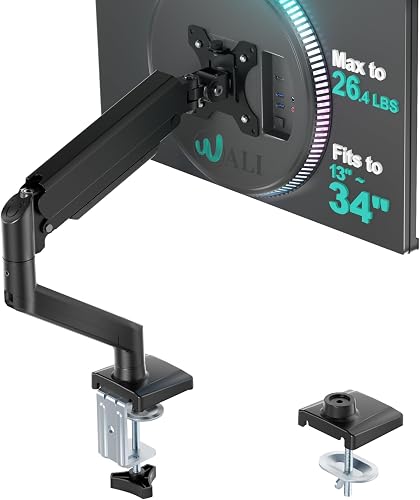
WALI Adjustable Single Monitor Arm for 13-34 inch Screens, up to 26.4 lbs
WALI Adjustable Single Monitor Arm for 13-34 inch Screens, up to 26.4 lbs: Best for a center screen add-on
- 13-34 inch screens
- Up to 26.4 lbs flat, 19.8 lbs curved
- 75x75mm and 100x100mm VESA
- 19.3 in extension, 17.3 in height
A strong single arm to complete a triple setup when paired with a dual arm, with wide adjustment and cable guides.
Pros
- High load capacity for a single arm
- Wide tilt, swivel and rotation
- C-clamp and grommet base
Cons
- Single screen only
- Needs a second arm for triple use
This WALI single arm suits the center screen in a triple layout. It fits 13 to 34 inch screens, with up to 26.4 lbs for flat screens and 19.8 lbs for curved screens, which helps if your center display is heavier than the side displays.
It extends out 19.3 inches and raises up to 17.3 inches above the desk. It swivels 180 degrees each way, tilts from plus 70 to minus 45 degrees, and rotates 360 degrees.
You can pull the center screen closer for detailed work, then push it back for a wider view. Cable guides run along the arms, which helps keep cords out of the way when you add a second arm.
If your desk cannot take a clamp, compare monitor wall mounts. Mounting is by C-clamp or grommet base for desks from 0.39 to 2.76 inches thick, on wood desks with no cross beam blocking the underside.
The trade is clear. This is one screen only, so you still need a dual arm for the other two.
Its capacity and range make it the easiest center piece to match with heavier displays.
ErGear Dual Monitor Arm
ErGear Dual Monitor Arm: Best for fast tool-free setup
- 13-32 in screens
- Up to 19.8 lbs
- Tool-free VESA mount
- 17.5 in height, 18.1 in extension
A dual arm with quick VESA mounting and independent positioning for two of your three screens.
Pros
- Tool-free VESA plate
- Independent arm adjustment
- Cable clips open without tools
Cons
- Dual screens only
- 19.8 lbs limit per stated total
This ErGear dual arm suits buyers who want the side pair mounted fast and adjusted on their own. It fits 13 to 32 inch flat or curved monitors up to 19.8 lbs, with 75x75mm or 100x100mm VESA patterns.
Each arm moves on its own, so you can angle one screen inward while the other stays straight. Setup is the main appeal.
The VESA plate mounts without tools in three steps, which helps when you are swapping screens or building a three monitor desk mount from parts.
The one-piece C-clamp fits desks from 0.39 to 2.56 inches thick. A grommet mount fits desks from 0.39 to 2.95 inches thick.
If a desk clamp will not work, compare adjustable wall mount arms.
Height goes up to 17.5 inches and extension up to 18.1 inches. Tilt is plus 80 to minus 50 degrees, swivel is plus or minus 90 degrees, and rotation is 360 degrees.
Cable clips open by hand and route wires along the arm. At 19.8 lbs it is fine for many 24 to 32 inch screens, but check heavier models.
It also covers two screens only, so add a single arm for the third.
HUANUO FlowLift™ Pro Monitor Arm for 13–32" Screens
HUANUO FlowLift™ Pro Monitor Arm for 13–32" Screens: Best for set and forget viewing
- 13-32 in, 4.4-15.4 lbs
- MechaSpring arm
- Tool-free VESA mount
- Up to 18.7 in extension
A single arm built to hold steady after you set the angle, useful as the center screen in a triple array.
Pros
- Steady hold after adjustment
- Visual tension window
- Quick snap-in VESA plate
Cons
- Lower 15.4 lbs limit
- Single screen only
This HUANUO single arm suits a center screen that you set once and leave in place for focused work. It fits 13 to 32 inch screens weighing 4.4 to 15.4 lbs, with 75x75mm or 100x100mm VESA holes.
That weight range covers many common monitors, but it is lower than several other picks here. The LockSteady system is the reason to pick it.
HUANUO says the arm moves with one finger, then holds steady without droop.
That helps in a triple setup where a side arm may bump the center screen during adjustment. The PrecisionView window shows tension with a yellow indicator, so you can set spring tension by sight rather than guesswork.
Reach is generous for a single arm. It extends up to 18.7 inches and adjusts height up to 16.5 inches.
Tilt ranges from plus 85 to minus 25 degrees, with swivel and rotation at plus or minus 90 degrees.
Mounting is by C-clamp or grommet base on wood desks from 0.59 to 3.54 inches thick. The trade is the 15.4 lbs cap and single screen design.
If your center monitor is light, this is a steady choice. If it is heavy, look at the WALI single or TitanLift instead.
WALI Adjustable Dual Monitor Arm for 13-32 inch Screens, 22 lbs per Arm
WALI Adjustable Dual Monitor Arm for 13-32 inch Screens, 22 lbs per Arm: Best for heavier dual screens
- 13-32 in screens
- 22 lbs per arm
- 75x75mm and 100x100mm VESA
- 19.3 in extension, 17.3 in height
A dual arm for two heavier side screens, with full motion and built-in cable management.
Pros
- 22 lbs per arm capacity
- Full tilt, swivel and rotation
- C-clamp and grommet options
Cons
- Dual screens only
- Needs a third support for triple use
This WALI dual arm suits a triple setup with heavier side screens. It fits most flat or curved screens up to 32 inches, with a max load of 22 lbs per arm and 75x75mm or 100x100mm VESA patterns.
That per arm rating is higher than the ErGear dual arm above, which gives more room for larger displays. It extends out 19.3 inches and raises up to 17.3 inches above the desk.
Swivel is plus or minus 90 degrees, tilt is plus 70 to minus 45 degrees, and rotation is 360 degrees. In daily use, that lets you pull both side screens forward for a close view of spreadsheets or timelines.
Cable management guides wires along the arms, so three screens do not leave a tangle at the back of the desk. WALI says the core has been tested through more than 20,000 cycles for smooth adjustment over years of use.
Mounting options are C-clamp or grommet base for desks from 0.39 to 2.76 inches thick. WALI recommends wood desks with no cross beam blocking the underside.
The trade is still two screens only, so pair it with a single arm and plan clamp spacing before you drill.
ErGear Dual Monitor Stand up to 33 inches Screen
ErGear Dual Monitor Stand up to 33 inches Screen: Best for large dual screens
- 17-33 in screens
- 4.4-22 lbs each arm
- 75x75 and 100x100mm VESA
- 17.5 in height and extension
A dual stand for larger side monitors, with steel construction and wide tilt range.
Pros
- Fits up to 33 in screens
- Steel VESA mount
- Cable management clips
Cons
- Dual screens only
- Minimum 17 in screen size
This ErGear dual stand suits buyers with larger side monitors in a triple array. Each screen must be 17 to 33 inches and 4.4 to 22 lbs, with 75x75mm or 100x100mm VESA holes.
That size range is wider on the top end than most dual arms here, which helps if your side screens are 32 or 33 inches. The VESA mount is steel, and the arms can rise up to 17.5 inches above the desk and extend 17.5 inches toward you.
Swivel is plus or minus 90 degrees, tilt is plus 90 to minus 35 degrees, and rotation is 360 degrees for portrait or landscape use. Cable management clips on the arm and pillar help route wires for a cleaner desk.
The mount has been tested for 20,000 cycles, according to ErGear, for smooth adjustment over time. That matters when you move side screens often for calls or shared viewing.
Install by C-clamp for desks from 0.39 to 2.56 inches thick, or by grommet for desks from 0.39 to 2.17 inches thick. ErGear recommends wood desks with no beams blocking the underside.
The trade is a 17 inch minimum screen size, so it does not suit very small side displays.
HUANUO TitanLift Heavy Duty Monitor Arm
HUANUO TitanLift Heavy Duty Monitor Arm: Best for ultrawide center screens
- 17-49 in screens
- 6.6-44 lbs
- 75x75 and 100x100mm VESA
- 22.5 in extension, 19.6 in height
A heavy duty single arm for a large ultrawide center display beside two smaller side screens.
Pros
- Holds up to 44 lbs
- Fits ultrawide up to 49 in
- Dual C-clamp base
Cons
- Single screen only
- Heavy duty size takes more desk space
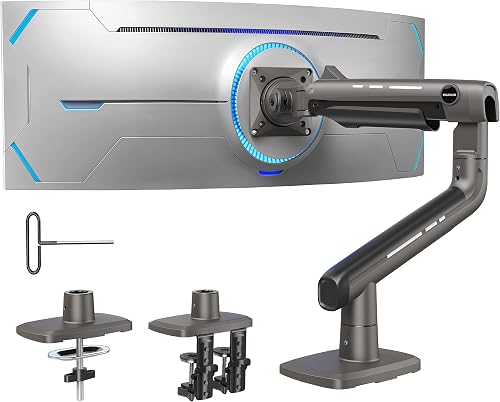
This HUANUO heavy duty arm suits a triple setup built around a large center display. It fits screens from 17 to 49 inches weighing 6.6 to 44 lbs, with 75x75mm or 100x100mm VESA holes.
That capacity is far above the other single arms here, so it handles ultrawide screens that lighter arms cannot.
Daily use is about reach and stability. The arm extends up to 22.5 inches and adjusts height up to 19.6 inches from the desk surface to the VESA center.
Tilt is plus or minus 50 degrees, swivel is 180 degrees each way, and rotation is 360 degrees for screens up to 35 inches. HUANUO says the aluminum alloy build, thicker arms and wider base support the load.
Setup uses a quick-install VESA head and a dual C-clamp base. Desk limits are strict.
Use only wood desks from 0.8 to 3.5 inches thick, with no cross beams or panels under the mounting area. Plastic and glass desks are not recommended.
The trade is size and single screen use. It takes more desk depth than a standard arm, and you still need side supports.
Pick it when the center screen is the heavy part of your triple layout.
MOUNTUP Dual Monitor Stand for Desk
MOUNTUP Dual Monitor Stand for Desk: Best for portrait and landscape mix
- 17-32 in screens
- 4.4-17.6 lbs
- 75x75 and 100x100mm VESA
- 17.3 in extension, 9.4 in height
A dual arm with pneumatic adjustment and rotation for mixed portrait and landscape side screens.
Pros
- 360 rotation for portrait mode
- Pneumatic arms
- Cable management in arms
Cons
- 17.6 lbs limit
- Dual screens only
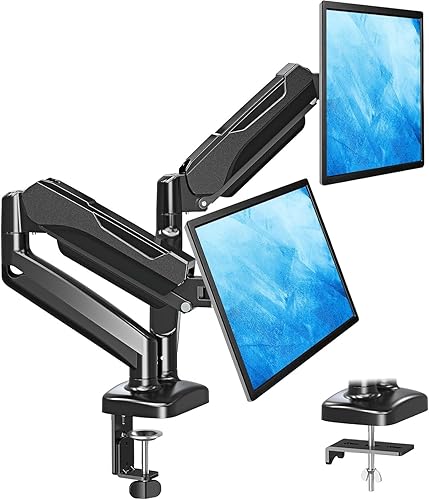
This MOUNTUP dual stand suits a triple layout with a mix of portrait and landscape screens. It fits flat and curved screens from 17 to 32 inches and 4.4 to 17.6 lbs, with 75x75mm or 100x100mm VESA patterns.
The lower weight limit means you must check heavier 27 to 32 inch models before you buy.
Pneumatic arms give smooth movement. Extension is 17.3 inches and height adjustment is 9.4 inches, which is shorter than several rivals here.
Tilt is 135 degrees total range in the stated spec, swivel is 180 degrees, and rotation is 360 degrees. In practice, that rotation lets you turn one side screen vertical for code, chat or documents while the other stays horizontal.
Cable management hides wires inside the arms, which helps when three screens and a laptop sit close together. The C-clamp fits desks from 0.39 to 2.76 inches thick.
A grommet option fits desks from 0.39 to 3.15 inches thick with a hole from 0.39 to 2.36 inches.
The trade is the 17.6 lbs cap and shorter height range. It is a good fit for lighter side screens and mixed orientation.
For heavier screens, the WALI dual or ErGear dual stand gives more headroom.
Acer Dual Monitor Arm
Acer Dual Monitor Arm: Best for flexible layouts
- 17-32 in screens
- 4.4-19.8 lbs per monitor
- 75x75 and 100x100mm VESA
- 18.1 in height, 21.25 in extension
A gas spring dual arm for varied layouts, from dual horizontal to mixed vertical setups.
Pros
- Multiple layout options
- Gas spring lift
- Hidden cable clips
Cons
- Not for glass or plastic desks
- Dual screens only
This Acer dual arm suits buyers who change layouts often. It supports 17 to 32 inch screens at 4.4 to 19.8 lbs per monitor, with 75x75mm or 100x100mm VESA patterns.
Acer lists multiple layouts, including dual horizontal, horizontal and vertical, dual vertical, and cross horizontal. That flexibility helps where one side screen may run vertical.
Gas spring lift gives smooth height changes. Max height adjustment is 18.1 inches and max extension is 21.25 inches, which is longer than most dual arms here.
Rotation is 360 degrees, tilt is plus 90 to minus 60 degrees, and swivel is plus or minus 90 degrees. You can pull screens close for detail work, then push them back for a wider field of view.
Mounting is by C-clamp or grommet base for desktop thickness from 0.59 to 3.15 inches. The grommet hole must be over 10mm.
Acer says the arm is not suitable for glass or plastic surfaces, and you should confirm desktop depth before you buy. Hidden cable clips help keep the desk tidy.
The trade is the 19.8 lbs limit and the need to check desktop depth. Layout flexibility is strong, but weight capacity is mid range for triple use.
NB SmooVex™ Monitor Arm
NB SmooVex™ Monitor Arm: Best for slim desk setups
- Up to 32 in screens
- Mechanical spring mount
- 75x75 and 100x100mm VESA
- 230mm height travel
A slim single arm with mechanical spring support, useful where desk depth is tight.
Pros
- Slim arm design
- Mechanical spring, no gas leak concern
- C-clamp and grommet options
Cons
- Single screen only
- Load limit not stated in pounds
This NB single arm suits a center screen in a slim triple setup where desk depth is limited. It fits flat and curved monitors up to 32 inches with 75x75mm or 100x100mm VESA patterns.
The load limit is not stated in pounds, so check your monitor weight with care before pairing it with heavier displays.
The mechanical spring system is the main design choice. NB says it replaces traditional gas spring arms for smoother movement and stable support, with no gas leakage concern and less sagging over time.
That can suit a screen you adjust daily for work, study or gaming.
Adjustment is simple. Rotation is plus or minus 90 degrees, tilt runs from minus 25 to 90 degrees, and height travel is 230mm.
That is less reach than the WALI or HUANUO single arms, but the slimmer arm design helps save desk space and reduce wall blocking issues.
Install in three steps with C-clamp or grommet mounting options. NB positions it for home offices, business workstations and multi-screen desk setups.
The trade is limited stated capacity and single screen use. It is a light duty center option, not the pick for a heavy ultrawide screen.
How these monitor arms for 3 monitors compare
A dual arm plus a single arm is the most flexible way to build triple support. You can set the center screen first, then angle the side screens inward to reduce neck turning.
Use {{compare}} to compare size, weight and VESA limits side by side. The key split is between arms that hold two screens and arms that hold one.
Dual arms save clamp space and keep wiring together. Single arms let you match capacity to a heavier center screen.
We checked specs for each model, including screen size, weight range, VESA pattern, extension, height range, tilt, swivel, rotation and desk thickness. We did not test these arms hands on.
If you prefer a fixed row with no separate arms, a freestanding stand may fit better. See our best freestanding triple monitor stand guide for that layout.
For a laptop plus two monitors, the best dual monitor arm with laptop tray guide covers a different setup.
Can a monitor arm 3 monitors setup work on a small desk?
Yes, if you lift the screens and plan clamp spacing first. A monitor arm for 3 monitors frees the surface below for a keyboard and notebook, but the arms still need room to swing.
Measure desk depth and width before you buy.
Check desk depth before you buy
Extension ranges here run from about 17 to 22.5 inches. On a shallow desk, a long extension can push arms into the wall or leave no room for a chair.
Confirm depth for the Acer arm in particular, since Acer asks buyers to check desktop depth.
Leave room for cable routing
Three screens mean more power and video cables. Arms with cable guides or clips help, but you still need a path to a power strip.
Route cables before you tighten clamps, so you do not need to lift screens again.
Match arm reach to chair position
Pair the setup with a Best Desk Chair with Adjustable Height so eye level and screen height can move together. Armrests also matter, so check Best Desk Chair with Adjustable Armrests if you reach for a mouse all day.
How many arms do you need for a 3 monitor desk mount?
Most buyers need two arms, one dual and one single. A dedicated triple arm would hold all three from one pole, but the picks here are mostly single and dual arms.
That mix is common because it gives independent adjustment.
Dual arm plus single arm
This is the most flexible option. The dual arm handles the side screens from one clamp.
The single arm handles the center screen from its own clamp. You can space clamps to fit desk edges, cable trays and cross beams.
Two dual arms for four screens
Some buyers use two dual arms and leave one arm empty for future use. That adds cost and clamp space.
It only helps if you plan to add a fourth screen later.
Single arm plus a stand
A single arm for the center screen can pair with a stand for side screens. That saves one clamp, but side screens lose independent lift and angle.
It can work for light office use where screens stay fixed.
What weight limit do you need for three screens?
Add the weight of all three screens, then check each arm limit on its own. A monitor mount for desk 3 screens fails when one screen exceeds its arm rating, even if the other two are light.
Weigh each monitor, not the average
Use the weight of the heaviest screen on each arm. The WALI dual arm allows 22 lbs per arm.
The ErGear dual arm allows 19.8 lbs. The MOUNTUP dual arm allows 17.6 lbs.
Curved screens often weigh more than flat screens in the same size, so check the exact model.
Check VESA pattern on every screen
Most picks here use 75x75mm or 100x100mm patterns. Some monitors need an adapter plate or have recessed holes.
Confirm VESA pattern, size and weight for each screen before you order, as several brands state in their compatibility notes.
Allow margin for cables and adapters
Video cables, power bricks and adapters add pull and weight at the VESA head. A screen near the limit may sag or drift.
If a monitor sits close to the cap, choose an arm with a higher rating, such as the 26.4 lbs WALI single arm or the 44 lbs TitanLift.
Single arm, dual arm or triple stand: which fits your desk?
The right choice depends on desk material, thickness and how often you move screens. Arms give the most adjustment.
Stands give a fixed row with fewer clamps.
Choose arms for adjustable alignment
Arms let you tilt, swivel, rotate and change height for each screen. That helps support three screens with adjustable alignment, which is the core goal here.
If you share your desk or change seats often, arms are worth the extra setup time.
Choose a stand for a fixed row
A triple monitor stand for laptop setups and desktop triple rows keeps screens locked in one line. Our triple monitor stand for laptop guide covers that use when a laptop sits below the row.
A stand can also suit curved displays, as covered in best triple monitor stand for curved monitors.
Check brand if you like one maker
If you want one brand across the desk, see best vivo triple monitor stand for a stand based option. For arms, mix brands by capacity.
A heavy center screen may need the TitanLift, while lighter side screens can use a dual arm with a lower cap.
How do you set up and care for a triple arm system?
Set the center screen first, then add side screens. That order keeps the main view at eye level and lets you angle side screens inward without fighting a fixed center position.
Install on wood desks with clear undersides
Most brands here recommend wood desks. Check thickness against the clamp range for your model.
Look under the desk for cross beams, drawers or cable trays that block the clamp. If a beam blocks the spot, move the clamp or choose grommet mounting where the desk allows it.
Adjust tension after mounting
Gas spring and mechanical spring arms need tension set for the screen weight. If a screen rises on its own, reduce tension.
If it falls, increase tension. Make small changes, then check tilt and swivel still hold.
HUANUO's window and Acer's tension screw both help with this step.
Check clamps and cables every few months
Tighten clamps, check VESA screws and route cables again after any move. Wipe arms with a dry cloth.
Do not use a screen as a handle to pull the arm. Hold the arm or the VESA head with care, and keep weight within the stated limit.
Verdict: best monitor arms for 3 monitors
Pick the WALI single arm plus a dual arm if you want the most flexible triple setup. The WALI single arm handles up to 26.4 lbs and reaches 19.3 inches, so it works as a strong center piece.
Pair it with the WALI dual arm for side screens up to 22 lbs per arm.
Pick the HUANUO TitanLift if your center screen is a large ultrawide up to 49 inches and 44 lbs. Pick the ErGear dual arm if fast tool-free VESA mounting matters more than maximum weight.
Pick the HUANUO FlowLift Pro if you want a center arm that holds steady after setup.
Before you buy, weigh each monitor, confirm VESA holes and measure desk thickness and depth. That simple check prevents most fit problems in a triple monitor arm setup.
Our top 3 picks at a glance
-
1
Best for a center screen add-on
WALI Adjustable Single Monitor Arm for 13-34 inch Screens, up to 26.4 lbs
9.6/10 our score
See it on Amazon -
2
-
3
Best for set and forget viewing
HUANUO FlowLift™ Pro Monitor Arm for 13–32" Screens
9.5/10 our score
See it on Amazon
Frequently asked questions
Can one arm hold three monitors?
Most arms in this guide hold one or two screens, so a triple setup usually needs a dual arm plus a single arm. Check each screen weight against the arm limit and confirm VESA holes before you order.
What desk thickness works for these arms?
C-clamp ranges vary by model, often from about 0.39 in to 2.76 in or wider. Measure desk thickness and check for cross beams under the mounting area before choosing clamp or grommet mounting.
Are dual arms plus a single arm better than a triple stand?
They give more independent adjustment for each screen. A triple stand keepsscreens in a fixed row, while separate arms let you angle side screens inward and match height to your chair.