7 Best Monitor Desk Mounts (November 2026)
The best best monitor desk mounts include the VIVO Dual Monitor Desk Mount for dual monitors up to 30 inches, the HUANUO FlowLift™ Dual Monitor Stand for dual screens up to 32 inches, and the HUANUO Dual Monitor Stand for a white dual setup.
On this page (8 sections)
- The best monitor desk mounts for single and dual screens
- How the best monitor desk mounts compare
- How do I choose the right monitor desk mount?
- Will a monitor desk mount bracket fit my desk?
- How do I set up a monitor desk mount for eye level viewing?
- Single, dual or ultrawide: which best monitor desk mount setup is right?
- What should I check before I order a monitor desk mount?
- Verdict: which best monitor desk mount should you buy?
The best monitor desk mount for most desks is the VIVO Dual Monitor Desk Mount, because it holds two 13 to 30 inch screens up to 22 lb each and gives full tilt, swivel and rotation.
You get a monitor desk mount bracket that frees desk space while keeping both screens at eye level.
Choose the HUANUO FlowLift for 32 inch dual screens, or the VIVO Single for one ultrawide up to 38 inches.
Our score weighs specs, features and buyer feedback against what you're shopping for.
We compared size, weight, VESA fit, desk thickness and adjustment range across these seven mounts.
We did not test them in person.
A good monitor desk mount does two jobs at once.
It secures a monitor to a desk while freeing usable workspace for your keyboard, laptop or notebook.
It also lets you set height and angle so you look straight ahead instead of down.
Our picks at a glance
-
1

-
2
 Best for dual screens up to 32 inches
HUANUO FlowLift™ Dual Monitor Stand
9.7/10 our score
See it on Amazon -
3

- 4
 Check it
VIVO Single 13 to 38 inch Ultrawide
Best for ultrawide monitors - 5
 Best for wide dual 32 inch screensCheck it
- 6
 Check it
Amazon Basics Single Computer Monitor Stand with
Best for a simple single screen - 7
 Check it
HEMUDU Single Desk Monitor Arm Mount Stand
Best for flat or curved single screens
The best monitor desk mounts for single and dual screens
The top picks split by screen count and size, not by looks.
Dual mounts win for multitasking, while single arms win for ultrawides and small desks.
Use the sections below to match the mount to your screens.
VIVO Dual Monitor Desk Mount: Best for dual monitors up to 30 inches
- Dual screens 13 to 30 in
- Up to 22 lb per screen
- VESA 75x75mm or 100x100mm
- C-clamp or grommet, desk up to 3.25 in
- Cable clips on arms and pole
A heavy duty steel dual mount for two screens up to 30 inches, with tilt, swivel, rotation and height adjustment along the center pole.
Pros
- 22 lb per screen
- Portrait or landscape
- C-clamp or grommet
Cons
- 30 inch limit
- Needs VESA holes
The VIVO Dual Monitor Desk Mount suits a desk with two 13 to 30 inch screens up to 22 lb each.
Each arm gives +90 to -90 degree tilt, 180 degree swivel and 360 degree rotation, so you can run landscape for spreadsheets and portrait for code or documents.
Height adjustment runs along the center pole, which helps you line both screens at the same eye level.
Cable clips on the arms and pole keep power and video cables off the desk surface.
The heavy duty C-clamp fits desks up to 3.25 inches thick, and VIVO also gives an optional grommet mount. For another mounting style, compare monitor wall mounts.
Detachable VESA plates mount to 75x75mm or 100x100mm holes, and hardware and instructions are included.
That hardware detail matters because the detachable plates let you attach the screens first and then lift them onto the arms.
The steel center pole design keeps both screens on one shared support, which simplifies alignment compared with two separate single arms.
Trade-off: it stops at 30 inches per screen, so a pair of 32 inch monitors needs a different pick here.
VIVO backs the steel design with a 3 year warranty.
HUANUO FlowLift™ Dual Monitor Stand: Best for dual screens up to 32 inches
- Dual screens 13 to 32 in
- 4.4 to 19.8 lb per arm
- VESA 75x75 or 100x100
- Desk 0.59 to 3.54 in
- Height up to 15.75 in
A full motion dual mount for 13 to 32 inch screens, with a dual C-clamp base, grommet option and cable guides along the arms.
Pros
- 32 inch screens
- Dual C-clamp base
- One hand adjustment
Cons
- 19.8 lb limit per arm
- Wood desks recommended
The HUANUO FlowLift Dual Monitor Stand suits dual 13 to 32 inch screens weighing 4.4 to 19.8 lb each.
It offers +85 to -50 degree tilt, plus or minus 90 degree swivel and 360 degree rotation, with height up to 15.75 inches.
The upgraded base uses a larger platform and a dual C-clamp structure.
A grommet option is also offered for desks from 0.59 to 3.54 inches thick.
HUANUO recommends wooden desks and warns that plastic or glass desks cannot be used. A wall mount monitor arm may suit a setup where desk mounting is not an option.
Built-in cable guides route wires along the arms.
Lifting both screens opens space for a keyboard, dock or notebook, which is the main daily benefit for most buyers.
The height range is useful when you sit at a fixed desk height and need the top of the screen near eye level without lowering the desk.
One hand movement for pulling a screen closer or pushing it back helps when you switch between reading and video.
Trade-off: the 19.8 lb per arm limit is lower than the VIVO dual pick.
Check your exact screen weight before you order, and confirm no cross beams block the clamp under the desk.
HUANUO Dual Monitor Stand: Best for a white dual setup
- Dual screens 13 to 32 in
- 4.4 to 19.8 lb per arm
- VESA 75x75 or 100x100
- C-clamp or grommet base
- White finish
The white version of a full adjustable dual mount for 13 to 32 inch screens, with swivel, tilt, rotate and height adjustment.
Pros
- White finish
- Dual screens to 32 in
- Cable management
Cons
- 19.8 lb limit per arm
- Check VESA before you order
The HUANUO Dual Monitor Stand in white suits a light colored desk where you want two 13 to 32 inch screens in a matching finish.
Each arm holds 4.4 to 19.8 lb and mounts with VESA 75x75mm or 100x100mm holes.
It gives swivel, tilt and rotate, with height adjustment to raise screens to eye level.
That helps you keep a more upright posture during long work blocks, which many buyers mention as the point of a mount.
Both a C-clamp and a grommet base are offered.
Cable management routes wires for a cleaner look, and HUANUO says mounting can free up extra desktop space and reduce clutter.
The white finish is the clearest difference from the black HUANUO pick, so treat the choice as a style decision once size and weight check out.
Full motion adjustment lets you rotate a screen to portrait for reading while keeping the other in landscape for reference material.
The structural design and desk fixation options aim for stability while you type or click.
Trade-off: it shares the same size, weight and VESA limits as the black HUANUO pick.
Choose white for style, or choose black if it matches your other gear.
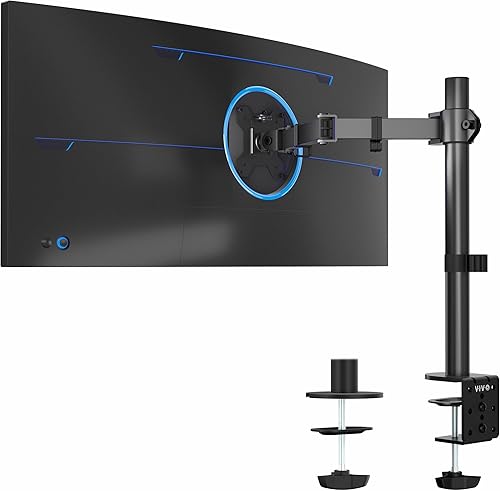
VIVO Single 13 to 38 inch Ultrawide: Best for ultrawide monitors
- Single screen 13 to 32 in, ultrawide to 38 in
- Up to 22 lb
- VESA 75x75 or 100x100
- Height up to 16 in
- C-clamp or grommet
A single arm for regular screens to 32 inches and ultrawides to 38 inches, with full tilt, swivel and rotation.
Pros
- 38 in ultrawide
- 22 lb capacity
- Portrait or landscape
Cons
- Single screen only
- Check weight before you order
The VIVO Single 13 to 38 inch Ultrawide suits one large screen rather than a pair.
It fits regular monitors from 13 to 32 inches and ultrawide monitors up to 38 inches, up to 22 lb.
The arm gives +90 to -90 degree tilt, 360 degree swivel and 360 degree rotation, with height adjustment up to 16 inches along the center pole.
Portrait mode works for long documents or chat panels.
The heavy duty clamp fits desks up to 3.25 inches thick with hand tightening, and a grommet mount is included.
Detachable cable clips on the arms and pole help keep cords organized.
The hand tightening clamp is a practical detail because it reduces the tools needed for the initial desk attachment.
The 16 inch pole height gives more vertical travel than several single arms here, which helps taller users or higher desks.
Trade-off: it holds one screen only, so it does not suit a dual monitor layout.
For a closer look at one-screen setups, see our best single monitor arm guide.
VIVO gives a 3 year warranty.
ErGear Dual Monitor Stand: Best for wide dual 32 inch screens
- Dual screens 13 to 32 in
- Up to 17.6 lb per arm
- VESA 75x75 or 100x100
- 31.22 in arm span
- 16 in high bar
A dual mount for two 32 inch screens, with a wide arm span, swivel, tilt and rotation for immersive or multitasking setups.
Pros
- Two 32 in screens
- Wide arm span
- Cable clips
Cons
- 17.6 lb limit per arm
- Wood tables recommended
The ErGear Dual Monitor Stand suits two screens up to 32 inches where a wide span matters.
Each arm supports up to 17.6 lb, with VESA holes at 75x75mm or 100x100mm.
It has a 31.22 inch wide arm span and a 16 inch high bar, which ErGear says can accommodate two 32 inch monitors.
That wide reach helps for immersive gaming or side by side multitasking.
Adjustment includes plus or minus 90 degree swivel, plus or minus 45 degree tilt and 360 degree rotation.
Cable clips help route wires, and lifting the screens frees desk space.
The wide span also gives you room to angle the outer edges of the screens toward you, which can reduce glare and widen the usable reading area.
The 16 inch bar height supports eye level placement for larger panels without crowding the desk surface below.
Trade-off: the weight limit is the lowest among the dual picks here at 17.6 lb per arm.
ErGear recommends wooden tables, with a C-clamp for 0.39 to 3 inches and a grommet mount for 0.39 to 2.36 inches.
Amazon Basics Single Computer Monitor Stand with: Best for a simple single screen
- Single screen 13 to 30 in
- Up to 22 lb
- VESA 75x75 or 100x100
- Height 7.9 to 14.2 in
- Desk 0.8 to 3.9 in
A steel single arm for 13 to 30 inch screens, with 360 degree rotation, tilt and cable management.
Pros
- Simple setup
- 22 lb capacity
- Portrait or landscape
Cons
- 30 inch limit
- Narrow tilt range
The Amazon Basics Single Computer Monitor Stand suits a simple one screen desk.
It fits most screens from 13 to 30 inches and up to 22 lb, on desks from 0.8 to 3.9 inches thick.
Height adjusts from 7.9 to 14.2 inches, with 360 degree rotation for landscape or portrait and tilt from -15 to +85 degrees.
A detachable VESA plate fits 100x100mm and 75x75mm patterns, and tools and hardware are included.
The steel arm has a cable management system to keep cords out of the way.
That makes it a straightforward choice when you want eye level viewing without a complex arm.
The desk thickness range up to 3.9 inches is the widest single arm range in this list, which helps with thicker desktops.
The stated height range is narrower than the VIVO single, so very tall setups may need a different arm.
Trade-off: the 30 inch limit and narrower tilt range make it less flexible than the VIVO single pick.
Amazon Basics gives a limited 1 year warranty.
HEMUDU Single Desk Monitor Arm Mount Stand: Best for flat or curved single screens
- Single screen 13 to 32 in
- Holds up to 77 lb
- VESA 75x75 or 100x100
- 360 rotation, tilt and swivel
- Desk up to 2.9 in
A single arm for flat or curved screens to 32 inches, with height adjustment, swivel, tilt and 360 degree rotation.
Pros
- Flat or curved screens
- High stated weight limit
- Cable clip
Cons
- Desk up to 2.9 in
- Check curved fit carefully
The HEMUDU Single Desk Monitor Arm suits flat or curved screens from 13 to 32 inches.
It is stated to hold up to 77 lb and fits VESA patterns at 75x75mm and 100x100mm.
It offers 360 degree rotation, plus or minus 50 degree tilt, plus or minus 45 degree swivel and height adjustment along the metal pole.
That range helps you set an ergonomic angle for work or gaming.
The cold-rolled steel construction and a cable clip help keep wires organized and free desk space.
HEMUDU says the package includes all needed accessories for easy installation.
The curved screen fit is the main reason to consider this pick, since many single arms list flat screens only.
The knob based fine tuning for verticality gives a simple way to lock a chosen angle after adjustment.
Trade-off: desk thickness is limited to 2.9 inches, which is tighter than several other picks.
Check curved screen fit and VESA holes carefully before you order.
How the best monitor desk mounts compare
The VIVO dual pick has the highest weight limit for dual use at 22 lb per screen.
The HUANUO dual picks reach 32 inches but stop at 19.8 lb per arm, and ErGear stops at 17.6 lb.
For single screens, the VIVO ultrawide arm and the Amazon Basics arm both support 22 lb.
| Product | Best for | Screen size | Weight per screen | VESA | Our score |
|---|---|---|---|---|---|
| VIVO Dual Monitor Desk Mount | dual monitors up to 30 inches | 13 to 30 in | Up to 22 lb | 75x75mm or 100x100mm | 9.7 |
| HUANUO FlowLift™ Dual Monitor Stand | dual screens up to 32 inches | 13 to 32 in | 75x75mm or 100x100mm | 9.7 | |
| HUANUO Dual Monitor Stand | a white dual setup | 13 to 32 in | 9.4 | ||
| VIVO Single 13 to 38 inch Ultrawide | ultrawide monitors | 13 to 38 in ultrawide | 75x75mm or 100x100mm | 9.3 | |
| ErGear Dual Monitor Stand | wide dual 32 inch screens | 13 to 32 in | 75x75mm or 100x100mm | 9.2 | |
| Amazon Basics Single Computer Monitor Stand with | a simple single screen | 13 to 30 in | 75x75mm or 100x100mm | 9.1 | |
| HEMUDU Single Desk Monitor Arm Mount Stand | flat or curved single screens | 13 to 32 in | 75x75mm or 100x100mm | 8.6 |
Size and weight tell you more than brand.
A 32 inch screen that weighs too much for an arm will sag or refuse to stay put, even if the inches fit.
Always check both numbers together.
Desk fit is the other split.
Clamp ranges here cover roughly 0.39 to 3.9 inches, but the exact range changes by model.
Measure your desk thickness before you choose C-clamp or grommet.
Adjustment ranges side by side
Tilt ranges differ in a way that affects daily use.
The VIVO dual and VIVO single arms list +90 to -90 degree tilt, while ErGear lists plus or minus 45 degrees.
Swivel also varies, with the VIVO single listing 360 degree swivel and the HUANUO picks listing plus or minus 90 degree swivel.
Rotation is listed at 360 degrees across most picks, which is what allows portrait use.
Height travel matters as much as the angle numbers.
The VIVO single reaches up to 16 inches along the pole, and the Amazon Basics arm adjusts from 7.9 to 14.2 inches.
The HEMUDU arm adjusts height along its metal pole, but the listing does not give a numeric height range.
Those differences explain why two mounts with similar screen limits can feel quite different on the same desk.
A taller pole gives more room to clear a laptop or a tall keyboard tray.
A shorter travel range can still work well if your chair and desk already place your eyes at the right height.
Check the height range against your seated eye level before you assume a mount will raise a screen enough.
How do I choose the right monitor desk mount?
Choose by screen count first, then by size and weight.
One screen points you to a single arm, while two screens point you to a dual mount.
After that, check inches and pounds per arm.
Single or dual mount
A single arm suits one monitor, one ultrawide or a small desk.
A dual mount suits two matched screens for documents, video calls and gaming.
Our computer monitor arms guide breaks down the types in more detail.
Screen size and weight
Match the mount to your largest screen.
The dual picks here cover 13 to 30 or 32 inches, while the VIVO single covers ultrawides to 38 inches.
Weight per arm is just as strict, so weigh or check your monitor spec sheet.
VESA holes
Look for 75x75mm or 100x100mm holes on the back of each screen.
Most picks here use one of those two patterns.
If your screen has no holes, you may need an adapter before any mount will work.
Desk material and thickness
Measure the desk at the clamp point and check the material.
Wood desks are recommended for the HUANUO and ErGear picks.
Plastic or glass desks are a poor match for several clamps in this list.
Will a monitor desk mount bracket fit my desk?
A clamp or grommet bracket fits a desk only when thickness and material match.
Measure thickness at the back edge where the clamp will sit.
Also check for beams or panels under the desk that can block the clamp.
Wood desks work with every pick here.
Some makers warn against plastic or glass desks, so do not force a clamp on a surface it was not designed for.
A grommet mount needs a hole and solid material around it.
Think about chair fit too.
A Best Desk Chair for Multiple Monitors can help you sit at the right height for a raised screen.
If you run a wide layout, our Best Office Chair For Dual Monitor Desk Setup guide is worth a read.
C-clamp or grommet mount
A C-clamp grips the back edge of the desk and needs clear space underneath.
A grommet mount uses a hole in the desk and needs solid material around that hole.
The VIVO picks fit desks up to 3.25 inches thick with either method.
The HUANUO picks list a desk range from 0.59 to 3.54 inches for their clamp and grommet options.
ErGear lists a C-clamp range from 0.39 to 3 inches and a grommet range from 0.39 to 2.36 inches.
The Amazon Basics arm fits desks from 0.8 to 3.9 inches, which is the thickest range here.
The HEMUDU arm lists desk thickness up to 2.9 inches.
Use those exact ranges rather than assuming every clamp fits every desk.
How do I set up a monitor desk mount for eye level viewing?
Set the screen so the top third sits at or below eye level.
Raise the arm, then tilt the screen back a few degrees.
Pull the screens close enough that you do not lean forward to read.
Use the full motion in daily use.
Pull a screen closer for spreadsheets, push it back for video and rotate to portrait for long text.
Our how to use a monitor arm guide walks through those moves step by step.
Route cables through the clips on the arms and pole.
Leave a little slack so the arm can still swivel and tilt without pulling a cable tight.
Tighten the clamp after you set the position, then recheck tilt.
Portrait or landscape for each task
Landscape suits most office work and video.
Portrait suits code, long documents and chat panels.
The VIVO dual pick lets you mix one screen in each orientation.
The HUANUO picks also offer 360 degree rotation for the same mix.
Test both orientations at your desk height before you lock the cable clips.
A screen that looks fine in landscape can feel too tall in portrait.
Single, dual or ultrawide: which best monitor desk mount setup is right?
Pick a single arm for one screen, a dual mount for two matched screens, and an ultrawide arm for one wide panel.
The VIVO Single handles ultrawides to 38 inches.
The dual picks handle two screens to 30 or 32 inches.
For one screen that you move often, a gas spring arm can help.
See our best gas spring monitor arm picks for that style.
For a fixed one screen desk, the simpler steel arms here may be enough.
Match the mount to your chair and desk height as well.
A screen at eye level helps only when your seat height lets you sit upright.
Adjust chair, desk and arm together.
When two screens beat one ultrawide
Two screens give you a clean split between tasks.
You can keep a document on one screen and a video call on the other.
An ultrawide gives you one continuous surface with no center bezel.
That single surface can suit timelines and wide spreadsheets.
The cost in this list is weight and width, which the VIVO single meets at up to 38 inches and 22 lb.
What should I check before I order a monitor desk mount?
Check screen size, weight, VESA pattern and desk thickness before you order.
Those four checks prevent most returns.
Measure in inches and pounds, and confirm hole spacing in millimeters.
Also check desk material and clearance under the desk.
A clamp needs a flat edge and room to tighten.
A grommet mount needs a hole at the back where the pole can sit.
If your screen has no VESA holes, look at a best vesa monitor adapter plate before you buy a mount.
An adapter only helps when the back panel can support it and the screws have a place to go.
A simple pre order checklist
Confirm each screen is within the size range for the arm you pick.
Confirm each screen weight is within the per arm limit.
Confirm VESA holes at 75x75mm or 100x100mm on every screen.
Confirm desk thickness against the clamp or grommet range.
Confirm the desk material is suitable and the underside has no blocking beams.
That short list covers the limits stated for every pick in this roundup.
Verdict: which best monitor desk mount should you buy?
Buy the VIVO Dual Monitor Desk Mount for two screens to 30 inches and 22 lb each.
Buy the HUANUO FlowLift for two 32 inch screens up to 19.8 lb each.
Buy the VIVO Single for one ultrawide up to 38 inches.
That rule keeps the choice simple.
Match screen count, then check size and weight, then confirm VESA and desk thickness.
With those four numbers in hand, the right mount is easy to spot.
Our top 3 picks at a glance
-
1
-
2
Best for dual screens up to 32 inches
HUANUO FlowLift™ Dual Monitor Stand
9.7/10 our score
See it on Amazon -
3
Frequently asked questions
What size monitor does a desk mount fit?
Most mounts here fit 13 to 30 or 32 inch screens. Check both size and weight per arm, because a large screen can exceed the limit even when it fits by inches.
Also confirm VESA holes at 75x75mm or 100x100mm on the back.
Will a desk mount fit my desk?
Check desk thickness and material first. Clamp ranges here run from about 0.39 to 3.9 inches depending on the model.
Wood desks are recommended on several picks, and beams under the desk can block a clamp.
Do I need a VESA adapter?
Only if your monitor lacks 75x75mm or 100x100mm holes. Measure the hole spacing in millimeters before you order.
Our guide to a best vesa monitor adapter plate can help when no holes are present.
Can a mount hold an ultrawide?
Yes, if the arm supports the size and weight. The VIVO Single here supports ultrawides to 38 inches and up to 22 lb.
Regular dual mounts in this list stop at 30 or 32 inches, so check the exact limit.