9 Best Laptop Stands with Fans (November 2026)
The best laptop stands with fans include the YICOSUN Adjustable Laptop Cooling Stand with 2 for compact desks, the Craftreasure Laptop Cooling Stand with Fan and for taller desk setups, and the Tonmom Laptop Stand for Desk for travel and ventilation.
On this page (10 sections)
- Best laptop stands with fans for cooling and posture
- How the best laptop stand with fan picks compare
- How we compared these laptop stands with fans
- Do you need a fan, or is an open stand enough?
- How high should you raise your laptop?
- Which laptop stand with fan fits gaming laptops?
- What should you check for travel and small desks?
- Do you need a hub in your laptop stand?
- How do you set up and care for a fan stand?
- Which fan stand should you buy in the end?
The best laptop stand with fan for most people is the YICOSUN, since it balances two fans, 3 speeds and a foldable frame for 10 to 16 inch laptops.
This guide compares nine stands by cooling, height, tilt, size and portability so you can match the stand to your desk, not just to a score.
Our score weighs specs, features and buyer feedback against what you are shopping for.
A laptop stand with fan does two jobs at once. It lifts the screen toward eye level and moves air under the base where many laptops pull in cool air.
That mix helps posture during long sessions and helps heat escape during heavy work.
Not every reader needs powered cooling, so this list also includes open vented designs and lap desks.
Our picks at a glance
-
1
 Best for compact desks
YICOSUN Adjustable Laptop Cooling Stand with 2
9.7/10 our score
See it on Amazon -
2
 Best for taller desk setups
Craftreasure Laptop Cooling Stand with Fan and
9.6/10 our score
See it on Amazon -
3

- 4
 Best for larger laptopsCheck it
- 5
 Check it
SHUWEI Laptop Cooling Stand with 3 Speed
Best for adjustable airflow - 6
 Check it
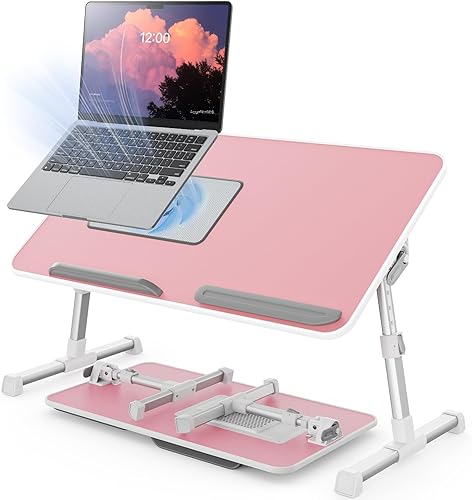
SAIJI Laptop Desk for Bed with Cooling
Best for bed and couch work - 7
 Check it
Uncaged Ergonomics Laptop Stand & Lap Desk
Best for lap and standing use - 8
 Check it
VanFeb 360° Rotating Adjustable Laptop Stand with
Best for shared screens - 9
 Check it
HC USB-C Hub Laptop Stand with Fan
Best for USB-C docking
Best laptop stands with fans for cooling and posture
The top picks split into three groups. Compact fan stands suit desks and travel.
Tall adjustable stands suit fixed workstations.
Lap and hub stands suit bed, couch and docking setups.
Choose the group first, then compare fan count and height.
YICOSUN Adjustable Laptop Cooling Stand with 2: Best for compact desks
- 2 quiet fans
- 3-speed cooling
- RGB lighting
- Foldable aluminum alloy
- Fits 10-16 inch laptops
Two fans and 3 speeds give you control over airflow on a small desk. The foldable aluminum frame suits travel and shared workspaces.
Pros
- 2 fans with 3 speeds
- Foldable and portable
- Anti-slip silicone pads
Cons
- RGB lighting may not suit every office
- Remove the laptop before adjusting height or angle
YICOSUN suits a small desk, a gaming setup or a DJ corner where space is tight.
Two fans with 3 speeds let you run quiet airflow for office work and stronger airflow for gaming.
The RGB lighting is a styling choice, so judge it by whether your room allows it.
The aluminum alloy frame folds for travel and weighs 1.9 pounds.
Anti-slip silicone pads help hold MacBook, Lenovo, ASUS and Dell models from 10 to 16 inches in place during typing or presentations.
Height adjustment helps you find a comfortable viewing angle, but you should remove the laptop before changing height or angle.
That step protects the hinges and keeps the stand stable.
Against the Craftreasure, YICOSUN gives you two fans and a lighter travel shape.
Against the Tonmom, it gives you powered cooling instead of passive airflow.
It is the best all-round pick here for most desks.
Craftreasure Laptop Cooling Stand with Fan and: Best for taller desk setups
- 1 quiet fan
- One-touch switch
- 0-90 degree angle
- 0-30 cm height adjustment
- Carbon steel, 10 kg load
A carbon steel frame and wide height range help you raise the screen closer to eye level. One fan and a simple switch keep controls easy.
Pros
- Wide height and angle range
- Sturdy carbon steel
- Simple one-key fan control
Cons
- Only 1 fan
- Larger folded footprint than the lightest picks
Craftreasure suits a fixed desk where you want the screen higher than compact stands allow.
0 to 30 cm height adjustment and a 0 to 90 degree angle range cover seated and standing work.
That range helps you bring a 10 to 16 inch laptop closer to eye level.
The carbon steel frame is rated for a 10 kg load.
Non-slip silicone pads help prevent slides and scratches.
For a heavy laptop, that sturdy frame matters more than a slim fold.
One quiet fan keeps the controls simple.
The one-touch switch, powered by USB-A or USB-C, lets you turn cooling on or off without reaching for a separate control.
You connect it to the laptop, so keep a free port in mind.
It trades a second fan for height and strength.
If your main need is a tall desk setup with simple fan control, this is a strong choice.
If you travel daily, a lighter foldable model may suit you better.
Tonmom Laptop Stand for Desk: Best for travel and ventilation
- Ventilated open design
- 7 height levels
- 2.78 to 6.5 inches high
- Folds to 10.5 x 1.96 x 0.68 inches
- Weighs 0.53 pounds
This stand relies on open airflow rather than a powered fan. Its very light foldable frame is easy to carry between home, office and outdoor work.
Pros
- Very light at 0.53 lb
- Open design for airflow
- 7 height settings
Cons
- No powered fan
- Smaller 10-15.6 inch range
Tonmom suits travel, hot-desking and outdoor work where weight matters.
It weighs only 0.53 pounds and folds to 10.5 x 1.96 x 0.68 inches.
You can slip it into a bag without changing how you pack.
The open design and forward tilt give more airflow than a laptop lying flat on a table.
It has no powered fan, so it will not move air on its own.
In a cool room with light office work, that trade-off is often fine.
Seven height levels raise the laptop from 2.78 to 6.5 inches.
That range helps posture, though it is shorter than the Craftreasure or SHUWEI.
Large anti-slip pads help secure 10 to 15.6 inch laptops.
Choose Tonmom for portability and passive ventilation.
Choose a fan model from this list if your laptop runs hot during gaming, exports or long calls.
Our best laptop stand for ventilation guide explains when open airflow is enough.
ZMYPPYA Laptop Stand for Desk: Best for larger laptops
- 1 active cooling fan
- Fits 14-18 inch laptops
- Up to 5 kg load with screw adjustment
- Foldable, 1.3 inches thick folded
- USB-A and USB-Type-C ports
A wider fit for 14 to 18 inch laptops makes this a pick for bigger gaming and work machines. The active fan and extra ports add cooling without a separate hub.
Pros
- Fits 14-18 inch laptops
- Active cooling fan
- USB-A and USB-C ports
Cons
- Load range needs screw adjustment
- Heavier laptops need care
ZMYPPYA suits owners of larger 14 to 18 inch laptops that many compact stands do not fit well.
The active cooling fan works with an open-frame design to move air during long sessions.
That wider fit is the main reason to pick it.
Load capacity reaches up to 5 kg after screw adjustment.
Use the included screw adjustment tool to set the load range for your machine.
Heavier gaming laptops need that step done carefully before daily use.
The stand folds to 1.3 inches thick for storage.
USB-A and USB-Type-C ports add connection options, and a phone mount gives a small extra perch. For more built-in storage, compare laptop stands with desk organizers.
Those extras help a crowded desk, but the fan and size fit come first.
Compared with the YICOSUN, ZMYPPYA fits bigger laptops but asks more setup.
It suits a gaming laptop stand role for larger machines.
If your laptop is 13 or 14 inches, a smaller stand will be easier to store and move.
SHUWEI Laptop Cooling Stand with 3 Speed: Best for adjustable airflow
- 1 large fan
- 3 wind speeds
- 40, 52 and 85 CFM modes
- Height to 11.8 inches
- Angle 0-120 degrees
- Supports 22 lb
Three stated airflow levels let you match fan speed to the task. The tall height range and wide angle help with seated posture and presentations.
Pros
- 3 clear fan speeds
- Tall 11.8 inch reach
- Supports up to 22 lb
Cons
- Best paired with an external keyboard
- 1 fan only
SHUWEI suits a desk where you want clear control over fan strength.
Three wind modes are stated at 40 CFM, 52 CFM and 85 CFM.
Soft mode suits quiet work, while strong mode suits heavy tasks when noise matters less.
Height reaches 11.8 inches and angle adjusts from 0 to 120 degrees.
That range helps you set a comfortable seated position for 10 to 15 inch notebooks.
The anodized aluminum support is rated for 22 pounds.
The stand weighs 0.95 kg, so it is a desk-first pick rather than a daily travel pick.
SHUWEI suggests an external keyboard and mouse.
That advice fits any tall stand, since typing on a high laptop keyboard can feel shaky.
It has one large fan instead of two smaller fans.
If you value predictable airflow levels, this model is easy to understand.
If you want the lightest folder, Tonmom is lighter.
If you want two fans, YICOSUN has them.
SAIJI Laptop Desk for Bed with Cooling: Best for bed and couch work
- USB cooling fan
- 5 heights, 9.4-12.6 inches
- 4 angles, 0-36 degrees
- 20.5 x 11.8 inch desktop
- Holds up to 80 lb
- Folds to 1.8 inches thick
A full desktop with a fan suits bed, couch and lap use. The wrist rest and retractable blocker help keep the laptop in place outside a desk.
Pros
- Large 20.5 x 11.8 inch surface
- USB cooling fan
- 5 heights and 4 angles
Cons
- Heaviest pick at 4.2 lb
- Less rigid than a fixed desk stand
SAIJI suits bed, couch and lap work more than a fixed desk unit.
The desktop measures 20.5 x 11.8 inches, enough room for a 17 inch laptop and a mouse.
That flat surface is a clear advantage outside a desk.
A USB cooling fan connects to the laptop for airflow during long use.
Five heights from 9.4 to 12.6 inches and four angles from 0 to 36 degrees help you find a posture that suits a sofa or bed.
The soft wrist rest and retractable blocker add comfort and security.
The frame uses a wood panel and metal legs rated for up to 80 pounds.
It folds to 1.8 inches thick for storage.
At 4.2 pounds, it is not a light travel stand.
It is a home comfort pick.
Choose SAIJI for lap work, reading and casual computing.
Choose a compact desk stand if you need a stable typing platform or a small footprint.
A lap desk will never feel as fixed as a desk, so set that expectation first.
Uncaged Ergonomics Laptop Stand & Lap Desk: Best for lap and standing use
- 2 fans
- 3 USB ports
- 18 x 11 inch aluminum panel
- 360 degree rotation
- Height 2 to 21 inches
- Removable mouse pad included
Two fans, three USB ports and a wide rotating panel cover desk, bed and standing use. Its height range is the widest here, but it is also heavy.
Pros
- 2 fans and 3 USB ports
- 18 x 11 inch panel
- 2 to 21 inch height range
Cons
- Weighs 5 pounds
- Large panel needs more space
Uncaged Ergonomics suits people who work in more than one place.
The 18 x 11 inch panel rotates 360 degrees and holds notebooks up to 15.6 inches.
You can use it at a desk, over legs in bed or beside you on a couch.
Two fans and three USB ports help with cooling and accessories.
Height adjusts from 2 to 21 inches, the widest range in this group.
That range can support seated work and a portable standing setup at a desk.
A removable mouse pad is included.
The anodized aluminum panel is wide enough for a laptop and mouse, which helps when you cannot use a full desk.
At 5 pounds, it is the heaviest pick here.
This is a versatility pick, not a travel pick.
If you move between bed, couch and desk, the size and height range earn their keep.
If you need a slim stand for a bag, look at the Tonmom or YICOSUN instead.
VanFeb 360° Rotating Adjustable Laptop Stand with: Best for shared screens
- 360 degree rotation
- 1 cooling fan
- 0-180 degree tilt
- Fits 10-17.3 inch devices
- Supports 10 kg / 22 lb
- Carbon steel dual-bar design
The 360 degree base lets you turn the screen toward a partner without moving the stand. A wide 10 to 17.3 inch fit covers most laptops and large tablets.
Pros
- 360 degree rotation
- Fits 10-17.3 inch devices
- Supports 22 lb
Cons
- 1 fan only
- Heavier than slim travel stands
VanFeb suits shared work and presentations.
The 360 degree rotating base lets you turn the screen toward another person without lifting the laptop.
That helps in group projects, tutoring and small meetings.
A 5 inch cooling fan supports heat dissipation.
Height and tilt adjust, with angle from 0 to 180 degrees.
The dual-bar carbon steel design is rated for 10 kg or 22 lb, which covers many 10 to 17.3 inch laptops and large tablets.
It weighs 1.47 kg, so it sits between slim travel stands and lap desks.
The wide compatibility helps if you switch between a laptop and a tablet.
The single fan is a trade-off against two-fan models.
Choose VanFeb for rotation and wide fit.
Choose the HC if you also need docking ports.
Choose YICOSUN if a lighter fold and two fans matter more than turning the screen.
HC USB-C Hub Laptop Stand with Fan: Best for USB-C docking
- 9-in-1 USB-C hub
- 4K at 60Hz HDMI
- 100W PD charging
- Detachable magnetic fan
- 360 degree swivel
- Raises to 5.5 inches
This stand doubles as a docking station with HDMI, USB 3.0, audio and 100W charging. The detachable fan adds cooling, but you must confirm a full-function USB-C port first.
Pros
- 9-in-1 hub in the stand
- Detachable magnetic fan
- 360 degree swivel
Cons
- Needs full-function USB-C
- Fan cable connects through the hub
HC suits a USB-C laptop desk that needs docking in one device.
The 9-in-1 hub includes 4K at 60Hz HDMI, 100W PD charging, USB 3.0 and 3.5 mm audio.
One cable to the host port brings the ports to life.
The detachable fan mounts magnetically at the rear of the panel.
It connects to a hub USB port with the provided power cord and uses an in-line switch.
That design lets you run the fan only when heat builds.
Height rises to 5.5 inches, with upper and lower hinges for tilt.
The 360 degree swivel locks in place for precise angles.
It folds to 9.84 x 8.37 x 1.42 inches and weighs 2.09 lbs.
Check compatibility first.
You need a full-function USB-C port and a laptop up to 15.6 inches.
If your port lacks video or charging, the hub will not work as expected.
That check is worth doing before you order.
How the best laptop stand with fan picks compare
| Product | Score | Fan | Height and fit | Best use |
|---|---|---|---|---|
| YICOSUN Adjustable | 9.7 | 2 fans, 3 speeds | Compact, 10-16 inches | Small desk and gaming |
| Craftreasure | 9.6 | 1 fan | 0-30 cm, 10-16 inches | Tall desk setup |
| Tonmom | 9.3 | Passive airflow | 2.78-6.5 inches, 10-15.6 inches | Travel |
| ZMYPPYA | 9.3 | 1 fan | 14-18 inches | Larger laptops |
| SHUWEI | 9.1 | 1 fan, 3 speeds | To 11.8 inches, 10-15 inches | Adjustable airflow |
| SAIJI | 9.1 | USB fan | 9.4-12.6 inches, 20.5 inch top | Bed and couch |
| Uncaged Ergonomics | 8.3 | 2 fans | 2-21 inches, 18 x 11 inch top | Lap and standing |
| VanFeb | 7.9 | 1 fan | 10-17.3 inches | Shared screen |
| HC | 7.7 | Detachable fan | To 5.5 inches, to 15.6 inches | USB-C docking |
| Product | Best for | Size | Weight | Compatibility | Our score |
|---|---|---|---|---|---|
| YICOSUN Adjustable Laptop Cooling Stand with 2 | compact desks | 9.8 x 8.7 x 1.2 inches | 1.9 pounds | 10-16 inch laptops | 9.7 |
| Craftreasure Laptop Cooling Stand with Fan and | taller desk setups | 10.24 x 8.66 x 2 inches | 10-16 inch laptops | 9.6 | |
| Tonmom Laptop Stand for Desk | travel and ventilation | 10.5 x 1.96 x 0.92 inches | 0.53 pounds | 10-15.6 inch laptops | 9.3 |
| ZMYPPYA Laptop Stand for Desk | larger laptops | 14-18 inch laptops | 9.3 | ||
| SHUWEI Laptop Cooling Stand with 3 Speed | adjustable airflow | 0.95 kg | 10-15 inch notebooks | 9.1 | |
| SAIJI Laptop Desk for Bed with Cooling | bed and couch work | 11.8 x 20.5 x 12.6 inches | 4.2 pounds | 9.1 | |
| Uncaged Ergonomics Laptop Stand & Lap Desk | lap and standing use | 18 x 11 x 24 inches | 5 pounds | Up to 15.6 inch notebooks | 8.3 |
| VanFeb 360° Rotating Adjustable Laptop Stand with | shared screens | 1.47 kg | 10-17.3 inch devices | 7.9 | |
| HC USB-C Hub Laptop Stand with Fan | USB-C docking | 2.09 lbs | Full-function USB-C laptops up to 15.6 inches | 7.7 |
How we compared these laptop stands with fans
We compared specs, features and buyer feedback against the search for a laptop stand with fan.
Fan count alone did not decide the order.
Height range, laptop size fit, weight and folding size mattered just as much.
We checked each stand for clear height and angle ranges.
A tall stand suits a fixed desk with an external keyboard.
A short stand suits travel and makes typing on the laptop keyboard easier.
The right choice depends on where you will use it most days.
We also checked load ratings and platform size.
Gaming laptops can be heavy and deep.
A stand rated for 10 kg or 22 lb gives more margin than a slim travel frame.
Measure your laptop before you choose the smallest option.
We looked at power needs.
Small fans often draw power from the laptop USB port.
Hub stands draw more and need the right cable.
Keep a free port in mind, since a fan should not force you to unplug a mouse or drive.
We did not test these stands in person.
Our scores come from research into stated specs, features and buyer patterns.
That is why the buying sections below focus on fit, size and use, not on invented test results.
Do you need a fan, or is an open stand enough?
An open vented stand is enough for light work in a cool room.
It lifts the laptop, creates a gap under the base and lets heat escape.
The Tonmom is the clear example here, since it relies on airflow rather than a powered fan.
A powered fan helps when the base gets hot during gaming, video work or long calls.
Moving air under the laptop can help the internal fans do their job with less strain.
It will not fix blocked vents or a failing internal fan.
Choose a fan if your laptop feels hot on the underside, throttles during heavy work or sits in a warm room.
Choose open airflow if your tasks are light and you want the lightest carry.
Noise matters too, so check whether you can turn the fan off.
Many stands here let you run the fan only when needed.
That gives you passive ventilation for email and powered cooling for heavy work.
It is a practical middle ground for mixed use.
How high should you raise your laptop?
Raise the screen until the top third is near eye level when you sit tall.
That position helps you look forward instead of down at a low screen.
Start with a lower height and move up in small steps.
At a high setting, you will usually need an external keyboard and mouse.
Typing on a raised laptop keyboard can wobble and can strain wrists.
An external keyboard also keeps your hands away from a warm base.
Check the stand's stated height range before you buy.
The Craftreasure reaches 0 to 30 cm, while the HC reaches 5.5 inches.
The Uncaged model reaches 2 to 21 inches, which is far taller than most desk stands.
Tall is not always better.
A stand that is too high for your chair can force you to reach up.
Match the height range to your chair, desk and screen size, then adjust for the view that feels natural.
Which laptop stand with fan fits gaming laptops?
Gaming laptops often run hot and weigh more than ultrabooks.
Look for a wider platform, a clear load rating and a fan that can run at full speed during long sessions.
The ZMYPPYA fits 14 to 18 inch laptops and reaches a 5 kg load with adjustment.
The YICOSUN suits 10 to 16 inch gaming laptops with two fans and 3 speeds.
Its compact fold helps if you share a desk or travel to a second location.
RGB lighting may suit a gaming desk, but it is not needed for cooling.
The SHUWEI gives stated airflow levels up to 85 CFM on strong mode.
That clear speed choice helps during long games.
Its 11.8 inch height also helps with a fixed gaming desk and external keyboard.
Avoid a slim stand if your gaming laptop is deep or heavy.
Check the platform depth and load rating first.
A stand that fits a 14 inch ultrabook may feel small under a larger machine.
Our best laptop stand for gaming laptop guide covers gaming-specific fit in more detail.
What should you check for travel and small desks?
Travel stands need low weight, a thin fold and simple setup.
The Tonmom weighs 0.53 pounds and folds very thin.
The YICOSUN weighs 1.9 pounds and folds for a bag or backpack.
Small desks need a narrow footprint more than extra height.
A compact stand leaves room for a mouse, notebook or phone.
The YICOSUN measures 9.8 x 8.7 inches, which helps on a shared desk.
Check the folded size, not just the open size.
A stand that packs flat is easier to store in a drawer or bag.
The ZMYPPYA folds to 1.3 inches thick, while the HC folds to 1.42 inches high.
If you travel often, our best foldable laptop stand with fan roundup narrows the field to models built around folding and carrying.
That shortlist suits commuters, students and hybrid workers.
Do you need a hub in your laptop stand?
A hub stand helps if you plug in a monitor, charger and accessories every day.
The HC includes 9 ports, HDMI, USB 3.0, audio and 100W charging.
That can replace a separate dock on a small desk.
A hub also adds cost and a compatibility check.
You need a full-function USB-C port for video and charging.
If your laptop has a charge-only USB-C port, the hub ports will not work as you expect.
For a fixed desk, a hub stand can cut cable clutter.
For travel, it adds weight and another cable.
Decide whether you dock daily at home or just carry the laptop between rooms.
If you already own a dock, a plain fan stand is simpler.
If you want one device to hold, cool and connect the laptop, the HC is the only pick here built for that job.
How do you set up and care for a fan stand?
Set the stand on a flat desk first.
Raise it slowly and check that the laptop sits centered on the platform.
Remove the laptop before changing height or angle on models that ask for that step.
Connect the fan cable before you place the laptop.
Keep the cable away from the hinge so it does not pinch.
Run the fan on low for office work and switch to a higher speed for gaming or exports.
Keep vents clear.
Do not block the rear or side exhausts with a wall, blanket or bag.
Leave space behind the laptop so hot air can move away from the stand.
Clean the fan and platform with a dry cloth.
Dust on the fan can reduce airflow over time.
Check silicone pads and hinges now and then, since loose pads let a laptop slide.
Which fan stand should you buy in the end?
The best laptop stand with fan for most desks is the YICOSUN, with two fans, 3 speeds and a foldable frame for 10 to 16 inch laptops.
It balances cooling, size and travel better than any other pick here.
Pick the Craftreasure for a taller fixed desk setup.
Pick the Tonmom for light travel and passive ventilation.
Pick the ZMYPPYA for a larger 14 to 18 inch laptop.
Pick the SHUWEI for clear fan speeds and a tall 11.8 inch reach.
Pick the SAIJI or Uncaged model for bed, couch and lap work.
Pick the VanFeb for a rotating shared screen.
Pick the HC if a USB-C hub matters more than a slim shape.
If your desk also needs a screen arm, see our computer monitor arms guide for a separate monitor setup.
Start with your laptop size, then your main location.
That order prevents the most common mistake, which is buying a tall stand for travel or a slim stand for a heavy gaming laptop.
Measure first, then choose the fan and height that fit the job.
Our top 3 picks at a glance
-
1
Best for compact desks
YICOSUN Adjustable Laptop Cooling Stand with 2
9.7/10 our score
See it on Amazon -
2
Best for taller desk setups
Craftreasure Laptop Cooling Stand with Fan and
9.6/10 our score
See it on Amazon -
3
Frequently asked questions
Does a laptop stand with a fan really help a hot laptop?
A fan stand helps most when the laptop vents sit on the underside. It lifts the base, opens airflow and adds moving air under the machine.
It will not fix a failing fan or blocked vents inside the laptop.
Clean the laptop vents and keep rear and side exhausts clear for the best result.
How high should a laptop stand be?
Raise the screen so the top third sits near eye level when you sit tall. You will usually need an external keyboard and mouse at that height.
Start low, sit back and adjust in small steps.
Neck comfort matters more than reaching the highest setting.
Do I need a fan, or is a vented stand enough?
A vented stand is enough for light office work in a cool room. A powered fan helps during gaming, video export or long office sessions.
If your laptop throttles or feels hot on the base, a fan model is the safer pick.
Match the fan to the heat, not just the price.
Can I type on a laptop held high on a stand?
Short typing sessions can work, but a high angle often strains wrists. Most tall stands work best with an external keyboard and mouse.
Use the laptop keyboard only for short checks or travel.
That setup also keeps your hands away from the warm base.
What size laptop should I measure before buying?
Measure the laptop width and depth, then check the stand width and folding size. A 16 inch laptop needs a wider platform than a 13 inch model.
Also check weight limits for heavier gaming laptops.
A stand that fits the screen size on paper still needs room for the base.