9 Best Adjustable Wall Mount Monitor Arms (November 2026)
The best adjustable wall mount monitor arms include the MOUNT PRO Single Monitor Wall Mount for for most single-monitor desks, the HUANUO FlowLift Pro Monitor Arm for 13-32 in for smooth daily adjustments, and the ErGear Monitor Wall Mount for large 34 in screens.
On this page (10 sections)
- Best adjustable wall mount monitor arms for height and angle control
- How we compared these adjustable wall mount monitor arms
- How high should a height adjustable monitor wall mount sit?
- What size and weight limit do you need?
- Which wall type can hold a wall monitor mount adjustable arm?
- How far should the arm extend from the wall?
- Do you need a single, dual or ultrawide wall mount?
- How do you install and set tension on a wall monitor mount?
- What are the trade-offs between spring, gas spring and mechanical arms?
- Verdict: which adjustable wall mount monitor arm should you buy?
The best wall mount monitor arm for most desks is the MOUNT PRO, because it combines a 19.8 lb limit, a 21.6 in extension and full motion tilt, swivel and rotation for 13 to 32 in screens.
It frees desk space and lets you set viewing height without a stand on the desk.
A wall mount suits you if your desk is narrow, your desk is pushed to the wall, or your desk top is too thick for a clamp.
It also helps if typing shakes a desk stand.
Start with your screen size and weight, then check the wall.
Most picks here need a wood stud, solid concrete or brick wall, not drywall alone.
Our score weighs specs, features and buyer feedback against what you are shopping for.
We compared size range, weight limit, extension, height adjustment and wall type across all nine picks.
Our picks at a glance
-
1
 Best for most single-monitor desks
MOUNT PRO Single Monitor Wall Mount for
9.5/10 our score
See it on Amazon -
2
 Best for smooth daily adjustments
HUANUO FlowLift Pro Monitor Arm for 13-32 in
9.5/10 our score
See it on Amazon -
3

- 4
 Check it
HUANUO Gaming Dual Monitor Wall Mount for
Best for two monitors on one rail - 5
 Check it
ARES WING Wall Mount Monitor Arm for
Best for heavy ultrawide screens - 6
 Check it
Mount-It! Monitor Wall Mount Arm
Best for fingertip gas spring height moves - 7
 Check it
VIVO Black Monitor Arm Wall Mount
Best for ultrawides with spring lift - 8
 Check it
monTEK Single Monitor Wall Mount
Best for wide tilt range - 9
 Check it
MOUNTUP Single Monitor Wall Mount for Max
Best budget full motion pick
Best adjustable wall mount monitor arms for height and angle control
These nine picks cover single screens, dual screens and ultrawides.
The height adjustable monitor wall mount you need depends on screen size first, then weight, then how far the screen must reach from the wall.
We checked each model's stated screen range, weight limit, VESA pattern and wall type.
That order matters, because a mount that fits your screen but not your wall will not hold it safely.
For a general overview of the category, our computer monitor arms guide explains how desk arms and wall arms differ.
Our best monitor wall mount roundup covers fixed mounts in more detail.
MOUNT PRO Single Monitor Wall Mount for: Best for most single-monitor desks
- 13 to 32 in screens
- Holds up to 19.8 lb
- Extends up to 21.6 in
- Tilt +90 to -45 degrees, 180 degree swivel, 360 degree rotation
- VESA 75x75 and 100x100
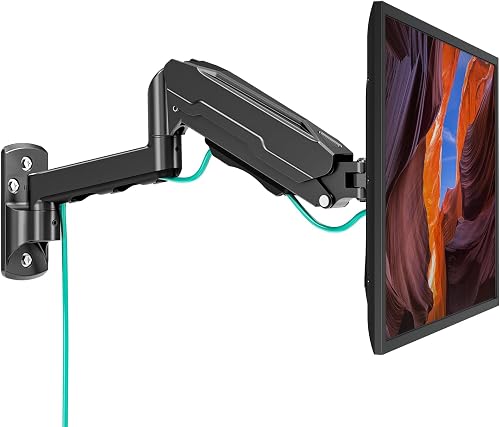
A full motion height adjustable monitor wall mount for 13 to 32 in screens, with cable management and a 21.6 in reach.
Pros
- High 19.8 lb capacity
- Long 21.6 in extension
- Cable management included
Cons
- Not for 1000R, 1500R or 1800R curved screens
- Needs a wood stud or solid concrete wall
MOUNT PRO suits a single monitor desk where you want height adjustment plus a long reach.
It fits 13 to 32 in screens up to 19.8 lb, which covers most home office monitors.
The arm extends up to 21.6 in, so you can pull the screen close for detail work or push it back to open desk space.
Tilt runs +90 to -45 degrees, swivel is 180 degrees, and rotation is 360 degrees for portrait or landscape use.
Height adjustment is set to your monitor weight, which gives a free-float feel once the tension is right.
MOUNT PRO says the arm passed 20,000 movement cycles.
It fits wood stud and solid concrete walls.
It is not compatible with 1000R, 1500R or 1800R curved screens, so check your screen shape before you order.
Choose it for a strong single screen setup with cable management.
Skip it for curved screens listed above.
HUANUO FlowLift Pro Monitor Arm for 13-32 in: Best for smooth daily adjustments
- 13 to 32 in screens
- 4.4 to 15.4 lb
- Up to 18.7 in extension
- 16.5 in height adjustment
- Tilt, swivel and rotation
- Tool-free VESA mount
A MechaSpring arm for 13 to 32 in screens, with a visible tension window and a snap-in VESA plate.
Pros
- Visible tension adjustment
- Tool-free VESA plate
- 16.5 in height range
Cons
- 15.4 lb limit is lower than several rivals
- Desk clamp version is not wall mounted
HUANUO FlowLift Pro suits buyers who adjust their screen often.
It fits 13 to 32 in screens from 4.4 to 15.4 lb with VESA 75x75 or 100x100.
It extends up to 18.7 in and adjusts height by 16.5 in, with +85 to -25 degree tilt, plus or minus 90 degree swivel and plus or minus 90 degree rotation.
That range helps you raise the screen to eye level.
The PrecisionView window shows tension with a yellow indicator, so you can set it by sight rather than by feel.
The InstaMount VESA plate is tool-free and snaps into place.
HUANUO says the MechaSpring arm lasts up to 2 times longer than conventional mounts.
The arm is 90% metal in construction.
Trade-off: the 15.4 lb limit is lower than the 19.8 lb limit on several rivals.
Also note this is a desk clamp or grommet arm, not a wall mount, so it suits desk setups rather than wall setups.
ErGear Monitor Wall Mount: Best for large 34 in screens
- 13 to 34 in screens
- Holds up to 19.8 lb
- Extends to 20.47 in
- 12.2 in height adjustment
- Tilt +80 to -50 degrees, swivel plus or minus 90 degrees, rotate 360 degrees
A full motion wall monitor mount adjustable to 34 in screens, with 12.2 in of height adjustment and a 3.54 in retracted depth.
Pros
- Fits screens up to 34 in
- Retracts to 3.54 in
- Good height range
Cons
- Do not mount on drywall alone
- Needs a wood stud, concrete or brick wall
ErGear suits a thick desk, a wall-side desk or a tight corner.
It fits 13 to 34 in monitors up to 19.8 lb, which is wider than most single arms here.
It extends to 20.47 in, retracts to 3.54 in, and gives 12.2 in of height adjustment.
You can pull the screen close, then tuck it back to save space.
Tilt is +80 to -50 degrees, swivel is plus or minus 90 degrees, and rotation is 360 degrees.
That makes portrait viewing and screen sharing easier without moving the desk.
It mounts to wood studs, concrete or brick.
ErGear says it was tested through 50,000 adjustment cycles.
Trade-off: do not mount it on drywall alone.
If your wall is drywall over studs, find a stud or use a different support plan.
Choose it for screens up to 34 in.
Choose MOUNT PRO if you want the longest single arm reach in this group.
HUANUO Gaming Dual Monitor Wall Mount for: Best for two monitors on one rail
- Two 17 to 32 in monitors
- 17.6 lb per arm
- Plus or minus 90 degree swivel
- Plus or minus 35 degree tilt
- 360 degree rotation
- VESA 75x75 and 100x100
A dual wall mount for two 17 to 32 in monitors, with swivel, tilt, rotation and cable management.
Pros
- Holds two monitors
- Cable management
- Portrait or landscape on each screen
Cons
- Needs two screens in the 17 to 32 in range
- Tilt range is narrower than single arms
HUANUO dual suits a two screen workstation.
It holds two monitors from 17 to 32 in, at 17.6 lb each, with VESA 75x75 or 100x100.
Each arm swivels plus or minus 90 degrees, tilts plus or minus 35 degrees, and rotates 360 degrees.
You can run both screens in landscape, or turn one to portrait for code or documents.
Height adjustment lets you raise both screens to reduce neck and shoulder strain.
Cable management keeps power cords out of sight.
It mounts to wood studs, solid concrete and brick.
HUANUO says assembly takes less than 10 minutes.
Trade-off: tilt range is narrower than the single arms, and total wall width matters a lot with two 32 in screens.
Measure the wall and the combined width before you buy.
For more dual layouts, see our best dual monitor arm wall mount guide.
For portrait stacks, see best vertical monitor wall mount.
ARES WING Wall Mount Monitor Arm for: Best for heavy ultrawide screens
- 17 to 49 in ultrawide screens
- Holds up to 44 lb
- Extends up to 23.9 in
- 10 in height adjustment
- Tilt +50 to -20 degrees, 180 degree swivel, 360 degree rotation
A heavy duty wall mount for 17 to 49 in ultrawide screens, including 1000R curved monitors, with a 23.9 in reach.
Pros
- 44 lb capacity
- Fits ultrawide to 49 in
- Long 23.9 in extension
Cons
- May need a VESA adapter if the screen has no VESA holes
- Do not use the anchor on drywall or wood alone
ARES WING suits heavy ultrawide screens.
It fits 17 to 49 in ultrawide screens up to 44 lb, including 1000R curved monitors.
It extends up to 23.9 in, the longest reach here, with a 10 in height range, +50 to -20 degree tilt, 180 degree swivel and 360 degree rotation.
You can pull a wide screen close, then fold it back to 5 in from the wall.
The gas spring was tested through 20,000 fatigue cycles, according to ARES WING.
The arm is made with steel and aluminum.
It should attach to a wood stud, solid concrete or brick wall.
Do not use the anchor on drywall or wood alone.
Trade-off: if your screen has no VESA holes, you will need to prepare a VESA adapter.
That extra part is worth checking before you order a heavy ultrawide.
Choose it for large ultrawides.
Choose a standard single arm if your screen is 32 in or smaller.
Mount-It! Monitor Wall Mount Arm: Best for fingertip gas spring height moves
- 13 to 32 in screens
- Holds up to 14.3 lb
- Extends up to 17.1 in
- Tilt +90 to -45 degrees, swivel 180 degrees, rotate 360 degrees
- Full motion gas spring
A single stud wall mount for 13 to 32 in screens, with gas spring height adjustment and integrated cable management.
Pros
- Gas spring height adjustment
- Single stud mounting
- Slide-in VESA plate
Cons
- 14.3 lb limit suits lighter screens
- Not for drywall only walls
Mount-It! suits a single stud wall and lighter screens.
It fits 13 to 32 in screens up to 14.3 lb with VESA 75x75 or 100x100.
It extends up to 17.1 in, with tilt +90 to -45 degrees, 180 degree swivel and 360 degree rotation.
The gas spring lets you glide the screen to height with fingertip ease once tension is set.
Steel construction and integrated cable management help keep the setup stable and tidy.
The slide-in VESA plate also makes it easier to move the screen between spots.
It attaches to a single wood stud or solid concrete wall, not drywall only.
Anchors and hardware are included.
Trade-off: the 14.3 lb limit is the lowest among the true wall mounts here, so heavier 27 to 32 in screens may exceed it.
Check your screen weight first.
Choose it for light to mid weight screens on a single stud.
Choose MOUNT PRO for a higher weight limit.
VIVO Black Monitor Arm Wall Mount: Best for ultrawides with spring lift
- Ultrawides up to 49 in
- Standard screens up to 32 in
- Holds up to 44 lb
- 13 in height adjustment
- Tilt -45 to +45 degrees, swivel 180 degrees, rotation 360 degrees
An aluminum wall mount for ultrawides up to 49 in, with pneumatic spring lift and a quick-release VESA plate.
Pros
- 44 lb capacity
- 13 in height adjustment
- Quick-release VESA plate
Cons
- VESA adapter not included if needed
- Hardware is for wood and concrete or brick walls
VIVO suits ultrawide buyers who want spring lift.
It fits ultrawides up to 49 in and standard screens up to 32 in, including 1000R curved screens, and holds up to 44 lb.
It gives 13 in of height adjustment, the tallest height range here, with pneumatic spring lift.
Tilt is -45 to +45 degrees, swivel is 180 degrees, and rotation is 360 degrees.
An elbow spring gauge helps set weight adjustment.
Cable management and a quick-release VESA plate keep install and daily moves simple.
Hardware is included for wood and concrete or brick walls.
The arm folds back against the wall when not in use.
Trade-off: if your monitor has no VESA holes, you will need an adapter that is not included.
Confirm VESA 75x75 or 100x100 on your screen first.
Choose it for ultrawides with a need for tall height adjustment.
Choose ARES WING if you want the longest extension.
monTEK Single Monitor Wall Mount: Best for wide tilt range
- 17 to 32 in screens
- 4.4 to 19.8 lb
- Extends up to 21.7 in
- 9.84 in height adjustment
- Tilt +90 to -90 degrees, swivel 180 degrees, rotation 360 degrees
A spring arm wall mount for 17 to 32 in screens, with a wide +90 to -90 degree tilt and a 21.7 in reach.
Pros
- Wide tilt range
- 19.8 lb capacity
- Retracts to 4 in
Cons
- Starts at 17 in, so small screens do not fit
- VESA adapter not included if needed
monTEK suits buyers who need a wide tilt range.
It fits 17 to 32 in screens from 4.4 to 19.8 lb with VESA 75x75 or 100x100.
It extends up to 21.7 in and retracts to 4 in, with 9.84 in of height adjustment.
Tilt runs +90 to -90 degrees, swivel is 180 degrees, and rotation is 360 degrees.
The steel and aluminum spring arm is built to reduce wobble and keep the screen stable.
Integrated cable management keeps wires tidy.
It is designed for wood studs, brick and concrete, not drywall alone.
The quick-release VESA plate helps fit the screen in about 10 minutes, according to monTEK.
Trade-off: it starts at 17 in, so smaller screens do not fit.
You will also need your own VESA adapter if your screen lacks VESA holes.
Choose it for 17 to 32 in screens and wide tilt.
Choose MOUNT PRO for 13 to 16 in screens.
MOUNTUP Single Monitor Wall Mount for Max: Best budget full motion pick
- Up to 32 in screens
- 4.4 to 19.8 lb
- Full motion tilt, swivel, height adjust and 360 degree rotate
- VESA 75x75 and 100x100
- Detachable VESA plate
A full motion wall mount for screens up to 32 in, with spring movement, a detachable VESA plate and height adjustment.
Pros
- Full motion in a simple design
- 19.8 lb capacity
- Detachable VESA plate
Cons
- Height adjustment range is not stated in the same detail as rivals
- Not for drywall alone
MOUNTUP suits a simple full motion wall mount on a budget.
It fits screens up to 32 in from 4.4 to 19.8 lb, with VESA 75x75 or 100x100.
The arm offers tilt, swivel, height adjustment and 360 degree rotation from landscape to portrait.
That gives you a full motion setup without a complex gas spring.
A detachable VESA plate makes it simple to attach the monitor.
The spring movement is designed to feel smoother and hold the screen stable.
It is designed for wood studs, brick and concrete, not drywall alone.
Clear instructions and mounting hardware are included.
Trade-off: the height adjustment range is less clearly stated than the 12.2 in on ErGear or the 13 in on VIVO.
If tall height travel matters, compare those first.
Choose it for a straightforward up to 32 in setup.
Choose a dual or ultrawide model if one screen is too small for your work.
How we compared these adjustable wall mount monitor arms
We compared screen size, weight limit, extension, height adjustment, tilt, swivel, rotation and wall type.
Those specs decide whether a mount fits your desk and your screen.
We did not test these arms.
We checked the stated specs and features for each model, and we label maker claims as claims from the brand.
A wall mount that fits a 32 in screen may still fail if your screen weighs more than the limit.
Always check both size and weight.
Cable management was also compared, because long power and video cables can pull on a screen when you move it.
How high should a height adjustable monitor wall mount sit?
Set the top of the screen at or just below eye level, then tilt to cut glare.
That starting point helps reduce neck strain for most seated users.
Your chair height changes the right monitor height.
If you pair the mount with a Best Desk Chair with Adjustable Height, set the chair first, then set the screen.
For seated work
Sit in your normal posture and raise the screen until the top edge is near eye level.
Then pull it close enough to read without leaning forward.
For standing desks
Raise the mount higher and extend the arm so you can step back for calls or screen sharing.
The longest arms here reach 21.6 to 23.9 in.
For shared screens
Use swivel to turn the screen toward a second person.
A 180 degree swivel helps for side-by-side sharing, while 360 degree rotation helps for portrait documents.
What size and weight limit do you need?
Match both screen size and screen weight, not size alone.
A 32 in screen can weigh far less than another 32 in screen.
Most single arms here fit 13 to 32 in screens and hold up to 19.8 lb.
The ErGear stretches to 34 in, while the ARES WING and VIVO stretch to 49 in for ultrawides.
For 13 to 32 in screens
MOUNT PRO, ErGear, Mount-It!, monTEK and MOUNTUP cover this range.
Check the lower limit too, because monTEK starts at 17 in.
For 34 in screens
ErGear is the only pick here rated to 34 in.
Check that your screen is 19.8 lb or less.
For ultrawide screens to 49 in
ARES WING and VIVO hold up to 44 lb and fit ultrawides to 49 in.
Measure your wall width, because a 49 in screen needs a wide wall.
Which wall type can hold a wall monitor mount adjustable arm?
Use a wood stud, solid concrete or brick wall, not drywall alone.
Drywall alone cannot hold the combined weight of a screen and arm.
Find a stud with a stud finder for wood walls.
For concrete or brick, use the anchors provided for that wall type.
For wood stud walls
Mount into the stud itself.
Several models warn against using anchors in drywall or wood alone, so follow the wall instructions for your stud.
For concrete or brick walls
Use the provided anchors for solid concrete or brick.
Drill with the right bits and do not rush the holes.
For drywall only walls
Do not use these mounts on drywall alone.
Consider a desk clamp arm instead, or find a stud or solid backing behind the wall.
How far should the arm extend from the wall?
Choose extension by desk depth and viewing distance, not by the longest number.
A 17 in reach suits a shallow desk, while 21 to 24 in suits deeper desks.
Mount-It! reaches 17.1 in, HUANUO FlowLift reaches 18.7 in, and ErGear reaches 20.47 in.
MOUNT PRO reaches 21.6 in, monTEK reaches 21.7 in, and ARES WING reaches 23.9 in.
For compact desks
A shorter reach can be enough if the wall is close to the desk edge.
Retracted depth also matters, because ErGear retracts to 3.54 in and monTEK to 4 in.
For deep desks
Look for 20 in or more of reach so the screen can sit at a comfortable distance.
Pull the screen close for detail work, then push it back to free space.
For corner desks
Test swivel range before you buy.
A 180 degree swivel lets you turn the screen toward the desk, while rotation helps for portrait use.
Do you need a single, dual or ultrawide wall mount?
Pick by total screen width, not by screen count alone.
Two small screens can be easier to fit than one large ultrawide.
For two screens, the HUANUO dual holds two 17 to 32 in monitors.
For three screens, our triple monitor wall mount guide covers spacing and weight checks.
For one screen
Single arms give you the widest choice here, from 13 in to 49 in.
They are also easier to balance for height adjustment.
For two screens
Measure the combined width and check the per-arm weight limit.
The HUANUO dual limit is 17.6 lb per arm.
For one ultrawide screen
ARES WING and VIVO hold up to 44 lb and fit to 49 in.
Check VESA holes, because an adapter may be needed.
How do you install and set tension on a wall monitor mount?
Attach the wall plate first, then fit the screen, then set tension to its weight.
That order keeps the arm from dropping while you work.
Our how to use monitor wall mount guide walks through positioning and daily use.
Follow the instructions for your wall type before you drill.
Step 1: Mark height and stud position
Hold the screen at eye level and mark the wall plate position.
Find the stud or mark concrete or brick holes.
Step 2: Attach the wall plate and VESA plate
Fix the wall plate to the stud or solid wall.
Then fit the VESA plate to the screen at 75x75 or 100x100.
Step 3: Hang the screen and set tension
Hang the screen, then adjust tension for its weight.
MOUNT PRO notes the arm is preset for a minimum tension of 4.4 lb, so a lighter screen may need care.
Step 4: Set tilt, swivel and cable routing
Tilt the screen to cut glare, swivel it toward you, and route cables through the management channel.
Leave slack so cables do not pull when you move the arm.
What are the trade-offs between spring, gas spring and mechanical arms?
Spring and gas spring arms move with less effort, but they need correct tension for your screen weight.
Mechanical arms are simpler, but height moves can take more effort.
MOUNT PRO uses a weight-based height system.
Mount-It! and ARES WING use gas spring designs.
monTEK and MOUNTUP use spring arms.
For frequent height changes
Gas spring or spring arms suit sit-stand desks and shared workstations.
Set tension once, then move height with less effort.
For set-and-forget setups
A simpler arm may be enough if you rarely change height.
Tilt, swivel and rotation still help for glare and sharing.
For heavy screens
Check the weight limit first.
A 44 lb ultrawide mount is built for heavy screens, while a 14.3 lb limit suits lighter screens only.
Verdict: which adjustable wall mount monitor arm should you buy?
Buy the MOUNT PRO for most single monitor desks, the ErGear for 34 in screens, and the ARES WING or VIVO for ultrawides to 49 in.
Match size, weight and wall type before you compare extra features.
Pick the HUANUO dual if you need two monitors on one wall mount.
Pick Mount-It! for a single stud and a lighter screen.
Pick monTEK for wide tilt, and MOUNTUP for a simple full motion design up to 32 in.
If you also need a chair that changes height with your desk, compare our Best Computer Chair with Adjustable Height picks.
They pair well with a height adjustable wall mount for sit-stand use.
Measure your screen, weigh it if you can, and find your wall type.
Then choose the best wall mount monitor arm that fits all three.
Our top 3 picks at a glance
-
1
Best for most single-monitor desks
MOUNT PRO Single Monitor Wall Mount for
9.5/10 our score
See it on Amazon -
2
Best for smooth daily adjustments
HUANUO FlowLift Pro Monitor Arm for 13-32 in
9.5/10 our score
See it on Amazon -
3
Frequently asked questions
What wall type does a height adjustable monitor wall mount need?
Use a wood stud, solid concrete or brick wall for most models here. Drywall alone is not enough for the weight of a screen plus the arm.
Check the wall type and the weight limit before you drill.
How high should a wall mounted monitor sit?
Set the top of the screen at or just below eye level when you sit or stand. Then use tilt to reduce glare.
A height adjustable arm lets you change that position as your chair height changes.
Can one wall mount hold two monitors?
Yes. The HUANUO dual model holds two 17 to 32 in monitors at 17.6 lb each.
Measure the total width first, because two large screens need more wall space than two small ones.
Will a wall mount fit an ultrawide monitor?
Some will. The ARES WING and VIVO models fit ultrawides up to 49 in and hold up to 44 lb.
Check the screen size, weight and VESA pattern before you choose an ultrawide mount.
Do I need a VESA adapter for a wall mount?
Only if your monitor has no VESA holes. The ARES WING, VIVO and monTEK entries note that an adapter may be needed.
VESA 75x75 or 100x100 fits most screens in this guide.