9 Best Vertical Stands for Multiple Laptops (November 2026)
The best vertical laptop stands for multiple laptops include the OMOTON 3-Slot Multiple Vertical Laptop Stand for three laptops in aluminum, the OMOTON 3-Slot Multiple Vertical Laptop Stand for a black metal look, and the Vaydeer Vertical Laptop Stand for Desk for a dual slot plastic stand.
On this page (10 sections)
- How we compared vertical stands for multiple laptops
- The best vertical laptop stands for multiple laptops, ranked by score
- How these vertical stands compare: slots, width and material
- How many slots do you actually need?
- What width range fits your laptops?
- Aluminum or plastic: which material should you pick?
- Will a vertical stand help with cooling and airflow?
- How do you set up and care for a multi-laptop stand?
- Which stand fits your desk setup?
- Verdict: the best vertical laptop stand for multiple laptops
The best vertical laptop stand for multiple laptops frees flat desk space by storing each laptop upright in its own padded slot.
The OMOTON 3-slot leads here because it combines three slots, a 0 to 1.37 in width range, and an anodized aluminum body with a wide base.
Our score weighs specs, features and buyer feedback against what multi-laptop buyers need. More slots help only if each slot fits your laptops at their thickest point.
We compared slot counts from 2 to 5, width ranges, materials, footprints and padding. A stand with five slots is not better for you if its slots are too narrow for your thickest machine.
If you are still comparing single-laptop holders, our best vertical laptop stand guide covers that wider group. The picks here focus on stands built to store several devices at once.
Our picks at a glance
-
1
 Best for three laptops in aluminum
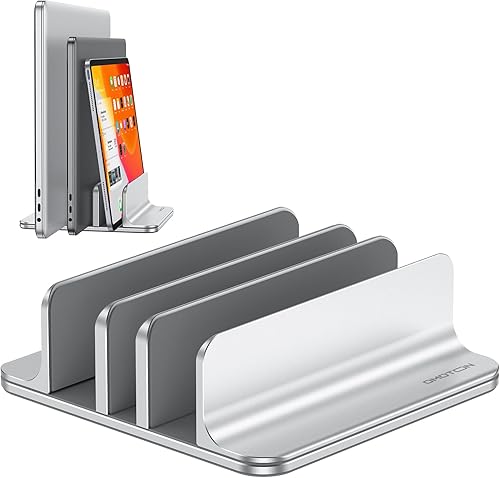
OMOTON 3-Slot Multiple Vertical Laptop Stand
9.6/10 our score
See it on Amazon -
2
 Best for a black metal look
OMOTON 3-Slot Multiple Vertical Laptop Stand
9.5/10 our score
See it on Amazon -
3
 Best for a dual slot plastic stand
Vaydeer Vertical Laptop Stand for Desk
9.4/10 our score
See it on Amazon
- 4
 Check it
Ryvlan Vertical Laptop Stand for Desk
Best for laptops plus tablets - 5
 Best for a walnut and aluminum lookCheck it
- 6
 Check it
AboveTEK Vertical Laptop Stand
Best for wide adjustable slots - 7
 Check it
KDD 4-Slot Vertical Laptop Stand with Gravity
Best for gravity locking storage - 8
 Check it
YICOSUN 4-Slot Aluminum Vertical Laptop Stand for
Best for a compact aluminum 4-slot - 9
 Check it
Elestoria 5- Slot Vertical Laptop Stand
Best for five devices upright
How we compared vertical stands for multiple laptops
We checked the stated slot count, width range, material, footprint, weight, padding and included items for each stand. We then matched those facts to common multi-laptop setups, such as a work laptop plus a personal laptop, or a work laptop plus a tablet and phone.
We did not test these stands, and we do not claim test results. Where a brand makes a claim about stability, cooling or scratch protection, we treat it as a brand claim and weigh it against the stated specs.
A key trade-off runs through this group. Stands with more slots store more devices, but they also need a larger footprint and a stable base.
A dual slot stand can be the right pick even when a 5-slot stand exists.
Accessories matter too. If your laptops connect to external screens, computer monitor arms can free desk space in a different way and pair well with closed-lid use.
The best vertical laptop stands for multiple laptops, ranked by score
The OMOTON silver stand leads the group on slot count, width range and build. The order below follows the scores, so read top down if you want the strongest overall pick first.
OMOTON 3-Slot Multiple Vertical Laptop Stand: Best for three laptops in aluminum
- 3 slots
- Adjustable width 0 to 1.37 in
- Anodized aluminum
- Silicone mats and base pads
- Bright silver finish
Three padded slots in bright silver hold up to three laptops upright while anodized aluminum and a wide base keep the stand steady.
Pros
- 3 slots for multiple laptops
- 0 to 1.37 in width range
- Silicone protection in slots and on base
Cons
- Silver finish may not suit a dark desk
- Only 3 slots if you need more storage
This OMOTON is the best fit if you own two or three MacBooks or mixed laptops and want one aluminum stand for all of them. Its three slots let a work laptop, a personal laptop and a spare machine stand upright at the same time.
The width range runs from 0 to 1.37 in, which covers thin ultrabooks and thicker machines in the same stand. You can adjust each slot to the device in it rather than using one fixed gap.
Anodized aluminum gives the body a stiff feel, and the wide base helps keep three upright laptops from tipping. Silicone mats cover the slots to reduce scratches, and pads on the base help it stay put on the desk.
The bright silver finish matches a MacBook-style setup, and the sandblasted, brushed finish suits a clean desk. Brands describe closed-lid use as possible with a MacBook holder like this, but check your own laptop maker rules before running it closed.
Against the black OMOTON below it, this version wins on finish preference alone. Against wider stands such as AboveTEK, it gives up some max width but keeps three equal slots.
OMOTON 3-Slot Multiple Vertical Laptop Stand: Best for a black metal look
- 3 slots
- Adjustable width 0 to 1.37 in
- Anodized aluminum
- Silicone mats and base pads
- Black finish
The black version matches the silver OMOTON on slot count and width range, with the same aluminum build and padded slots.
Pros
- 3 slots for multiple laptops
- 0 to 1.37 in width range
- Black finish for dark setups
Cons
- Same 3-slot limit as the silver version
- Black finish can show dust on some desks
This black OMOTON suits the same three-laptop buyer who prefers a dark finish. The layout matches the silver version, with three slots, a 0 to 1.37 in width range, and an anodized aluminum body.
That shared layout matters because you do not give up capacity to get the black color. You can store three laptops upright, adjust each slot to the machine in it, and rely on silicone mats in the slots plus pads on the base.
The wide base is the part to notice for stability. Three laptops standing upright put more leverage on a stand than one laptop does, so a wider footprint helps the stand resist tipping when you slide a machine in or out.
The black finish blends with black laptops, black desks and dark monitor setups. It can also show dust and fingerprints more than a silver finish on some desks, so wipe it with a soft cloth as part of normal care.
Choose the silver OMOTON if your desk is light and you want the stand to blend with a MacBook. Choose this black version if your setup is dark and you want the stand to disappear behind the laptops.
Vaydeer Vertical Laptop Stand for Desk: Best for a dual slot plastic stand
- Dual slots
- Adjustable width 0.59 to 0.94 in
- ABS plastic
- Silicone mats and base pads
- 5.98 x 5.51 x 2.17 in
A dual slot ABS plastic holder for two laptops, with adjustable width and silicone pads to grip the desk.
Pros
- Dual slot design for 2 laptops
- Lightweight ABS plastic
- Silicone pads on base
Cons
- Only 2 slots
- 0.59 to 0.94 in range is narrower than 3-slot picks
This Vaydeer is the best fit if a double vertical laptop stand covers your needs. Its two slots hold two laptops upright at the same time, which suits a work laptop plus a personal laptop.
The width range runs from 0.59 to 0.94 in. That range suits many standard laptops, but it is narrower than the OMOTON range.
Measure your thickest laptop before you assume both slots will fit your machines.
ABS plastic keeps the stand light, and the stated dimensions are 5.98 x 5.51 x 2.17 in at 0.23 kg. A light stand is easy to move between desks, but weight alone does not guarantee stability with two tall laptops.
Silicone mats line the slots to reduce scratches, and silicone pads on the base help grip the desk. Vaydeer describes the design as a 4-in-1 organizer that can also hold a tablet, phone or books.
Against the 3-slot stands, this Vaydeer gives up one slot. It makes up for that with a simple dual layout that many two-laptop households do not need to outgrow.
Ryvlan Vertical Laptop Stand for Desk: Best for laptops plus tablets
- 3 laptop slots plus 2 front slots
- Adjustable width 0.47 to 1.2 in
- ABS with silicone padding
- 7.32 x 5.93 x 2.17 in
- 283 g
Three laptop slots with two extra front slots for tablets or phones, in a light ABS body with silicone padding.
Pros
- Holds laptops plus tablets or phones
- 0.47 to 1.2 in width range
- Light at 283 g
Cons
- Front slots are not full laptop slots
- Plastic body rather than aluminum
This Ryvlan suits a desk where laptops share space with a tablet or phone. It has three laptop slots plus two front slots that take a tablet, e-reader or phone.
Each slot adjusts from 0.47 to 1.2 in. That range covers a thin notebook and a thicker gaming machine, and a wrench is included for adjustment.
The maker says adjustment takes about a minute.
The body is moulded ABS with silicone padding across the slot walls and bases. Padding helps grip each device and reduce scratches, and it also helps keep the stand from sliding on a bare desk.
The footprint is about 7.3 x 5.9 in, and the stand weighs 283 g. That is light enough to move between a home office and a dorm or classroom desk.
The trade-off is that the two front slots are not full laptop slots. If you plan to store four laptops, a true 4-slot stand such as the KDD or YICOSUN below will match that job better.
Choose this Ryvlan if your clutter is mixed devices. Choose a plain 3-slot aluminum stand if your clutter is three laptops and nothing else.
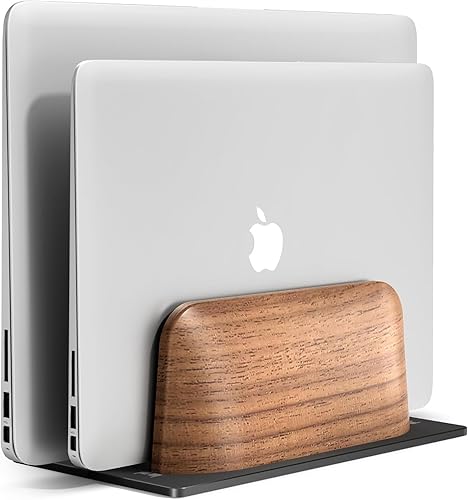
UPERGO Vertical Laptop Stand: Best for a walnut and aluminum look
- Dual slots
- Adjustable width 0.47 to 1.1 in
- Black walnut and anodized aluminum
- Silicone pads and felt lining
- 8.45 x 6 x 2.95 in
A dual slot stand built from black walnut and anodized aluminum, with felt lining in the clips and silicone on the base.
Pros
- Walnut and aluminum finish
- 0.47 to 1.1 in width range
- Felt and silicone protection
Cons
- Only 2 slots
- Wood grain varies between pieces
This UPERGO suits a desk where appearance matters as much as storage. It has two slots built from black walnut and anodized aluminum, so it reads as furniture rather than office hardware.
Each slot adjusts from 0.47 to 1.1 in. That range covers MacBook Pro and Air models, Dell XPS, HP Spectre, Lenovo ThinkPad and most 13 to 16 in laptops, according to the brand.
Measure your own machines to confirm the fit.
The wooden clips use felt lining inside, and the aluminum base uses silicone pads. That two-layer protection helps reduce scratches on the sides and base of each laptop.
The stand measures 8.45 x 6 x 2.95 in. Its footprint is larger than the Vaydeer dual slot stand, so it needs a bit more desk depth.
UPERGO notes that each walnut piece has unique grain and slight color differences. That variation is normal for real wood, and it means your stand will not look identical to a photo.
Against other dual slot stands, this one trades slot count for materials and finish. It is the pick when two slots are enough and you want the stand itself to look good on the desk.
AboveTEK Vertical Laptop Stand: Best for wide adjustable slots
- 3 slots
- Rear width 0.6 to 1.6 in
- Sandblasted aluminum
- Silicone mats
- 6.5 x 4.9 x 2 in
- 1.6 lb
Three aluminum slots with a rear holder that adjusts to 1.6 in, plus a phone dock slot and silicone mats.
Pros
- 3 slots in aluminum
- 0.6 to 1.6 in rear width range
- Phone dock slot
Cons
- At 1.6 lb it is heavier than plastic picks
- Rear adjustment is the main adjustable slot
This AboveTEK suits buyers who need a wide slot for a thicker laptop. It has three slots in a sandblasted aluminum body, and the rear holder adjusts from 0.6 to 1.6 in.
That 1.6 in maximum is the widest range in this group. It gives thick gaming laptops more room than stands that stop at 1.1 or 1.2 in.
The stand also has a dock slot for a phone, and the brand describes it as holding two laptops up to 17.3 in plus that phone dock. The silicone mats help reduce scratches, and the heavy base helps resist tipping.
At 6.5 x 4.9 x 2 in and 1.6 lb, it is heavier than the plastic picks. That weight can help stability, but it also means the stand is less easy to carry between rooms.
An Allen wrench is included to adjust the rear holder width. Plan a few minutes for setup if you need to change that slot for a thick machine.
Against the OMOTON, this AboveTEK offers wider max width but less even adjustment across all three slots. Choose it when one thick laptop drives your purchase.
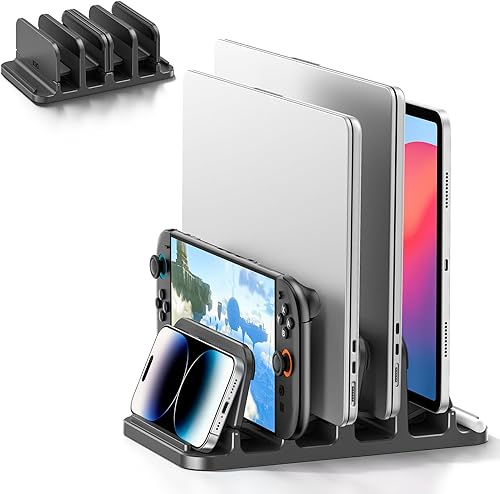
KDD 4-Slot Vertical Laptop Stand with Gravity: Best for gravity locking storage
- 4 slots, 6 storage slots in 6-in-1 design
- Thickness 0 to 1.1 in
- Gravity locking
- Silicone anti-slip pads
- 0.59 kg
A 4-slot stand with gravity locking that holds a device in place when you slide it into the slot, with pads on base and slots.
Pros
- 4 slots for more storage
- Gravity locking design
- 0 to 1.1 in thickness range
Cons
- Gravity mechanism is simpler than adjustable dividers
- 6-in-1 storage count mixes small devices with laptops
This KDD suits a buyer who wants four slots plus a locking feel. Its gravity locking design holds a device in place when you slide it into the slot, with no extra clamps to fasten.
The stand accepts thicknesses from 0 to 1.1 in, which covers MacBook, Surface, HP and Dell laptops, plus tablets, phones and Switch consoles, according to the brand. The 6-in-1 design counts six storage slots for mixed devices.
Silicone anti-slip pads sit on the base and in the device slots. Those pads provide grip and help keep the stand from sliding as you add or remove devices.
The vertical layout stores equipment upright, which frees flat desk space. At 0.59 kg, it is heavier than small plastic stands but still light enough to move by hand.
The trade-off is in how storage is counted. Some of the six slots suit phones or small devices rather than full laptops, so count the laptop-sized slots before you assume all six will hold laptops.
Choose this KDD if gravity locking appeals to you. Choose an adjustable divider stand if you want to set each slot width to a specific laptop.
YICOSUN 4-Slot Aluminum Vertical Laptop Stand for: Best for a compact aluminum 4-slot
- 4 slots
- Adjustable width 0.55 to 0.86 in
- Anodized aluminum alloy
- Silicone mats
- 4.3 x 5.4 x 2.7 in
- 0.49 kg
Four aluminum slots in a compact 4.3 x 5.4 in footprint, with a narrow width range that suits thinner laptops.
Pros
- 4 slots in aluminum
- Compact footprint
- Silicone mats
Cons
- 0.55 to 0.86 in range excludes thicker laptops
- Allen key included for adjustment
This YICOSUN suits a compact desk where four slots in aluminum matter more than a wide width range. Its four slots can hold a laptop, tablet and phone at the same time.
The width adjusts from 0.55 to 0.86 in. That range suits thinner laptops and tablets, but it will not fit a thick gaming laptop that needs more than 0.86 in.
The body is sandblasted, anodized and CNC-machined aluminum alloy. That build gives the stand a stiff feel, and the brand says it can support multiple devices without deformation or shaking.
Non-slip silicone mats provide backing pads to reduce sliding and friction scratches. The footprint is 4.3 x 5.4 x 2.7 in at 0.49 kg, which is compact for a 4-slot stand.
An Allen key is included for adjustment. That means you need the tool handy if you change slot widths often, rather than adjusting by hand.
Against the KDD, this YICOSUN offers aluminum construction and a more compact footprint. Against the Elestoria, it offers fewer slots but a clearer width range.
Elestoria 5- Slot Vertical Laptop Stand: Best for five devices upright
- 5 slots
- Aluminum alloy
- Soft silicone padding
- 10 x 5 x 2 in
- Devices up to 17.3 in
Five aluminum slots for laptops, tablets or phones up to 17.3 in, with a heavy base and silicone padding.
Pros
- 5 slots for the most storage here
- Aluminum alloy build
- Fits devices up to 17.3 in
Cons
- Largest footprint at 10 x 5 in
- No stated width range in inches
This Elestoria suits a desk with five devices to store upright. Its five adjustable slots can dock laptops, tablets or mobile devices in a single stand.
The brand says it fits devices up to 17.3 in, including heavy gaming laptops. That screen size range matters because slot count alone does not tell you whether a large laptop will fit.
The body is aluminum alloy with a heavy base, polished edges and soft silicone padding. Padding helps protect against scratches and grip each device, while the base helps resist tipping with several laptops upright.
The stand measures 10 x 5 x 2 in, which is the largest footprint here. Five slots need that space, so measure your desk depth before you order.
Elestoria describes the design as reclaiming desk space and allowing 360-degree airflow around upright devices. Treat airflow claims as brand claims, and still keep fans and vents clear of dividers.
Against 4-slot stands, this Elestoria gives you one more slot. It gives up compactness to do it, so it fits desks with room to spare rather than small shared desks.
How these vertical stands compare: slots, width and material
The comparison table below puts the key facts side by side. Slot count, width range, material and footprint explain most of the price and size differences in this group.
| Product | Best for | Slots | Width range | Material | Our score |
|---|---|---|---|---|---|
| OMOTON 3-Slot Multiple Vertical Laptop Stand | three laptops in aluminum | 3 | 0 to 1.37 in | Anodized aluminum | 9.6 |
| OMOTON 3-Slot Multiple Vertical Laptop Stand | a black metal look | 3 | 0 to 1.37 in | Anodized aluminum | 9.5 |
| Vaydeer Vertical Laptop Stand for Desk | a dual slot plastic stand | 2 | 0.59 to 0.94 in | ABS plastic | 9.4 |
| Ryvlan Vertical Laptop Stand for Desk | laptops plus tablets | 3 plus 2 front | 0.47 to 1.2 in | ABS, silicone | 9.3 |
| UPERGO Vertical Laptop Stand | a walnut and aluminum look | 2 | 0.47 to 1.1 in | Aluminum and black walnut | 9.1 |
| AboveTEK Vertical Laptop Stand | wide adjustable slots | 3 | 0.6 to 1.6 in | Aluminum | 8.9 |
| KDD 4-Slot Vertical Laptop Stand with Gravity | gravity locking storage | 4 | 0 to 1.1 in | Silicone pads | 8.6 |
| YICOSUN 4-Slot Aluminum Vertical Laptop Stand for | a compact aluminum 4-slot | 4 | 0.55 to 0.86 in | Aluminum, silicone | 8.4 |
| Elestoria 5- Slot Vertical Laptop Stand | five devices upright | 5 | Adjustable slots | Aluminum alloy | 8.1 |
A 3-slot stand is the sweet spot for many households. It stores a work laptop, a personal laptop and a spare device without taking as much desk depth as a 5-slot stand.
Width range matters as much as slot count. A 4-slot stand with a 0.86 in maximum will not fit a thick laptop, while a 3-slot stand with a 1.6 in maximum might.
Material shapes daily use. Aluminum stands tend to feel stiff and heavy, which helps stability.
ABS plastic stands are lighter and easier to move between rooms.
How many slots do you actually need?
Two slots suit most two-laptop households. A dual slot stand such as the Vaydeer or UPERGO stores a work laptop and a personal laptop upright.
Three slots suit mixed-device desks. The OMOTON, Ryvlan and AboveTEK stands hold three laptops, or two laptops plus a tablet or phone.
Four or five slots suit storage-heavy desks. The KDD, YICOSUN and Elestoria stands help when laptops, tablets and phones all compete for space.
Count only the slots that fit your largest laptop. A phone slot does not replace a laptop slot when you need to store a fourth machine.
Think about growth too. A 3-slot stand gives you a spare slot for a tablet or a future laptop, while a dual slot stand is full once both laptops are docked.
What width range fits your laptops?
Measure each laptop at its thickest point. Use a tape measure across the hinge or the thickest edge, and include a case if you store the laptop in one.
Thin laptops and tablets
Thin ultrabooks, MacBooks and tablets often need less than 0.6 in. Stands that start at 0.47 in, such as the Ryvlan and UPERGO, adjust down to that range.
Standard laptops
Many standard laptops fall between 0.6 and 1.0 in at their thickest point. The Vaydeer range of 0.59 to 0.94 in and the KDD range of 0 to 1.1 in cover much of this group.
Thick gaming laptops
Thick machines can need 1.2 in or more. The AboveTEK rear slot reaches 1.6 in, and the OMOTON range reaches 1.37 in.
Check our best vertical laptop stand thick laptop guide if your laptop is on the thick side.
If you need to compare metal builds before you buy, our best vertical metal laptop stand guide covers that angle in more detail.
Aluminum or plastic: which material should you pick?
Aluminum stands include the OMOTON, AboveTEK, YICOSUN and Elestoria picks. They tend to feel rigid and heavy for their size, which can help a stand stay put with several laptops upright.
Plastic stands include the Vaydeer and Ryvlan picks. ABS plastic is light and easy to move, which suits students, dorm rooms and shared desks where the stand may move often.
The UPERGO mixes black walnut with anodized aluminum. That mix suits a desk where the stand is visible furniture, not hidden storage.
Silicone padding matters in both materials. Pads in the slots reduce scratch risk, and pads on the base help the stand grip the desk.
Choose aluminum if you want a fixed home office stand. Choose plastic if you move the stand between rooms or desks.
Will a vertical stand help with cooling and airflow?
Upright storage can help airflow compared with a laptop lying flat on a desk. Air can move around the sides of an upright laptop instead of being trapped under a flat base.
That benefit depends on placement. Keep vents, fans and exhausts clear of dividers, and do not pack slots so tightly that air cannot move between laptops.
If heat is your main concern, read our vertical laptop stand with cooling guide before you buy. Some buyers pair a vertical stand with a raised stand for active use and a vertical stand for storage.
A vertical stand is mainly a storage tool. It does not raise a laptop to eye level for typing, so pair it with an external keyboard, mouse and monitor if you plan to use the laptop closed or docked.
How do you set up and care for a multi-laptop stand?
Place the stand on a flat, stable desk surface. A wobbly desk or a desk mat that slides can let a loaded stand shift.
Load the heaviest laptop in the center slot first if your stand allows it. That order keeps the center of weight low and centered on the base.
Adjust each slot to the device in it. A slot that is too loose lets a laptop lean, while a slot that is too tight can squeeze a case or a thick edge.
Daily care
Wipe aluminum and plastic with a soft, dry cloth. Check silicone pads now and then for dust, since dust can reduce grip on the base and in the slots.
Cable care
Route cables so they do not pull the stand when you lift a laptop out. A hub or dock placed near the stand can keep cables short and reduce tugs on the laptops.
Which stand fits your desk setup?
A gaming desk with a thick laptop and a spare laptop often needs the widest slot range. The AboveTEK or OMOTON stands fit that job because their ranges reach 1.6 in and 1.37 in.
A quiet home office with two MacBooks often needs only a dual slot stand. The Vaydeer or UPERGO stands fit that job without paying for slots you will not use.
A student desk with laptops, a tablet and a phone often needs mixed storage. The Ryvlan stand fits that job because its front slots take tablets and phones.
A shared workstation where laptops come and go needs easy loading. The KDD gravity locking design fits that job because you slide a device in and it locks without extra clamps.
If you spend long hours at the desk, your chair matters too. Our Best Desk Chair for Multiple Monitors guide and our Best Ergonomic Chair for Multiple Monitors guide cover seating for wide monitor setups.
Verdict: the best vertical laptop stand for multiple laptops
The OMOTON 3-slot in bright silver is the best vertical laptop stand for multiple laptops for most buyers. It holds three laptops upright, adjusts from 0 to 1.37 in, and uses an anodized aluminum body with a wide base and silicone padding.
Pick the black OMOTON if your setup is dark and you want the same layout in a different finish. Pick the Vaydeer or UPERGO dual slot stands if two laptops cover your needs.
Pick the AboveTEK if one thick laptop needs up to 1.6 in of slot width. Pick the KDD, YICOSUN or Elestoria if you need four or five slots and have desk depth to spare.
Measure your thickest laptop first, then count the slots you will actually fill. That order will point you to the right stand faster than slot count alone.
Our top 3 picks at a glance
-
1
Best for three laptops in aluminum
OMOTON 3-Slot Multiple Vertical Laptop Stand
9.6/10 our score
See it on Amazon -
2
Best for a black metal look
OMOTON 3-Slot Multiple Vertical Laptop Stand
9.5/10 our score
See it on Amazon -
3
Best for a dual slot plastic stand
Vaydeer Vertical Laptop Stand for Desk
9.4/10 our score
See it on Amazon
Frequently asked questions
What is a double vertical laptop stand?
A double vertical laptop stand has two upright slots, each with its own dividers and padding. It stores two laptops or a laptop and a tablet in one footprint.
Choose it when two devices cover your storage needs and desk space is tight.
How many laptops can a vertical stand hold?
Slot count sets the limit. Dual stands hold two devices, 3-slot stands hold three, and 4-slot or 5-slot stands hold more.
Check slot width range before assuming every slot will fit a thick laptop.
What width range should I look for?
Measure each laptop at its thickest point, including a case if you use one. Pick a stand whose full range covers that measure with room to spare.
A wider range gives more flexibility across brands.
Do vertical stands reduce desk clutter?
Yes, because they move laptops from flat desk space to upright storage. The footprint stays small while height does the work.
Pair the stand with a dock or hub if you also want fewer cables on the desk.
Are aluminum stands better than plastic?
Aluminum stands tend to feel stiffer and heavier, which can help stability with several laptops. Plastic stands are lighter and often cost less.
Material alone does not decide fit, so check slot count and width range first.