9 Best Vertical Laptop Stands (November 2026)
The best vertical laptop stands include the JARLINK Vertical Laptop Stand for thick laptops, the OMOTON 3-Slot Multiple Vertical Laptop Stand for three devices, and the Vaydeer Vertical Laptop Stand Holder Organizer Plastic for laptop and phone together.
On this page (10 sections)
- Best vertical laptop stands compared by slot count and thickness
- Side by side comparison of the best vertical laptop stands
- How we compared these vertical laptop stands
- What thickness should a vertical laptop stand fit?
- How many slots do you need?
- Screw adjust, automatic grip or gravity lock?
- Aluminum, plastic or wood?
- How should you set up a docked vertical workstation?
- Which brands and laptop types fit best?
- Verdict: which vertical laptop stand should you buy?
The best vertical laptop stand for most desks is the JARLINK, because its 0.55 to 2.55 inch range covers thin and thick laptops in one adjustable aluminum frame. If you dock one laptop all day, that range matters more than extra slots.
If you store several devices, OMOTON or KDD will help more.
A vertical laptop stand for desk use solves a simple problem. A closed laptop lying flat takes a full footprint.
Standing it upright frees that area for a keyboard, mouse, notebook or monitor gear. It also keeps the laptop away from spills on the desk surface.
Our score weighs specs, features and buyer feedback against what you are shopping for. We compared slot counts, thickness ranges, materials, adjustment type and stability features across these nine models.
None of these stands were hands on tested by our team.
Our picks at a glance
-
1

-
2
 Best for three devices
OMOTON 3-Slot Multiple Vertical Laptop Stand
9.6/10 our score
See it on Amazon -
3
 Best for laptop and phone together
Vaydeer Vertical Laptop Stand Holder Organizer Plastic
9.5/10 our score
See it on Amazon
- 4
 Check it
Vaydeer Vertical Laptop Stand for Desk
Best dual slot plastic pick - 5
 Check it
HumanCentric Vertical Laptop Stand for Desks Adjustable
Best tool free automatic grip - 6
 Check it
SODI Vertical Laptop Stand for Desk
Best gravity auto lock - 7
 Check it
KDD 4-Slot Vertical Laptop Stand with Gravity
Best for six devices - 8
 Best aluminum screw adjustCheck it
- 9
 Check it
Nuvograin Adjustable Vertical Laptop Stand
Best wooden look
Best vertical laptop stands compared by slot count and thickness
The right pick depends first on how many devices you store and second on laptop thickness. Single slot models suit a docked workstation.
For help pairing the stand with a typing setup, read how to choose a laptop stand and keyboard setup.
Multi slot models suit shared desks, students and households with several laptops or tablets.
JARLINK Vertical Laptop Stand: Best for thick laptops
- Adjustable 0.55 to 2.55 inches
- Anodized aluminum
- Silicone mat
- Allen key included
Wide adjustment range fits thicker laptops, with anodized aluminum and silicone protection.
Pros
- Widest thickness range here
- Scratch resistant aluminum
- Allen key included
Cons
- Single slot only
- Manual screw adjustment
JARLINK suits docked users with a thick laptop or a case. Its 0.55 to 2.55 inch range is the widest here, so it covers thin ultrabooks and thicker gaming laptops without forcing a compromise.
An included Allen key adjusts the screw to your exact width.
You get anodized aluminum with a silver finish and a silicone mat that guards against scratches. JARLINK says the mat also helps secure the laptop in a stable position.
The tower form factor measures 6 x 6.07 x 1.75 inches, so it needs a small but clear desk area.
Compatibility covers MacBook Pro and Air, Surface, Chromebook, Dell, Samsung, Acer, Asus XPS, HP ENVY and iPad, among others. That breadth helps if you switch devices.
The trade off is a single slot and manual adjustment, so people who swap laptops often may prefer a gravity lock model.
In daily use, the wide range is the main reason to choose this model. Set the screw once for your main laptop, then leave it set while you dock with cables attached.
That simple setup suits a fixed workstation where the laptop stays upright for the full day.
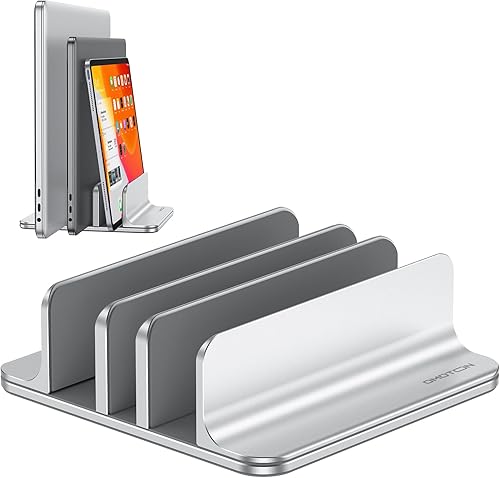
OMOTON 3-Slot Multiple Vertical Laptop Stand: Best for three devices
- 3 slots
- Adjustable 0 to 1.37 inches
- Anodized aluminum
- Silicone mats and base pads
Three aluminum slots hold laptops, tablets or phones in one stable base.
Pros
- Three slots in one unit
- Wide base for stability
- Silicone in slots and on base
Cons
- Narrower max thickness than JARLINK
- Bright silver finish only
OMOTON suits a desk with a laptop plus a tablet or phone. Its three slots let you store three devices upright in one unit.
That helps small desks where each device would otherwise take its own footprint.
The stand adjusts from 0 to 1.37 inches in thickness. Silicone mats line the slots to reduce scratches, and non slip pads on the base help keep the unit steady.
OMOTON uses anodized aluminum with sandblasted, brushed and CNC machined finishes for a MacBook like texture.
A wide base helps when you load several devices at once. The trade off is the 1.37 inch limit, which is tighter than JARLINK for very thick laptops.
If your main laptop is thick, check OMOTON against the best vertical laptop stand thick laptop guide before you order.
For daily use, think about which slot holds the heaviest device. Put the laptop in the most stable central position, then use the outer slots for lighter tablets or phones.
Measuring each device first helps each slot grip without forcing the adjustment.
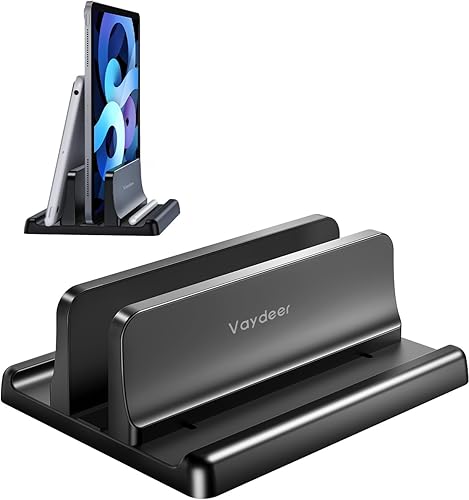
Vaydeer Vertical Laptop Stand Holder Organizer Plastic: Best for laptop and phone together
- 3 in 1 design
- Adjustable 0.55 to 1.69 inches
- ABS plastic
- Silicone mats
Lightweight plastic holder for one laptop plus a phone or iPad.
Pros
- Very light at 0.14 kg
- Allen wrench included
- Holds laptop and phone
Cons
- Plastic body
- Narrower max thickness
This Vaydeer model suits a single laptop user who also parks a phone or iPad vertically. Its 3 in 1 design cradles one laptop and a phone or iPad at the same time.
That mix is useful on a student desk or a shared home office desk.
Adjustment runs from 0.55 to 1.69 inches, with an included Allen wrench. The body is ABS plastic, so it weighs only 0.14 kg.
Soft silicone mats line the grooves to protect against scratches, and Vaydeer says the polished surface gives a smooth feel in daily use.
Compatibility covers MacBook Pro and Air, Surface, Dell, Samsung, Lenovo, Acer, Asus XPS, HP ENVY, iPad and iPhone, plus books. The trade off is plastic construction and a lower max thickness than JARLINK.
If you care about a metal frame, compare our best vertical metal laptop stand picks.
The light weight is a real benefit if you move the stand between a desk and a shelf. It also suits a laptop that stays docked but travels on weekends.
You still need to check thickness with a case, since the 1.69 inch limit is lower than aluminum picks in this guide.
Vaydeer Vertical Laptop Stand for Desk: Best dual slot plastic pick
- Dual slots
- Adjustable 0.59 to 0.94 inch per slot
- ABS plastic
- Non slip silicone pads
Dual slot plastic organizer for two laptops or mixed devices.
Pros
- Two slots
- Lightweight
- Silicone base pads
Cons
- Narrow thickness range
- Plastic construction
This second Vaydeer model suits two laptops on one desk. Its dual slot design supports two laptops vertically at once.
That doubles storage without doubling the footprint, which helps in a home office with a work laptop and a personal laptop.
Each slot adjusts from 0.59 to 0.94 inch in thickness. That range is narrow, so measure both laptops first.
The body is ABS plastic and the unit weighs 0.23 kg. Non slip silicone pads on the base grip the desk, and silicone mats cover the slots.
Vaydeer also lists iPad, iPhone, gaming laptops, notebooks and books as fit options. The trade off is clear: if either laptop exceeds 0.94 inch with a case, this is not the right holder.
For thicker machines, JARLINK or TECKNET gives more room.
In daily use, this model works best when both devices are similar in thickness. That balance helps the stand feel steady when you slide one laptop out while the other stays in place.
If one device is much thicker, a wider range single slot stand may be a safer choice.
HumanCentric Vertical Laptop Stand for Desks Adjustable: Best tool free automatic grip
- Fits up to 1 inch thick
- Anodized aluminum alloy
- Silicone pads and feet
- No tools needed
Automatic grip adjusts without tools for laptops up to 1 inch thick.
Pros
- No tools or inserts
- Matte black aluminum
- Silicone feet
Cons
- 1 inch limit
- Single slot
HumanCentric suits MacBook users who dock in closed lid mode. It automatically grips the laptop when you place it in the stand, with no tools or inserts needed.
That matters if you dock and undock several times a day.
It fits most laptops and MacBooks up to 1 inch in thickness, including those with skins and cases within that limit. The body is anodized aluminum alloy with a matte black finish.
Silicone pads grip the laptop, and silicone feet keep the stand in place on the desk.
The minimalist design suits a clean desk and pairs well with computer monitor arms when you build a full docked setup. A monitor wall mount setup guide can help plan the screen position.
The trade off is a single slot and a firm 1 inch cap.
Thicker laptops need a wider range model from this list.
For daily use, the automatic grip removes the need to retune width after each swap. That speed helps if you carry the laptop between rooms and dock it again at your main desk.
Just confirm your laptop stays under 1 inch with any case before you rely on this model.
SODI Vertical Laptop Stand for Desk: Best gravity auto lock
- Gravity auto lock
- Fits up to 1.05 inches
- Aluminum alloy
- Silicone pads
Gravity locking aluminum stand for fast store and retrieve use.
Pros
- Auto lock, no screws
- Aluminum alloy build
- Multi device use
Cons
- Single main slot focus
- Narrower max thickness
SODI suits people who want no screws. Its gravity auto lock design holds the laptop when you place it in the slot.
That makes store and retrieve use faster than a screw adjustable stand.
It fits laptops with thickness up to 1.05 inches. SODI lists 13 inch MacBook Air, MacBook Air M1 and M2, and 13 to 16 inch MacBook Pro models from 2019 to 2023, among other laptops within the thickness limit.
The body is aluminum alloy with sandblasted and CNC machined finishes.
SODI says the vertical position prevents blockage of air vents and helps heat dissipation. The stand also takes phones, tablets, books and Kindles in a 3 in 1 multi device role.
The trade off is less thickness headroom than JARLINK, so thick gaming laptops may not fit.
In daily use, the auto lock suits a routine of docking, undocking and docking again. You place the laptop in, gravity holds it, and you lift it out without tools.
Keep the vents side clear of walls and curtains so the upright position can do its job.
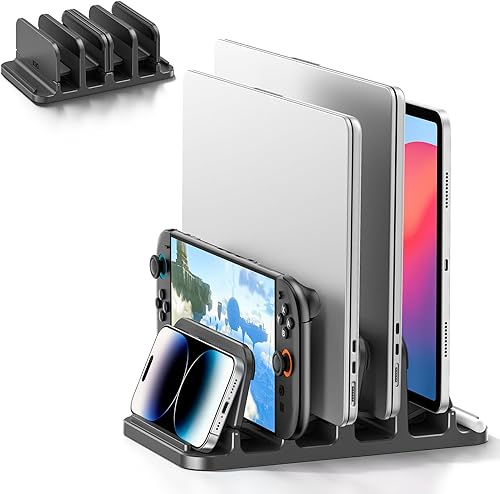
KDD 4-Slot Vertical Laptop Stand with Gravity: Best for six devices
- 6 storage slots
- Gravity locking
- Fits 0 to 1.1 inches
- Silicone anti slip pads
Six slot gravity locking organizer for laptops, tablets, phones and more.
Pros
- Six slots
- Gravity locking
- Wide device range
Cons
- Larger footprint
- Reaching middle slots takes care
KDD suits a multi device desk. Its six storage slots hold up to six devices at once, including laptops, tablets, phones, Kindles, books and game consoles.
That is the largest slot count in this guide.
Gravity locking holds each device without extra clamps. KDD says thickness range runs from 0 to 1.1 inches.
Silicone anti slip pads sit on the base and in the slots to reduce sliding. The vertical layout keeps the desktop neat in a home office or study area.
The trade off is size and reach. Six slots need more desk width than a single slot stand, and the middle slots can be harder to reach.
If you have only one laptop, OMOTON or JARLINK will be simpler. If you store many devices, KDD earns its place.
For daily use, plan what goes in each slot before you fill them all. Keep the laptop in an easy reach slot and place phones or books where you can see them.
That small plan stops a six slot organizer from becoming a cluttered shelf.
TECKNET Vertical Laptop Stand: Best aluminum screw adjust
- Adjustable 0.59 to 1.3 inches
- Aluminum
- Silicone pads
- Fits up to 17.3 in laptops
Screw adjustable aluminum stand with silicone protection at all contact points.
Pros
- Clear screw adjustment
- Compact footprint
- Fits 17.3 in laptops
Cons
- Single slot
- Manual adjustment
TECKNET suits a single laptop user who wants a clear screw adjustment. You turn the screw to set width from 0.59 to 1.3 inches.
That range fits most laptops up to 17.3 inches, including MacBook Pro and Air, Dell, HP, Lenovo ThinkPad, Surface and Chromebook models within the thickness limit.
The body is aluminum, which TECKNET says gives rock solid stability with no wobble. Silicone pads line the slots and base to reduce slips and scratches.
The compact size is 5.9 x 4.3 x 2.1 inches, so it fits a tight desk corner.
TECKNET provides a 36 month warranty with registration. The trade off is a single slot and manual tuning.
If you switch between very different laptops, a gravity lock model may be easier. For a fixed docked laptop, this screw adjust approach is simple and secure.
In daily use, the screw adjust is best set once and left alone. That suits a workstation where the same laptop stays docked for weeks.
If you travel with the laptop, check the screw after transport so the width stays firm on your desk.
Nuvograin Adjustable Vertical Laptop Stand: Best wooden look
- Natural wood
- Adjustable single slot
- EVA protection pad
- Anti slip pads
Single slot wooden stand with adjustable width and EVA padding.
Pros
- Natural wood finish
- Compact size
- EVA protection pad
Cons
- Single slot
- Weight more than plastic picks
Nuvograin suits a home office where looks matter. It is made from 100 percent natural wood with an adjustable single slot design.
That gives a warm, calm look that metal stands do not provide.
The slot width adjusts to fit a wide range of laptop models. An EVA protection pad guards the laptop and desktop from scratches, and anti slip pads on the bottom help the stand stay in place.
Nuvograin lists size as 7.0 x 3.5 x 1.65 inches in one measure and 6 x 3 x 1.6 inches in another, so confirm the exact inches before you order.
It suits closed lid use with charging, like other single slot models here. The trade off is one slot and a wood build that weighs 9.6 ounces.
If you want a similar natural look in plastic or metal, check our best wooden vertical laptop stand guide for more options.
For daily use, wood suits a desk with wood furniture and soft colors. Place it on a flat surface and keep it dry, since the anti slip pads need a clean base to grip well.
That care helps the stand stay steady while you dock and undock your laptop.
Side by side comparison of the best vertical laptop stands
Use this table to compare slot count, thickness range and material at a glance. Then read the buying sections below for setup and care steps.
A stand that fits your laptop today is better than a stand with extra features that never get used.
| Product | Best for | Material | Thickness range | Size | Our score |
|---|---|---|---|---|---|
| JARLINK Vertical Laptop Stand | thick laptops | Aluminum, Silicone | 0.55 to 2.55 inches | 6 x 6.07 x 1.75 inches | 9.7 |
| OMOTON 3-Slot Multiple Vertical Laptop Stand | three devices | Aluminum | 0 to 1.37 inches | 9.6 | |
| Vaydeer Vertical Laptop Stand Holder Organizer Plastic | laptop and phone together | ABS plastic, Silicone | 0.55 to 1.69 inches | 9.5 | |
| Vaydeer Vertical Laptop Stand for Desk | dual slot plastic pick | ABS plastic | 0.59 to 0.94 inch | 9.4 | |
| HumanCentric Vertical Laptop Stand for Desks Adjustable | tool free automatic grip | Anodized aluminum alloy, Silicone | 9.1 | ||
| SODI Vertical Laptop Stand for Desk | gravity auto lock | Aluminum alloy | 8.8 | ||
| KDD 4-Slot Vertical Laptop Stand with Gravity | six devices | 0 to 1.1 inches | 8.6 | ||
| TECKNET Vertical Laptop Stand | aluminum screw adjust | Aluminum | 0.59 to 1.3 inches | 5.9 x 4.3 x 2.1 in | 8.5 |
| Nuvograin Adjustable Vertical Laptop Stand | wooden look | Wood | 7.0 x 3.5 x 1.65 inches | 8.1 |
How we compared these vertical laptop stands
We compared nine models by thickness range, slot count, adjustment type, material and stability features. We also checked compatibility claims against each model's stated limits.
Scores reflect how well each stand fits a docked desk search, not raw size or weight alone.
We grouped picks by job: single slot docking, multi slot storage, gravity lock use and material preference. That grouping helps you skip models that solve a different problem.
For example, a six slot organizer is useful, but it is not better for a one laptop desk.
Buyer patterns in the data point to two common needs. People want stands that grip without scratching, and they want width that fits their actual laptop.
That is why silicone pads and thickness range appear in almost every pick.
What we checked first
We checked thickness range before slot count, since a stand that does not fit your laptop cannot do its job. We then checked material and weight, since aluminum, plastic and wood each suit a different desk style.
We also looked at adjustment style, because a screw adjust stand and a gravity lock stand fit different routines. A fixed setup can handle a screw, while frequent docking favors a tool free design.
Those checks keep the shortlist tied to real daily use.
What thickness should a vertical laptop stand fit?
Measure your laptop thickness with any case on it, then add a small margin for grip. A laptop at 0.9 inch with a case may act like a 1.05 inch laptop in the slot.
That small change can decide which stand fits.
JARLINK covers the widest range at 0.55 to 2.55 inches. TECKNET goes to 1.3 inches.
HumanCentric stops at 1 inch, and Vaydeer dual slot stops at 0.94 inch per slot. Match the range to your real measure, not the bare laptop spec.
Stands for thick laptops
Thick laptops need a wide slot and a firm frame. JARLINK is the clear pick here for max thickness.
If you have a Dell model, check our best vertical laptop stand for dell guide for brand specific fit notes.
Stands for thin laptops
Thin laptops and tablets need a slot that grips without rattling. OMOTON starts at 0 inches, and KDD starts at 0 inches.
That helps with books, tablets and phones in extra slots.
How many slots do you need?
One slot is enough for a docked workstation with one laptop. You connect external gear and leave the laptop upright all day.
Single slot models from JARLINK, HumanCentric, SODI, TECKNET and Nuvograin fit this use.
Two or three slots help when a second laptop, tablet or phone lives on the same desk. Vaydeer dual slot holds two laptops.
OMOTON holds three devices. Both save the floor space of separate holders.
Multi slot stands for shared desks
KDD holds six devices, which suits a family desk or a small office with mixed gear. Our best vertical laptop stand for multiple laptops guide covers this use in more depth.
Plan desk width before you buy a six slot unit.
Slim stands for tight desks
If desk width is tight, a slim single slot stand wins. Our best slim vertical laptop stand guide lists narrow options.
Compare each model's base size with your clear desk area first.
Screw adjust, automatic grip or gravity lock?
Screw adjust stands let you set an exact width with an Allen key or a screw turn. JARLINK, Vaydeer 3 in 1 and TECKNET use this style.
It gives a firm fit, but you tune it each time you change devices.
Automatic grip stands adjust on their own. HumanCentric grips when you place the laptop in the stand.
SODI uses gravity auto lock for fast store and retrieve use. KDD also uses gravity locking across its slots.
Best for frequent docking
If you dock many times a day, gravity lock or automatic grip saves time. SODI and HumanCentric fit this pattern best.
You avoid tools and repeated tuning.
Best for a fixed setup
If your laptop stays docked for weeks, screw adjust is fine. TECKNET and JARLINK hold a set width well.
Set it once, then leave it alone.
Aluminum, plastic or wood?
Aluminum stands give a firm frame and a metal look. JARLINK, OMOTON, HumanCentric, SODI and TECKNET use aluminum or aluminum alloy.
Silicone pads in these models help protect the laptop from scratches.
ABS plastic stands are lighter. Vaydeer 3 in 1 weighs 0.14 kg and Vaydeer dual slot weighs 0.23 kg.
That weight matters if you move the stand between rooms or travel with it.
Metal picks for a firm frame
Our best aluminum vertical laptop stand guide covers metal options in more depth. Metal also helps if you prefer a scratch resistant surface over plastic.
Wood picks for a warm desk
Nuvograin is the wood pick in this guide. Wood suits a home office with wood furniture.
It will not match a black metal desk as well as matte black aluminum.
How should you set up a docked vertical workstation?
Start with your monitor at eye level, then place the stand where cables reach easily. Connect power, video and USB cables to the laptop while it sits upright.
Test closed lid mode before you close the lid for a full work session.
Keep vents clear on the laptop side that faces open air. SODI says vertical storage prevents blockage of air vents.
TECKNET says aluminum can act as a heat sink. Both claims depend on your laptop design and workload.
Cooling and airflow checks
If you use a vertical laptop stand with cooling focus, check fan noise after 30 minutes of work. Move the stand away from walls or curtains if heat builds up.
A vertical open laptop stand may suit you better if you type on the laptop itself.
Cable and dock planning
If you need ports in one place, a vertical laptop stand with docking station may help more than a plain holder. Plain stands here do not add ports.
Plan cable length so the stand can sit near your monitor arm or desk edge.
Which brands and laptop types fit best?
MacBook users should check thickness first. HumanCentric lists MacBook Pro 13, 15 and 16 inch from 2016 and later, and MacBook Air from 2018 and later, in its compatibility notes.
SODI lists several MacBook Air and Pro models within its 1.05 inch limit.
Dell, HP, Lenovo, Surface and Chromebook models appear across JARLINK, Vaydeer, TECKNET and KDD compatibility lists. Our best lenovo laptop vertical stand guide helps Lenovo owners narrow the choice.
Fit checks by laptop type
Gaming laptops are often thicker. JARLINK's 2.55 inch max helps here.
Slim ultrabooks fit almost every model here, but check the minimum thickness so the slot does not feel loose.
Care tips for daily use
Wipe silicone pads with a dry cloth when dust builds up. Check screw adjustment every few months if you move the stand often.
Keep the base on a flat, dry surface so pads grip well.
Verdict: which vertical laptop stand should you buy?
Pick JARLINK if you want the widest thickness range in a single slot aluminum stand. Pick OMOTON for three devices or KDD for six devices.
Pick Vaydeer dual slot if two laptops share one desk and both measure under 0.94 inch.
Pick HumanCentric or SODI if you dock often and want no tools. Pick TECKNET for a screw adjustable aluminum stand with a 36 month warranty with registration.
Pick Nuvograin for a wooden look in a home office.
Your chair and desk height still matter in a docked setup. If you sit for long hours, pair this stand with a chair guide from our site, such as our Best Pc Gaming Chair picks or Best Pc Gaming Chair With Lumbar Support picks, and set your monitor height so your neck stays neutral.
The best vertical laptop stand for you is the one that fits your measured thickness, holds your device count and leaves your desk clear. Measure first, then buy with confidence.
Our top 3 picks at a glance
-
1
-
2
Best for three devices
OMOTON 3-Slot Multiple Vertical Laptop Stand
9.6/10 our score
See it on Amazon -
3
Best for laptop and phone together
Vaydeer Vertical Laptop Stand Holder Organizer Plastic
9.5/10 our score
See it on Amazon
Frequently asked questions
What is a vertical laptop stand for desk use?
A vertical laptop stand for desk use holds a closed laptop upright so it takes less desk space. You connect an external monitor, keyboard and mouse, then dock the laptop in closed lid mode.
The upright position also leaves room for pads, cups or other tools.
How thick can a laptop be for these stands?
Thickness limits vary by model in this guide. JARLINK goes to 2.55 inches, while Vaydeer dual slot stops at 0.94 inch per slot.
Measure your laptop with its case before you choose, since cases add thickness.
Can a vertical stand hold more than one device?
Yes. OMOTON holds three devices and KDD holds six devices in separate slots.
Vaydeer dual slot holds two laptops.
Group devices by thickness so each slot grips without squeezing.
Does standing a laptop upright help with heat?
SODI says vertical storage prevents blockage of air vents and improves airflow. TECKNET says aluminum acts as a heat sink.
Heat results still depend on your room, lid mode and workload, so watch fan noise and surface heat.
Which material is best for a vertical laptop stand?
Aluminum gives a firm, scratch resistant frame and a metal look. ABS plastic is lighter and often lower cost.
Wood gives a warm look for home offices.
Pick by weight, look and thickness range rather than assuming one material always wins.