6 Best Adjustable Clamp-On Keyboard Trays (November 2026)
The best adjustable clamp on keyboard tray include the VIVO Black Clamp-on 27 x 11 in for most desks, the VIVO Black Extra Large Clamp-on 34 x for wide keyboard setups, and the AX WABER Keyboard Tray Under Desk Pull Out for thicker desktops.
On this page (9 sections)
- How we compared these clamp-on keyboard trays
- The best adjustable clamp-on keyboard trays
- How do these trays compare on size and fit?
- What desk thickness does a clamp-on keyboard tray need?
- How much desk space does a clamp-on tray take?
- How do I set the tray height for typing comfort?
- How do I install a clamp-on keyboard tray without drilling?
- Which clamp-on keyboard tray is best for a gaming or wide keyboard?
- Our verdict on the best clamp on adjustable keyboard tray
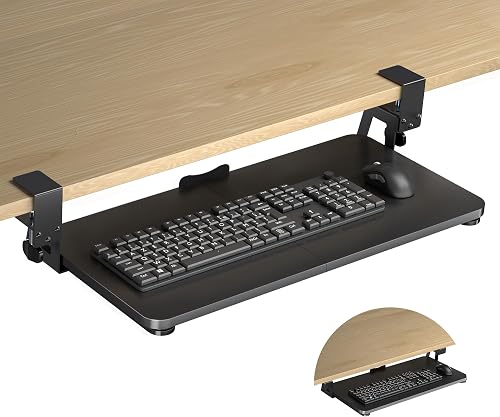
The best clamp on adjustable keyboard tray for most desks is the VIVO Black Clamp-on 27 x 11 in, with a tray that slides out 8.5 in and holds up to 11 lb. It gives you a lower typing surface without drilling, and it slides away when you need the desk space back.
If your desk is thicker than 1.25 in, the AX WABER fits up to 1.9 in. If your desk is short, the EHO needs only 24.8 in from clamp to clamp.
If you want three set heights, the Kensington gives you 3.9, 4.7 and 5.5 in.
Our score weighs specs, features and buyer feedback against what you are shopping for. We compared tray width, clamp-to-clamp length, desk thickness limits, slide-out reach and load limits across these six models.
Start with your desk measurements. A tray that looks right by tray width can still be too long once the clamps are added.
Our best clamp on keyboard tray guide covers the wider clamp-on range if you want more options.
Our picks at a glance
-
1

-
2
 Best for wide keyboard setups
VIVO Black Extra Large Clamp-on 34 x
9.6/10 our score
See it on Amazon -
3
 Best for thicker desktops
AX WABER Keyboard Tray Under Desk Pull Out
9.5/10 our score
See it on Amazon
- 4
 Check it
XINLEI Keyboard Tray Under Desk Large C-Clamp
Best for deep slide-out travel - 5
 Check it
Kensington Clamp-On Keyboard Tray
Best for height adjustment - 6
 Check it
EHO Clamp-On Retractable Adjustable Keyboard Tray
Best for small desks with wrist rest
How we compared these clamp-on keyboard trays
We checked each tray against the same fit questions. Tray width tells you what fits on top.
Clamp-to-clamp length tells you if it fits on your desk at all. Desk thickness tells you if the clamps will close.
Slide-out reach matters for comfort. If you want a tray positioned by an articulating arm, see keyboard trays with arms.
A tray that pulls out 8.5 in puts your keyboard farther from the desk edge than one that pulls out 5.7 in.
That extra reach can help wrist angle, but it also needs clear legroom.
Load limits here range from 11 lb to 22 lb. Most keyboards and mice sit well under those figures.
The limit matters more for heavy gaming keyboards, wrist rests and stored accessories.
We favored trays that give a clear fit rule. VIVO states a 1.25 in maximum thickness and warns against beveled edges.
AX WABER states 1.9 in. Kensington states 1.5 in with three heights.
Those stated limits make the buying decision safer.
Desk edge and underside checks
We also weighed edge shape and underside clearance. Several makers require a level underside for clamps to secure properly.
A clean square edge with smooth upper and lower surfaces gives the clamps a flat bite.
Crossbars and other supports in the clamp area can block a tray that otherwise measures correctly. That is why clamp-to-clamp length alone is not enough.
You need clear space under the desk for the full travel of the tray.
Weight, materials and slide motion
We checked build and motion where the data lists it. The VIVO trays use alloy steel and weigh about 10.4 lb as a unit.
The XINLEI uses metal rails and lists 8.73 lb. The EHO lists EVA, plastic and sponge at 5.04 lb.
Smooth gliding tracks that extend the tray and allow easy storage under the desk came up across multiple models. Slide travel differs a lot, from 5.7 in on one model to 12.24 in of inward travel on another.
We scored reach together with tray depth, because both shape legroom and wrist position.
The best adjustable clamp-on keyboard trays
The VIVO standard is the default pick for a normal desk. The extra large VIVO is the pick for a wide keyboard.
The AX WABER is the pick for a thick desktop. The rest solve smaller desks, deeper travel or height tuning.
VIVO Black Clamp-on 27 x 11 in: Best for most desks
- 26.8 in tray, 32.5 in including clamps
- 11 in depth
- Extends 8.5 in from desk edge
- Holds up to 11 lb
- Fits desks up to 1.25 in thick
A standard-size slide-out tray that frees the desktop and uses sturdy C-clamps with no drilling. It suits a full keyboard and mouse on most square-edged desks.
Pros
- Good balance of size and reach
- Slides under the desk for storage
- No drilling required
Cons
- Needs 32.5 in of clear space from clamp to clamp
- Not for beveled desk edges
The VIVO 27 x 11 in suits most home offices because it balances tray room and desk fit. The tray is 26.8 in wide, or 32.5 in including clamps, and 11 in deep.
That size holds a standard keyboard, a mouse and small accessories below the desktop. It extends 8.5 in from the desk edge and holds up to 11 lb.
That reach gives a lower typing position while keeping the keyboard close enough for your chair, as in our best office chair with adjustable armrests setup checks.
The C-clamps fit desks up to 1.25 in thick and need no drilling. VIVO warns against beveled edges, and the underside needs to be level for the clamps to secure properly.
The desktop should be clear of crossbars or other supports at the clamp location. All hardware and instructions are provided, and the clamps hold tightly without damaging the desk when the edge is square.
The trade-off is space. You need a full 32.5 in from clamp to clamp, so a shorter edge may suit the XINLEI or EHO better.
VIVO Black Extra Large Clamp-on 34 x: Best for wide keyboard setups
- 33.9 in tray, 39.4 in including clamps
- 11 in depth
- Extends 8.5 in from desk edge
- Holds up to 11 lb
- Fits desks up to 1.25 in thick
An extra long version of the VIVO design for larger keyboards and wider mouse space. It needs a long, clear desk edge before you buy.
Pros
- Extra room for wide setups
- Same slide-out reach as the standard VIVO
- No drilling required
Cons
- Needs 39.4 in from clamp to clamp
- Not for beveled desk edges
The VIVO Extra Large suits buyers with a wide keyboard or a full-size setup that feels tight on a 27 in tray. The tray is 33.9 in wide, or 39.4 in including clamps, and 11 in deep.
That extra width gives side room for a wide keyboard without forcing your mouse onto the desktop. It keeps the same 8.5 in maximum extension and 11 lb limit as the standard VIVO.
That means more side-to-side room without a deeper pull-out than the standard model. Smooth sliding motion and ergonomic typing angles are aimed at relieving stress on wrists and shoulders.
The clamps fit desks up to 1.25 in thick, with the same square-edge rule and no drilling. All hardware and instructions are provided, and the sturdy C-clamps attach without causing damage on a suitable edge.
A level desktop is required for the clamps to secure properly, and beveled edges are not compatible.
The trade-off is desk length. You need 39.4 in from clamp to clamp, which rules out many smaller desks.
Also see our best vivo clamp on keyboard tray picks to compare VIVO sizes before you measure.
AX WABER Keyboard Tray Under Desk Pull Out: Best for thicker desktops
- 27.3 in tray, 32.5 in including clamps
- 8.3 in depth in bullet text, 11 in in title sizing
- Extends 5.7 in from desk edge
- Holds up to 11 lb
- Fits desks up to 1.9 in thick
A clamp-on tray built for thicker desktops, with a shorter pull-out reach than the VIVO models. It is a fit-first pick when desk thickness is your limit.
Pros
- Handles thicker desktops than the VIVOs
- C-clamps need no drilling
- Holds 11 lb
Cons
- Shorter 5.7 in extension
- Needs a clear square edge and about 33 in of desktop width
The AX WABER suits desks that are too thick for the VIVO clamps. Its C-clamps fit up to 1.9 in thick, the highest limit in this group.
The tray is 27.3 in wide, or 32.5 in including clamps, so it holds a keyboard and mouse below the desktop in a familiar layout. It extends 5.7 in from the edge and holds up to 11 lb.
That shorter reach is the main trade-off against the VIVO models. You get thick-desk fit, but less pull-out distance for wrist angle, so the keyboard stays closer to the desk edge.
The maker notes a desktop size of at least 33 in for installation, a level underside, and no beveled bottom edge. Reinforcing tubes or other obstructions at the clamp area can block fitting.
The detailed notes state a mounting range of 0.3 in to 1.75 in, so check your exact thickness against both statements before you order.
Choose it when thickness is the blocker. Choose the VIVO instead when your desk is 1.25 in or thinner and you want the longer 8.5 in reach.
Both use an adjustable clamp on keyboard tray design with no drilling.
XINLEI Keyboard Tray Under Desk Large C-Clamp: Best for deep slide-out travel
- 25.6 in tray, 30 in including clamps
- 11.8 in depth
- Pulls out 7.75 in, slides in 12.24 in
- Fits desks up to 1.63 in thick
- Back baffle to stop keyboard slipping
A compact clamp-to-clamp design with deep slide travel and a back baffle. It suits desks where a shorter overall width matters.
Pros
- Shortest clamp-to-clamp length here
- Deep in-and-out slide travel
- Back baffle helps keep the keyboard in place
Cons
- Narrower tray than the 27 in models
- Thicker desks reduce keyboard clearance
The XINLEI suits desks where clamp-to-clamp length is tight. The tray is 25.6 in wide, or 30 in including clamps, and 11.8 in deep.
That is the second shortest overall length here after the EHO. The deeper tray can help a larger keyboard sit flat with room for a mouse beside it.
It pulls out 7.75 in and slides in 12.24 in on metal rails. That travel range helps you find a comfortable position and then tuck the tray away under the desk.
Smooth glide means you can adjust reach during the day without lifting the tray or disturbing your keyboard position.
The C-clamps fit up to 1.63 in thick, with a total height of 4.45 in on the clamp design. Thicker desktops leave less keyboard clearance, so check the space under your desk before fitting.
Upper EVA pads help prevent damage when the clamps are tightened. A back baffle helps stop the keyboard from slipping backward.
The trade-off is a narrower tray than the 27 in VIVO and AX WABER models, so check your keyboard width first. There is also a screw mounting option for some thicker desktops, with 2.4 in height clearance, but that changes the install from clamp-only.
Kensington Clamp-On Keyboard Tray: Best for height adjustment
- 13.3 x 32.4 x 2.4 in
- Three heights: 3.9, 4.7 and 5.5 in
- Fits desks up to 1.5 in thick
- Cable management
- No tools needed for install
A tool-free clamp-on drawer with three height settings for fine tuning. It suits slim to mechanical keyboards and vertical mice.
Pros
- Three height settings
- Tool-free metal clamps
- Cable management channel
Cons
- Only three fixed heights
- Less pull-out reach than the VIVO trays
The Kensington suits buyers who want set height options rather than a fixed clamp height. It gives three heights: 3.9, 4.7 and 5.5 in, set with the SmartFit system.
That helps you match the tray to your chair height without tools or a separate slider under the desk.
The unit measures 32.4 x 13.3 in and the metal clamps fit desks up to 1.5 in thick. Kensington says install takes minutes with no tools, and the clamp design will not damage or mark the desk.
The sturdy easy-to-install metal clamps are a plus if you rent or move desks often.
A smooth-moving rail gives a 27 in x 12 in keyboard tray area, with room for slim to mechanical keyboards and vertical mice or trackballs. Cable management helps keep cords off the tray and reduces snagging as the tray slides.
That matters in daily use when a cable can pull the keyboard or catch on the desk edge.
The trade-off is fewer positions than a fully adjustable arm. If you need fine height tuning, our ergonomic keyboard and mouse guide covers pairing the tray with the right controls.
EHO Clamp-On Retractable Adjustable Keyboard Tray: Best for small desks with wrist rest
- 20 in tray, 24.8 in including clamps
- 11.5 in depth
- Built-in padded wrist rest
- Holds up to 22 lb
- Fits desks up to 1.57 in thick
The smallest tray here, with a padded wrist rest and tool-free clamps. It fits a full keyboard and mouse on a compact desk.
Pros
- Smallest footprint in this group
- Built-in wrist rest
- Holds up to 22 lb
Cons
- Narrowest tray for wide keyboards
- Check crossbars and legs before fitting
The EHO suits small desks and short desk edges. The tray is 20 in wide, or 24.8 in including clamps, and 11.5 in deep.
That is the shortest clamp-to-clamp length in this group. The maker says it fits a full-size keyboard and mouse while keeping the desktop clear and organized.
It has a built-in padded wrist rest and holds up to 22 lb, the highest load limit here. The gel wrist rest is meant to improve wrist comfort during long typing or gaming sessions.
Smooth glide rails let you slide the tray in and out to maximize legroom when you are not typing. The C-clamps fit desks up to 1.57 in thick with tool-free setup and anti-slip pads.
Heavy-duty clamps ensure stability without drilling or damage. The unit lists EVA, plastic and sponge materials and weighs 5.04 lb, which makes it lighter to handle during fitting than the steel VIVO models.
The trade-off is width. A 20 in tray is tight for wide or split keyboards and large mouse pads.
Check crossbars, legs and controllers under the desk, and see our best small clamp keyboard tray picks for other compact options.
How do these trays compare on size and fit?
The table below shows the fit numbers that decide most purchases. Start with clamp-to-clamp length, then check desk thickness, then check pull-out reach.
| Product | Best for | Tray size | Length including clamps | Max desk thickness | Our score |
|---|---|---|---|---|---|
| VIVO Black Clamp-on 27 x 11 in | most desks | 26.8 x 11 in | 32.5 in | 1.25 in | 9.7 |
| VIVO Black Extra Large Clamp-on 34 x | wide keyboard setups | 33.9 x 11 in | 39.4 in | 1.25 in | 9.6 |
| AX WABER Keyboard Tray Under Desk Pull Out | thicker desktops | 27.3 x 11 in | 32.5 in | 1.9 in | 9.5 |
| XINLEI Keyboard Tray Under Desk Large C-Clamp | deep slide-out travel | 25.6 x 11.8 in | 30 in | 1.63 in | 9.2 |
| Kensington Clamp-On Keyboard Tray | height adjustment | 1.5 in | 8.9 | ||
| EHO Clamp-On Retractable Adjustable Keyboard Tray | small desks with wrist rest | 20 x 11.5 in | 24.8 in | 1.57 in | 8.7 |
The VIVO standard and AX WABER both need 32.5 in from clamp to clamp. The VIVO extra large needs 39.4 in.
The XINLEI needs 30 in. The Kensington measures 32.4 in overall.
The EHO needs only 24.8 in.
Desk thickness limits split the group. VIVO stops at 1.25 in.
Kensington stops at 1.5 in. EHO stops at 1.57 in.
XINLEI stops at 1.63 in. AX WABER stops at 1.9 in.
Pull-out reach also splits the group. VIVO reaches 8.5 in.
XINLEI reaches 7.75 in. AX WABER reaches 5.7 in.
More reach can improve typing angle, but it also asks more of your legroom and chair fit as in our best office chair with adjustable lumbar checks.
Tray depth and load in daily use
Depth changes how a keyboard sits. The XINLEI lists 11.8 in and the EHO lists 11.5 in, while the VIVO models list 11 in.
That extra half inch to eight tenths can matter for a deep keyboard or a wrist rest placed on the tray.
Load limits follow a similar pattern. Five of these trays sit at or near standard keyboard weight.
The EHO lists 22 lb, which gives more headroom for accessories. Spread weight evenly in all cases and avoid leaning on the front lip, because that loads the rails and clamps unevenly.
What desk thickness does a clamp-on keyboard tray need?
A clamp-on keyboard tray needs a desk thickness at or below the clamp limit. Measure the desktop at the clamp point, not at the thickest part of the desk.
1.25 in or thinner
The VIVO trays fit desks up to 1.25 in. That covers many standard desks.
Stick with the VIVO standard unless you need the extra width of the 34 in model.
1.5 to 1.63 in
The Kensington fits up to 1.5 in. The EHO fits up to 1.57 in.
The XINLEI fits up to 1.63 in. These three cover mid-thickness desks that the VIVO clamps will not close on.
Up to 1.9 in
The AX WABER fits up to 1.9 in. It is the only tray here for very thick desktops.
You trade shorter pull-out reach for that thicker clamp range.
How much desk space does a clamp-on tray take?
A clamp-on tray takes the clamp-to-clamp length, not just the tray width. Measure the clear front edge of your desk before you choose a model.
Short desk edge
The EHO needs 24.8 in including clamps. The XINLEI needs 30 in.
Both suit desks where a 32.5 in tray would hit a leg, a support or a drawer.
Standard desk edge
The VIVO standard, AX WABER and Kensington all sit near 32.4 to 32.5 in overall. That is a common size for a standard desk, but the edge must be clear across that full length.
Long desk edge
The VIVO extra large needs 39.4 in including clamps. That suits a long desk with a wide keyboard.
Do not force it onto a shorter edge, because the clamps need room to grip.
How do I set the tray height for typing comfort?
Set the tray so your elbows sit near a right angle and your wrists stay straight. Your chair height drives the tray height, not the other way around.
Start with the tray pushed in. Pull it out until your keyboard sits at a comfortable reach, then check that your knees clear the underside.
The VIVO trays pull out 8.5 in, so test chair position at that full reach.
If you use the Kensington, try the three heights in order. Set 3.9 in first, then 4.7 in, then 5.5 in.
Keep the one that keeps your shoulders relaxed without pushing the keyboard too far away.
A wrist rest, such as the EHO padded rest, helps some typists. It is not a fix for a tray that is too high or too far out.
Lower the tray or move your chair first.
How do I install a clamp-on keyboard tray without drilling?
A clamp-on keyboard tray installs with C-clamps and no drilling. The key is a square, smooth desk edge with a level underside.
Find a clamp spot clear of crossbars, supports, legs and controllers. Tighten the clamps evenly so the tray sits level.
Slide the tray in and out a few times to check for wobble or rubbing.
Route your keyboard cable so it does not pull as the tray moves. The Kensington has cable management for that reason.
Other trays need a loose cable loop.
Check clearance at both sitting and standing height if you use a height-adjustable desk. A tray that fits at one height can clash with frame hardware at another.
Which clamp-on keyboard tray is best for a gaming or wide keyboard?
A gaming or wide keyboard needs tray width first. The VIVO extra large gives 33.9 in of tray width.
The VIVO standard and AX WABER give about 27 in.
Depth matters too. The XINLEI gives 11.8 in of depth with a back baffle.
The EHO gives 11.5 in with a wrist rest. Both help keep a larger keyboard and mouse on the tray.
Weight matters for heavy keyboards. The EHO holds up to 22 lb.
The VIVO and AX WABER trays hold up to 11 lb. Spread the load and avoid resting your wrists heavily on the front edge.
Our verdict on the best clamp on adjustable keyboard tray
Pick the VIVO Black Clamp-on 27 x 11 in for most desks up to 1.25 in thick. It has the best balance of tray width, 8.5 in reach and simple C-clamp fitting.
Pick the VIVO Extra Large for a wide keyboard on a long desk. Pick the AX WABER for a thick desktop up to 1.9 in.
Pick the EHO for a short desk edge with a wrist rest. Pick the Kensington if three set heights help you fine tune chair fit.
Measure clamp-to-clamp length and desk thickness before you order. That one check prevents most returns with a clamp on adjustable keyboard tray.
Our top 3 picks at a glance
-
1
-
2
Best for wide keyboard setups
VIVO Black Extra Large Clamp-on 34 x
9.6/10 our score
See it on Amazon -
3
Best for thicker desktops
AX WABER Keyboard Tray Under Desk Pull Out
9.5/10 our score
See it on Amazon
Frequently asked questions
What is a clamp on adjustable keyboard tray?
It is a slide-out platform that clamps to the front edge of your desk from below. You pull it out to type, then slide it back under the desk to free space.
Adjustable means the tray position, height or slide travel can be changed for your chair height and typing angle.
Will a clamp on keyboard tray damage my desk?
Clamp-on trays are made to avoid drilling and desk damage when fitted to a suitable edge. Check the maximum desk thickness, keep the edge square and smooth, and avoid beveled or lipped edges where the clamps sit.
How much space does a clamp on keyboard tray need?
Measure from clamp to clamp, not just the tray width. The VIVO standard needs 32.5 in, the extra large VIVO needs 39.4 in, and the EHO needs 24.8 in.
Also check for crossbars, legs and controllers under the desk.
Can I use a clamp on keyboard tray with a standing desk?
Many buyers do, provided the desk frame hardware does not block the clamp area. Measure the underside and travel of the tray at sitting and standing height before you order, and check that cables still reach.
What weight can these trays hold?
The VIVO and AX WABER trays here hold up to 11 lb. The EHO holds up to 22 lb.
Keep the load spread across the tray and avoid leaning on the front edge, which can stress the clamps and rails.