7 Best Keyboard Trays with Articulating Arms (November 2026)
The best keyboard tray arms with articulating support include the BONTEC Ergonomic Desk Extender Tray for clamp-on elbow support, the VIVO Black Pneumatic Arm 24 x 10 for wall-mounted height adjustment, and the Sisyphy Ergonomics Desk Extender Tray for quick punch-free setup.
On this page (9 sections)
- The keyboard tray arms we picked for flex reach and positioning
- Side-by-side: how these tray arms differ
- How we compared these keyboard tray arms
- Clamp-on extender or full articulating arm: which do you need?
- What reach, tilt and swivel should you look for?
- Will it fit your desk, wall or corner?
- How do you set up and care for a tray arm?
- What about your chair, wrist rest and mouse?
- Verdict: which keyboard tray arm should you buy?
The best keyboard tray arm for most people is the BONTEC Ergonomic Desk Extender Tray, because it adds support without drilling and folds away in seconds. This best keyboard tray arm idea covers two very different jobs, and you should pick by that job first.
Small clamp-on extenders support your elbows and add side space. Full articulating arms move a keyboard up, down, back and forward for sit-stand or shared use.
Our score weighs specs, features and buyer feedback against what you are shopping for. We compared desk thickness limits, tray size, reach, tilt, swivel and mount type across all seven picks.
That matters because a tray that fits a thick desk may not fit a thin one, and a wall arm may not suit a renter.
If you want a standard under-desk tray instead of an arm, see best keyboard trays adjustable under desk. If your desk shape is unusual, our guides to corner and curved desks will save you measuring twice.
Our picks at a glance
-
1
 Best for clamp-on elbow support
BONTEC Ergonomic Desk Extender Tray
9.7/10 our score
See it on Amazon -
2
 Best for wall-mounted height adjustment
VIVO Black Pneumatic Arm 24 x 10
9.6/10 our score
See it on Amazon -
3
 Best for quick punch-free setup
Sisyphy Ergonomics Desk Extender Tray
9.3/10 our score
See it on Amazon
- 4
 Check it
Mount-It! Single Monitor Arm Wall Mount Workstation
Best for shared wall workstations - 5
 Check it
YOUSBEZY Under Desk Keyboard Tray Support Bracket
Best for DIY tray support - 6
 Check it
PUTORSEN Heavy-Duty Monitor Arm with Keyboard Tray
Best for large monitors - 7
 Check it
Mount-It! Sit-Stand Monitor Arm Desk Mount with
Best for sit-stand desk mounts
The keyboard tray arms we picked for flex reach and positioning
These seven cover small elbow extenders, a DIY bracket kit, and full monitor-plus-tray workstations. BONTEC is the top pick for simple clamp-on support, VIVO is the top pick for wall-mounted pneumatic movement, and PUTORSEN is the pick for large screens.
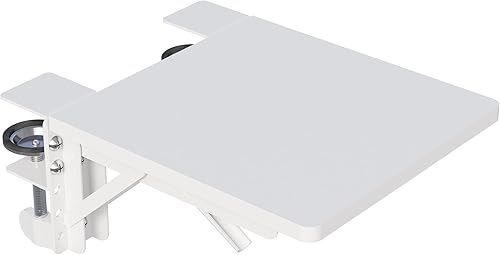
BONTEC Ergonomic Desk Extender Tray: Best for clamp-on elbow support
- 9.5 x 9.1 in tray
- 90 degree foldable arm
- Clamp-on table mount
- Holds up to 33 lb
A small foldable extender that adds elbow support and a side shelf without drilling. It works best where reach matters more than full keyboard height travel.
Pros
- Folds down 90 degrees
- No drilling needed
- Holds 33 lb
Cons
- Small surface for a full keyboard and mouse
- Limited height and tilt movement
BONTEC suits people whose main problem is tired elbows, not keyboard height. Its 9.5 x 9.1 in surface works as an arm rest shelf and a small work ledge that holds up to 33 lb.
That load covers a keyboard, mouse and notebook in daily use, though it is tight for a full-size keyboard plus a large mouse pad side by side.
The 90 degree fold is the key feature. You can swing it down when you need your leg space back or when you host guests at the desk.
VIVO and Mount-It! wall arms also fold, but they need a wall and a larger commitment.
BONTEC says the arm eases neck, shoulder and wrist pressure and reduces elbow pressure by up to 90 percent. Treat that as a maker claim, not a promise.
What you can measure is support: your forearms have a flat place to rest at desk height, which can help you keep a steadier posture.
Trade-off: this is support, not a height-adjustable typing platform. If you stand to work, look at the Mount-It! desk mount or PUTORSEN instead.
VIVO Black Pneumatic Arm 24 x 10: Best for wall-mounted height adjustment
- Pneumatic lift range 10.6 in
- Tilt +90 to -20 degrees
- 180 degree swivel
- Extends 37.8 in from wall
A true floating workstation arm with pneumatic height, tilt and swivel for shared or wall-based setups. It gives the widest reach here but needs stud or masonry mounting.
Pros
- 10.6 in pneumatic height range
- Wide tilt and swivel range
- Folds flat against wall
Cons
- Wall mounting only
- Needs a separate monitor mount
VIVO suits a wall-based workstation where a desk cannot do the job. Its 24 x 10 in tray holds a keyboard and mouse, and the pneumatic arm raises or lowers the surface by 10.6 in.
That range covers most seated to standing changes without lifting weights by hand.
Reach is the headline here. The tray extends 37.8 in from the wall, so you can pull it close for focused work or push it back when you need floor space.
It also tilts from +90 to -20 degrees and swivels 180 degrees, which lets you angle the tray for a neutral wrist position.
VIVO says it installs to wood studs and concrete or brick walls, and holds up to 11 lb. The monitor mount is sold separately, so budget for that as part of the system.
It folds up against the wall when not in use, which suits small rooms, clinics and workshops.
Trade-off: wall mounting is permanent and needs the right wall. If you rent or your wall is drywall over hollow space, a desk clamp arm is safer.
Sisyphy Ergonomics Desk Extender Tray: Best for quick punch-free setup
- 9.5 x 9.1 in tray
- Punch-free clamp on
- Foldable under desk
- For desk thickness within 4.5 cm
A compact clamp-on extender for arm support and extra side space. It suits right-angle desks and folds away when you do not need the extra reach.
Pros
- No drilling required
- Folds under desk
- Sets up in about 5 minutes
Cons
- Small tray surface
- Desk thickness limit is strict
Sisyphy suits renters and small desks where you want extra arm space with no holes. Its 9.5 x 9.1 in tray extends the desktop sideways or forward, and the clamp-on design should set up in about 5 minutes.
Sisyphy says no drilling is needed, and the clamp keeps the desk surface intact.
The tray folds down under the desk when you do not need it. That helps in a shared room where a fixed shelf would crowd your knees or your chair.
When extended, it gives room for a keyboard, mouse, laptop or notebook, though a full keyboard will fill most of the width.
Compatibility is the limit to check first. Sisyphy says desk thickness must be within 4.5 cm, and it fits standard right-angle desks on the side or front.
Measure your top before you order, because a thicker desk edge will not clamp firmly.
Trade-off: like the BONTEC, this is an extender for support and space, not a pneumatic height platform. It also carries a 12-month warranty from Sisyphy, which is useful if a clamp loosens over time.
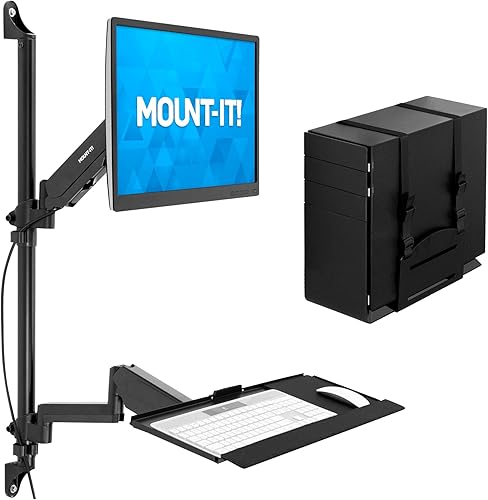
Mount-It! Single Monitor Arm Wall Mount Workstation: Best for shared wall workstations
- 26 x 9.5 in keyboard tray
- Gas spring height adjustment
- Monitor arm included
- CPU holder included
A full wall workstation with monitor arm, keyboard tray and CPU holder in one unit. It suits medical, warehouse or shared stations where a desk surface is not available.
Pros
- Complete workstation in one system
- Full-size tray
- Adjustable CPU holder
Cons
- Wall installation only
- Not a desk add-on
Mount-It! suits shared computer stations in medical, industrial or warehouse settings. It combines a single monitor arm, a foldable 26 x 9.5 in keyboard tray and an adjustable CPU holder in one wall system.
That tray size fits a full-size keyboard and mouse without crowding.
The monitor arm fits 17 to 32 in screens with VESA 75 x 75 mm or 100 x 100 mm patterns, and holds up to 17.6 lb. Gas spring height adjustment and 28 in of height range between monitor and tray help different users share one station.
Tilt is plus or minus 35 degrees, with 180 degree swivel.
The CPU holder secures towers 4.8 to 8.3 in wide and holds up to 22 lb. Keeping the tower off the floor frees space and reduces trips over cables.
Mount-It! says dual wall points mount to wood studs or concrete, and this is wall only, not desk mounted.
Trade-off: this is a fixed workstation, not a desk add-on. If you only want a tray arm for your home desk, the VIVO tray or a desk mount will fit better.
YOUSBEZY Under Desk Keyboard Tray Support Bracket: Best for DIY tray support
- Support bracket only, no tray board
- C-clamps included
- 90 degree foldable design
- For desks up to 1.9 in thick
A bracket kit for holding your own extender board or tray under a desk. It is a flexible choice if you already own a board or want a custom surface.
Pros
- Works with your own board
- Folds for storage
- Padded C-clamps
Cons
- No tray board included
- Desk thickness capped at 1.9 in
YOUSBEZY suits tinkerers who already own a board or want to build a custom lower tier. This is a support bracket set only, with no tray board included.
The box holds 2 support brackets, 2 padded C-clamps and mounting hardware.
The brackets fold 90 degrees, so you can slide a board under the desk when you do not need it. YOUSBEZY says the reinforced K-shaped alloy brackets hold up to 661 lb, which is far above what a keyboard tray will carry.
The real limit is your desk and your board, not the bracket.
Desk thickness caps the fit at 1.9 in maximum. Check your desktop before you order, and check that your desk type suits an under-desk board at all.
The padded clamps help avoid damage, and install is mostly tightening four screws.
Trade-off: you supply the surface, so size, finish and wrist comfort depend on your board. If you want a complete, tested tray in the box, BONTEC or Sisyphy is the simpler buy.
PUTORSEN Heavy-Duty Monitor Arm with Keyboard Tray: Best for large monitors
- 25.74 x 9.55 in keyboard tray
- Supports monitors up to 49 in
- 32 in extended reach
- Pneumatic spring arm
A heavy-duty desk arm pairing a large monitor mount with a roomy keyboard tray. It suits ultrawide and large-screen sit-stand desks where standard arms feel undersized.
Pros
- Large 25.74 in tray
- Supports up to 49 in monitors
- C-clamp or grommet mount
Cons
- Heavy-duty build suits thick desks best
- Large footprint when extended
PUTORSEN suits people with a large monitor who want keyboard and screen on one arm system. The keyboard tray measures 25.74 x 9.55 in, which is the roomiest tray here, with a padded wrist rest along the edge.
A full keyboard and mouse fit with room to spare.
The arm supports flat monitors up to 49 in and 44.4 lb, or curved monitors up to 30.8 lb, plus 19.8 lb for the keyboard. Reach extends 32 in from the mount.
Tilt runs -20 to 50 degrees, with 180 degree swivel and 360 degree rotation for the screen.
Mounting uses a heavy-duty C-clamp or grommet for desks 0.39 to 1.77 in thick. That thin-desk limit is stricter than the Mount-It! desk mount, so measure first.
PUTORSEN says cable management is integrated and install is tool-free at the VESA plate.
Trade-off: all-metal heavy-duty build means weight and a larger clamp footprint. It is a strong pick for an ultrawide sit-stand desk, and overkill for a small laptop desk.
Mount-It! Sit-Stand Monitor Arm Desk Mount with: Best for sit-stand desk mounts
- Integrated keyboard tray
- Gas spring height adjustment
- Supports monitors up to 32 in
- Clamp or grommet mount
A desk-mounted sit-stand workstation that keeps monitor and keyboard aligned on one arm system. It is a tidy choice for standard-size screens and shared desks.
Pros
- Monitor and tray move together
- Gas spring height adjustment
- Clamp or grommet options
Cons
- Capped at 32 in monitors
- Tray size is not stated in full
Mount-It! suits a standard home or office desk where you switch between sitting and standing. The monitor arm and keyboard tray move as one system, so your screen and keys stay aligned as you raise or lower the setup.
Gas spring adjustment keeps that move smooth.
The arm fits monitors up to 32 in and 17.6 lb, with VESA 75 x 75 mm or 100 x 100 mm patterns. Tilt goes to 35 degrees, swivel to 180 degrees, and rotation to 360 degrees, so portrait mode is easy for reading and code.
Mount-It! says the height range between monitor and tray is 28 in.
Mounting is by C-clamp for desks up to 3.5 in thick or grommet for desks up to 3.3 in thick. That covers more desk thicknesses than most picks here.
Hardware, a manual and step-by-step video guidance are included, with US-based support for install questions.
Trade-off: the tray size is not stated in full, so check that your keyboard and mouse fit as a pair. For a screen over 32 in, PUTORSEN is the better match.
Side-by-side: how these tray arms differ
| Product | Best for | Tray size | Load capacity | Mount | Our score |
|---|---|---|---|---|---|
| BONTEC Ergonomic Desk Extender Tray | clamp-on elbow support | 9.5 x 9.1 in | 33 lb | Clamp on | 9.7 |
| VIVO Black Pneumatic Arm 24 x 10 | wall-mounted height adjustment | 24 x 10 in | Wall mount | 9.6 | |
| Sisyphy Ergonomics Desk Extender Tray | quick punch-free setup | 9.5 x 9.1 in | Clamp on | 9.3 | |
| Mount-It! Single Monitor Arm Wall Mount Workstation | shared wall workstations | 26 x 9.5 in | Wall mount | 9.1 | |
| YOUSBEZY Under Desk Keyboard Tray Support Bracket | DIY tray support | C-clamp | 8.8 | ||
| PUTORSEN Heavy-Duty Monitor Arm with Keyboard Tray | large monitors | 25.74 x 9.55 in | 8.6 | ||
| Mount-It! Sit-Stand Monitor Arm Desk Mount with | sit-stand desk mounts | Clamp or grommet | 8.3 |
We compared these seven by mount type first, then by movement. Clamp-on extenders move by folding.
Pneumatic arms move by height, tilt and swivel. That split explains most price and use differences.
Desk thickness is the most common deal-breaker. BONTEC and Sisyphy are small extenders, so their limits matter less for load and more for clamp fit.
YOUSBEZY caps at 1.9 in, PUTORSEN caps at 1.77 in for its clamp, and the Mount-It! desk mount allows up to 3.5 in. Measure the thickest part of your top, including any edge band, before you choose.
Tray size also splits the group. BONTEC and Sisyphy give you about 9.5 in of depth for elbows and a mouse.
VIVO, Mount-It! wall and PUTORSEN give you 10 in or more of depth for a full keyboard. If you type on a compact keyboard, the small extenders are fine.
If you use a full-size board, pick a 24 in or larger tray.
How we compared these keyboard tray arms
We checked the stated tray size, reach, tilt range, swivel, load limit and desk thickness limit for each pick. We also noted what is in the box, because some arms are tray-only and others include a monitor arm and CPU holder.
We grouped the picks by job. Elbow-support extenders are one job.
Height-adjustable typing platforms are another. Full workstations with a monitor arm are a third.
A product can score well for one job and poorly for another, so our scores reflect fit for this search, not raw quality alone.
Buyer patterns in the data guided our trade-off notes. We looked at what owners praise about fold-away storage, clamp stability and gas spring smoothness, and we flagged where a stated limit, such as a 4.5 cm desk cap, could stop a buyer cold.
We did not test these arms in a room. We researched specs and stated features, and we label maker claims as claims.
If you have ongoing wrist, neck or shoulder pain, check with a clinician before you rely on a tray to treat it.
Clamp-on extender or full articulating arm: which do you need?
Start with how you sit and stand. If you sit all day and your elbows get tired, a clamp-on extender such as BONTEC or Sisyphy adds support at desk height.
If you stand, share a station, or need the keyboard lower than your desk, you need a pneumatic or gas spring arm.
Small extenders for elbow support
BONTEC and Sisyphy add about 9.5 in of shelf space and fold down when not in use. They suit people who type on the desk and rest forearms on the shelf.
They do not raise or lower your keyboard.
Full arms for height and reach
VIVO, PUTORSEN and both Mount-It! systems move the keyboard in height, tilt or reach. They suit sit-stand desks, shared stations and wall setups.
They cost more in space and mount effort, and they solve a different problem.
Bracket kits for custom boards
YOUSBEZY is for owners who want a specific board size or finish. You gain control over the surface and lose the convenience of a complete tray.
Only choose this route if you already own a suitable board.
What reach, tilt and swivel should you look for?
Reach decides whether the arm fits your chair and knees. A short extender adds a few inches.
A wall arm such as VIVO extends 37.8 in, which can push your keyboard well past your desk edge.
Pull the tray out at your usual sitting height and check knee clearance before you fix the mount.
Tilt for wrist position
Tilt changes wrist angle. VIVO tilts +90 to -20 degrees, PUTORSEN tilts -20 to 50 degrees on the monitor, and the Mount-It! desk mount tilts to 35 degrees.
A slight backward tilt helps many typists keep wrists neutral. Too much tilt can make keys feel steep and slide your mouse.
Swivel for shared use
Swivel turns the tray toward a second user or away from a wall. VIVO swivels 180 degrees.
That matters for shared workstations, where the Mount-It! wall system also shines. For a single-user desk, swivel is a bonus, not a must.
Height range for sit-stand
Gas spring and pneumatic arms do the lifting. VIVO gives 10.6 in of travel.
Mount-It! systems claim 28 in of range between monitor and tray. PUTORSEN uses pneumatic springs for sit-stand moves.
If you only sit, you will use a small part of that range, and a simpler extender may serve you better.
Will it fit your desk, wall or corner?
Measure first, then match the mount. Desk clamps need a flat edge and a thickness within the stated limit.
Wall mounts need studs or masonry.
Corner and curved desks add a third check, because a clamp or tray may meet a curve or a support leg.
If your desk is an L shape, start with our best keyboard tray corner desk guide. It covers how extenders sit on the short leg of a corner desk without fighting the main top.
If your top has a curved front edge, read our best keyboard tray for curved desk guide before you order a clamp. A clamp that grips a straight edge may rock on a curve, and a wall arm may be the steadier fix.
If you want storage for pens, cables or a phone, our best keyboard tray with drawer guide covers trays with built-in drawers. None of the arms here include a drawer, so that is a deliberate trade-off for movement.
How do you set up and care for a tray arm?
Set height before you set tilt, then check reach last. Raise the tray until your elbows sit near 90 degrees with shoulders relaxed.
Add a slight backward tilt.
Then pull the tray toward you or push it away until your wrists stay straight over the keys.
If you use a monitor arm with a tray, set the screen top near eye level first. Then bring the tray to your hands, not the other way around.
Owners often fix the tray first and end up looking down at the screen.
Check the clamp or wall mount after the first week and again each month. C-clamps can loosen as a desk top settles, and gas spring tension can drift.
Tighten hardware with the tray empty, and keep the arm clear of cables that could catch during swivel.
Wipe MDF and particle board trays with a dry or barely damp cloth. BONTEC uses MDF with a textured black finish, and VIVO uses steel, particle board and plastic.
Keeping water off the edges protects the core material over time.
What about your chair, wrist rest and mouse?
A tray arm works best as part of a full setup. If your chair arms push your elbows up, a tray at desk height may not fix the angle.
Our guide to Best Office Chair Arm Covers helps you tune chair arm height and padding so your arms and the tray meet at a natural height.
Pair the tray with the right input devices. A low-profile keyboard pairs well with a shallow extender, while a full-size board needs a 24 in tray.
An ergonomic keyboard and mouse with a split or tented design can reduce wrist bend when the tray tilt is limited.
Keep your mouse on the same tray as your keyboard when you can. A mouse on the desk and keys on a lower tray forces a reach that defeats the arm.
If space is tight, a compact mouse on the tray beats a large mouse pad on the desk.
For ongoing pain, this guide is not medical advice. See a clinician if pain persists, and adjust chair height, screen height and tray height together rather than moving one part alone.
Verdict: which keyboard tray arm should you buy?
Buy BONTEC if you want simple elbow support with no drilling. Buy VIVO if you need a wall-mounted floating station with real pneumatic height.
Buy PUTORSEN if your monitor is large and your desk is built for a heavy-duty arm.
For most home desks, the BONTEC is the easiest first step. It folds away, holds 33 lb, and costs you no wall work.
Add Sisyphy instead if you prefer a punch-free clamp with a 12-month warranty and you know your desk is within 4.5 cm thick.
Choose the Mount-It! desk mount for a standard sit-stand desk with a screen up to 32 in. Choose the Mount-It! wall workstation for a shared or clinical station where a desk is not an option.
Choose YOUSBEZY only if you already own a board you love and want bracket support under it.
Measure your desk thickness, your keyboard width and your knee space before you order. Those three numbers will point you to the right arm faster than any feature list.
Start with the fit, then enjoy the reach.
Our top 3 picks at a glance
-
1
Best for clamp-on elbow support
BONTEC Ergonomic Desk Extender Tray
9.7/10 our score
See it on Amazon -
2
Best for wall-mounted height adjustment
VIVO Black Pneumatic Arm 24 x 10
9.6/10 our score
See it on Amazon -
3
Best for quick punch-free setup
Sisyphy Ergonomics Desk Extender Tray
9.3/10 our score
See it on Amazon
Frequently asked questions
What is a keyboard tray arm?
A keyboard tray arm is an articulated support that holds a tray away from your desk so you can change reach, height, tilt or swivel. Some arms hold only the tray, while others combine the tray with a monitor arm for sit-stand use.
Do I need a wall mount or a desk clamp?
Choose a desk clamp if you rent, move often or want no drilling. Choose a wall mount if your desk is full, shared or too shallow for a clamp, and if you can find studs or masonry for a firm hold.
How much reach do I need?
Measure from your desk edge to where your keyboard sits at elbow height. A short extender adds only a few inches, while a wall arm such as the VIVO extends 37.8 in and changes the whole layout.
Can a tray arm help wrist comfort?
A tray arm can help by letting you set a neutral typing angle and keep elbows supported. Tilt, height and distance matter more than the arm alone, so pair it with an ergonomic keyboard and mouse that fits your hands.


