9 Best Keyboard Trays for Corner Desks (November 2026)
The best keyboard tray for corner desk include the VIVO L-Shaped Corner Desk Connector Platform for filling the corner gap, the VECELO Corner Computer Desk 41 x 30 for a complete small-space desk, and the VECELO Corner Desk Computer Desk Writing Table for a warm finish on a budget.
On this page (11 sections)
- How to use a keyboard tray on a corner desk
- The best keyboard tray corner desk picks for L-shaped setups
- Compare the top corner desk options side by side
- How we compared these corner trays and desks
- What thickness does a corner keyboard tray need to fit?
- Do you need a corner platform or a full corner desk?
- Can a clamp-on tray work at a 90 degree corner?
- How much space do you need for centered typing?
- What about curved or rounded corner desks?
- How do you install and care for a corner tray?
- The verdict
The best keyboard tray for a corner desk is the VIVO L-Shaped Corner Desk Connector Platform, because it solves the actual corner problem. Most L-shaped desks leave a gap or seam at the center joint.
This 16.8 x 9.8 in steel platform covers that joint, so you can place a keyboard there or mount a tray below it. For more options that sit below a desk, see desktop keyboard trays.
If you do not own a corner desk yet, start with a different pick. The VECELO desks below include a keyboard tray in the purchase.
That path costs less in parts and avoids compatibility checks.
Our score weighs specs, features and buyer feedback against what you are shopping for. A corner extender scores high when it fits your desk thickness and pairs with a tray you can use.
Our picks at a glance
-
1
 Best for filling the corner gap
VIVO L-Shaped Corner Desk Connector Platform
9.7/10 our score
See it on Amazon -
2
 Best for a complete small-space desk
VECELO Corner Computer Desk 41 x 30
9.6/10 our score
See it on Amazon -
3
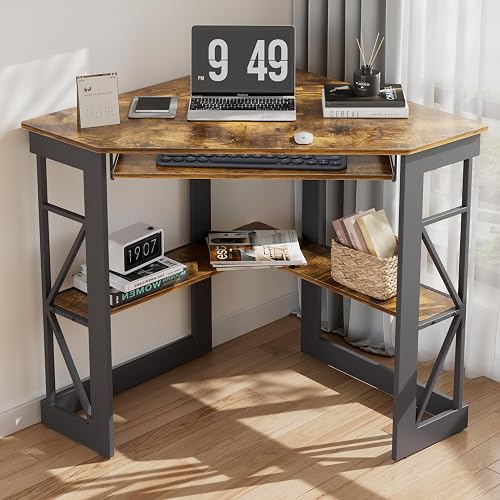 Best for a warm finish on a budget
VECELO Corner Desk Computer Desk Writing Table
9.4/10 our score
See it on Amazon
- 4
 Check it
Uniheim Corner Desk with Hutch and LED
Best for gaming setups with lights - 5
 Check it
VIVO Black Clamp-on 27 x 11 in
Best clamp-on tray for corner desks - 6
 Check it
Suptek 17-inch Black Corner Mounting Bracket Extender
Best for thicker desktop tops - 7
 Check it
BOUNHOHE 17 inch Clamp-on Corner Desk Connector
Best simple install - 8
 Check it
StarTech.com Clamp-On Steel Desk Corner Sleeve for
Best for knee and chair clearance - 9
 Check it
Auromie Triangle Corner Desk with Charging Station
Best for storage and charging
How to use a keyboard tray on a corner desk
A corner desk changes where your keyboard should sit. On a straight desk, you center the keyboard in front of your chair.
On an L-shaped desk, you often sit at the inner corner, which puts the seam right in front of you.
A corner platform or bridging tray moves your typing surface to that center point. For more positioning range, compare keyboard trays with articulating arms.
Your monitor can then sit straight ahead instead of off to one side.
Start with our guide to ergonomic keyboard and mouse setups if your wrists or shoulders feel tight. A lower tray helps only when your chair and monitor height also fit.
The best keyboard tray corner desk picks for L-shaped setups
We compared nine options by score, from corner platforms that attach to your current desk to full desks with built-in trays. The top pick wins for existing L-shaped desks.
The full desks win when you need a complete workstation in a small room.
VIVO L-Shaped Corner Desk Connector Platform: Best for filling the corner gap
- 17 in corner platform
- Fits desks up to 1.4 in thick
- Fits VIVO trays MOUNT-KB01, MOUNT-KB03B and MOUNT-KB04C
- Solid steel
A steel corner platform that lets you sit centered at a 90 degree joint and mount a compatible VIVO tray below.
Pros
- Fills the L-shaped corner
- Works with three VIVO trays
- Low profile black finish
Cons
- Platform only, tray sold separately
- Desks over 1.4 in thick do not fit
This pick suits readers who already own an L-shaped desk and feel squeezed at the corner. The platform is 16.8 x 9.8 in and made of solid steel.
It attaches at the 90 degree joint where the main top and return meet.
VIVO says it fits three under-desk trays: MOUNT-KB01, MOUNT-KB03B and MOUNT-KB04C. That matters because the platform alone is only a surface.
You need one of those trays if you want a lower typing level.
The fit limit is desks up to 1.4 in thick. Measure your top before you order.
The low profile black finish blends with most L-shaped desks and does not interrupt the desk line.
Trade-off: this is a platform, not a full tray. If you want a sliding tray today, you must buy a compatible VIVO tray too.
To compare angle adjustment, see keyboard trays with adjustable tilt.
For a centered corner position, that two-part setup still beats sitting off to one side.
VECELO Corner Computer Desk 41 x 30: Best for a complete small-space desk
- 41 x 30 in corner desk
- Keyboard tray included
- Two open storage shelves
- MDF top with alloy steel frame
A full corner desk with a push keyboard tray and side shelves for a small bedroom or home office.
Pros
- Keyboard tray included
- Storage shelves included
- Compact triangle footprint
Cons
- Fixed 30 in height
- Full desk, not an add-on tray
This pick suits a small bedroom or home office where you need a full desk in one box. It is a 41 x 28 x 30 in corner desk in black, with a keyboard tray and two open shelves on the side.
The triangle design uses the corner of the room without wasting space on either side. Both sides measure 29.5 in, so the desk fits tight corners better than a rectangular top.
The top and shelves are MDF, with an alloy steel frame for support. VECELO says the surface is water proof and easy to clean.
Assembly takes about 20 minutes with the included instructions. The tray and shelves suit students, remote workers, and small bedrooms where floor space is limited.
You get a place to type below the main top and open storage for books or supplies at the side. Care is simple because the smooth surface wipes clean with a damp cloth.
Keep the shelves light so the frame stays stable over time. Trade-off: height is fixed at 30 in, so tall users or high chairs may need a footrest.
VECELO Corner Desk Computer Desk Writing Table: Best for a warm finish on a budget
- 41 x 28 x 30 in
- Smooth keyboard tray included
- Two open storage shelves
- Antique brown finish
A compact triangle desk with a keyboard tray and shelves in an antique brown finish.
Pros
- Keyboard tray included
- Shelves for books and supplies
- Easy to clean MDF surface
Cons
- Fixed height
- No power outlets or monitor stand
This pick suits buyers who want the same compact layout as the black VECELO model but in a warmer finish. It is a 41 x 28 x 30 in triangle desk in antique brown, with a smooth keyboard tray and two open shelves.
The large space under the tray lets you stretch your legs and move between the left and right parts of the desk. VIVO says similar corner platforms lower the typing surface.
Here, the tray is already part of the desk.
The frame is metal and the top is MDF. VECELO says the surface is sturdy and easy to clean.
All hardware and clear instructions are included.
Trade-off: there are no power outlets, a monitor stand or LED lights. If you need charging at the desk, the Uniheim or Auromie picks below do more.
For simple typing, writing and study use, this finish may suit a bedroom better.
Uniheim Corner Desk with Hutch and LED: Best for gaming setups with lights
- Corner desk with keyboard tray
- LED light with 7 colors and up to 20 modes
- 3 AC outlets and 2 USB ports
- Monitor stand included
A small corner desk with a hutch, LED strip, power outlets and a keyboard tray under the main top.
Pros
- Power and USB charging built in
- LED ambience for gaming
- Monitor stand included
Cons
- Larger due to hutch
- Particleboard finish
This pick suits gamers and workers who want lights and charging in a small corner. It is a corner desk with a keyboard tray, a monitor stand, 2-tier upper shelves and a hutch.
The LED strip offers 7 main colors and up to 20 dynamic modes. You can switch colors for work or gaming ambience.
Power is built in with 3 AC outlets and 2 USB charging ports. That helps you charge a laptop, phone and accessories without more strips on the floor.
The monitor stand lifts your screen while the tray keeps your keyboard below the main top. The upper shelves hold small items, and the open shelves under the desk can hold a printer, books, or a router.
Trade-off: the hutch and shelves make it taller and less simple than the VECELO triangle desks. Assembly takes about 45 minutes.
Choose it for the full package, not for a minimal look. It works best when you want lighting, charging, and storage together.
Measure the corner first because the added height needs clear space above the desk.
VIVO Black Clamp-on 27 x 11 in: Best clamp-on tray for corner desks
- 26.8 x 11 in tray, 32.5 in with clamps
- Swiveling C-clamps rotate 90 degrees
- Fits desks up to 1.25 in thick
- Holds up to 11 lb
A sliding clamp-on tray made for L-shaped desks, with clamps that turn to match the corner angle.
Pros
- Clamps rotate for corner fit
- Slides in and out
- No drilling needed
Cons
- Not for beveled desk edges
- 11 lb limit
This pick suits readers who want a real sliding tray, not just a corner platform. It is a 26.8 x 11 in tray, or 32.5 in including the clamps, in black.
The clamps are the key for corner use. They swivel 90 degrees independently, so you can set them on an L-shaped top without drilling.
The tray slides in and out for a lower typing position.
It fits desks up to 1.25 in thick and holds up to 11 lb. VIVO says it is not compatible with beveled edges.
Check that detail first, because many desks have a rounded or angled edge.
Trade-off: the 1.25 in limit is the thinnest here. If your top is thicker, look at the Suptek or StarTech options.
For a standard top, this is the most direct corner tray in the group.
Read our best clamp on keyboard tray guide if you want more clamp-on styles beyond corner use.
Suptek 17-inch Black Corner Mounting Bracket Extender: Best for thicker desktop tops
- 16.8 x 9.8 in platform
- Fits desks up to 1.57 in thick
- Three clamp sizes included
- Solid steel
A steel corner extender with three clamp sizes for desks up to 1.57 in thick.
Pros
- Thickest desk fit here
- Three clamp sizes
- Low profile black finish
Cons
- Platform only
- Newer model with fewer buyer reports
This pick suits owners of thicker L-shaped desks. The platform is 16.8 x 9.8 in and clamps to desks up to 1.57 in thick, which is the highest limit in this group.
It includes three clamp sizes. That helps you match the clamp to your top instead of forcing one size to fit all.
The construction is solid steel in a low profile black finish.
Suptek describes it as mostly assembled. You choose the correct clamp, install it, and the extra corner space is ready for a keyboard, laptop or monitor.
Trade-off: this is a platform only, with no sliding tray included. It shares the same size as the VIVO platform, but the thicker desk fit is its main edge.
If your desk is 1.5 in thick, this is the safer measure.
See also our best keyboard trays adjustable under desk picks for pairing a platform with a tray.
BOUNHOHE 17 inch Clamp-on Corner Desk Connector: Best simple install
- 17 x 10 in platform
- Fits desks up to 1.4 in thick
- Screw clamps included
- Steel construction
A clamp-on corner connector plate that adds space at the joint of an L-shaped desk.
Pros
- Quick clamp install
- Fits most 1.4 in desks
- Simple black finish
Cons
- Platform only
- No tray included
This pick suits buyers who want a simple corner connector with a quick install. The plate is 17 x 10 in and uses screw clamps to fit desks up to 1.4 in thick.
BOUNHOHE says the solid steel construction gives strong support at the corner. You can use the added space for a keyboard, mouse or laptop, or mount a tray below it.
Installation uses the included hardware and instructions. You choose the screw clamp size for your desktop thickness, and the maker says the job takes minutes.
It suits people who already like their L-shaped desk and only need the center joint filled. The black finish keeps the setup looking simple, and the low profile does not take over the desk line.
Trade-off: like the other small plates, it adds a surface but not a sliding tray. The value is in simplicity and price tier.
If you want storage drawers under the tray, compare our best keyboard tray with drawer guide.
Check thickness at the corner before you order, and tighten the clamps evenly. Wipe the steel with a dry cloth to keep the finish clean.
StarTech.com Clamp-On Steel Desk Corner Sleeve for: Best for knee and chair clearance
- 25 x 13.1 in usable surface
- Fits desks 0.5 to 1.5 in thick
- Knob-less clamp design
- Alloy steel, powder coated
A large steel corner sleeve with a knob-less clamp that stays out of knee and armrest space.
Pros
- Largest corner surface here
- Wide thickness range
- No-drill clamp option
Cons
- Heavier at 11.02 lb
- No mouse pad included
This pick suits readers who bump their knees or chair arms on clamp knobs. It offers a 25 x 13.1 in usable surface, the largest corner area in this group.
The clamp has a knob-less design. That low profile helps when your chair sits close to the corner.
You can attach it with the clamp or with wood screws, based on your desk type. It fits desks from 0.5 to 1.5 in thick and is made of alloy steel with a powder-coated finish.
StarTech says protective foam padding helps prevent surface damage during a no-drill install. The larger surface suits a full keyboard and mouse placed at the center of an L-shaped desk.
It also gives more room to rest your wrists while you type. Trade-off: it weighs 11.02 lb, so it is heavier than the 17 in plates.
It also does not include a mouse pad or other accessories. Choose it for space and clearance, not for a light temporary add-on.
Measure your desk thickness and check knee clearance before you choose the clamp or screw mount.
Auromie Triangle Corner Desk with Charging Station: Best for storage and charging
- 33.86 x 33.86 x 35.43 in
- Keyboard tray included
- Monitor stand included
- 2 AC outlets and 2 USB ports, LED strip
A larger triangle desk with a keyboard tray, monitor stand, charging station and three-tier shelves.
Pros
- Charging station built in
- Three-tier storage shelves
- Monitor stand raises screen
Cons
- Largest footprint here
- Fixed height
This pick suits small rooms where storage and charging matter as much as typing space. It is a 33.86 x 33.86 x 35.43 in triangle corner desk in Black Plus.
It includes a keyboard tray, a full-size monitor stand and three-tier storage shelves at the bottom. The monitor stand raises your screen to eye level, which can reduce neck strain during long work sessions.
Power is built in with 2 AC outlets and 2 USB ports. An LED strip can adjust color and mode for a well-lit workspace.
Auromie says the particle board top and metal frame keep the desk stable.
Trade-off: this is the largest footprint here. Measure your corner first, including door swing and chair space.
If space is very tight, the VECELO desks use less floor area.
Chair fit matters too. Our Best Office Chair For Corner Desk Setup guide helps you match chair size to a tight corner.
Compare the top corner desk options side by side
| Product | Best for | Platform size | Desk thickness | Material | Our score |
|---|---|---|---|---|---|
| VIVO L-Shaped Corner Desk Connector Platform | filling the corner gap | 16.8 x 9.8 in | Up to 1.4 in | Steel | 9.7 |
| VECELO Corner Computer Desk 41 x 30 | a complete small-space desk | MDF, alloy steel | 9.6 | ||
| VECELO Corner Desk Computer Desk Writing Table | a warm finish on a budget | MDF, metal frame | 9.4 | ||
| Uniheim Corner Desk with Hutch and LED | gaming setups with lights | Engineered wood | 9.2 | ||
| VIVO Black Clamp-on 27 x 11 in | clamp-on tray for corner desks | Up to 1.25 in | 8.9 | ||
| Suptek 17-inch Black Corner Mounting Bracket Extender | thicker desktop tops | 16.8 x 9.8 in | Up to 1.57 in | Steel | 8.7 |
| BOUNHOHE 17 inch Clamp-on Corner Desk Connector | simple install | 17 x 10 in | Up to 1.4 in | Iron | 8.5 |
| StarTech.com Clamp-On Steel Desk Corner Sleeve for | knee and chair clearance | 0.5 to 1.5 in | Alloy steel | 8.2 | |
| Auromie Triangle Corner Desk with Charging Station | storage and charging | Particle board, metal frame | 8.0 |
The table shows the main split in this group. Corner platforms add space to a desk you own.
Full corner desks add a tray, shelves and sometimes power in one purchase. Check desk thickness first, because that one measure rules out more options than any other spec.
Platforms such as the VIVO, Suptek, BOUNHOHE, and StarTech options keep your current L-shaped desk. They fill the joint where the main top and return meet, so you can sit centered.
Full desks such as the VECELO, Uniheim, and Auromie options suit a new room setup. They include a keyboard tray and storage, and some add a monitor stand, LED lighting, or charging ports.
Use the table to match the product type to your situation. If your desk is sturdy, a platform is often enough.
If you need shelves or power, a full desk saves a second purchase. Compare size, thickness limit, and whether a tray is included before you decide.
Also check the shape of your corner and the space for your chair. A centered tray only helps if your chair can move into the corner without hitting a return or drawer.
How we compared these corner trays and desks
We compared the nine picks by platform size, desk thickness limit, whether a tray is included, and how the product handles a 90 degree corner. We also checked material, weight and included hardware from the product data.
We did not test these products. We researched specs and buyer patterns, then scored each pick for a corner desk searcher.
A platform that bridges the joint scores higher than a tray that only fits a straight edge.
The VIVO platform ranks first because it is made for the corner joint and fits three VIVO trays. The VECELO desks rank next because they include a tray and shelves at a compact size.
The clamp-on VIVO tray ranks high for readers who want a sliding tray without buying a new desk.
What thickness does a corner keyboard tray need to fit?
Measure your desktop thickness before you compare features. Most corner platforms fit desks up to 1.4 in thick.
The VIVO clamp-on tray fits up to 1.25 in. The Suptek platform fits up to 1.57 in.
The StarTech sleeve fits 0.5 to 1.5 in.
Thickness is not the only check. A beveled or rounded edge can block a clamp even when thickness is fine.
VIVO warns that its clamp-on tray is not compatible with beveled edges.
How to measure in 2 minutes
Use a ruler or tape on the side of the desk. Measure at the corner, not just at the front edge.
Some desks have a thicker edge band than the main top.
Also check below the desk. A sliding tray needs clear space for your knees, chair arms and any drawers.
Our Best Desk Chair for Office Work guide can help if your chair is too wide for the corner.
Do you need a corner platform or a full corner desk?
Choose a corner platform if your L-shaped desk is already sturdy. The VIVO, Suptek, BOUNHOHE and StarTech options all add a surface at the joint.
You keep your current desk and spend less.
Choose a full corner desk if you need a complete setup. The VECELO, Uniheim and Auromie desks include a keyboard tray, shelves and sometimes a monitor stand or power outlets.
When a platform is enough
A platform is enough when your monitors, chair and storage already work. You only need keyboard space at the center.
That keeps the change simple.
When a full desk saves work
A full desk saves work when you are setting up a new room. You get a tray, shelves and surface in one order.
You also avoid guessing whether a separate tray fits your old desk.
Can a clamp-on tray work at a 90 degree corner?
Yes, if the clamps can turn or bridge the joint. The VIVO clamp-on tray has clamps that rotate 90 degrees independently.
That lets you place the tray across the corner instead of on one straight section.
The corner platforms take a different path. They sit at the joint itself, so your keyboard can rest on the platform or on a tray mounted below it.
Clamp-on versus under-desk mounting
A clamp-on tray is faster to install and does not need tools in many cases. An under-desk tray sits lower and slides away when you need leg room.
Both can work at a corner if the mounting points are clear.
If you prefer a pull-out style, see our best pull out keyboard tray guide. Compare rail clearance before you choose that mount for a corner.
How much space do you need for centered typing?
Plan for at least the width of your keyboard plus your mouse. The 17 in platforms give you a compact center surface.
The StarTech sleeve gives you 25 x 13.1 in, which is easier for a full keyboard and mouse.
Also leave room to sit centered. Your chair should face the corner, not one return.
That is the main benefit of these products: your monitor, keyboard and chair all line up.
Check chair width too. A wide chair may hit the desk return before you can center yourself.
Measure from the desk edge to the wall behind your chair.
What about curved or rounded corner desks?
A 90 degree platform does not fit every corner shape. Curved desks need a tray that follows the curve or clamps to a straight front edge.
The same thickness and edge checks still apply. Measure the top at the corner, and look for a beveled or rounded edge that could block a clamp.
A sharp L joint and a curved corner place different demands on a tray. A platform made for a 90 degree joint may leave a gap on a curved top, or it may sit too high at the edge.
Do not force a 90 degree platform onto a curved top. A poor fit can wobble, damage the edge, or leave your keyboard in an awkward angle.
If your desk has a small curve, a clamp-on tray on a straight section may work better. Measure the straight area first and confirm it can hold the tray width.
For a fully rounded corner, look for a tray designed for that shape. Check where your chair will sit as well, because the center point is less clear on a curved desk.
Our best keyboard tray for curved desk guide covers curved tops and rounded corners. Use that guide if your desk bends instead of meeting at a sharp L joint.
Take your time with the measurements before you order. Thickness, edge shape, and chair space matter more than small differences in tray size.
How do you install and care for a corner tray?
Start by dry-fitting the platform or tray at the corner. Center it where you will sit.
Mark the clamp points and check that your knees and chair arms clear the hardware. Sit in your chair and test the reach to the keyboard and mouse before you tighten anything.
Tighten clamps evenly. A loose clamp can shift when you type, and a firm mount keeps the tray steady.
Wipe steel surfaces with a dry cloth. VIVO lists dry cloth care for its platform.
For full desks, follow the included instructions for shelf and tray hardware. Keep shelves and trays loaded within a sensible limit so the frame stays stable.
Keep weight within the stated limit. The VIVO clamp-on tray holds up to 11 lb, so do not load it with heavy items.
Recheck clamp tightness after the first week of use. Wood and metal tops can settle over time.
Clean tray surfaces with a soft cloth and avoid harsh cleaners. That protects the finish and keeps the sliding action smooth.
If you use screws instead of clamps, check that they do not loosen over time. Tighten them evenly and do not overtighten into the desk material.
The verdict
Pick the VIVO L-Shaped Corner Desk Connector Platform if you own an L-shaped desk and want centered keyboard space at the corner. Pair it with a compatible VIVO tray for a lower typing surface.
Pick the VECELO Corner Computer Desk 41 x 30 if you need a complete small-space desk with a tray and shelves. Pick the VIVO Black Clamp-on 27 x 11 in if you want a sliding tray that clamps to your current corner desk.
Next, measure desk thickness, check for beveled edges, and plan your chair space. Those three checks will tell you more than any feature list.
Start with the top pick for your current desk, and use the buying sections above if you are building a new corner setup.
Our top 3 picks at a glance
-
1
Best for filling the corner gap
VIVO L-Shaped Corner Desk Connector Platform
9.7/10 our score
See it on Amazon -
2
Best for a complete small-space desk
VECELO Corner Computer Desk 41 x 30
9.6/10 our score
See it on Amazon -
3
Best for a warm finish on a budget
VECELO Corner Desk Computer Desk Writing Table
9.4/10 our score
See it on Amazon
Frequently asked questions
What is the best keyboard tray for a corner desk?
The best keyboard tray for a corner desk is the VIVO L-Shaped Corner Desk Connector Platform if you already own an L-shaped desk. It fills the center gap so you can sit at the corner.
Pair it with a compatible VIVO tray for a lower typing surface.
Will a clamp-on keyboard tray fit my L-shaped desk?
It will fit if your desktop thickness is within the tray limit and the edge is not beveled. The VIVO clamp-on tray fits desks up to 1.25 in thick.
Measure thickness and check the edge before you order.
Do I need a corner extender or a full corner desk?
Choose a corner extender if your current L-shaped desk is sturdy and you only need keyboard space. Choose a full corner desk if you need a complete setup with shelves, a monitor stand or power outlets.
That saves a second purchase.
Can I sit centered at the corner of an L-shaped desk?
Yes, with a corner platform or a tray that bridges the joint. Without one, the seam between the two desk sections often forces you to sit to one side.
A 17 in platform gives you a centered position.
How do I measure for a corner keyboard tray?
Measure desktop thickness first, then measure the open corner space where the two sections meet. Also check leg and drawer clearance below the desk.
A tray that slides out needs clear room for your knees and chair arms.