9 Best Trackball Mice for Small Hands (November 2026)
The best trackball mouse for small hands include the TECKNET Wireless Trackball Mouse for switchable wireless work, the Nulea M501 Wireless Trackball Mouse Ergonomic Thumb for thumb control on the go, and the Logitech Ergo M575S Wireless Bluetooth Trackball Mouse for most small hands.
On this page (8 sections)
- Trackball mouse for small hands: which models fit best
- How we compared trackball mouse for small hands
- Thumb trackball or finger trackball for small hands?
- What size and shape should you look for?
- Which buttons and DPI settings matter most?
- Wired, Bluetooth or receiver: which connection is best?
- How should you set up and care for a trackball mouse?
- Verdict: the small hands trackball mouse to buy first
The best trackball mouse for small hands is the Logitech Ergo M575S, because its sculpted thumb shape is stated to fit most hand sizes and it does not need room to slide. This guide explains fit, reach and ball placement in plain terms, so you can match a small trackball mouse to your grip.
A small hands trackball mouse needs more than a compact title. Your fingers must reach the ball and buttons without a long stretch, and your palm must rest without pressing the wrong keys.
We compared specs, stated hand sizes, ball sizes, button counts and connection types across these 9 models.
Our score weighs specs, features and buyer feedback against what you are shopping for. Higher scores here reflect stronger fit notes for smaller hands, useful controls and flexible connections.
A high score does not mean every hand will find the same shape comfortable.
Our picks at a glance
-
1
 Best for switchable wireless work
TECKNET Wireless Trackball Mouse
9.7/10 our score
See it on Amazon -
2
 Best for thumb control on the go
Nulea M501 Wireless Trackball Mouse Ergonomic Thumb
9.6/10 our score
See it on Amazon -
3
 Best for most small hands
Logitech Ergo M575S Wireless Bluetooth Trackball Mouse
9.5/10 our score
See it on Amazon
- 4
 Check it
PORLEI Wired Ergonomic Trackball Mouse for Large
Best for a large finger ball - 5
 Check it
Kensington Expert Trackball Mouse
Best for scroll ring control - 6
 Check it
Logitech MX Ergo S Advanced Wireless Trackball
Best for advanced customization - 7
 Check it
Kensington Orbit Trackball Mouse
Best for a simple compact ball - 8
 Check it
ProtoArc EM04 Wireless Trackball Mouse
Best for quiet multi device use - 9
 Check it
PORLEI Wired Ergonomic Trackball Mouse
Best for wired thumb precision
Trackball mouse for small hands: which models fit best
The Logitech Ergo M575S leads for most small hands because Logitech states a good fit for most hand sizes. The Kensington Orbit is the simpler compact finger option, while the PORLEI wired thumb model gives precise DPI control in a wired setup.
If you want a broader view before you choose, our ergonomic keyboard and mouse guide covers how mouse shape works with keyboard height and desk layout. For a wider shortlist, see the best ergonomic trackball mouse roundup.
TECKNET Wireless Trackball Mouse: Best for switchable wireless work
- 16 degree vertical angle
- Bluetooth and 2.4G connection for 3 devices
- 500mAh rechargeable battery
- 5 DPI levels from 100 to 1200
- 6 buttons
- Right hand orientation
A tilted wireless thumb model with triple device switching and adjustable sensitivity. Its stated size is aimed at medium to large hands, so smaller hands should check reach carefully.
Pros
- Triple device connection
- Rechargeable battery
- Adjustable DPI
- Quiet clicks
Cons
- Sized for medium to large hands
- Shorter stated battery average life than some rivals
The TECKNET suits people who switch between 3 devices and want a tilted thumb shape for long desk sessions. Its 16 degree angle is meant to keep the forearm in a more natural position and reduce strain by up to 50%, according to TECKNET.
The stated dimensions are 5.5 by 4.1 by 2 inches, with 6 buttons and a right hand shape. TECKNET says it is specially designed for medium to large hand sizes, so this is a caution pick for small hands rather than a safe first choice.
You get Bluetooth plus 2.4G, a 500mAh rechargeable battery and 5 DPI levels from 100 to 1200. A 15 minute charge is stated to give a full day of use, which helps if you forget to charge.
The trade-off is fit. Smaller hands may need to stretch for the thumb ball or buttons, and the learning period is stated as 1 to 2 weeks.
Compare it with the Logitech Ergo M575S below if fit for most hand sizes matters more.
Nulea M501 Wireless Trackball Mouse Ergonomic Thumb: Best for thumb control on the go
- Thumb trackball control
- 4 DPI levels from 400 to 1600
- Bluetooth and USB dongle for 3 devices
- Rechargeable battery
- 6 buttons
- Right hand orientation
A thumb trackball model built for tight desks, sofas and other narrow spaces. Buttons are not programmable, which keeps setup simple but limits custom shortcuts.
Pros
- Works without moving the mouse
- Connects to 3 devices
- Rechargeable
- Back and forward buttons
Cons
- Buttons are not programmable
- Forward and back buttons do not work on macOS
The Nulea M501 suits people who work in narrow spaces such as a messy desk, couch, bed or small writing board. Thumb control moves the cursor without moving the wrist and arm, and the palm can stay in a natural position.
It has 6 buttons, including back and forward buttons, and connects to up to 3 devices by Bluetooth or USB dongle. The 2.4G receiver is stored at the bottom, so check there first if the wireless link does not connect.
DPI has 4 levels from 400 to 1600, which lets you slow the cursor for detail work or raise it for faster travel across screens. The rechargeable battery removes disposable batteries, and Nulea says to use the included cable or a 5V charger rather than a fast charger.
The main limits are practical. All buttons are not programmable, and the forward and backward buttons are not compatible with macOS.
Its 5.51 by 4.37 inch size also means small hands should check thumb reach before committing.
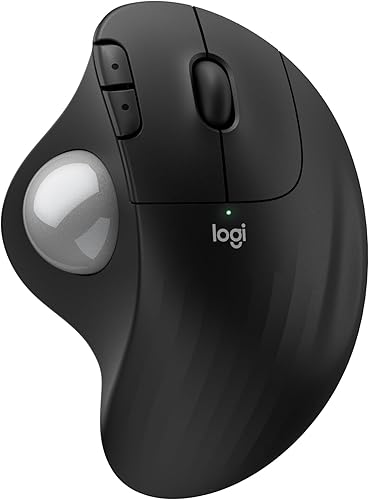
Logitech Ergo M575S Wireless Bluetooth Trackball Mouse: Best for most small hands
- Sculpted thumb control shape
- Bluetooth or Logi Bolt receiver
- Up to 18 months battery life
- 3 customizable buttons
- Quiet clicks
- Right hand orientation
Logitech says this shape supports the hand and fits most hand sizes, with thumb control that does not need desk space to move. Custom buttons and quiet clicks make it a strong everyday pick.
Pros
- Good fit for most hand sizes
- Long battery life
- Bluetooth and receiver options
- Customizable buttons
Cons
- Only 2 buttons in the main spec count
- Needs Logi Options+ for some customization
The Logitech Ergo M575S suits most small hands because Logitech says the ergonomic shape is a good fit for most hand sizes. The sculpted body supports the hand while thumb control moves the cursor, so your hand does not need to slide across the desk.
You get Bluetooth or the included Logi Bolt USB receiver, plus up to 18 months of battery life with an AA battery included. Logitech also states 25% less muscle strain in the forearm compared with a Logitech M650 mouse, based on its Ergo Lab work.
There are 3 customizable buttons, with shortcuts and Smart Actions through the Logi Options+ app. Cursor speed can be adjusted in that app, which helps if the default thumb speed feels too fast or too slow at first.
The trade-off is a simpler button layout than some rivals. If you need many side buttons or a scroll ring, look at the Kensington Expert.
For a balanced small hands pick, this remains the top choice in this guide.
PORLEI Wired Ergonomic Trackball Mouse for Large: Best for a large finger ball
- 44mm finger operated trackball
- 5 DPI levels
- 1.8m wired cable
- 6 buttons
- Right hand orientation
- Wired USB connection
A wide finger control model made for larger hands and tight spaces. The 44mm ball and wired plug and play setup suit office and design work, but it is not recommended for gaming.
Pros
- Large 44mm finger ball
- No drivers needed
- Works on many surfaces
- Adjustable DPI
Cons
- Made for larger hands
- Not recommended for gaming
- Forward and back buttons do not work on Mac
The PORLEI Wired Ergonomic for Large suits users who want a 44mm finger operated ball and a wired setup for office or design tasks. The ball works on many surfaces, so it can help in tight workspaces where a regular mouse has no room to move.
It has 5 DPI levels and 6 buttons, with a 1.8m cable and USB plug and play connection for Windows and Mac OS. PORLEI says no drivers are needed, which keeps setup simple on a work computer.
The shape is wider and taller than standard models and is aimed at larger hands. That makes it a poor first pick for small hands, even though the finger ball itself may be easy to roll.
Small hands may struggle to reach the far buttons while keeping the palm settled.
PORLEI also says this model is not recommended for gaming due to its tracking profile and response. Forward and backward buttons do not work on Mac systems.
Choose it for the large finger ball, not for compact fit.
Kensington Expert Trackball Mouse: Best for scroll ring control
- Large 55mm ball
- Scroll ring
- Detachable wrist rest
- Ambidextrous design
- Customizable 4 button design
- Wired USB connection
A big ambidextrous finger trackball with a scroll ring and detachable wrist rest. The 55mm ball is easy to roll, but the full size footprint can overwhelm smaller hands.
Pros
- Scroll ring for long pages
- Ambidextrous shape
- Detachable wrist rest
- Customizable buttons
Cons
- Large footprint for small hands
- Wired only
- Heavier than compact picks
The Kensington Expert suits people who scroll long documents and want a scroll ring instead of a wheel. The large 55mm ball uses Diamond Eye optical tracking for precise cursor control, and the patented scroll ring helps you move up and down pages quickly.
The ambidextrous design and detachable wrist rest support either hand. The wrist rest can help keep the hand and wrist in a steadier position during long sessions, though small hands may not need the full support surface.
Buttons are customizable through KensingtonKonnect software on supported systems. The wired USB-A connection gives a reliable link with no battery to charge, and the 4 button design suits shortcuts for office work.
The trade-off is size. At 5 by 5-3/4 by 2-1/2 inches and 0.34 kg, it is a full size workstation piece.
Small hands may find the reach to the ball and buttons too wide, so treat it as a comfort pick for larger hands.
Logitech MX Ergo S Advanced Wireless Trackball: Best for advanced customization
- 20 degree tilt
- Sculpted ergonomic design
- 6 customizable buttons
- Bluetooth and Logi Bolt receiver
- USB-C charging
- Right hand orientation
A tilted thumb trackball with speed and precision switching and strong software control. Logitech states it for medium to large hands, so small hands may find the tilt and palm support too much.
Pros
- 20 degree tilt for forearm posture
- Customizable buttons
- Dual wireless connection
- Fast USB-C charging
Cons
- Stated for medium to large hands
- Charging cable not included
- Higher price tier
The Logitech MX Ergo S suits advanced users who want a 20 degree tilt and more control over buttons and shortcuts. The sculpted shape and soft rubber grip are certified by ergonomists for improved comfort, according to Logitech.
Thumb control switches between speed and high precision tracking at the tap of a button. Logitech says the tilt gives 27% less muscle activity in the forearm compared with a Logitech M650 mouse, and clicks are 80% quieter than the earlier MX Ergo.
There are 6 customizable buttons, with shortcuts and Smart Actions in the Logi Options+ app. Dual wireless connection through Bluetooth or the included Logi Bolt receiver lets you switch between 2 devices with Easy-Switch.
The fit note matters for this guide. Logitech states this model for medium to large sized hands, so small hands may find the palm support and tilt too large.
It is a strong advanced pick, but not the safest small hands choice.
Kensington Orbit Trackball Mouse: Best for a simple compact ball
- Medium 40mm ball
- Ambidextrous design
- Compact design
- Wired USB connection
- 2 buttons
- No scroll ring
A compact wired finger ball with only 2 buttons and no scroll ring. It saves desk space and suits left or right use, but scrolling and customization are basic.
Pros
- Compact footprint
- Ambidextrous
- Simple wired setup
- No batteries needed
Cons
- No scroll ring
- Only 2 buttons
- Wired only
The Kensington Orbit suits people who want a simple, compact finger trackball with no extra buttons to learn. The medium 40mm ball uses internal red optics for accurate cursor movement, and the compact design uses far less desk space than a regular mouse.
The ambidextrous shape works for left or right hand use. That can help in shared workstations or if you switch hands during the day, and the wired USB connection needs no batteries.
Kensington Konnect software lets you assign functions to the 2 buttons and adjust cursor speed. There is no scroll ring, so scrolling depends on the operating system and any software options you set up.
This is one of the more plausible compact options for small hands because the ball is smaller than the Expert model. Still, check your finger reach to the top of the ball and keep expectations simple if you need a wheel or many shortcuts.
ProtoArc EM04 Wireless Trackball Mouse: Best for quiet multi device use
- Thumb trackball control
- Bluetooth and 2.4G for 3 devices
- 450mAh rechargeable battery
- 5 DPI levels from 200 to 1600
- 6 buttons
- Quiet clicks
A lightweight thumb model with quiet clicks and triple connection switching. Buttons are not programmable, and back and forward buttons do not work on macOS.
Pros
- Lightweight at 120 g
- Quiet clicks
- Triple connection modes
- Rechargeable
Cons
- Buttons are not programmable
- Back and forward buttons not compatible with macOS
- Auto sleep after a few minutes
The ProtoArc EM04 suits quiet offices and multi device desks where click noise matters. Quiet clicks and a frosted surface help you work without bothering others, while thumb control keeps the hand still and reduces wrist and arm movement.
It connects through Bluetooth and 2.4G in 3 modes, so you can switch between devices such as a laptop, tablet or phone with one button. The built-in 450mAh battery gives each full charge about 1 month of standby, according to ProtoArc, and it charges with the included Type-C cable.
DPI has 5 levels from 200 to 1600, which covers slow detail work and faster screen travel. At 120 g, it is light enough to move between a desk and a sofa without adding much weight to a bag.
The limits are customization and sleep behavior. All buttons are non-programmable, back and forward buttons are not compatible with macOS, and the mouse enters auto sleep after a few minutes without use.
PORLEI Wired Ergonomic Trackball Mouse: Best for wired thumb precision
- 34mm thumb control trackball
- 5 DPI levels from 100 to 1200
- 1.8m wired cable
- 6 buttons
- RGB lighting
- Right hand orientation
A wired thumb trackball with a smaller 34mm ball and 5 DPI levels for tight desks. All buttons are not programmable, and back and forward buttons do not work on macOS.
Pros
- Smaller 34mm thumb ball
- Adjustable DPI
- Stable wired connection
- Easy to clean ball
Cons
- Buttons are not programmable
- Wired only
- Back and forward buttons not compatible with macOS
The PORLEI Wired Ergonomic with 34mm thumb control suits people who want a wired thumb ball for tight desks and simple plug and play setup. The sculpted shape keeps the palm in a natural position, and thumb movement replaces wrist and arm movement for cursor control.
The 34mm ball is smaller than the 44mm finger ball on the other PORLEI model here. That can help small hands if the thumb can reach the ball without stretching across the body of the mouse.
It has 5 DPI levels from 100 to 1200, plus large back and forward buttons and a precision scroll wheel. The 1.8m cable gives a stable wired link through USB-A, with no drivers needed for Windows or Mac OS.
All buttons are non-programmable, and back and forward buttons are not compatible with macOS. The RGB lighting can be turned off by pressing the scroll wheel and right button together for 3 to 5 seconds, which suits low light or shared rooms.
How we compared trackball mouse for small hands
We compared stated hand sizes, dimensions, weight, ball size, button count, DPI range and connection type for all 9 models. We also noted which models need a receiver, which are wired only and which buttons do not work on macOS.
Fit came first because a small hands trackball mouse fails if reach is wrong. A smaller ball does not help if the palm must stretch or the buttons sit too far away.
Models stated for medium to large hands were scored with that limit in mind.
We checked ergonomics notes such as tilt angle, forearm posture claims and wrist rest support. Those claims are labeled by brand, because comfort still depends on your grip, desk height and how long you work each day.
We also checked everyday limits. Non-programmable buttons, missing scroll rings, auto sleep and macOS button limits can matter more than a headline feature.
The score reflects those trade-offs for small hands use.
Thumb trackball or finger trackball for small hands?
A thumb trackball is often easier for small hands because the hand stays planted and only the thumb moves. That suits laptops, crowded desks and people who want less arm movement during long work blocks.
A finger trackball can work well if the ball is mid size and the buttons sit close to your natural grip. The Kensington Orbit uses a 40mm ball, which is smaller than the 55mm ball on the Kensington Expert.
Finger models can feel more precise for page scrolling when they add a scroll ring. The Expert has that ring, but its larger footprint may offset the benefit for small hands.
Try to match ball placement to your hand, not just screen size. If your fingers must reach upward or outward to roll the ball, a thumb model may feel calmer and more compact.
What size and shape should you look for?
Look for a body that lets your palm rest without pressing side buttons. Small hands often do better with a lower profile shape and buttons placed near the front where fingers already sit.
Check stated dimensions before you buy. The TECKNET measures 5.5 by 4.1 by 2 inches, while the Nulea M501 is 5.51 by 4.37 inches.
Those numbers do not prove a bad fit, but they warn against assuming a compact feel.
Weight matters for lap or travel use. The ProtoArc EM04 weighs 120 g, while the Kensington Expert weighs 0.34 kg.
A lighter mouse is easier to lift, though trackball use rarely needs lifting for cursor movement.
If your desk is also tight, pair the mouse with a Best Office Chair For Small Spaces guide and a Best Desk Chair for Small Spaces check. Chair height and desk depth change how your forearm meets the mouse.
Which buttons and DPI settings matter most?
Start with the buttons you will actually use each day. Six buttons can help with back, forward and middle click tasks, but non-programmable buttons limit custom shortcuts.
Adjustable DPI helps small hands because a slower cursor can reduce thumb travel. The PORLEI wired thumb model offers 100 to 1200 DPI in 5 steps, while the Nulea M501 offers 400 to 1600 in 4 steps.
Slow settings help with text editing and small targets. Faster settings help with large monitors and quick page travel.
A DPI button near the scroll wheel makes those changes easy during work.
If you game or need fast flicks, compare the best trackball mouse for gaming guide before you choose. If you prefer wireless switching, see the best wireless trackball mouse roundup.
Wired, Bluetooth or receiver: which connection is best?
Wired models give a stable link with no charging and no battery swaps. The PORLEI thumb model and Kensington Orbit both use a cable, which suits a fixed desk and simple setup.
Bluetooth suits laptops and tablets and keeps the desk cleaner. The Logitech Ergo M575S and MX Ergo S also include a Logi Bolt receiver, so you can choose the link that fits your computer.
Triple connection models help if you work across a laptop, tablet and phone. The TECKNET and Nulea M501 both support 3 devices, but check whether the receiver is included or stored in the mouse.
Battery life changes the daily routine. Logitech states up to 18 months for the Ergo M575S with an AA battery, while rechargeable models need regular charging.
Choose based on whether you prefer swaps or charging.
How should you set up and care for a trackball mouse?
Place the mouse at desk height so your forearm rests level and your shoulder stays relaxed. Keep the ball low enough that your thumb or fingers roll it without lifting the palm.
Set DPI low first, then raise it until cursor movement feels smooth. A slow start helps you learn ball control without overshooting small targets in menus and documents.
Clean the ball and cavity with a soft cloth when movement feels rough. The PORLEI wired thumb model has an easy to remove ball, and clean hands help the ball roll with less friction.
Give yourself time to adjust. TECKNET suggests 1 to 2 weeks to get familiar with its shape, and PORLEI says most people need a few days with finger control.
A short learning period is normal for trackball use.
Verdict: the small hands trackball mouse to buy first
Pick the Logitech Ergo M575S first if you want the best balance of fit, comfort and simple wireless setup for small hands. Its stated fit for most hand sizes makes it the safest starting point in this list.
Pick the Kensington Orbit if you want a compact ambidextrous finger ball with fewer buttons. Pick the PORLEI wired thumb model if you want a smaller 34mm thumb ball and stable wired control.
Avoid the models stated for large or medium to large hands unless your hands measure closer to those sizes. The PORLEI 44mm finger model, Kensington Expert and Logitech MX Ergo S can be excellent, but their size notes point away from small hands.
If wireless choice is your top priority, check the best wireless trackball mouse picks next. If your hands are larger than average, the best trackball mouse for large hands guide is a better fit.
For brand specific finger models, see the best sanwa trackball mouse guide for a separate comparison.
Our top 3 picks at a glance
-
1
Best for switchable wireless work
TECKNET Wireless Trackball Mouse
9.7/10 our score
See it on Amazon -
2
Best for thumb control on the go
Nulea M501 Wireless Trackball Mouse Ergonomic Thumb
9.6/10 our score
See it on Amazon -
3
Best for most small hands
Logitech Ergo M575S Wireless Bluetooth Trackball Mouse
9.5/10 our score
See it on Amazon
Frequently asked questions
What should small hands check first on a trackball mouse?
Check whether your thumb or fingers reach the ball without stretching. Then check whether your palm rests without pushing the buttons.
A shape that fits most hand sizes can still feel large, so compare stated dimensions and hand size notes before you buy.
Is a thumb trackball or finger trackball better for small hands?
A thumb trackball suits many small hands because the hand stays still and the thumb rolls the ball. A finger trackball can work if the ball is not too large and the buttons sit close.
Reach matters more than ball type alone.
Do trackball mice work in tight desk spaces?
Yes. The mouse body stays in one place while the ball moves the cursor.
That helps on crowded desks, sofas and laps.
You still need room for your hand and any wrist rest around the mouse.
Should you choose wired or wireless for a small hands trackball mouse?
Choose wireless if you move between devices or want a cleaner desk. Choose wired if you want a stable connection with no charging or batteries.
Check whether the model needs a receiver, Bluetooth or a cable before you decide.
Can you clean a trackball to keep it smooth?
Yes. Remove the ball where the design allows it, then wipe the ball and the cavity with a soft cloth.
Clean hands also help, because oils and dust can make the ball feel rough over time.