6 Best Wireless Trackball Mice (November 2026)
The best wireless trackball mice include the TECKNET Wireless Trackball Mouse for rechargeable multi-device use, the Nulea M501 Wireless Trackball Mouse Ergonomic Thumb for adjustable thumb control, and the Logitech Ergo M575S Wireless Bluetooth Trackball Mouse for long AA battery life.
On this page (6 sections)
The best wireless trackball mouse for most small desks is the TECKNET Wireless Trackball Mouse, thanks to its 16° angle, rechargeable battery, 5 DPI levels and connection for up to 3 devices. Choose Nulea for a 4-level DPI range, Logitech for long AA battery life, or Yadkbo for a 30° tilt.
That short answer shows how differently these mice suit daily work. TECKNET suits people who switch between devices and want to avoid disposable batteries, while each other option puts one feature first.
Wireless trackballs keep cursor control under your thumb while the mouse stays in one place. That makes them useful on narrow desks, crowded work areas and setups where moving a regular mouse feels awkward.
They also suit people who work from a sofa, a bed or another surface where a mouse pad does not fit well. Because the unit does not need to slide, you can keep it in a more stable position beside a keyboard.
Each model here is right-handed, so hand fit matters from the start. A shape made for medium to large hands may feel bulky for a smaller hand, even if thumb control is easy to learn.
DPI is another practical difference. A lower setting gives slower, more careful cursor movement, while a higher setting lets the pointer travel farther for the same thumb motion on a large screen.
Power choice shapes how you care for the mouse over time. Rechargeable models need regular charging, while AA and AAA models let you swap in fresh batteries when needed.
Connection choice also matters day to day. Bluetooth keeps a USB port free, while a USB receiver may be simpler on a computer where pairing is less convenient.
If you are comparing the whole input setup, our guide to ergonomic keyboard and mouse options explains how the keyboard and mouse should work together. For more trackball-specific shapes, see our picks for the best ergonomic trackball mouse.
The sections below cover connection choices, battery design, DPI range and the trade-offs that matter most for a small or busy desk. They also note which models suit multi-device use and which suit a longer battery period.
In short, pick by hand fit, power and number of devices first. DPI and extras matter, but they should not override comfort and desk space.
Our picks at a glance
-
1
 Best for rechargeable multi-device use
TECKNET Wireless Trackball Mouse
9.7/10 our score
See it on Amazon -
2
 Best for adjustable thumb control
Nulea M501 Wireless Trackball Mouse Ergonomic Thumb
9.6/10 our score
See it on Amazon -
3
 Best for long AA battery life
Logitech Ergo M575S Wireless Bluetooth Trackball Mouse
9.5/10 our score
See it on Amazon
- 4
 Check it
Logitech Ergo M575S Wireless Bluetooth Trackball Mouse
Best for graphite styling - 5
 Check it
Logitech Ergo M575S Wireless Trackball Mouse- Off-White
Best for an off-white setup - 6
 Check it
Yadkbo Ergonomic Wireless Trackball Mouse
Best for AAA battery convenience
The best wireless trackball mice for different setups
The best wireless trackball mouse depends on the shape you prefer, how you want to power it and whether you need more than one connection. The picks below are ordered by score, with the highest-scoring option first.
If you need a smaller fit, compare trackball mice for small hands.
TECKNET Wireless Trackball Mouse: Best for rechargeable multi-device use
- 16° vertical angle
- Bluetooth and 2.4G connection
- Up to 3 devices
- 500mAh rechargeable battery
- 5 DPI levels from 100 to 1200
The TECKNET combines thumb control with a 16° angle, 3-device pairing and a rechargeable battery. Its larger shape suits medium to large hands.
Pros
- 3-device connection
- Rechargeable battery
- 5 DPI levels
- 16° vertical angle
Cons
- Right-handed design
- Larger shape may not suit small hands
The TECKNET Wireless Trackball Mouse is the best match for a medium to large right hand that wants an upright angle and rechargeable power. Its 16° vertical angle keeps the hand in a less flat position, while the thumb-controlled ball moves the pointer without sliding the whole mouse.
It connects to up to 3 devices through Bluetooth and 2.4G, with BT1, BT2 and 2.4G connection options. That setup suits a desk where you switch between a personal computer, a laptop or another supported device.
The 500mAh rechargeable battery is useful if you prefer charging over replacing disposable batteries. TECKNET says 15 minutes of charging can provide a full day of use, and the battery average life is 24 hours.
Five DPI levels range from 100 to 1200. Lower settings favor slower pointer movement, while higher settings make the cursor move farther with the same thumb motion.
The 5.5 x 4.1 x 2 in shape is made for medium to large hands. For more options sized for a larger grip, see ergonomic mice for large hands.
Give yourself time to learn the thumb movement, especially if you are changing from a standard mouse.
Nulea M501 Wireless Trackball Mouse Ergonomic Thumb: Best for adjustable thumb control
- 4 DPI levels from 400 to 1600
- Bluetooth and USB receiver
- Up to 3 devices
- Rechargeable battery
- 6 buttons
The Nulea M501 gives you 4 DPI settings and 3-device wireless switching in a right-handed thumb-control shape. Its rechargeable battery avoids dry-cell changes.
Pros
- 4 DPI levels
- 3-device connection
- Rechargeable battery
- 6 buttons
Cons
- Buttons are not programmable
- Forward and Backward buttons are not compatible with macOS
The Nulea M501 is a strong choice if you want a rechargeable wireless trackball with 4 DPI settings and 3-device switching. Its settings are 400, 800, 1200 and 1600, so it gives you a higher top speed than the TECKNET.
The right-handed shape uses thumb control to move the pointer while your wrist and arm stay more still. Its 5.51 x 4.37 in dimensions give it a substantial footprint, so measure the usable space beside your keyboard.
You can connect through Bluetooth or the 2.4G USB receiver. The receiver is stored at the bottom of the mouse, which reduces the chance of losing it when you travel.
The rechargeable battery uses the included charging cable, a computer USB port or a 5V charger. Nulea warns against using a fast charger.
A blue light shows charging, and the light turns off when charging is complete.
The M501 has 6 buttons, but none are programmable. The Forward and Backward buttons are not compatible with macOS, so Mac users should choose it mainly for its basic trackball control and DPI settings.
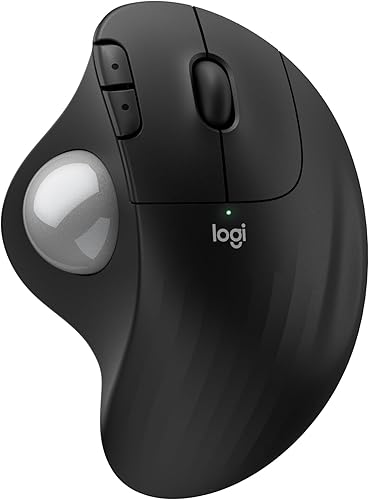
Logitech Ergo M575S Wireless Bluetooth Trackball Mouse: Best for long AA battery life
- Bluetooth and Logi Bolt USB receiver
- Up to 18 months of battery life
- Up to 2000 DPI
- Quiet clicks
- Recycled plastic parts
The black and silver-ball Logitech ERGO M575S uses thumb control and a sculpted right-handed shape. Its AA battery and Bluetooth or Logi Bolt connection suit long-term desk use.
Pros
- Up to 18 months of battery life
- Bluetooth and Logi Bolt
- Quiet clicks
- Up to 2000 DPI
Cons
- Right-handed design
- Uses a replaceable AA battery
The black Logitech ERGO M575S is best for buyers who want a wireless trackball with up to 18 months of AA battery life. Its sculpted right-handed shape supports the hand while thumb control keeps the mouse from needing a wide sliding area.
Bluetooth and the included Logi Bolt USB receiver give you two ways to connect. The mouse works with personal computers and tablets, with Windows and macOS listed as supported operating systems.
Logitech gives this model a maximum sensitivity of 2000 DPI. Its quiet clicks suit an office or shared desk where louder button sounds can become distracting.
The ERGO M575S has 3 customizable buttons and supports cursor-speed changes through the Logi Options+ app. Basic mouse functions work without additional software, while the app adds control for supported settings.
The black version uses plastic parts made with certified post-consumer recycled plastic. Logitech lists 52% recycled plastic for the Graphite color family, excluding plastic in the printed wiring assembly, cables and packaging.
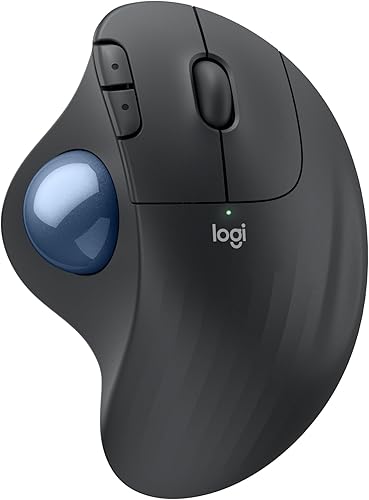
Logitech Ergo M575S Wireless Bluetooth Trackball Mouse: Best for graphite styling
- Graphite finish with blue ball
- Bluetooth and Logi Bolt USB receiver
- Up to 18 months of battery life
- Up to 2000 DPI
- Recycled plastic parts
This graphite ERGO M575S uses the same core trackball format as the other Logitech options here, with a blue ball, quiet clicks and long AA battery life.
Pros
- Up to 18 months of battery life
- Bluetooth and Logi Bolt
- Quiet clicks
- Graphite and blue color
Cons
- Right-handed design
- Uses a replaceable AA battery
The graphite Logitech ERGO M575S gives you the same core trackball approach with a blue ball and graphite finish. Pick it when the color matters as much as the long battery life and quiet thumb control.
It uses Bluetooth or the Logi Bolt USB receiver and runs on 1 included AA battery. Logitech states up to 18 months of battery life, although actual battery life can change with use and computing conditions.
The sculpted shape is designed for right-handed use and suits most hand sizes. Since the mouse stays in place while the thumb moves the ball, it fits a small desk or a crowded work surface.
The model supports up to 2000 DPI and includes 3 customizable buttons. The Logi Options+ app can adjust cursor speed and support shortcuts on compatible Windows and macOS systems.
Choose this version when the graphite and blue color combination fits your desk. If you prefer a lighter setup, the off-white version below uses a silver ball.
Logitech Ergo M575S Wireless Trackball Mouse- Off-White: Best for an off-white setup
- Off-white finish with silver ball
- Bluetooth and Logi Bolt USB receiver
- Up to 18 months of battery life
- Right-handed sculpted shape
- Included AA battery
The off-white ERGO M575S keeps the same thumb-control layout and long battery life while giving a desk setup a lighter color option.
Pros
- Up to 18 months of battery life
- Bluetooth and Logi Bolt
- Off-white color
- Quiet clicks
Cons
- Right-handed design
- Uses a replaceable AA battery
The off-white Logitech ERGO M575S is the best visual fit for a light desk setup, while keeping Bluetooth, USB receiver support and up to 18 months of AA battery life. It has a silver ball and a right-handed sculpted design.
The mouse connects through Bluetooth or the included Logi Bolt USB receiver. It works with personal computers and tablets, with Windows and macOS support listed for the model.
Thumb control keeps the cursor moving without sliding the unit across the desk. That makes the off-white M575S useful when your keyboard, notebook or monitor stand leaves limited space for a standard mouse.
The included AA battery avoids regular charging. Logitech also includes quiet clicks and 3 customizable buttons, while the Logi Options+ app can adjust cursor speed on supported systems.
This model has a maximum sensitivity of 2000 DPI. Choose it over the darker Logitech versions when the off-white finish and silver ball fit your workspace better.
Yadkbo Ergonomic Wireless Trackball Mouse: Best for AAA battery convenience
- Bluetooth and 2.4G connection
- Up to 3 devices
- 5 DPI levels from 100 to 1200
- Two AAA batteries required
- 30° tilt
The Yadkbo offers 3-device connection, 5 DPI levels and a 30° tilt. Its replaceable AAA batteries appeal to buyers who do not want a built-in rechargeable battery.
Pros
- 3-device connection
- 5 DPI levels
- 30° tilt
- Replaceable batteries
Cons
- AAA batteries are not included
- Right-handed design
The Yadkbo Ergonomic Wireless Trackball Mouse is the pick for buyers who prefer a 30° tilt and replaceable AAA batteries. It uses a right-handed thumb-control design with a blue finish and a shape made for medium to large hands.
Bluetooth and the included 2.4G USB receiver support up to 3 devices. Yadkbo lists a wireless range of 33 feet, or 10 meters, and compatibility with PCs, Macs, laptops and tablets.
Five DPI levels run from 100 to 1200. Use a lower setting for slower cursor movement and a higher setting when you want the pointer to cover more screen distance with less thumb motion.
The mouse needs 2 AAA batteries, which are not included. That means you can replace the batteries instead of relying on a built-in battery, but you need to keep spare AAA cells available.
The 5.5 x 5.5 in dimensions create a broad footprint. Measure your desk before ordering, especially if your keyboard and mouse area is narrow.
How we compared these wireless trackballs
Our score weighs specs, features and buyer feedback against what you are shopping for. For this roundup, the main factors were wireless connection choices, thumb-control comfort, power design, DPI range, device switching and fit for smaller desks.
Those factors matter because a trackball changes how you move the cursor. Instead of sliding the whole mouse, you roll the ball with your thumb, so control, comfort and desk space are linked in a way that does not apply to a standard mouse.
Wireless connection choices were a key comparison point. Bluetooth can keep a USB port free, while a USB receiver may be simpler on a computer where Bluetooth pairing is less convenient.
TECKNET and Yadkbo stand out for 3-device switching. TECKNET uses a rechargeable 500mAh battery, while Yadkbo uses 2 AAA batteries that are not included.
That 3-device feature suits people who move between a laptop, a desktop or another supported device during the day. With TECKNET, the options are BT1, BT2 and 2.4G, and you switch at the tap of a button.
Yadkbo uses BT1, BT2 and 2.4G as well, with a listed range of 33 feet. That gives you room to keep the mouse in a comfortable position even if the computer is not directly beside it.
Nulea also supports 3 devices and adds 4 DPI levels from 400 to 1600. That higher top setting may suit users who prefer a faster pointer, but its extra buttons cannot be programmed.
Nulea connects through Bluetooth or the included 2.4G USB receiver, which is stored at the bottom of the mouse. Storing the receiver in the unit can help if you travel between work locations.
The Logitech models focus on long battery life and a sculpted shape. They use Bluetooth or a Logi Bolt USB receiver, include 1 AA battery and offer up to 18 months of battery life.
That long stated battery period is a major trade-off in favour of Logitech for desk use. You avoid regular charging, but you do need to replace the AA battery eventually and keep a spare available.
Thumb-control comfort was judged through shape and angle rather than advanced ergonomic claims. TECKNET lists a 16° vertical angle, Yadkbo lists a 30° tilt, and Logitech describes a sculpted shape made for right-handed use.
Size also affected the comparison because these mice need a stable footprint. TECKNET is described for medium to large hands, Yadkbo is also aimed at medium to large hands, and Nulea has a substantial 5.51 x 4.37 in footprint.
DPI range was another dividing line. TECKNET and Yadkbo offer 5 levels from 100 to 1200, Nulea offers 4 levels from 400 to 1600, and Logitech lists a maximum sensitivity of 2000 DPI.
Higher DPI can reduce thumb movement on a large screen, while lower DPI can make careful placement easier. The best setting depends more on screen size and habits than on the highest number alone.
Compatibility also shaped the score. The models list support for Windows and macOS in different combinations, so check your operating system before choosing.
Overall, the scores reward a balance of connection flexibility, power design and right-handed thumb control. No single model leads on every factor, which is why the picks are separated by use case.
Wireless trackball mouse versus vertical mouse
A trackball mouse keeps the pointer moving through the ball, while a vertical mouse still moves across the desk. The better choice depends on whether your main problem is desk space, sliding movement or the angle of your hand.
A vertical trackball combines those ideas by keeping the ball under your thumb and lifting the hand into a more upright position. TECKNET has a 16° angle, while Yadkbo lists a 30° tilt.
Read our vertical mouse vs trackball comparison if you are unsure which movement style fits your work. A standard vertical mouse may feel more familiar, while a trackball usually needs less open desk space.
For another wireless shape comparison, see our guide to the best wireless vertical mouse with USB receiver. Left-handed buyers should also review the best left handed vertical mouse options, because every product in this roundup is right-handed.
How to choose a wireless trackball mouse
Choose by hand fit first, then compare power and connection features. A trackball can reduce the need to move your forearm, but the thumb position still needs to feel natural for your hand.
What size wireless trackball mouse fits you?
The TECKNET and Yadkbo are described for medium to large hands, with dimensions around 5.5 x 4.1 x 2 in or 5.5 x 5.5 in. Nulea measures 5.51 x 4.37 in, so it also needs a reasonable amount of desk space.
Keep the mouse close enough that your elbow stays near your side. Your thumb should rest on the ball without reaching forward, and your wrist should not bend sharply toward the desk.
How much DPI do you need?
DPI changes how far the pointer moves for a given amount of ball movement. Lower DPI can make precise cursor placement easier, while higher DPI can reduce the thumb movement needed across a large screen.
TECKNET and Yadkbo offer 100, 200, 400, 800 and 1200 DPI. Nulea offers 400, 800, 1200 and 1600 DPI, while Logitech lists a maximum sensitivity of 2000 DPI.
Start at a middle setting and adjust after a few minutes of normal work. The best setting is the one that lets you reach common screen areas without repeated thumb corrections.
Rechargeable or replaceable batteries?
A rechargeable model reduces the need to keep disposable batteries nearby. TECKNET and Nulea use rechargeable batteries, while Logitech uses 1 AA battery and Yadkbo uses 2 AAA batteries.
Choose TECKNET if a short charge matters to you. Choose Logitech if you want the longest stated battery period, or choose Yadkbo if you prefer replacing batteries rather than charging a built-in cell.
Bluetooth or USB receiver?
Bluetooth keeps a USB port free, while a USB receiver can be useful on computers where Bluetooth pairing is less convenient. TECKNET, Nulea, Logitech and Yadkbo all offer more than one wireless connection method.
Check the ports and operating systems you plan to use before ordering. If you switch between devices, TECKNET, Nulea and Yadkbo support up to 3 connections.
How to set up and care for a wireless trackball
Start by placing the mouse beside the keyboard with the ball under a relaxed thumb. Pair Bluetooth or insert the USB receiver, then choose a DPI setting that lets you control the pointer without large thumb movements.
Trackball surfaces collect dust over time, especially around the ball cage. If movement becomes rough, turn the mouse off, remove the ball only if the model allows it and clean around the contact points with care.
Nulea enters sleep mode after 30 minutes without use and wakes with a button click. Scrolling the ball or moving the mouse does not wake it, so remember to click a button when you return.
Keep rechargeable models on their normal charging instructions. Nulea specifies its included charging cable, a computer USB port or a 5V charger and warns against fast chargers.
Verdict: which wireless trackball should you choose?
The TECKNET Wireless Trackball Mouse is the best wireless trackball mouse for most medium to large right hands that want a rechargeable battery, 3-device connection and a 16° angle.
It is the strongest all-round choice here because it combines the features many buyers need together. You get Bluetooth and 2.4G switching for up to 3 devices, 5 DPI levels from 100 to 1200, and a 500mAh rechargeable battery.
That combination suits a desk where you move between devices without re-pairing each time. It also suits people who prefer charging a built-in battery to keeping disposable batteries in a drawer.
Pick Nulea if you want 4 DPI levels and a rechargeable 3-device mouse. The Nulea M501 offers settings from 400 to 1600, so it may suit users who prefer a faster pointer on a larger screen.
Pick Logitech if up to 18 months of AA battery life and quiet clicks matter most. The ERGO M575S models use Bluetooth or the included Logi Bolt USB receiver, and they include 1 AA battery.
Logitech is also a sensible pick if you want to avoid regular charging. The trade-off is that you will need to replace the AA battery over time, and the design is right-handed.
Choose Yadkbo for a steeper 30° tilt and replaceable AAA batteries. It offers 3-device connection and 5 DPI levels from 100 to 1200, but you will need to buy 2 AAA batteries because they are not included.
Before you order, check your hand size, operating system and desk space. Every model in this roundup is right-handed, and a larger shape may not feel comfortable if your hand is small.
Also check whether you prefer charging or replacing batteries, and whether you need 3-device switching. Those two choices will narrow the field faster than DPI alone.
For a lighter keyboard setup, pair your mouse research with our guide to the best large print wireless keyboard. If you work on a narrow desk and switch devices often, the TECKNET remains the best starting point.
Our top 3 picks at a glance
-
1
Best for rechargeable multi-device use
TECKNET Wireless Trackball Mouse
9.7/10 our score
See it on Amazon -
2
Best for adjustable thumb control
Nulea M501 Wireless Trackball Mouse Ergonomic Thumb
9.6/10 our score
See it on Amazon -
3
Best for long AA battery life
Logitech Ergo M575S Wireless Bluetooth Trackball Mouse
9.5/10 our score
See it on Amazon
Frequently asked questions
Are wireless trackball mice good for small desks?
Yes. A wireless trackball mouse keeps the cursor moving while your hand stays mostly in one place, so it needs less open desk space than a standard mouse.
TECKNET, Nulea, Logitech and Yadkbo all use thumb control, which suits narrow or busy work areas.
What is the best wireless vertical trackball mouse?
The TECKNET Wireless Trackball Mouse is the strongest upright option here because it combines a 16° vertical angle, thumb control, 3-device connection and a rechargeable 500mAh battery. Yadkbo offers a steeper 30° tilt, while Nulea focuses on adjustable DPI.
Do wireless trackball mice need a mouse pad?
No. A trackball mouse moves the cursor through the ball, so you do not need to slide the whole mouse across a pad.
Keep the unit on a stable surface and clean the ball area when cursor movement feels less smooth.
Are wireless trackball mice good for gaming?
They can work for some games, especially when desk space is limited, but thumb control takes adjustment. The best choice depends on cursor speed, button layout and comfort.
For more focused advice, see our guide to the best trackball mouse for gaming.