8 Best Laptop Stands for Desks (November 2026)
The best laptop stands for desks include the Amazon Basics Sturdy and Portable Ergonomic Laptop for everyday desk use, the BESIGN LS03 Aluminum Laptop Stand for a fixed eye-level height, and the Gogoonike Adjustable Laptop Stand for Desk for heavier laptops.
On this page (11 sections)
- How we compared these laptop stands for desks
- The best laptop stands for desks, by use
- Side-by-side comparison of laptop desk stands
- How high should a laptop stand raise your screen?
- What laptop size and weight should you check first?
- Do you need rotation or a fixed riser?
- How do airflow and materials affect daily use?
- How portable should a laptop desk stand be?
- What extras are worth paying for?
- How does a laptop stand fit with your chair and monitor setup?
- Our verdict on the best laptop stand for desk
The best laptop stand for desk for most people is the Amazon Basics Sturdy and Portable Ergonomic Laptop Stand, because it combines 7 inches of adjustment, an 11 lb limit and a fold-flat shape. Choose the BESIGN LS03 for a fixed 6-inch rise, the Gogoonike for heavier laptops, or a rotating model if you share your screen.
Our score weighs specs, features and buyer feedback against what you're shopping for. We compared height, weight limits, laptop sizes, rotation and portability across all eight picks.
A laptop stand on desk raises your screen so you can keep your head more upright. It works best when you pair it with a separate keyboard and mouse.
A monitor stand with a desk organizer is another way to raise a screen and keep supplies close.
Our picks at a glance
-
1
 Best for everyday desk use
Amazon Basics Sturdy and Portable Ergonomic Laptop
9.7/10 our score
See it on Amazon -
2
 Best for a fixed eye-level height
BESIGN LS03 Aluminum Laptop Stand
9.6/10 our score
See it on Amazon -
3
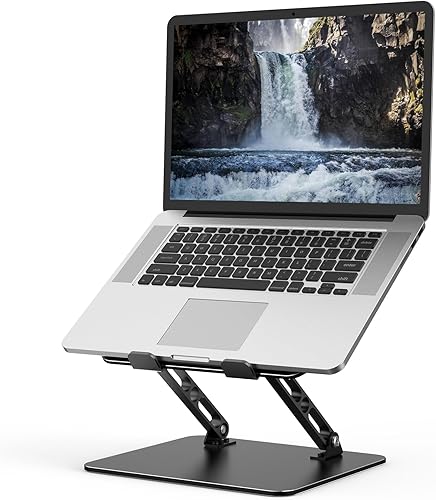 Best for heavier laptops
Gogoonike Adjustable Laptop Stand for Desk
9.6/10 our score
See it on Amazon
- 4
 Check it
Lamicall Aluminum Laptop Stand for Desk for
Best for large laptops - 5
 Best for tall adjustment and sharingCheck it
- 6
 Best for rotating on a budget footprintCheck it
- 7
 Check it
OMOTON LA10 360° Rotating Laptop Stand Riser
Best for collaborative work - 8
 Best for detachable simplicityCheck it
How we compared these laptop stands for desks
We checked each model's stated height range, weight limit and laptop size range. We also noted rotation, folding size and materials.
Weight limits range from 8.8 lb to 17.6 lb. That spread matters more than it looks, because a heavy 15.6-inch laptop can push past the lower limits.
Laptop sizes range from 10 inches to 17.3 inches. Larger laptops need a wider platform and a steadier base, especially when you type on the stand itself.
Height ranges range from a fixed 6 inches to 11.81 inches. Taller is not always better.
Match the rise to your chair height and eye level.
We also compared how each stand packs away. Folded dimensions tell you more about daily portability than the open size does.
A stand at 1.7 lb fits a bag with ease, while a stand at 1.53 kg changes how you pack for a trip.
Materials played a role in the comparison too. Aluminum alloy appears in most picks because it stays light and resists rust.
Metal builds can feel sturdier, but they often add weight that matters on the move.
The best laptop stands for desks, by use
These eight picks cover fixed risers, adjustable stands and rotating models. Each write-up below explains who the stand suits and where it gives something up.
Amazon Basics Sturdy and Portable Ergonomic Laptop: Best for everyday desk use
- Up to 7 inches of height adjustment
- Fits laptops from 10 to 15.6 inches
- 11 lb capacity
- Ventilated open design
- Folds to 10 x 8.7 x 1.8 inches
A simple height-adjustable riser with cooling vents and a fold-flat design for daily desk work.
Pros
- Tall 7-inch adjustment range
- Light and folds flat
- Open design aids airflow
Cons
- 11 lb limit is lower than some rivals
- No rotation
Amazon Basics suits daily desk work with a separate keyboard and mouse. Its 7 inches of height adjustment let you fine tune eye level as your chair height changes.
It fits laptops and tablets from 10 to 15.6 inches, including MacBook, Dell XPS, HP, ASUS and Acer models named by the brand. Its 11 lb limit covers many 13 to 15.6 inch laptops, but check heavier machines first.
The open hollow design aids airflow under the laptop. Non-slip silicone pads and protective hooks help hold the laptop in place on a flat surface.
It folds to 10 x 8.7 x 1.8 inches and weighs 1.7 lb, so it slips into most laptop bags. See more folding laptop stands for portable setups.
That makes it a strong pick for hybrid work between home and office.
The trade-off is the 11 lb limit and no rotation. If you need a heavier laptop or screen sharing, look at the Gogoonike or the rotating picks below.
BESIGN LS03 Aluminum Laptop Stand: Best for a fixed eye-level height
- Raises laptop by 6 inches
- Fits 10 to 15.6 inch laptops
- 8.8 lb capacity
- Detachable assembly in 3 steps
- Open aluminum design
A detachable aluminum riser that sets your screen at a fixed, comfortable height.
Pros
- Simple detachable design
- Open airflow design
- Lightweight
Cons
- Lower 8.8 lb capacity
- No height adjustment
BESIGN LS03 suits users who want one set height and no fiddling. It raises your laptop by 6 inches, which brings many 13 to 15.6 inch screens close to eye level.
It fits laptops from 10 to 15.6 inches, including MacBook Air, MacBook Pro, Lenovo ThinkPad, Dell, HP and ASUS models. The detachable design assembles in 3 steps and folds flat for storage.
The aluminum alloy build supports up to 8.8 lb. Rubber on the holder helps grip the laptop and guard against scratches.
The open design allows airflow under the laptop. That helps during long work sessions, though it does not guarantee cooler temperatures.
The trade-off is clear: the lowest weight limit here and no adjustment. If your laptop weighs more than 8.8 lb or you sit at different heights, choose an adjustable model instead.
Gogoonike Adjustable Laptop Stand for Desk: Best for heavier laptops
- Adjustable height and angle
- 17.6 lb capacity
- Fits 10 to 15.6 inch laptops
- Ventilation holes
- Foldable metal design
An adjustable metal stand with the highest weight limit in this group.
Pros
- 17.6 lb capacity
- Adjustable height and angle
- Rubber mats and silicone pads
Cons
- No rotation
- Height range not stated in inches
Gogoonike suits heavier laptops and users who type on the stand. Its 17.6 lb capacity is the highest in this group by a wide margin.
It fits laptops from 10 to 15.6 inches, including MacBook Air and Pro, Dell XPS, HP, Lenovo ThinkPad, Acer and Microsoft Surface models. You can adjust height and angle to reduce neck fatigue and eye strain, according to Gogoonike.
The metal build uses rubber mats on the hook and anti-slip silicone pads top and bottom. Smooth edges help protect your hands and your laptop.
Ventilation holes in the top support airflow. The foldable design also makes it easy to carry in a backpack for business travel.
The trade-off is no rotation and no stated inch range for height. If screen sharing matters, a rotating stand will serve you better.
Lamicall Aluminum Laptop Stand for Desk for: Best for large laptops
- Fits 10 to 17.3 inch laptops
- Adjustable height and angle
- Aluminum alloy with large base
- Ventilation holes
- Foldable and portable
A wide-size adjustable stand that supports laptops up to 17.3 inches.
Pros
- Widest size range here
- Large base for stability
- Foldable design
Cons
- No rotation
- No stated weight limit
Lamicall suits large laptops up to 17.3 inches. Its wide size range covers machines that the 15.6-inch models here cannot hold.
It fits popular models including MacBook, MacBook Air, MacBook Pro, Surface Laptop, Dell XPS, Google Pixelbook, HP, ASUS, Acer, Chromebook and Alienware. The riser adjusts to your preferred height and angle.
The larger, heavier aluminum alloy base aims to reduce shaking and sliding. Anti-skid silicone and smooth edges help protect the laptop from scratches.
Ventilation holes allow more airflow to cool the laptop during long sessions. It also folds up to carry for travel or business trips.
The trade-off is no rotation and no stated weight limit. If you own a large laptop and share your screen often, compare the OMOTON LA10, which also reaches 17 inches.
JOYEKY Laptop Stand for desk: Best for tall adjustment and sharing
- 360 degree rotation
- Height up to 11.81 inches
- Angle up to 120 degrees
- 11 lb capacity
- Fits 10 to 16 inch laptops
A rotating stand with the tallest rise and a wide angle range.
Pros
- Tallest max height
- 360 rotation
- Folds compactly
Cons
- 11 lb limit
- Taller rise may feel less steady for some users
JOYEKY suits higher desks and users who want a tall rise. It adjusts up to 11.81 inches, the tallest in this group.
It fits all 10 to 16 inch laptops, including MacBook Air and Pro, Dell XPS, HP, Lenovo, Acer and Chromebook models. The angle adjusts up to 120 degrees for viewing comfort.
The 360 degree swivel lets you turn the laptop to share a screen or join a presentation. That helps in small offices and shared workspaces.
The aluminum alloy stand supports up to 11 lbs. A larger, heavier base aims to keep it steady while you type.
It folds to 9.45 x 9.45 x 1.25 inches, so it packs well for work from home, office or travel. The open design also promotes airflow underneath.
The trade-off is the 11 lb limit. Taller stands can also feel less steady, so use it on a flat, solid desk.
LOXP Adjustable Laptop Stand: Best for rotating on a budget footprint
- 360 rotating base
- Height up to 7.5 inches
- Angle up to 120 degrees
- Fits 10 to 16 inch laptops
- Foldable metal design
A foldable rotating stand with a 7.5-inch rise and 120-degree tilt.
Pros
- 360 rotation
- 120-degree angle range
- Non-slip silicone
Cons
- Heaviest pick here
- No stated weight limit
LOXP suits users who want rotation without a tall frame. It raises your laptop up to 7.5 inches and tilts up to 120 degrees.
The 360 rotating base lets you turn the laptop to any angle. That helps for presentations, video calls and showing work to someone beside you.
It fits laptops from 10 to 16 inches, including MacBook Air and Pro, Dell XPS, HP, ASUS, Lenovo ThinkPad, Acer, Chromebook and Microsoft Surface models.
The one-piece fiber metal design aims for durability and stability. Non-slip silicone helps keep the laptop from sliding.
It folds for storage and travel, which suits home, office and outdoor use. Adjust height and angle to keep the screen at eye level, whether you sit or stand.
The trade-off is weight and size. At 1.53 kg and 12.21 x 12.61 inches, it is the bulkiest pick here, and no weight limit is stated.
OMOTON LA10 360° Rotating Laptop Stand Riser: Best for collaborative work
- 360 rotation with click feedback
- Height from 1.8 to 10.4 inches
- Fits laptops and tablets up to 17 inches
- Tool-free adjustment
- Folds to 11.4 x 1.7 inches
A tool-free rotating X-frame stand built for sharing screens and travel.
Pros
- Wide height range
- Tool-free setup
- Includes storage pouch
Cons
- Friction joints need firm adjustment
- Remove laptop before adjusting
OMOTON LA10 suits collaborative work and frequent travel. It raises your screen from 1.8 to 10.4 inches with tool-free adjustment.
The smooth 360 rotation turns your screen toward a colleague without extra desk space. Subtle click feedback marks each position, and the X-base keeps a low center of gravity.
It fits most laptops and tablets up to 17 inches, including MacBook Pro and Air, Dell, HP and Chromebook models. Anti-slip silicone pads grip the device and protect its finish.
The open X-frame lets air flow around the laptop instead of blocking bottom vents. The aluminum body also conducts heat away, according to OMOTON.
It folds to 11.4 x 1.7 inches, weighs 1.85 lb and includes a storage pouch. Remove your laptop before adjusting height or angle, the brand advises.
The trade-off is firm friction at the joints. That firmness holds your angle, but adjustment takes two hands.
OMOTON Laptop Stand: Best for detachable simplicity
- Detachable design
- Fits 10 to 17 inch laptops
- 11 lb capacity
- Aluminum alloy
- Open airflow design
A detachable aluminum stand for users who want a fixed riser without hinges.
Pros
- Detachable and portable
- Supports up to 17 inches
- 11 lb capacity
Cons
- No rotation
- No height adjustment
OMOTON Laptop Stand suits users who want detachable simplicity. It is a fixed aluminum alloy riser with no hinges to adjust.
It fits laptops from 10 to 17 inches, including MacBook 12 and 13 inch, MacBook Air 13 inch, MacBook Pro 13 and 16 inch, Microsoft Surface, ThinkPad, Dell, HP and Chromebook models.
The stand holds up to 11 lbs. Soft rubber pads help protect your laptop from scratches or slipping.
The compact, lightweight design detaches for easy carrying. You can take it apart for the library, a coworking space or a different desk.
The open design allows free airflow underneath and helps dissipate heat. The aluminum alloy body also helps absorb and diffuse heat, according to OMOTON.
The trade-off is no rotation and no height adjustment. If you need eye-level tuning or screen sharing, choose an adjustable or rotating model above.
Side-by-side comparison of laptop desk stands
Use the table to compare height, capacity and size at a glance. The best laptop stand for desk depends on your laptop weight more than on brand.
| Product | Best for | Height adjustment | Capacity | Laptop size | Our score |
|---|---|---|---|---|---|
| Amazon Basics Sturdy and Portable Ergonomic Laptop | everyday desk use | Up to 7 inches | 11 lb (5 kg) | 10 to 15.6 inches | 9.7 |
| BESIGN LS03 Aluminum Laptop Stand | a fixed eye-level height | 8.8 lb (4 kg) | 10 to 15.6 inches | 9.6 | |
| Gogoonike Adjustable Laptop Stand for Desk | heavier laptops | 17.6 lb (8 kg) | 10 to 15.6 inches | 9.6 | |
| Lamicall Aluminum Laptop Stand for Desk for | large laptops | 10 to 17.3 inches | 9.5 | ||
| JOYEKY Laptop Stand for desk | tall adjustment and sharing | 11 lb | 10 to 16 inches | 9.1 | |
| LOXP Adjustable Laptop Stand | rotating on a budget footprint | 10 to 16 inches | 9.1 | ||
| OMOTON LA10 360° Rotating Laptop Stand Riser | collaborative work | Up to 17 inches | 8.9 | ||
| OMOTON Laptop Stand | detachable simplicity | 11 lb (5 kg) | 10 to 17 inches | 8.6 |
For typing comfort, read our guide on how to choose a laptop stand and keyboard. A stand without a separate keyboard often just moves neck strain to your wrists.
How to read the table
Look at weight limit first, then laptop size, then height. A stand that fits your machine by size can still fail by weight when you add a heavy battery or a thick case.
Rotation is the last filter. It adds value for shared desks and meetings, but it does not improve posture on its own.
Choose rotation after you have the basics of size and load covered.
How high should a laptop stand raise your screen?
Raise the top edge of your screen to about eye level. Start with a low setting, then add height until you can look straight ahead without tilting your head down.
Fixed height vs adjustable height
Fixed stands like the BESIGN LS03 set one height, here 6 inches. That works if your chair and desk stay the same every day.
Adjustable stands cover a range, from 1.8 to 10.4 inches on the OMOTON LA10. That helps if you share a desk or change chairs.
How to set it up in 2 minutes
Place the stand on a flat, solid desk surface. Set your chair first, then adjust the stand until the screen top sits at eye level.
Add a separate keyboard and mouse at desk height. Keep the laptop lid open at about 90 to 110 degrees for viewing.
When a taller rise helps
A taller rise suits standing desks and higher chairs. The JOYEKY reaches 11.81 inches for that reason, while lower stands suit standard seated setups.
Do not chase the tallest number alone. A rise that matches your current chair usually feels better than the maximum setting on a shorter stand.
What laptop size and weight should you check first?
Check your laptop size and weight before you check style. Most picks here fit 10 to 15.6 inches, while a few reach 17 or 17.3 inches.
Laptops up to 15.6 inches
The Amazon Basics, BESIGN, Gogoonike and JOYEKY models cover this common range. Compare the weight limit next, because size alone does not tell you the load.
The Gogoonike supports up to 17.6 lb, while the BESIGN supports up to 8.8 lb. That gap decides the pick for heavier 15-inch laptops.
Laptops from 16 to 17.3 inches
The Lamicall reaches 17.3 inches, the OMOTON LA10 reaches 17 inches and the detachable OMOTON reaches 17 inches. Those wider platforms suit larger machines.
Our separate guide to laptop stands for large laptops covers this group in more detail.
Brand-specific fits
You may want a brand-specific guide if you own a MacBook Pro, MacBook Air, Dell or OMOTON model. We cover MacBook Pro stands, MacBook Air stands, Dell laptop stands and OMOTON stands in linked guides.
Weight checks in practice
Weigh your laptop alone, then add cables or a case if you use one. A laptop close to an 8.8 lb limit leaves little room for error, especially on a fixed riser.
If weight is close to the limit, a model with headroom such as the 17.6 lb Gogoonike gives you more margin. That margin also helps when you press down to type.
Do you need rotation or a fixed riser?
Rotation helps if you share your screen or turn to talk. Fixed risers help if you work alone and want the simplest setup.
Rotating stands for shared screens
The JOYEKY, LOXP and OMOTON LA10 all rotate 360 degrees. The OMOTON LA10 adds click feedback at each position.
Rotation also helps on video calls, because you can turn the camera toward your face as you move. Keep the base fully on the desk so it stays balanced.
Fixed stands for solo work
The BESIGN LS03 and OMOTON detachable stand use fixed risers. They have fewer moving parts and often feel steadier for typing.
If you want more adjustment without rotation, our adjustable laptop stand guide compares height-focused models.
Rotation limits to consider
Rotation adds a moving joint that needs a flat desk to stay steady. On a small or crowded desk, a fixed riser can feel calmer to use day to day.
Ask how often you share your screen. Daily sharing justifies rotation, while occasional sharing may not need it.
How do airflow and materials affect daily use?
Open frames and aluminum bodies help airflow under the laptop. That matters during long sessions, video calls and heavy multitasking.
Open and vented designs
The Amazon Basics uses a hollow open design. The Gogoonike and Lamicall use ventilation holes, while the OMOTON LA10 uses an open X-frame.
Airflow does not replace a clean fan intake. Keep vents clear and leave space under the laptop on the desk.
Aluminum vs metal builds
Most picks use aluminum alloy or metal. Aluminum is light and rust resistant, which helps for travel.
Rubber pads and silicone grips matter for scratch protection. Check that pads cover the contact points before you place an expensive laptop on a stand.
Why pads and edges matter
Pads stop sliding when you type or adjust the angle. Smooth edges protect both your hands and the laptop finish during setup.
A stand without good pads can shift on a smooth desk. That shift matters more on taller stands where the center of gravity sits higher.
How portable should a laptop desk stand be?
Fold-flat size matters if you travel or hot-desk. The JOYEKY folds to 9.45 x 9.45 x 1.25 inches, and the Amazon Basics folds to 10 x 8.7 x 1.8 inches.
Folding and detachable designs
Folding stands suit backpacks and laptop bags. Detachable stands like the BESIGN LS03 and OMOTON suit users who prefer a flat pack.
The OMOTON LA10 includes a storage pouch and folds to 11.4 x 1.7 inches. That shape fits a backpack sleeve or carry-on.
Storage at home
A stand that folds flat also clears desk space after work. Measure your storage spot before you buy, especially for the larger LOXP stand.
If storage space is your main issue, our desk organizer laptop stand guide covers stands with shelves and storage.
Weight for daily carrying
A stand near 1.7 lb adds little to a laptop bag. A stand at 1.53 kg adds a noticeable amount when you carry it beside a laptop.
Travelers should weigh the stand together with the laptop. Total bag weight matters more than the stand weight alone on a long commute.
What extras are worth paying for?
Extras help only if they match your desk setup. A shelf, hub or dock adds value when you lack space or ports.
Shelves, hubs and docks
A shelf can hold a keyboard or notebook under the laptop. A USB hub can add ports for a keyboard, mouse and display.
Our guides cover laptop stands with shelves, laptop stands with USB hubs and laptop stands with docking stations.
Wooden and color options
Wooden stands suit warmer desk styles, while pink stands suit a lighter color theme. We cover wooden laptop stands, adjustable wooden stands and pink laptop stands.
Style should come after height, weight limit and stability. A stand that fits your laptop will serve you longer than one that only matches your decor.
When extras add clutter
Extra shelves and hubs can crowd a small desk. On a compact desk, a simple riser with a separate keyboard often works better.
Buy extras for a clear gap in your setup. If you already have ports and space, the base stand does the main job.
How does a laptop stand fit with your chair and monitor setup?
Your chair height sets how much rise you need. A taller chair needs less stand height to reach eye level.
Pair your stand with a supportive seat from our desk chair for office work guide. For a wide desk, our dual monitor chair guide covers seating for larger setups.
If you use a separate monitor often, computer monitor arms can free desk space. A laptop stand then holds the laptop below or beside the main screen.
For brand-specific options, see Rain Design stands in our linked guides.
Using a stand with a second monitor
A stand can hold a laptop as a second screen below a main monitor. That setup works best when the laptop screen stays at a comfortable viewing angle.
Keep the keyboard at desk height in this setup too. The same rule applies whether the laptop is your main screen or a side screen.
Our verdict on the best laptop stand for desk
Pick the Amazon Basics for everyday desk use. It offers 7 inches of adjustment, an 11 lb limit and a fold-flat shape at 1.7 lb.
Pick the Gogoonike if your laptop weighs more than 11 lb, because it supports up to 17.6 lb. Pick the Lamicall for laptops up to 17.3 inches.
Pick the OMOTON LA10 if you share your screen or travel often. Its 360 rotation, 1.8 to 10.4 inch range and pouch make it the most flexible pick here.
Start with your laptop weight and size, then choose height or rotation. That order leads to the right laptop desk stand for your desk.
Our top 3 picks at a glance
-
1
Best for everyday desk use
Amazon Basics Sturdy and Portable Ergonomic Laptop
9.7/10 our score
See it on Amazon -
2
Best for a fixed eye-level height
BESIGN LS03 Aluminum Laptop Stand
9.6/10 our score
See it on Amazon -
3
Best for heavier laptops
Gogoonike Adjustable Laptop Stand for Desk
9.6/10 our score
See it on Amazon
Frequently asked questions
How high should a laptop stand raise your screen?
Raise the top of the screen to about eye level when you sit upright. Most stands in this guide offer 6 to 10 inches of rise, so start low and add height in small steps.
Your chair height matters too.
A higher chair may need less stand height.
Do you need an external keyboard with a laptop stand?
Yes, in most cases. Raising the laptop moves the built-in keyboard too high for comfortable typing.
Pair the stand with a separate keyboard and mouse, or use it only for viewing and video calls.
What laptop size fits most laptop stands for desks?
Most picks here fit 10 to 15.6 inch laptops. A few support up to 17 or 17.3 inches for larger machines.
Check your laptop size and weight against the stand limits before you buy.
Can a laptop stand help with heat?
An open frame can improve airflow under the laptop. Several picks use hollow or vented designs for that reason.
Airflow helps, but it does not replace good room ventilation or a clean fan intake.