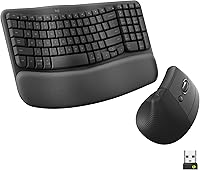
How to Use a Mouse Wrist Rest
Place the mouse wrist rest beside the mouse, then rest the heel of your hand lightly while keeping your wrist straight. Adjust the mouse and rest together so your forearm stays level.
On this page (8 sections)
- Where should you place a mouse wrist rest?
- How should your hand rest on the support?
- Should the wrist rest move with the mouse?
- Which mouse wrist rest materials can suit long desk sessions?
- How do you adjust the rest for a desk setup?
- What mistakes should you avoid?
- How do you use a mouse wrist rest for gaming?
- What is the best way to use a mouse wrist rest?
Here's how to use a mouse wrist rest: place it beside the mouse, support the heel of your hand lightly, and keep your wrist in a straight, relaxed position. Your forearm should stay level with the desk, and the mouse should move without your shoulder lifting.
A wrist rest is a positioning aid, not a brace. It should reduce the need to hover your hand, but it shouldn't trap your wrist or force your fingers into an awkward angle.
Where should you place a mouse wrist rest?
Place the mouse wrist rest directly beside the mouse, with the support close to the front edge of the mouse. This gives your hand a short transition from the rest to the mouse and keeps the rest from taking up the mouse's movement area.
Set the mouse on the same desk surface as the rest. If the rest is much higher or lower than the mouse, your wrist may bend as you move between them.
If you use a vertical mouse, compare wrist rests for vertical mice for a suitable shape and height.
The support should sit under the heel of your hand, near the base of the palm. Avoid placing the highest part under the center of your wrist, because that can create pressure during long periods of pointer use.
Readers comparing the wider setup can start with this guide to an ergonomic keyboard and mouse, especially when the keyboard, mouse, and chair height all need adjustment.
How should your hand rest on the support?
Let the heel of your hand touch the rest lightly while your fingers stay free to operate the mouse. Your thumb should reach the side of the mouse without stretching, and your index and middle fingers should rest naturally over the buttons.
Don't press your full body weight into the support. A light contact point lets you lift or shift your hand when the mouse needs wider movement.
Keep your wrist close to straight rather than bent upward, downward, or sharply toward the little-finger side. If your hand feels pinched, move the rest slightly away from the mouse and reassess the angle.
How do you use a mouse wrist rest without bending your wrist?
To use a mouse wrist rest without bending your wrist, match the rest height to the mouse and keep the forearm level. A thick keyboard rest may not suit a low mouse, while a low mouse rest may feel too flat beside a taller mouse.
Try a small adjustment at a time. Move the rest forward or backward before changing your chair, then check whether your shoulder, elbow, and wrist stay relaxed.
The goal is a smooth path from forearm to hand. If the mouse rest makes your wrist feel lifted, slide it away from the mouse or choose a lower profile.
Should the wrist rest move with the mouse?
The wrist rest should stay in place while your hand moves freely between the support and the mouse. It shouldn't need to travel with every small pointer movement.
A non-slip base can help keep the support from shifting on the desk. Still, test the position with the mouse at the farthest comfortable point in each direction.
A fixed rest is only useful if it doesn't block the movement range you need.
For a compact desk, compare a best small wrist rest for mouse option. A smaller support may leave more room for the mouse, but it can provide less area for your hand to return to.
Which mouse wrist rest materials can suit long desk sessions?
Choose the material by the feel and height you can use without pressure. Gel tends to provide a different feel from memory foam, while fabric or rubber covers change how the hand contacts the surface.
The Gimars set combines a memory foam keyboard rest with a separate mouse wrist rest and coaster. Its keyboard rest is 17 x 3.5 x 1.2 in, and its mouse rest is 6.3 x 3.3 x 1.2 in.
Gimars uses spandex fabric over the memory foam and a natural rubber base. The top is water-resistant and stain-resistant, so wipe it with a damp cloth and let it dry.
This set suits people who want both keyboard and mouse support in one coordinated setup. Its 1.2 in height may feel too high if your mouse sits low or your forearm already slopes downward.
The Kensington ErgoSoft Wrist Rest for Standard Mouse uses gel cushioning under an ultra-soft exterior. Its low-profile design is intended for a mouse higher than 1 in, and its non-skid rubber backing helps keep it from sliding.
Kensington's curved design is intended to support alignment during work or gaming. Choose it when you want a mouse-only rest rather than a matching keyboard-and-mouse set.
The MEKASS set uses slow-bounce memory foam, a smooth Lycra cover, and a non-slip silicone base. Its keyboard rest measures 17.32 x 3.15 x 0.79 in, while its mouse rest measures 6.23 x 3.54 x 0.79 in.
MEKASS suits readers who want a lower profile than the Gimars set and a separate support for the mouse hand. Its massage-pattern design may not suit anyone who prefers a plain, smooth contact surface.
For more material choices, compare a best gel mouse wrist rest guide. For wider mouse movement during play, see best mouse wrist rests for gaming.
How do you adjust the rest for a desk setup?
Adjust the chair, desk, mouse, and wrist rest as one setup. Start with your feet supported, let your shoulders drop, and bring the mouse close enough that your elbow stays near your side.
Keep the elbow at a comfortable angle instead of reaching forward. If your shoulder rises, move the mouse closer or lower the arm position before changing the wrist rest.
A wrist rest cannot correct every desk-height problem. If your chair leaves your arms too low or too high, review options such as a Best Desk Chair with Neck Rest or a Best Computer Chair with Neck Rest only as part of the wider workstation setup.
A split keyboard may also change how much space you need between the keyboard and mouse. Compare a best split keyboard with wrist rest if your current keyboard forces your mouse arm too far outward.
What mistakes should you avoid?
Avoid resting on the middle of your wrist, pushing hard into the pad, or placing the mouse too far away. These mistakes can create pressure or make your shoulder and forearm work harder.
Don't use the rest as a reason to keep your hand fixed during every movement. Lift your hand when you need to reposition, and use the mouse at a sensitivity that lets you work without repeated long reaches.
Avoid covering the mouse's travel area with the rest. If the support blocks the mouse, move it slightly toward the front edge or choose a smaller design.
Clean the surface according to its material. A damp cloth suits the Gimars spandex surface, while the Kensington rubber cover and MEKASS Lycra surface should be kept free of dust and debris.
If discomfort continues or affects daily tasks, stop using the setup and seek advice from a qualified health professional. A wrist rest can change positioning, but it isn't a treatment for an ongoing condition.
How do you use a mouse wrist rest for gaming?
For gaming, keep the rest as a light landing point and remove it if it limits fast mouse movement. Set the mouse and rest at matching heights, then check that the support doesn't catch your hand during wider movements.
The Kensington model suits a mouse higher than 1 in, while the Gimars and MEKASS options include separate mouse rests as part of larger sets. Choose based on the space available and whether you also want keyboard support.
A memory foam set may suit a desk used for both work and gaming. A mouse-only gel rest may suit a smaller setup where keyboard support is unnecessary.
What is the best way to use a mouse wrist rest?
The best way to use a mouse wrist rest is to keep the heel of your hand lightly supported while your wrist stays straight and your forearm remains level. Place the rest beside the mouse, leave room for movement, and adjust the height before accepting pressure.
Choose Gimars if you want a 3-piece memory foam set with a 1.2 in mouse rest. Choose Kensington if you want a low-profile gel rest for a mouse higher than 1 in.
Choose MEKASS if you want a 0.79 in mouse rest with a memory foam keyboard-and-mouse set.
Then reassess the full desk position. The right wrist rest should make mouse use easier without restricting movement, and your ergonomic keyboard and mouse setup should leave your shoulders, elbows, and hands relaxed.
Frequently asked questions
Should your wrist rest touch your wrist while using a mouse?
Yes, the wrist rest should support the heel or lower part of your hand without forcing your wrist upward. Keep contact light and let your forearm move the mouse.
If the rest presses into the middle of your wrist or bends it backward, adjust its position or height.
Should a mouse wrist rest be in front of or behind the mouse?
Place the mouse wrist rest directly beside the mouse, with its front edge close to the area where your hand approaches the mouse. Your hand should move from the rest to the mouse without a sharp bend.
Keep enough desk space for the mouse to move freely.
Can you use a keyboard wrist rest for a mouse?
A keyboard wrist rest is usually too long or too deep for mouse movement, though a set may include a separate mouse rest. Use the smaller mouse pad when available, and check that its height lets your hand reach the mouse without lifting your shoulder.
How do you use a mouse wrist rest for gaming?
Use a gaming mouse wrist rest as a light support point, not as a clamp around your wrist. Keep the mouse, rest, and forearm on the same level, and move the mouse with your arm when the game requires wider movement.
Remove the rest if it limits control.