How to Choose a Triple Monitor Floor Stand
Pick a triple monitor floor stand by matching screen size, weight and VESA holes first, then floor footprint and arm reach. A good fit holds all three screens without crowding your desk or forcing you to lean forward.
On this page (11 sections)
- How does a triple monitor floor stand compare with a desk clamp?
- What screen size and weight limits should you check first?
- How do VESA 75x75 and 100x100 patterns affect your choice?
- How much floor footprint does a freestanding base need?
- What pole height should a triple monitor floor stand have?
- How do arm reach and screen spacing change your desk layout?
- Which tilt, swivel and rotation ranges matter most?
- When do pneumatic arms and heavy duty joints help?
- How should you plan cable routing on a triple stand?
- How do you set up and care for a triple monitor stand?
- Which triple monitor floor stand should you buy?
A triple monitor floor stand earns its place when it lifts three screens off your desk and keeps them aligned at eye level. Start with screen size, per-screen weight and VESA pattern, because those three facts decide whether any stand will work safely.
Floor stands differ from desk clamps in how they use space. A freestanding base sits on the floor or desk surface, while a clamp arm grips the desk edge.
Both can hold three monitors, but they change your desk depth, cable routes and chair clearance in different ways.
This guide checks screen spacing and floor footprint for three display workstations. It also explains pole height, arm reach, tilt range and rotation, so you can judge a stand before you measure your desk.
We compared the specs for the three stands below. We looked at screen size ranges, weight limits, VESA patterns, base size, pole height and adjustment ranges, then matched each stand to the buyer it fits best.
How does a triple monitor floor stand compare with a desk clamp?
A triple monitor floor stand uses a weighted or wide freestanding base instead of a desk clamp. That helps if your desk is glass, thin, already full at the back edge, or shared with another person.
A desk clamp saves floor space and often gives a cleaner look under the desk. A freestanding base can sit behind the desk, beside the desk on the floor, or on top of a deep desk, depending on the model and your room layout.
Read the base type before you read the screen size. A base that sits on the floor needs a different footprint check than a base that sits on the desktop.
A clamp needs a desk thickness check instead.
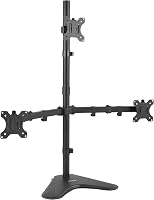
The VIVO STAND-V003E is a free standing triple monitor desk stand for screens up to 30 inches. It uses a heavy duty base that measures 40.0 cm by 27.9 cm, which tells you the footprint you must plan for on the floor or desk.
Rule: choose freestanding when your desk edge cannot take a clamp, and choose clamp when floor space is tighter than desk space.
What screen size and weight limits should you check first?
Check maximum screen size and maximum weight per arm before you look at style or cable clips. Those limits are per screen, not for all three combined.
The VIVO STAND-V003E fits 13 to 30 inch screens and holds up to 10.0 kg per monitor. That leaves room for larger 27 and 30 inch panels, provided each screen stays within the weight limit and has a matching VESA pattern.
The WALI MF003 fits 13 to 27 inch screens and supports up to 22 lb per arm. It suits the common 24 and 27 inch office triple, but it is not the pick if your outer screens are 28 to 30 inches.
The VIVO STAND-V300D takes a different route. It fits one screen up to 49 inches and two screens up to 38 inches, with a minimum screen size of 24 inches.
It holds 5.5 lb to 44 lb per arm, which makes it a heavy duty option for ultrawide panels.
Rule: buy for your heaviest and largest screen, not for the average of the three.
How do VESA 75x75 and 100x100 patterns affect your choice?
VESA holes are the four screw holes on the back of your monitor. The stand and the screen must share the same pattern before any other feature matters.
All three stands here support VESA 75x75 mm or 100x100 mm mounting holes. That covers most office and gaming monitors in the size ranges listed, but you still need to check each panel on your desk.
Some screens use a collar, spacer or adapter plate around the VESA holes. If the mounting plate cannot sit flat, the screen may sit tilted even before you adjust the arm.
Measure the hole spacing in millimeters rather than guessing from the diagonal size.
Detachable VESA plates help during setup. You can fix the plates to the monitors first, then slide the screens onto the arms.
That lowers the chance of dropping a panel while you reach across a pole.
Rule: confirm 75x75 mm or 100x100 mm on every screen, including any laptop or tablet you plan to add.
How much floor footprint does a freestanding base need?
A freestanding base needs more than its own outline on the floor. Add room for the chair, your feet, power strips and the walkway you use to reach the back of the desk.
The VIVO STAND-V003E base measures 40.0 cm by 27.9 cm. That is the stated footprint, and VIVO warns not to pull monitors too far forward or backward unless the stand is bolted down.
Plan the base position so normal arm reach stays near the center of gravity.
The WALI MF003 uses a free standing V-base that can sit on any desktop, plus a two-stage locking system with a 4 inch diameter grommet base option. The grommet option suits desk thickness from 0.3 to 2.4 inches.
That choice changes whether the footprint lands on the floor, on the desk or through a desk hole.
Tape the base outline on the floor before you order. Sit in your chair and push back to your normal position.
Check that casters, footrests and cabinet doors still clear the pole and base.
Rule: tape the footprint, test your chair roll, and only then order a freestanding base.
What pole height should a triple monitor floor stand have?
Pole height sets how high the center monitor can sit relative to your eyes. For a setup without a height-adjustable pole, monitor riser blocks can raise a screen from the desk.
A short pole can force the top of the screen too low, while a tall pole can push the center screen above a comfortable reach.
The WALI MF003 has a 16 inch height pole, with up and down monitor height adjustment of 0.8 inch in the stated setup. That suits standard 24 to 27 inch screens placed for desk work, where the center panel sits close to eye level.
The VIVO STAND-V300D has a 26.4 inch pole height and a maximum screen height of 37.6 inches for the center screen. That extra height matters for a 49 inch ultrawide center panel, which needs more vertical room than three 24 inch screens.
The VIVO STAND-V003E adjusts height along the center pole. Height adjustment along the pole lets you raise or lower the whole array, then fine tune each arm for tilt and swivel.
Rule: match pole height to your largest center screen, then set that screen first.
How do arm reach and screen spacing change your desk layout?
Arm reach decides how far the side screens can sit from the center pole. Too little reach forces wide bezel gaps.
Too much reach can pull the monitors forward and stress the base balance.
The VIVO STAND-V003E has adjustable arms with 360 degree swivel and 360 degree rotation. You can place screens in portrait or landscape shape, which helps if one side screen shows chat, code or documents in a tall layout.
The WALI MF003 side monitors tilt plus or minus 90 degrees and swivel plus or minus 90 degrees. That wide side tilt helps angle the outer panels inward for a curved viewing line, while the center monitor tilts plus or minus 15 degrees.
The VIVO STAND-V300D has an arm span of 39.4 inches and maximum extension of 19.7 inches. Those numbers matter when you run one 49 inch center screen with two 38 inch side screens, because the outer panels need more horizontal room.
Our best freestanding triple monitor stand roundup compares more freestanding options if these reach numbers do not fit your desk.
Rule: measure total width with your preferred bezel gaps, then check arm span against that total.
Which tilt, swivel and rotation ranges matter most?
Tilt, swivel and rotation do different jobs on a triple setup. Tilt changes glare and viewing angle up or down.
Swivel turns a screen left or right. Rotation flips a screen between landscape and portrait.
The VIVO STAND-V003E offers plus or minus 15 degrees of tilt, 360 degree swivel and 360 degree rotation. That gives full portrait use for side screens and a wide range for glare control.
The WALI MF003 gives the center monitor plus or minus 15 degrees of tilt, while side monitors tilt plus or minus 90 degrees. Side swivel also runs plus or minus 90 degrees, and rotation runs 360 degrees from landscape to portrait.
The VIVO STAND-V300D gives plus or minus 55 to minus 25 degrees of tilt, 180 degree swivel and 360 degree rotation. The wider tilt range helps with larger ultrawide panels, where a small angle change moves glare across a wide surface.
If you plan a vertical side screen, our triple vertical monitor mount guide explains the screen height and bezel checks that portrait layouts need.
Rule: pick rotation for portrait side screens, and pick tilt range for glare on large panels.
When do pneumatic arms and heavy duty joints help?
Pneumatic arms help when screens are heavy enough to fight you during adjustment. A counterbalanced arm holds the weight so you can move a panel with light hand pressure instead of lifting it with both hands.
The VIVO STAND-V300D uses pneumatic height adjustment with 10.4 inches of adjustment through the arms, plus more adjustment along the center pole. VIVO says the pneumatic arms counterbalance monitor weight for height changes at the touch of a hand.
The same stand uses cast aluminum construction with high capacity tilt joints. That build suits ultrawide screens at the higher end of the 5.5 lb to 44 lb per arm range, where lighter joints can sag over time.
The VIVO STAND-V003E uses steel and aluminum construction and carries a 3 year manufacturer warranty. The WALI MF003 uses metal construction and carries a 10 year warranty description.
Warranty length is a useful tie breaker when two stands otherwise fit your screens.
If you use curved panels, our best triple monitor stand for curved monitors list checks which arm ranges suit curved backs and larger bezels.
Rule: choose pneumatic arms for heavy ultrawides, and choose simpler arms for matched 24 to 27 inch panels.
How should you plan cable routing on a triple stand?
Cable routing keeps three power cords and three video cables from hanging in your lap. A stand with clips on the arms and pole can route each cable in a straight line, then drop it behind the desk.
The VIVO STAND-V003E has detachable cable clips on the arms and center pole. That helps you separate center and side cables so a swivel does not tug a cord across the desk.
The WALI MF003 has built-in cable management guides along the arms. Routing stays closer to the arm, which helps when you rotate a side screen to portrait and do not want the cable to swing free.
The VIVO STAND-V300D routes cables through the arms and cable clips. That matters more on a tall ultrawide setup, where longer cables can slide off the arm if they are not held in place.
Leave slack at each joint. A cable that is tight at full swivel will pull the screen when you turn it.
Test rotation and swivel after routing, not before.
Rule: route cables with slack at every joint, then test full swivel and rotation.
How do you set up and care for a triple monitor stand?
Setup starts with the base, pole and center screen, in that order. A level base and a straight pole make every later adjustment easier.
Place the base on a flat floor or desktop surface. The VIVO STAND-V003E base has padding on the bottom to protect a desk from scratches.
Keep the base load near its center, and follow VIVO guidance on not pulling monitors too far forward or backward unless the stand is bolted down.
Fix the VESA plates to each monitor while the screens sit on a soft, flat surface. Check that all four screws are snug and that the plate sits flat.
Then mount the center screen first and set its height before you add the side screens.
WALI includes a mounting hardware kit and a user manual with the MF003. VIVO provides hardware and instructions for the STAND-V003E and detachable VESA plates for the STAND-V300D.
Keep the spare screws and clips in a labeled bag after setup.
For care, wipe the pole and arms with a dry or slightly damp cloth. Check VESA screws and clamp joints after the first week, then each month.
Tighten any joint that lets a screen drift out of line.
If your chair rolls on hard floors, our best office chair for hardwood floors guide helps you match casters to the floor area around a freestanding base. If posture is your main concern, our how to choose an ergonomic office chair guide covers seat height and lumbar support in plain terms.
If you run a laptop as a fourth screen or as a side panel, our triple monitor stand for laptop guide explains the extra cable and height checks. If you want computer monitor arms instead of a pole stand, that guide compares clamp and grommet options.
Our best VIVO triple monitor stand roundup collects more VIVO options in one place.
Rule: set the base level, mount the center screen first, and recheck screws after the first week of use.
Which triple monitor floor stand should you buy?
Pick the VIVO STAND-V003E for matched screens up to 30 inches when you want a freestanding base, full rotation for portrait side screens and a 3 year manufacturer warranty. Its 40.0 cm by 27.9 cm base needs clear floor or desk space, so measure that footprint first.
Pick the WALI MF003 for matched screens up to 27 inches when you want a free standing V-base or a grommet base option and a 10 year warranty description. Its 16 inch pole and wide side tilt suit standard office triples with side screens angled inward.
Pick the VIVO STAND-V300D for ultrawide screens when one panel runs up to 49 inches and the side panels run up to 38 inches. Pneumatic arms, a 26.4 inch pole and cast aluminum joints suit heavy panels in the 5.5 lb to 44 lb per arm range.
Screen size is the first filter, weight is the second, and floor footprint is the third. If a stand fails any one of those checks, a different triple monitor floor stand will serve you better than forcing the fit.
Frequently asked questions
What is a triple monitor stand floor setup best for?
A triple monitor stand floor setup suits desks where you want three screens off the desktop and a freestanding base behind or beside the desk. It works well for trading, design review and multitasking when each screen size and weight stays within the mount limits.
Can a freestanding triple monitor stand replace computer monitor arms?
Yes, a freestanding triple monitor stand can replace three separate computer monitor arms when you need one pole, one base and shared cable routing. Separate arms still give more independent placement, so compare reach and tilt range before you switch.
How do I check screen spacing for three monitors?
Measure each screen width, then add the bezel gaps you want between panels. Check that the side arms can pull the outer monitors close enough for a straight line without pushing the center screen too far forward.
What floor footprint should I plan for?
Plan for the full base plus chair movement and walkway space around it. Tape the base outline on the floor, sit in your chair, and confirm you can push back without hitting the pole or base legs.