9 Best Wireless Ergonomic Vertical Mice (November 2026)
The best ergonomic vertical wireless mice include the Anker 2.4G Wireless Ergonomic Mouse for simple USB setup, the TECKNET Ergonomic Mouse for three-device switching, and the Logitech Lift Vertical Ergonomic Wireless Mouse for small to medium hands.
On this page (5 sections)
The best ergonomic vertical wireless mouse for most right-handed desks is the Anker 2.4G Wireless Ergonomic Mouse. It offers a neutral upright grip, a USB receiver, three DPI settings and forward and back buttons without Bluetooth pairing.
That mix suits a simple desk. You plug in the receiver, keep the mouse close to your keyboard, and start work without pairing steps.
The upright grip places your hand in a handshake position rather than flat on the desk. Over long sessions that can feel more relaxed for some users, especially if a flat mouse leaves your wrist turned inward.
Fit matters more than brand. A tall vertical body can feel supportive for one hand and cramped for another, so hand size and grip style should guide your choice before DPI or button count.
Choose Logitech Lift if your hands are small to medium and you want Bluetooth or Logi Bolt. That option suits desks that move between a laptop, tablet or second computer.
Pick ProtoArc if you prefer a rechargeable mouse that can connect with up to 3 devices. Rechargeable power helps if you dislike buying disposable batteries, while multi-device links help if you work across screens.
If you are comparing the whole desk setup, our ergonomic keyboard and mouse guide explains how the two tools work together. For receiver options, see the best wireless vertical mice with USB receivers.
Give any vertical mouse a few days before you judge it. If pain continues or worsens, get advice from a qualified health professional rather than forcing the shape.
Our picks at a glance
-
1

-
2

-
3
 Best for small to medium hands
Logitech Lift Vertical Ergonomic Wireless Mouse
9.6/10 our score
See it on Amazon
- 4
 Check it
ProtoArc EM11 NL Wireless Ergonomic Vertical Mouse
Best for rechargeable multi-device use - 5
 Best for rechargeable USB useCheck it
- 6
 Check it
TECKNET Ergonomic Mouse Vertical Wireless with 2.4GHz
Best for quiet USB browsing - 7
 Check it
UGREEN Ergonomic Wireless Mouse
Best for medium-to-large hands - 8
 Check it
Nulea Ergonomic Vertical Wireless Mouse with 6
Best for extra shortcut buttons - 9
 Best for rechargeable medium-to-large handsCheck it
The best ergonomic vertical wireless mouse picks
The Anker is the strongest all-purpose choice, while the other mice are better for specific hand sizes, connection needs or power preferences. A vertical shape can feel unusual at first, so fit and setup matter as much as the button count.
Anker 2.4G Wireless Ergonomic Mouse: Best for simple USB setup
Anker 2.4G Wireless Ergonomic Mouse: Best for simple USB setup
- Right-hand vertical grip
- 2.4 GHz USB receiver
- 800, 1200 and 1600 DPI
- Power-saving mode after 8 minutes
The Anker gives you a straightforward upright grip with a USB receiver and three DPI settings. It fits buyers who want basic wireless control without Bluetooth pairing.
Pros
- Neutral handshake-style grip
- Receiver stores in the mouse
- Forward and back buttons
Cons
- Right-handed only
- Clicks are not silent
- Batteries are not included
The Anker uses a right-hand vertical design that encourages a neutral handshake position. Its 800, 1200 and 1600 DPI settings let you choose slower cursor movement for precise work or faster movement for wider screens.
The 2.4 GHz connection uses a USB receiver, which is stored in the bottom of the mouse. This is a good fit for a desk where plug-and-play setup matters more than Bluetooth pairing.
It has 5 buttons, including next and previous controls for web browsing. The clicks are not silent, so a shared office or quiet library may favor one of the quieter TECKNET or Logitech options.
The mouse enters power-saving mode after 8 minutes of inactivity and wakes when you press the right or left button. Two AAA batteries are required and aren't included.
Choose Anker for a familiar USB workflow and a moderate price tier. If you want a wider range of DPI settings, the TECKNET models offer more control.
TECKNET Ergonomic Mouse: Best for three-device switching
TECKNET Ergonomic Mouse: Best for three-device switching
- Bluetooth 5.0 and 3.0
- 2.4 GHz USB-A mode
- Six DPI levels up to 4800
- Three-device connection
TECKNET suits a desk that moves between computers because it can connect with Bluetooth or its USB receiver. Its six DPI levels give you more cursor-speed choices than most picks here.
Pros
- Connects with up to 3 devices
- Quiet left and right clicks
- Windows, Mac, Chrome and Linux support
Cons
- Right-handed only
- Side buttons do not work with macOS
- Medium-to-large hands fit best
TECKNET connects through Bluetooth 5.0 or 3.0 and a 2.4 GHz USB-A receiver. Bluetooth can connect to 2 devices, while the mouse supports switching across 3 devices, making it useful for a computer, laptop and another work device.
Its six DPI levels run from 800 to 4800. That range gives you more control over cursor speed than the Anker, especially when moving between detailed documents and a large display.
The left and right buttons are nearly silent, but the other function buttons are not. It is designed for right-handed use and fits medium-to-large hands best.
For a left-hand specific shape, compare left-handed gaming mice.
TECKNET supports Windows, Mac, Chrome and Linux. The side buttons don't work with macOS, so Mac users who depend on browser shortcuts should account for that limit.
Choose it for multi-device switching and a broad DPI range. For small to medium right hands, Logitech Lift is the more targeted fit.
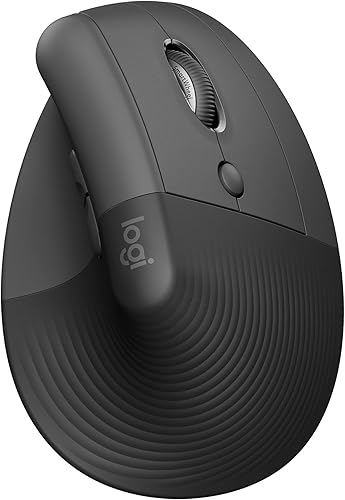
Logitech Lift Vertical Ergonomic Wireless Mouse: Best for small to medium hands
Logitech Lift Vertical Ergonomic Wireless Mouse: Best for small to medium hands
- 57-degree vertical shape
- Bluetooth Low Energy and Logi Bolt
- SmartWheel scrolling
- Up to 2 years from 1 AA battery
Logitech Lift is the clearest fit choice for small to medium right hands. Its 57-degree shape, SmartWheel and dual connection options suit a quieter multi-device desk.
Pros
- Small-to-medium hand fit
- Whisper-quiet clicks
- Windows, macOS, iPadOS, Chrome OS and Linux support
Cons
- Right-hand model shown
- Premium feature set may be more than a basic desk needs
- Uses a single AA battery
Logitech Lift is built around a 57-degree vertical angle and a softly textured grip with a thumb rest. It is specifically suited to small to medium right hands, so measure before choosing it for a larger hand.
The SmartWheel supports smooth scrolling, and the mouse has customizable buttons. Whisper-quiet clicks make it a better option for quiet rooms than the Anker.
Connection choices include Bluetooth Low Energy and the Logi Bolt USB receiver. Lift can connect with up to 3 devices, and Logitech states that one AA battery can last up to 2 years.
It works with Windows, macOS, iPadOS, Chrome OS and Linux. The box includes the mouse, one AA battery, a Logi Bolt USB receiver and a quick-start guide.
For more detail on Logitech's other upright model, read our Logitech MX Vertical mouse review. If your desk is built around Apple devices, our best vertical mouse for Mac guide covers the compatibility details that matter.
ProtoArc EM11 NL Wireless Ergonomic Vertical Mouse: Best for rechargeable multi-device use
ProtoArc EM11 NL Wireless Ergonomic Vertical Mouse: Best for rechargeable multi-device use
- 58-degree vertical design
- Dual Bluetooth and 2.4G USB-A
- 500mAh rechargeable battery
- 1000, 1600 and 2400 DPI
The ProtoArc EM11 NL combines a 58-degree grip with rechargeable power and connections for up to 3 devices. It is a strong match for small to medium hands that use several screens.
Pros
- Rechargeable through Type-C cable
- Connects with up to 3 devices
- Quiet left and right clicks
Cons
- Forward and back buttons do not work with Mac
- Buttons are not programmable
- Type-C cable is for charging only
ProtoArc EM11 NL is a strong choice for small to medium hands under 7.5 in. Its 58-degree vertical design keeps the grip upright, but you may need 1 to 2 weeks to adjust to the shape.
It connects to up to 3 devices through dual Bluetooth and 2.4G USB-A. The included Type-C cable charges its built-in 500mAh battery, but the cable is for charging only and isn't a USB-C receiver.
The 1000, 1600 and 2400 DPI settings cover common office work. Left and right clicks are quiet, while the scroll wheel and forward and back buttons are not.
The mouse works with Windows, Mac and Android systems listed for this model. Its forward and back buttons are not compatible with Mac, and none of the buttons are programmable.
Choose ProtoArc if you want rechargeable power and multi-device connections. For a larger hand, Lekvey or UGREEN may fit better.
Lekvey Ergonomic Mouse: Best for rechargeable USB use
Lekvey Ergonomic Mouse: Best for rechargeable USB use
- 600mAh rechargeable battery
- 800, 1200 and 1600 DPI
- 2.4G USB receiver
- Medium-to-large hand fit
Lekvey suits medium or large hands and removes routine battery changes with a rechargeable 600mAh battery. Its USB receiver keeps setup simple across Windows, Linux and Mac.
Pros
- Rechargeable battery
- Forward and back buttons work with Mac
- 150 cm Type-C charging cable included
Cons
- Right-handed only
- Buttons are not programmable
- Large body may not suit small hands
Lekvey is a 5 x 3 in right-handed vertical mouse recommended for medium or large hands. Its rechargeable 600mAh battery removes the need for disposable batteries, and the included 150 cm Type-C charging cable helps with desk placement.
The larger body suits a hand that needs more palm support than a slim mouse provides. It can spread contact across the palm, which some users find steadier during long browsing or document work.
The 2.4G USB receiver sits in the bottom of the mouse for plug-and-play setup. Store it back in the mouse when you move between desks.
Three DPI levels, at 800, 1200 and 1600, cover standard office cursor work. A lower setting can suit careful editing, while a higher setting can reduce hand travel across a wide monitor.
Forward and back buttons work with Mac, Windows and Linux systems listed for the mouse. The buttons are not programmable, so this is better for fixed browsing shortcuts than custom workflows.
The battery is rated to last about 3 to 4 weeks with 8 to 10 hours of daily use, or longer with light use. Auto sleep helps protect that charge when the mouse sits idle.
Lekvey is a practical choice for a larger hand that wants a rechargeable alternative to Anker. Small-hand users should compare the body dimensions before ordering.
TECKNET Ergonomic Mouse Vertical Wireless with 2.4GHz: Best for quiet USB browsing
TECKNET Ergonomic Mouse Vertical Wireless with 2.4GHz: Best for quiet USB browsing
- 2.4 GHz USB-A receiver
- Five DPI settings up to 4800
- Six-month battery life
- Over 3-million-click durability claim
This TECKNET is a practical USB-A choice with quiet clicks, forward and back buttons and five DPI levels. It works well for browsing and shared workspaces where noise matters.
Pros
- Near-silent clicks
- 49 ft wireless range
- Automatic sleep after 8 minutes
Cons
- Side buttons do not support Mac
- USB-C adapter may be needed
- Right-handed only
This TECKNET uses a 2.4 GHz USB-A receiver and a claimed 49 ft range. It is a simple choice for a desktop or laptop with USB-A, though a USB-C adapter may be needed on some Mac computers.
A receiver setup suits a fixed desk where you can leave the USB-A port plugged in. It avoids Bluetooth pairing steps, but it does use one port that another device could need.
The five DPI settings run from 800 to 4800. That wider range helps when you switch between careful document work and fast movement on a large screen.
Forward and back buttons help with web browsing, but those side buttons do not support Mac systems. Check your operating system before relying on shortcuts.
Two AAA batteries are rated for 6 months, and the mouse sleeps after 8 minutes of inactivity. A button press wakes the mouse when you return.
The side flashes red when the battery is low or when DPI changes. The flashes give feedback without opening software.
The vertical grip keeps your wrist and forearm in a handshake position. Rest your palm lightly instead of squeezing the sides.
TECKNET suggests allowing 1 to 2 weeks to get used to the shape. Short practice sessions with familiar tasks can help.
The clicks are nearly silent, which helps in shared rooms or quiet study areas. Choose this model for quiet clicks and a USB-only workflow.
UGREEN Ergonomic Wireless Mouse: Best for medium-to-large hands
UGREEN Ergonomic Wireless Mouse: Best for medium-to-large hands
- Bluetooth and 2.4G wireless
- Up to 3 devices
- 1000, 1600, 2000 and 4000 DPI
- Quiet clicks and PTFE glide feet
UGREEN gives medium-to-large hands a quiet vertical grip with Bluetooth and 2.4G options. Its four DPI settings and PTFE glide feet suit mixed office tasks.
Pros
- Three-device switching
- Quiet clicks
- Windows, macOS, Linux, ChromeOS and Android support
Cons
- Not intended for small hands
- Only 5 buttons
- Uses one AA battery
UGREEN is made for medium to large hands, with a vertical grip intended to reduce wrist rotation. Its 5-button layout keeps the control set practical for work, browsing and everyday desk use.
The larger fit can give more palm contact for users who find slim vertical mice too small. Check the hand size guide before ordering if your hands are on the smaller side.
You can connect through Bluetooth or 2.4G wireless and switch between up to 3 devices. That helps when a laptop, desktop and tablet all sit on the same desk.
The mouse works with Windows, macOS, Linux, ChromeOS and Android systems listed for it. Wide system support makes it easier to move the mouse between home and office machines.
Four DPI settings run from 1000 to 4000. You can use a lower setting for detailed editing and a higher setting for faster scrolling across multiple windows.
PTFE glide feet are designed to reduce surface friction, while quiet clicks help in a shared workspace. Smooth pads can make small movements feel lighter on a desk mat.
UGREEN uses one AA battery and has a smart sleep mode. Sleep mode helps extend battery life, and replacing one AA battery is simpler than managing several cells.
The stated wireless range is up to 10 m. Keep the mouse within a normal desk distance for the most stable connection.
The 5-button layout is easy to learn for everyday tasks. It avoids extra controls that some users may never use.
This is a good middle option for a larger hand that wants Bluetooth without moving to a more specialized multi-device model. Small hands should look at Logitech Lift or ProtoArc first.
Nulea Ergonomic Vertical Wireless Mouse with 6: Best for extra shortcut buttons
Nulea Ergonomic Vertical Wireless Mouse with 6: Best for extra shortcut buttons
- 57-degree grip
- Six-button layout
- 800, 1200 and 1600 DPI
- 2.4G USB connection
Nulea adds shortcut buttons for forward, back and returning to the desktop. It suits medium hands that want a simple 2.4G connection and a pink finish.
Pros
- Six-button layout
- Metal scroll wheel
- 10 m stated wireless range
Cons
- Buttons are not programmable
- Forward, back and desktop buttons do not work with Mac
- Battery is not included
Nulea uses a 57-degree grip and a 6-button layout that adds forward, back and desktop controls. It connects through a 2.4G USB receiver and offers 800, 1200 and 1600 DPI.
The angled grip places your hand in a handshake position to reduce forearm strain. A relaxed palm rest will feel more natural than holding the mouse tightly.
The mouse is recommended for medium hands and uses one AA battery, which isn't included. Buy the battery before setup so you can test the mouse on the first day.
Its intelligent sleep mode starts after 10 minutes of inactivity, and pressing a button wakes it. Moving the mouse alone will not wake it.
The non-slip metal scroll wheel adds a different feel from the plastic wheels on several other picks. Three DPI settings let you adjust cursor speed for different tasks.
The buttons aren't programmable, and the forward, back and desktop buttons do not work with Mac. The 2.4G receiver gives a plug-and-play setup for a PC or laptop.
This model is non-rechargeable, so battery cost and replacement timing are part of ownership. Choose Nulea if shortcut buttons matter more than Bluetooth or rechargeable power.
Acer Ergonomic Mouse Wireless: Best for rechargeable medium-to-large hands
Acer Ergonomic Mouse Wireless: Best for rechargeable medium-to-large hands
- 57-degree vertical design
- 2.4 GHz USB-A receiver
- 1000, 1200 and 1600 DPI
- 300mAh rechargeable battery
Acer combines a 57-degree grip with rechargeable power and a USB-A receiver. It fits medium-to-large hands that want a basic wireless mouse without Bluetooth.
Pros
- Rechargeable battery
- Up to 32 ft range
- Windows, Linux and Chrome OS support
Cons
- No Bluetooth
- Side button does not work on Mac
- May need 1 to 2 weeks to adjust
Acer's 57-degree vertical design is made for medium to large hands and uses only a USB-A receiver. It does not support Bluetooth, so check your laptop ports before choosing it.
The upright shape encourages a handshake grip for longer desk sessions. Let your palm rest against the contour instead of pressing hard with your fingers.
The rechargeable 300mAh battery is rated for up to a month on a full charge. The mouse sleeps after 10 minutes and wakes with a double click.
Rechargeable power removes routine battery purchases, but it adds charging to your weekly routine. Keep the included cable near your desk so charging does not become a chore.
Three DPI levels, at 1000, 1200 and 1600, cover spreadsheet, document and general browsing work. Those settings suit office tasks without the complexity of higher DPI ranges.
Forward and back buttons are included, but the side button doesn't work on Mac. Windows, Linux and Chrome OS users can use the browsing controls more fully.
Acer states compatibility with Windows, Linux and Chrome OS. The listed systems cover common laptop and desktop setups for home or office use.
The 32 ft wireless range gives it enough room for a normal desk setup. A stable receiver position close to the mouse helps keep the connection smooth.
The 57-degree angle may require 1 to 2 weeks of adjustment. Start with familiar tasks and keep your arm relaxed while you learn the new grip.
This model suits users who want a basic rechargeable mouse without Bluetooth pairing. It keeps the feature set simple and focused on everyday work.
Choose Acer for rechargeable power and a larger-hand fit at a simpler feature level. Choose ProtoArc if you need Bluetooth or more device connections.
How we compared ergonomic vertical wireless mice
Our score weighs specs, features and buyer feedback against what you're shopping for. For this roundup, the main factors were upright grip design, hand fit, connection options, power, DPI control, button usefulness and clear system limits.
A vertical mouse should fit your hand before you judge its extra features. Logitech Lift targets small to medium right hands, ProtoArc suits hand lengths under 7.5 in, and several other picks are made for medium-to-large hands.
Connection type changes daily setup. A 2.4 GHz receiver is usually quick to plug in, while Bluetooth can save a USB port and help when you move between devices.
Power also affects convenience. Anker, TECKNET, UGREEN and Nulea use disposable batteries, while ProtoArc, Lekvey and Acer use rechargeable batteries.
Logitech Lift uses one AA battery and is rated for up to 2 years.
DPI is about cursor speed, not grip comfort. Higher settings can move the pointer farther with less hand movement, but a lower setting may feel easier for detailed document work.
How to choose the right wireless vertical mouse
Choose the Anker if you want the simplest right-handed USB receiver and do not need Bluetooth. Its three DPI settings and browsing buttons cover common desk tasks.
That choice suits a single computer desk where plug-and-play setup matters. You can leave the receiver in place and avoid pairing steps each morning.
Choose Logitech Lift for small to medium right hands, quiet clicks and multi-device use. Its 57-degree shape and thumb rest suit users who need a smaller upright fit.
The Lift suits quiet rooms because the clicks are whisper-quiet. Bluetooth or Logi Bolt gives you a choice between saving a port and using a receiver.
Choose TECKNET's Bluetooth model if you want six DPI levels and three-device switching. The wider DPI range helps when you move between detailed work and a large display.
Choose ProtoArc or Lekvey if rechargeable power is the main reason you are changing mice. Both remove disposable batteries from your routine.
ProtoArc is the better multi-device choice, while Lekvey is aimed at medium or large hands with a single USB receiver. Match power choice to hand size before you compare extra buttons.
Choose UGREEN for medium to large hands and quiet Bluetooth or 2.4G use. Choose Nulea if a desktop shortcut button matters, or Acer if you want a rechargeable USB-A model.
Hand fit should come before connection type in your decision. Keep your forearm relaxed and let your palm rest naturally instead of squeezing the mouse.
Give the new shape several days, and allow up to 2 weeks for models that call for a longer adjustment period. Place the mouse close to your keyboard so your arm does not need to reach sideways.
What should you use with an ergonomic vertical mouse?
A vertical mouse works best when your keyboard, chair and screen also support a comfortable desk posture. Our best ergonomic vertical mouse guide covers upright designs beyond the wireless picks here.
Think of the mouse as one part of a wider setup rather than a fix on its own. Your elbows, shoulders and screen height all shape how your hand reaches the mouse.
Your keyboard should sit close enough that your upper arms hang relaxed. A keyboard tray or slight negative tilt can help your wrists stay straighter during long typing sessions.
Your chair height affects how your forearm reaches the desk. Use our best ergonomic office chair guide when your arm position feels wrong even after adjusting the mouse.
Your feet should rest flat on the floor or on a footrest. That stable base helps you keep your hips level and avoid leaning toward the mouse.
Your screen should sit at a height that keeps your neck neutral. A monitor arm or riser can help you raise the screen, with the top near eye level.
If you are unsure what makes a chair ergonomic, read what is an ergonomic office chair before changing your desk setup. Desk lighting also matters because poor light can make you lean forward.
For gaming-specific grip and button needs, see the best vertical mouse for gaming. Take short breaks to move your shoulders and hands during long days.
Final verdict on the best ergonomic vertical wireless mouse
The Anker 2.4G Wireless Ergonomic Mouse is the best ergonomic vertical wireless mouse for a simple right-handed USB setup, with a neutral grip, three DPI levels and useful browsing buttons.
It wins for most desks because the setup is easy to understand. Plug in the receiver, choose a DPI level, and use the upright grip for everyday work.
Pick Logitech Lift for small to medium hands and quiet multi-device work. Its 57-degree shape, SmartWheel and Bluetooth or Logi Bolt options suit a more flexible desk.
Pick ProtoArc for rechargeable power and up to 3 connections. That model suits small to medium hands that move between a computer, tablet and phone.
Pick Lekvey for medium or large hands with a rechargeable battery. Its larger body and USB receiver keep the setup simple for a bigger hand.
Pick TECKNET for quiet clicks with wider DPI control. The Bluetooth model adds three-device switching, while the USB model suits quiet browsing.
Use the hand-fit details first, then choose between Bluetooth, USB receiver and rechargeable power. That order helps you avoid a mouse that looks good on paper but fits poorly.
Check system limits before you buy, especially for Mac side buttons. A feature that does not work on your system can matter more than extra DPI levels.
Allow several days to adjust to the upright shape. Relax your grip, keep the mouse close to your keyboard, and give the new angle a fair test.
That order gives you a better chance of finding a wireless vertical mouse you can use comfortably each day.
Our top 3 picks at a glance
-
1
-
2
-
3
Best for small to medium hands
Logitech Lift Vertical Ergonomic Wireless Mouse
9.6/10 our score
See it on Amazon
Frequently asked questions
What is the best ergonomic vertical wireless mouse?
The Anker 2.4G Wireless Ergonomic Mouse is the best overall choice here because it combines a neutral vertical grip, three DPI settings, forward and back buttons and a simple USB receiver.
Choose Logitech Lift for small to medium hands, or ProtoArc if rechargeable power and multi-device use matter more.
Are vertical wireless mice good for wrist comfort?
A vertical mouse can place your hand in a more upright handshake position, which may reduce wrist rotation for some users. The fit and angle still matter, so choose by hand size and allow time to learn the grip.
Ongoing pain needs advice from a qualified health professional.
What hand size fits a vertical ergonomic mouse?
Hand fit varies by model. Logitech Lift is designed for small to medium right hands, ProtoArc EM11 NL is for hand lengths under 7.5 in, and TECKNET, UGREEN, Acer and Lekvey suit medium-to-large hands.
Measure your hand before choosing a tall mouse.
Is Bluetooth better than a USB receiver for a vertical mouse?
Bluetooth saves a USB port and helps with devices that lack USB-A. A USB receiver usually offers a simpler plug-in setup, but it may require an adapter on some laptops.
TECKNET, Logitech, ProtoArc and UGREEN offer more than one connection method.
How long does it take to get used to a vertical mouse?
Many users need several days to 2 weeks to adjust to the upright shape. ProtoArc and Acer recommend allowing 1 to 2 weeks, while the TECKNET data notes a 1-week adjustment period.
Start with relaxed movements and avoid gripping the mouse tightly.


