Logitech MX Vertical Mouse Review: Worth It? (November 2026)
The Logitech MX Vertical is a strong choice for right-handed desk work if you want a 57° upright grip, 4000 DPI tracking and wireless connectivity. Its larger vertical shape needs more adjustment than a standard mouse.
On this page (9 sections)
- Logitech MX Vertical mouse review: the short answer
- What stands out about the Logitech MX Vertical?
- Tracking, buttons and everyday control
- Wireless connection and battery details
- Logitech MX Vertical versus Logitech Mouse MX Vertical
- A lower-cost alternative to consider
- How to choose the right vertical mouse shape
- How to adjust to a vertical mouse
- Logitech MX Vertical mouse review: final verdict
The Logitech MX Vertical is a good fit for right-handed desk users who want an upright mouse with precise tracking. Its 57° angle, thumb rest and textured surface give it a more deliberate ergonomic shape than a flat mouse, while the 4000 DPI sensor keeps cursor movement flexible.
The main adjustment is its size and grip. For a direct fit comparison, read Logitech MX Vertical vs Lift.
Your hand sits around the mouse rather than resting flat on top, so the first decision is whether that upright position matches your normal desk work.
Logitech MX Vertical mouse review: the short answer
The Logitech MX Vertical earns a 9.5 score for its upright design, tracking and wireless flexibility. Logitech says its natural handshake position reduces muscular activity by 10 percent compared with a standard mouse, and its design was tested against criteria set by leading ergonomists.
That claim describes the design goal, not a medical result for every user. If you have ongoing wrist or hand pain, ask a qualified health professional for advice rather than using a mouse change as treatment.
The MX Vertical makes the most sense for long periods of pointer work, document editing, browsing and general computer use. It is less appealing if you want a compact mouse, use your left hand or prefer a flat shape with no learning period.
Our broader guide to an ergonomic keyboard and mouse explains how the keyboard, mouse and desk height work together.
What stands out about the Logitech MX Vertical?
The most important feature is the 57° vertical angle, which places the hand in what Logitech describes as a natural handshake position. A thumb rest supports the side of the hand, and the textured rubber surface gives your fingers a defined grip.
The design is right-handed. That matters more than a small feature difference because the mouse shape is built around the position of the thumb and the way the hand approaches the buttons.
The MX Vertical has 4 buttons and a cursor speed switch. Its optical sensor reaches 4000 DPI, and Logitech says that setting can produce 4 times less hand movement than a traditional mouse with a 1000 DPI sensor.
In daily use, higher sensitivity can help you move the pointer across a wide screen with less physical travel. It can also feel too fast at first, so start with a comfortable setting and adjust gradually.
Is the Logitech MX Vertical comfortable for long desk sessions?
The Logitech MX Vertical is designed to reduce wrist pressure by keeping the hand more upright, but comfort depends on hand size, grip and desk position. The thumb rest, shaped shell and rubber surface give your hand clear contact points.
A vertical mouse won't correct a desk that is too high or a forearm that has nowhere to rest. A keyboard and mouse wrist rest set may add another support point to the desk setup.
Keep the mouse close to the keyboard, let the shoulder stay relaxed and avoid reaching forward for it.
The larger upright body also changes how you move between the mouse and keyboard. Give yourself time to learn the button positions and avoid judging the shape after only a few minutes.
For another Logitech shape, compare our Logitech Lift mouse review. The Lift and MX Vertical both use an upright idea, but they are different products with different shapes and controls.
Tracking, buttons and everyday control
The 4000 DPI sensor gives the MX Vertical a wide sensitivity range for ordinary desk work and more detailed pointer control. The cursor speed switch lets you change speed without relying only on the operating system setting.
The four-button layout keeps the control scheme fairly simple. That can suit writing, spreadsheets, research and browsing, where predictable clicks matter more than a large number of programmable controls.
The upright design may change your scrolling and clicking habits. Move the whole hand gently instead of pressing down on the mouse, and keep the wrist as straight as your desk setup allows.
For wrist-rest positioning advice, see how to use a mouse wrist rest.
A high DPI number does not automatically make a mouse better. It gives you more sensitivity to choose from, but the useful setting is the one that lets you control the pointer without gripping tightly.
Wireless connection and battery details
The graphite wireless model supports Bluetooth or an included USB receiver, and its battery life is listed as up to 4 months on a full charge. Logitech also states that a 1-minute quick charge can provide 3 hours of use.
The included components for that model are the MX Vertical, a quick-start guide, receiver and USB-C cable. Its listed compatible systems include Windows, macOS and iPadOS, with Windows 10 shown as the minimum required operating system version in the product data.
The USB receiver is useful when you want a direct wireless connection without pairing. Bluetooth is useful when your computer supports it and you want to keep a USB port free.
Check your computer's available connection method before choosing how to set up the mouse. Keep the receiver in a place where it can maintain a clear connection, and charge the mouse before a long work session if the battery is low.
For setup help, follow our guide on how to use a Logitech MX Vertical mouse.
Logitech MX Vertical versus Logitech Mouse MX Vertical
The second Logitech option has the name Logitech Mouse MX Vertical, 910-005448, with a black finish and a 4000 DPI optical sensor. Its product data lists Bluetooth, radio frequency and USB connectivity, Windows and macOS support, and an average battery life of 4 months.
It has 4 buttons and weighs 4.76 ounces. The listed range is 5 meters, and the included battery is a lithium polymer battery.
The two product entries share the MX Vertical name and 4000 DPI sensitivity, but their listed details differ. The graphite model is identified as model 910-005447 and includes a receiver and USB-C cable, while the black model is identified as 910-005448 and lists batteries as included.
Treat the exact model number as important when comparing them. Check the color, part number, included items and connection details before you order.
Logitech MX Vertical Wireless Mouse Ergonomic Design: Best for premium ergonomic control
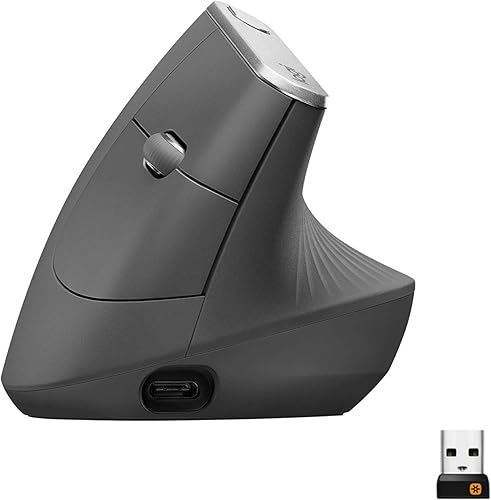
- 57° vertical angle
- 4000 DPI sensor
- Wireless design
- Right-hand orientation
A right-handed vertical mouse with a 57° angle, textured rubber surface and 4000 DPI tracking. It suits desk users who want a more upright grip and wireless use.
Pros
- Clear upright design
- 4000 DPI sensor
- Cursor speed switch
- Bluetooth and USB receiver options
Cons
- Larger shape needs adjustment
- Right-hand design
- More features than a basic mouse needs
The graphite wireless MX Vertical is the better match when you want the stated 57° angle, textured rubber surface, cursor speed switch and USB-C charging details together. Its right-hand shape is a key part of the buying decision.
Logitech Mouse MX Vertical: Best for simple MX Vertical setup

- Vertical ergonomic design
- 4000 DPI optical sensor
- Bluetooth and USB connectivity
- 4-month average battery life
This MX Vertical model combines a vertical layout with optical tracking and wireless connection choices. It fits users who want the core upright mouse format for Windows or macOS.
Pros
- 4000 DPI optical tracking
- Bluetooth and USB receiver options
- Average 4-month battery life
- Four-button layout
Cons
- Product data describes a different color and part number
- Vertical shape may take time to learn
- Range is stated as 5 meters
The black 910-005448 model suits users who want the MX Vertical format with Bluetooth, radio frequency and USB connection choices. Its product data describes Windows and macOS use, a 4000 DPI optical sensor and an average 4-month battery life.
A lower-cost alternative to consider
The Anker 2.4G Wireless Ergonomic Mouse uses a right-hand vertical design with a 2.4 GHz USB receiver. Its optical tracking offers 800, 1200 and 1600 DPI settings, so it has less maximum sensitivity than either MX Vertical model but still gives you three speeds to choose from.
The Anker has 5 buttons, including next and previous buttons for web browsing. It enters power-saving mode after 8 minutes of inactivity and wakes when you press the right or left button.
Its dimensions are 120 x 62.8 x 74.8 mm, and its weight is 3.4 ounces in the product description. It needs 2 AAA batteries, which are not included, and the USB receiver is stored in the bottom of the mouse.
The Anker uses USB wireless rather than Bluetooth. It also has unavoidable key click sounds, so consider that if you work near other people or prefer quiet controls.
Anker 2.4G Wireless Ergonomic Mouse: Best for lower-cost vertical basics

- Right-hand vertical design
- 800/1200/1600 DPI tracking
- 2.4 GHz USB receiver
- Five-button layout
A right-handed vertical mouse with 2.4 GHz USB wireless, adjustable DPI levels and next/previous buttons. It suits shoppers who want the upright format without MX Vertical features.
Pros
- Three DPI settings
- Five-button layout
- Power-saving mode after 8 minutes
- USB receiver stored in the mouse
Cons
- No Bluetooth
- 2 AAA batteries are not included
- Key click sounds are unavoidable
The Anker is the practical alternative when you want a vertical grip, adjustable DPI and extra browsing buttons. Its lower 1600 DPI maximum, USB-only connection and need for separate AAA batteries make it a simpler choice than the MX Vertical.
Our guide to the best ergonomic vertical mouse compares more upright options by grip, connection and daily use.
How to choose the right vertical mouse shape
Choose the upright shape first, then compare sensitivity and connection type. A vertical mouse helps only if you can hold it without squeezing and move it without reaching too far.
Measure the space beside your keyboard and consider how far your hand travels to the mouse. The Logitech models have a larger upright form, while the Anker's stated dimensions give you a clear reference point for desk space.
Right-hand orientation also matters. The MX Vertical entries and the Anker model are described with different orientation details, so read the exact product information before choosing if you do not use your right hand.
Think about your main work:
- Choose the MX Vertical if you want a 57° angle and 4000 DPI tracking.
- Choose the second MX Vertical entry if Bluetooth, radio frequency and USB options matter.
- Choose the Anker if adjustable 800, 1200 and 1600 DPI settings and five buttons are enough.
- Choose a different style if you need a compact, flat or left-handed mouse.
A trackball is another way to reduce broad mouse movement. Our guide to the best Kensington trackball mouse is useful if you want to compare that control style.
How to adjust to a vertical mouse
Start with the mouse close to the keyboard and use light contact. Let the larger muscles of the arm guide wider movements while your fingers handle clicks and scrolling.
Set the pointer speed low enough to control accurately, then increase it in small steps. On the MX Vertical, the cursor speed switch gives you a direct way to change sensitivity.
Keep your forearm supported when possible, but don't pin the wrist to the desk. The goal is a relaxed position that lets the hand move naturally.
Use short adjustment periods at first if the upright grip feels unfamiliar. If a position causes persistent pain or numbness, stop and seek professional advice.
For a different Logitech model, see how to use a Logitech Lift mouse.
Logitech MX Vertical mouse review: final verdict
The Logitech MX Vertical is the best fit here for a right-handed user who wants an upright 57° grip, 4000 DPI tracking and flexible wireless connection. Its larger body and learning curve are real trade-offs, but the design gives you more ergonomic structure than a standard flat mouse.
Pick the graphite model for the clearest combination of 57° angle, textured grip, cursor speed switch and USB-C charging details. Pick the black MX Vertical entry when its listed Bluetooth, radio frequency and USB options suit your setup.
Choose the Anker if you want a simpler vertical mouse with three DPI settings, five buttons and a USB receiver. The right choice is the one that lets you keep your hand relaxed during the work you actually do.
Frequently asked questions
Is the Logitech MX Vertical good for everyday desk work?
The Logitech MX Vertical suits everyday desk work when you prefer a right-handed upright grip. Its 57° angle, thumb rest, textured rubber surface and 4000 DPI sensor are aimed at reducing hand movement and wrist pressure, but the taller shape can take time to feel natural.
What is the difference between the Logitech MX Vertical and a standard mouse?
The Logitech MX Vertical places your hand in a 57° vertical angle instead of a flat palm-down position. It also has a 4000 DPI sensor and a cursor speed switch.
The upright shape changes how you move your wrist, fingers and forearm during desk work.
Does the Logitech MX Vertical work with Mac and Windows?
The Logitech MX Vertical data lists Windows and macOS support, along with iPadOS for the graphite wireless model. Connection options include Bluetooth and a USB receiver, while the exact operating system requirement and connection range depend on the model.
Should you buy the Logitech MX Vertical or Anker vertical mouse?
Choose the Logitech MX Vertical for its 57° angle, 4000 DPI tracking and Bluetooth or USB wireless options. Choose the Anker 2.4G Wireless Ergonomic Mouse if adjustable 800, 1200 or 1600 DPI settings, five buttons and a USB receiver meet your needs.


