Logitech MX Vertical vs Lift: Which Fits Your Hand? (November 2026)
Choose Lift for small to medium right hands and longer battery life, or MX Vertical for its 4,000 DPI sensor and adjustable cursor speed. Both use a 57-degree upright shape, so hand fit and connection needs should guide your choice.
On this page (9 sections)
- Logitech MX Vertical vs Lift: which fits your hand?
- Which mouse has the better controls?
- Which has better tracking?
- Which mouse has better battery life?
- Which connections work with your computer?
- How do the 4 Logitech models differ?
- How should you set up either vertical mouse?
- Logitech Lift mouse vs MX Vertical: which should you choose?
- Final verdict on Logitech MX Vertical vs Lift
Choose Lift for small to medium right hands and longer battery life, or MX Vertical for adjustable tracking and connection flexibility. The Logitech MX Vertical mouse vs Lift decision depends on your hand size, preferred controls and how often you want to charge or replace a battery.
Both mice use an upright design with a 57-degree angle. The Wave Keys and Lift combo review covers a matched keyboard and vertical mouse set.
The main difference is fit: Lift is made for small to medium right hands, while MX Vertical is described as fitting a variety of hand shapes and sizes.
Lift also offers SmartWheel scrolling, quiet clicks and up to 24 months of battery life. MX Vertical focuses on its optical sensor, adjustable angle and up to 4,000 DPI tracking.

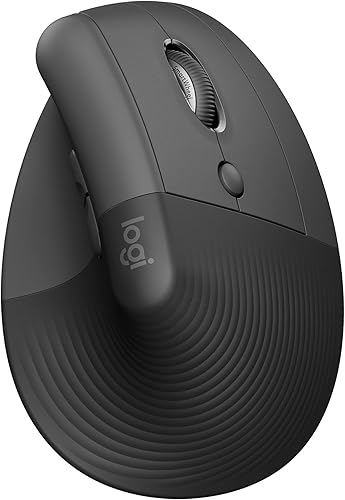 Best for small to medium hands
Logitech Lift Vertical Ergonomic Wireless Mouse
Logitech MX Vertical vs Lift: which fits your hand?
Lift is the safer starting point for small to medium right hands, while MX Vertical offers a broader shape description. Both are right-hand designs in the product information supplied for this comparison.
Lift measures 4.3 x 2.7 inches and weighs 125 g. Its softly textured grip and thumb rest are designed around a smaller right-hand fit.
MX Vertical has dimensions of 4 x 4 inches in one product record and weighs 4.76 ounces. Its description focuses on a natural handshake position, textured surface and a form that fits a variety of hand shapes and sizes.
These dimensions are not presented in the same format, so don't compare the numbers as if they describe identical sides. Instead, think about where your palm rests, whether your thumb reaches the thumb rest and whether your fingers sit naturally over the buttons.
How should you judge the grip?
Place your hand over the mouse without squeezing. Your wrist should remain relaxed, your thumb should have a stable resting area and your fingers should reach the main buttons without stretching.
Lift's 57-degree shape is paired with a snug thumb rest and a softly textured grip. Its design is aimed at small to medium right hands.
MX Vertical's 57-degree position is also intended to reduce wrist pressure and forearm strain compared with a standard mouse. Its textured rubber surface and form are described as fitting a variety of hand shapes and sizes.
A vertical mouse can still feel awkward if the shell is too large or too small. Give your hand time to learn the upright grip, and keep the mouse close enough that your shoulder does not reach forward.
For broader guidance, see our ergonomic keyboard and mouse buying guide.
Which mouse has the better controls?
Lift has more listed buttons and adds SmartWheel scrolling, while MX Vertical gives you an easier focus on cursor speed. Choose based on the controls you use during a normal workday.
The graphite Lift has 6 buttons, customizable controls, whisper-quiet clicks and a SmartWheel that shifts between precision and speed scrolling. The rose Lift also has 6 buttons and SmartWheel features in its product description.
MX Vertical has 4 buttons. Its cursor speed switch changes DPI speed and accuracy, which can help when you move between detailed work and broad screen movements.
More buttons are useful only if your hand can reach them comfortably. Extra controls may help with app shortcuts, but they can also make a smaller mouse feel busy.
The best ergonomic vertical mouse guide can help if neither control layout seems right for your routine.
Lift controls for everyday desk work
Lift suits users who scroll through long documents, switch between apps and want easy-to-reach customizable buttons. Its SmartWheel supports both precise scrolling and faster movement through longer pages.
The product information also describes quiet clicks. That may suit a shared office or a desk near other people, although click sound is only one part of a quiet workspace.
Logi Options+ software is described for customizing the controls. Use the default layout first, then change only the shortcuts you use often.
MX Vertical controls for cursor changes
MX Vertical suits users who want a quick way to change cursor speed. Its 4,000 DPI optical sensor and cursor speed switch target precise control without requiring a different mouse.
The B07FNHV4MW version has 4 buttons and an adjustable angle. The graphite B07FNJB8TT version also has 4 buttons, a 57-degree angle and a cursor speed switch.
Which has better tracking?
MX Vertical and Lift both reach 4,000 DPI in the supplied product information, so tracking alone does not separate them. The more useful difference is how each mouse lets you adjust or use that tracking.
MX Vertical includes a cursor speed switch. That gives you a direct control for changing DPI speed and accuracy.
Lift's product details describe 4,000 DPI tracking that is fully adjustable. It pairs that tracking with SmartWheel scrolling and customizable buttons.
Tracking sensitivity does not decide hand comfort. A fast sensor cannot correct a grip that makes you twist your wrist or stretch your fingers.
Start with a moderate pointer speed, then adjust it while keeping your forearm relaxed. If you need repeated large movements, raise the speed gradually rather than gripping the mouse harder.
Which mouse has better battery life?
Lift wins battery life by a wide margin, with up to 24 months from 1 AA battery. MX Vertical has an average battery life of 4 months, although one MX Vertical description says it can gain 3 hours of use from a 1-minute quick charge.
The graphite Lift includes 1 AA battery and a Logi Bolt USB receiver. The rose Lift also includes 1 AA battery and a Logi Bolt USB receiver.
MX Vertical B07FNHV4MW is battery powered and includes batteries. The product data identifies 1 Lithium Polymer battery as included.
Battery life depends on use and computing conditions. Keep the correct replacement or charging setup nearby, especially if the mouse is part of your daily work system.
If you want a closer look at the MX model's setup, read how to use a Logitech MX Vertical mouse. For Lift, see how to use a Logitech Lift mouse.
Which connections work with your computer?
Lift offers Bluetooth Low Energy or Logi Bolt USB across several operating systems, while MX Vertical offers Bluetooth and USB receiver connections. Check the computer and operating system you use before choosing.
Compare wireless ergonomic vertical mice if connection type is a priority.
MX Vertical B07FNHV4MW works with Windows and macOS. Its connectivity information includes Bluetooth, radio frequency and USB.
The graphite MX Vertical B07FNJB8TT is described for Windows, macOS and iPadOS, with Bluetooth or an included USB receiver. Its minimum required operating system version is Windows 10.
Lift is described for Windows, macOS, iPadOS, Chrome OS and Linux. The graphite model lists Windows 10 as its minimum required operating system version, while the rose model lists ChromeOS 134, Windows 10 and iOS 14.
Lift also supports Logi Bolt USB. The graphite description says it can connect with up to 3 devices and switch between them, while the rose description includes the same multi-device behavior.
Make sure the receiver can reach the computer without being blocked by a crowded desk. If you prefer Bluetooth, confirm that your computer supports the required connection before you order.
How do the 4 Logitech models differ?
The 2 MX Vertical entries focus on adjustable tracking, while the 2 Lift entries focus on smaller right-hand fit and battery life. The product order here follows the supplied scores, with the 2 highest-scoring models tied at 9.6.
Logitech Mouse MX Vertical, B07FNHV4MW
This black MX Vertical has an adjustable vertical layout, Bluetooth or USB receiver connectivity and a 4,000 DPI optical sensor. Its average battery life is 4 months, and it works with Windows and macOS.
Logitech Lift Vertical Ergonomic Wireless Mouse, B09J1TB35S
This graphite Lift is made for small to medium right hands. It has a 57-degree angle, 6 buttons, SmartWheel scrolling, quiet clicks and up to 24 months of battery life from 1 AA battery.
It connects through Bluetooth Low Energy or Logi Bolt USB. The product information lists Windows, macOS, iPadOS, Chrome OS and Linux compatibility.
Logitech MX Vertical Wireless Mouse Ergonomic Design, B07FNJB8TT
This graphite MX Vertical has a 57-degree angle, a 4,000 DPI sensor and a cursor speed switch. It includes an MX Vertical mouse, quick-start guide, receiver and USB-C cable.
Its product data lists a battery life of up to 4 months and compatibility with Windows, macOS and iPadOS. The design is right-handed and uses a graphite and rubber enclosure.
Logitech Lift Vertical Ergonomic Wireless Mouse, B098HXFLMW
This rose Lift has the same listed 57-degree upright angle, 6 buttons and 24-month battery life as the graphite Lift. Its product data lists a small to medium right-hand fit and Bluetooth or Logi Bolt USB connections.
The main visible difference here is the rose color. The listed compatibility is for a laptop, with ChromeOS 134, Windows 10 and iOS 14 as the minimum required system versions.
How should you set up either vertical mouse?
Start with a relaxed handshake grip, place the mouse close to the keyboard and adjust pointer speed before changing your posture. A vertical shape works best when your arm position and desk distance also feel natural.
Keep your elbow near your side instead of reaching toward the mouse. Let your forearm guide the movement, and avoid pressing down hard with your palm.
Use the mouse for short sessions at first if the upright position feels unfamiliar. The goal is a steady grip that does not make you tense your fingers or lift your shoulder.
Keep the surface clear and use a stable area for the optical sensor. If the pointer feels too slow, adjust the speed before making larger arm movements.
For Lift, test the thumb rest and button reach. For MX Vertical, try the cursor speed switch and adjust the angle if your model supports it.
Logitech Lift mouse vs MX Vertical: which should you choose?
Pick Lift if your hand is small to medium, you want SmartWheel controls or you prefer up to 24 months of battery life. Pick MX Vertical if you want a broader stated hand fit, adjustable angle or a dedicated cursor speed switch.
Choose the graphite Lift if you want the standard dark finish and the listed multi-device features. Choose the rose Lift if the same fit and battery pattern works for you and color matters.
Choose MX Vertical B07FNHV4MW for Bluetooth or USB receiver flexibility with Windows and macOS. Choose the graphite B07FNJB8TT when its 57-degree angle, cursor speed switch and included USB-C cable suit your setup.
The best choice is the one your hand can hold without squeezing. Compare the grip, button reach, connection method and battery routine before focusing on small differences in shape.
Final verdict on Logitech MX Vertical vs Lift
Choose Logitech Lift for small to medium right hands and long battery life. Choose Logitech MX Vertical for adjustable tracking, a cursor speed switch and a shape described as fitting a variety of hand sizes.
Both mice use the same 57-degree upright idea, so the decision is not about whether either design is vertical. It is about which shape, control layout and power routine fit your desk.
If you are still comparing the Lift model, our Logitech Lift mouse review covers its fit, controls and connection details. If you are comparing ergonomic desk parts more broadly, you may also want to know How Much Does a Gas Lift Cylinder Cost?.
Frequently asked questions
Is Logitech MX Vertical better than Lift?
Logitech MX Vertical is better when you want an adjustable vertical layout, a 4,000 DPI optical sensor and a choice of Bluetooth or USB receiver connection. Lift is better for small to medium right hands, quieter clicks, SmartWheel scrolling and a battery life of up to 24 months.
Is Logitech Lift good for large hands?
Lift is designed for small to medium right hands, so it may feel short or narrow if your hand is large. MX Vertical has a form that fits a variety of hand shapes and sizes, but the best choice still depends on how your palm, thumb and fingers rest on the mouse.
Do MX Vertical and Lift have the same angle?
Both designs use a 57-degree upright angle in the product information. The angle places your hand in a handshake-style position, but the mouse shape differs.
Lift is made for small to medium right hands, while MX Vertical is described as fitting a variety of hand shapes and sizes.
Which has better battery life, MX Vertical or Lift?
Lift has the longer stated battery life. The Lift uses 1 AA battery and can last up to 24 months, while MX Vertical has an average battery life of 4 months.
Actual battery life can vary with use and computing conditions.


