9 Best Keyboard Trays with Adjustable Tilt (November 2026)
The best keyboard trays with tilt include the BONTEC Under Desk Keyboard Tray for flat desks without drilling, the HUANUO Under Desk Keyboard Tray for wide tilt range, and the EUREKA ERGONOMIC Keyboard Tray Height Adjustable for full motion adjustment.
On this page (8 sections)
- Best keyboard trays with tilt for different desks and typing styles
- How to choose a keyboard tray with tilt for your desk
- What does negative tilt do for wrist position
- How do clamp-on and bolted trays differ
- What size tray do you need for your keyboard
- How should you set chair height and tray height together
- How we compared these keyboard trays
- Verdict: which keyboard tray with tilt should you buy
The best keyboard tray with tilt for most people is the BONTEC, because its wide platform and clamp mount suit standard desks without drilling. If you want a deeper negative tilt, the HUANUO gives you 22 degrees down.
If you want full motion, the EUREKA ERGONOMIC models give you 43 degrees of tilt and 360 degrees of swivel.
A keyboard tray with tilt helps you set the angle of your keyboard, not just its height. You can lower the tray below your desktop and angle it so your wrists stay closer to neutral.
That can make long typing sessions feel easier, especially when your chair and desk height do not line up.
Start with your desk measurements before you compare features. Measure the width and depth below the desktop, the thickness of the top, and the distance from the edge to any crossbar.
Those numbers rule out more trays than any other factor.
Our score weighs specs, features and buyer feedback against what you want from a tilted tray. We compared size, tilt range, height change, swivel, mount type, weight limit and desk needs.
We looked at each tray on those points, not on price.
Our picks at a glance
-
1
 Best for flat desks without drilling
BONTEC Under Desk Keyboard Tray
9.7/10 our score
See it on Amazon -
2

-
3
 Best for full motion adjustment
EUREKA ERGONOMIC Keyboard Tray Height Adjustable
9.3/10 our score
See it on Amazon
- 4
 Check it
EUREKA ERGONOMIC Height Adjustable Mouse & Keyboard
Best for larger keyboards - 5
 Best for simple height adjustmentCheck it
- 6
 Check it
Mount-It! Under Desk Keyboard Tray with Wrist
Best for bolted steel track - 7
 Best for a light desk setupCheck it
- 8
 Check it
Mount-It! Under Desk Keyboard Tray with Wrist
Best for separate mouse platform - 9
 Check it
Klearlook Keyboard Tray Under Desk
Best for clamp-on storage extras
Best keyboard trays with tilt for different desks and typing styles
The picks below cover clamp-on, bolted, wide and compact layouts. For more reach and positioning options, see keyboard trays with articulating arms.
Each one suits a different desk shape and a different way of typing.
Read the trade-offs before you choose by score alone.
Use this section with an ergonomic keyboard and mouse guide if you are changing your keyboard at the same time. A tray and a keyboard work as a pair, so angle matters more when you pair them.
Platform depth matters in daily use because it decides how much wrist space remains beyond the keyboard. A deeper tray such as the BONTEC at 11.8 inches leaves more room in front of a standard keyboard than a tray near 9 inches deep.
That extra depth can support a wrist rest without pushing the mouse off the side. It also helps when the tray is tilted, because the keyboard has more surface to grip.
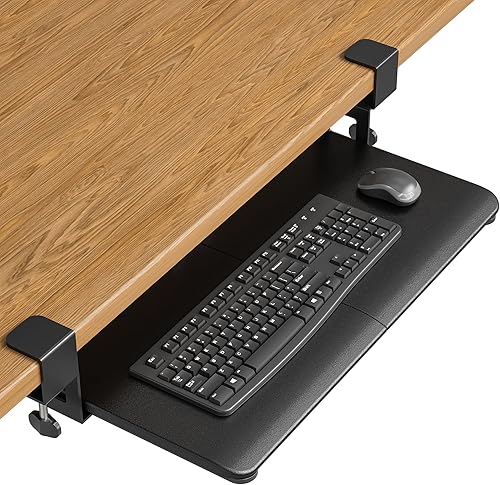
BONTEC Under Desk Keyboard Tray: Best for flat desks without drilling
- 25.6 x 11.8 inch platform
- C-clamps for desks up to 1.97 in thick
- Slides under desk after use
- Supports up to 11 lb
A wide pull-out platform that frees your desktop and needs a flat, clear underside.
Pros
- Large platform for keyboard and mouse
- No drilling required
- Slides away when not in use
Cons
- Needs 31.3 in width and 11.8 in depth below desk
- Not for curved or beveled desk edges
The BONTEC suits a flat desk with a clear underside and no crossbar in the way. Its 25.6 x 11.8 inch platform gives you room for a standard keyboard and mouse side by side.
BONTEC says it supports up to 11 lb, which covers most standard setups.
It mounts with C-clamps to desks up to 1.97 inches thick. That means no drilling and no lasting change to your desk.
Protective pads help guard the desk edge and improve grip. The engineered wood platform pulls out when you need it and slides beneath the desk after use.
The trade-off is fit. You need at least 31.3 inches of width and 11.8 inches of depth below the desk so it can slide in and out.
It will not suit curved, beveled or rounded edges. Large gaming keyboards, vertical mice and split ergonomic keyboards may not fit well.
Check your keyboard and mouse sizes and the height clearance you have below the top before you order, because the clamp mount leaves little room to work around an obstruction.
HUANUO Under Desk Keyboard Tray: Best for wide tilt range
- 25 x 9.84 inch tray
- Tilts 6 degrees up and 22 degrees down
- Swivels 180 degrees
- 6.3 in height adjustment
Strong tilt and height change for sitting and standing setups.
Pros
- Wide negative tilt range
- Height change for standing desks
- Wrist rest included
Cons
- Needs clearance from crossbars and legs
- Knob must be tight before typing
The HUANUO suits people who want a clear negative tilt and height change for a standing desk. It tilts 6 degrees up and 22 degrees down, which is a wider downward range than most picks here.
It also swivels 180 degrees left and right.
Height adjustment is 6.3 inches, so you can move from sitting to standing without changing desks. The tray is 25 x 9.84 inches and fits keyboards up to 17.3 x 5.5 inches plus mouse space.
A wrist rest is included. The lowest connector height is 7.48 inches, which matters for leg room when the tray is at its lowest setting.
The trade-off is clearance. HUANUO says to allow 14.17 inches from the desk edge to a crossbar, or 16.22 inches for a full slide-under.
You also need side clearance if you rotate the tray. Tighten the knob before typing so the angle holds.
Against the BONTEC, it gives far more tilt and height change, but it loses the simple clamp fit and asks more of your desk measurements.
EUREKA ERGONOMIC Keyboard Tray Height Adjustable: Best for full motion adjustment
- 25 x 9.13 inch tray
- 5.8 in height range
- 360 degree horizontal rotation
- 43 degree vertical tilt
Full motion tray for desks with beams, with wrist rest and mouse pad.
Pros
- Full motion in height, tilt and swivel
- Fits desks with beams
- Wrist rest and mouse pad included
Cons
- 6.6 lb limit is lower than others
- Needs desk at least 19.69 x 39.5 x 29.1 in
This EUREKA ERGONOMIC tray suits a desk with beams or a layout where you need full motion. It gives you 5.8 inches of height range, 360 degree rotation and 43 degree vertical tilt.
You can pull it forward or back to find your reach.
The tray is 25 x 9.13 inches and fits most keyboards and mice. It can also hold a small laptop or tablet.
A soft wrist rest helps stop the keyboard slipping when tilted, and a mouse pad gives a smooth surface. The one piece swivel design keeps the platform in one plane while it moves.
The trade-off is load and size. The weight limit is 6.6 lb, so keep heavy items off it.
The mounting bracket is 17.8 inches deep, so your desk should be at least 19.69 x 39.5 x 29.1 inches. It fits wood or MDF tops at least 0.71 inch thick, not plastic, stone or glass.
Against the larger EUREKA model, it keeps the same motion range in a narrower tray, which suits a smaller keyboard but leaves less mouse room.
EUREKA ERGONOMIC Height Adjustable Mouse & Keyboard: Best for larger keyboards
- 28.3 x 10.2 inch tray
- 360 degree swivel and 43 degree tilt
- Self-locking slide
- Wrist rest lip
Largest platform here, with dual mount and a lip to stop sliding.
Pros
- Extra wide tray
- Fits desks with beams
- Lip helps on tilt
Cons
- Needs desk at least 20 x 39.5 x 29.1 in
- Not for plastic, stone or glass tops
This larger EUREKA ERGONOMIC tray suits people with a full-size keyboard and mouse who want more room. Its 28.3 x 10.2 inch tray is the widest in this group.
It also gives 360 degree swivel and 43 degree tilt, with a slide you can push forward or back.
A lip along the front acts as a wrist rest and helps keep the keyboard from sliding when tilted. The wrist rest and mouse pad are removable, which helps if you prefer your own pad.
The carbon fiber finish gives the surface a smooth feel for mouse movement. The gravity self-locking slide needs a gentle lift to move, which helps stop accidental pushing.
The trade-off is desk size and load. The weight limit is 6.6 lb.
The mounting bracket is 17.8 inches deep, so your desk should be at least 20 x 39.5 x 29.1 inches. It fits wood or MDF tops at least 0.71 inch thick.
Check that it will not hit a standing desk motor. Against the smaller EUREKA tray, this width helps wide keyboards, but it asks for a bigger desk and more leg clearance.
VIVO Black Under Desk 25 x 10: Best for simple height adjustment
- 25 x 10 inch tray
- 5 inch height adjustment
- Full side to side rotation
- 14.25 in slide track
A straightforward tray with rubber padding and included hardware.
Pros
- Simple assembly with hardware included
- Rubber padding for wrists
- Fits most keyboards and mice
Cons
- Needs 14.25 in clear from edge to crossbar
- Spacer bracket not included for adjustable desks
The VIVO black tray suits a standard desk where you want simple height change and rotation. It gives 5 inches of height adjustment and full side to side rotation.
The tray is 25 x 10 inches and fits most keyboards and mice.
It slides forward and back on a 14.25 inch long track. That track needs 14.25 inches between the desktop edge and any crossbar.
Rubber padding along the front supports your wrists. All mounting hardware is included.
The track itself is 6.25 inches wide, so the slide path is narrower than the tray you type on.
The trade-off is adjustable desks. If you mount it to a height adjustable desk, you will need a spacer bracket for the track to fit over the frame crossbar.
That bracket is not included. The tray weighs 10 lb, so make sure your desk can support that load below the top.
Against the white VIVO model, the function is the same, so the choice comes down to how it matches your furniture.
Mount-It! Under Desk Keyboard Tray with Wrist: Best for bolted steel track
- 26.4 x 10 inch platform
- Tilts 15 degrees either way
- Swivels 20 degrees
- Extends 12.6 inches
Steel track tray with gel wrist pad and lifetime warranty.
Pros
- Gel wrist pad built in
- Lifetime manufacturer warranty
- Steel track feels secure
Cons
- 4.4 lb limit is the lowest here
- Needs wood or MDF at least 1 in thick
This Mount-It! tray suits a wood or MDF desk where you want a bolted steel track, not a clamp. It tilts 15 degrees in either direction and swivels 20 degrees from center.
It also extends 12.6 inches on smooth tracks.
The platform is 26.4 x 10 inches, so it holds a full-size keyboard and mouse together. A gel wrist pad runs along the front edge.
Mount-It! rates the platform to 4.4 lb and backs it with a lifetime manufacturer warranty. The hand knob lets you pivot the tray up or down and then lock the angle for long sessions.
The trade-off is load and desk type. The 4.4 lb limit is low, so it suits a standard keyboard and mouse, not extra gear.
It needs a wood or MDF desktop at least 1 inch thick. It will not suit glass, metal or desks with crossbars in the way.
Against the other Mount-It! model, it keeps one joined platform, which is simpler, but it gives less tilt range and a much lower weight limit.
VIVO White Under Desk 25 x 10: Best for a light desk setup
- 25 x 10 inch tray
- 5 inch height adjustment
- Full side to side rotation
- 3 year manufacturer warranty
White version of the VIVO tray with plush padding.
Pros
- Matches light furniture
- 3 year warranty
- Hardware included
Cons
- Needs spacer for some height adjustable desks
- 10 lb tray weight needs desk support
The VIVO white tray suits a light-colored desk where you want the same layout as the black VIVO model. It gives 5 inches of height adjustment and full side to side rotation.
The 25 x 10 inch platform fits most keyboards and mice.
It slides on a 14.25 inch track and needs at least 5/8 inch desktop thickness. Plush padding helps reduce wrist soreness during long sessions.
VIVO backs it with a limited 3 year manufacturer warranty. All necessary mounting hardware is included, and the tray pushes under the desk when not in use.
The trade-off is the same as the black model. You need clearance from the edge to a crossbar, and a spacer bracket for some height adjustable desks.
The tray weighs 10 lb, so check that your desk can support it. Its particle board and steel build is listed in the specs, which differs from the black model.
Choose white for looks, not for a different feature set.
Mount-It! Under Desk Keyboard Tray with Wrist: Best for separate mouse platform
- 15 in slide-out reach
- Tilts +20 to -25 degrees
- 360 degree swivel
- Separate 7 x 9.25 in mouse platform
Split layout with a mouse platform you can place on either side.
Pros
- Mouse platform for left or right
- Wide tilt range
- Lifetime warranty
Cons
- Wood or MDF only, not glass or metal
- Separate platform takes desk width
This Mount-It! tray suits people who want a separate mouse platform. It slides out 15 inches on a 17.25 inch steel track and then tucks under the desk.
The mouse platform is 7 x 9.25 inches and mounts on either side.
Height changes up to 5.5 inches. Tilt runs from +20 to -25 degrees, and swivel is 360 degrees.
That range lets you set a negative tilt without moving your chair. A gel wrist pad runs along the tray and the mouse platform has its own pad.
The split layout can keep the mouse closer to your body than a joined tray allows.
The trade-off is desk type and space. It bolts to wood or MDF desktops only, not glass, metal or crossbar desks.
The separate platform needs width on one side. Mount-It! backs it with a lifetime warranty and US-based support.
Against the joined Mount-It! tray, this model gives far more tilt and side choice, but the extra platform asks for more desk width.
Klearlook Keyboard Tray Under Desk: Best for clamp-on storage extras
- 24.4 x 10 inch tray
- 360 degree rotation
- C-clamp for desks up to 2.68 in thick
- Drawer, phone slot and headphone hanger
Clamp-on tray with storage drawer and fixed height.
Pros
- C-clamp needs no drilling
- Storage drawer and phone slot
- Mouse pad included
Cons
- Height cannot be adjusted
- Needs 35 in width for double-sided rotation
The Klearlook tray suits a desk where you want a clamp-on mount and small storage extras. It rotates 360 degrees and clamps to desks up to 2.68 inches thick.
The tray is 24.4 x 10 inches and includes a mouse pad.
It has a drawer for small items, a phone slot and a headphone hanger. Those extras help if your desk is tight and you want peripherals within reach.
The tray tucks under the desk when you rotate it away. The ABS plastic build keeps the tray light at 9.24 pounds compared with many steel bolted options here.
The trade-off is fixed height. Height cannot be adjusted, so you must match it to your chair height.
Double-sided rotation needs at least 35 inches of table width, and single-sided rotation needs 27.5 inches. Check those numbers before you order.
Against the BONTEC clamp, it adds storage and rotation, but it gives up height change entirely.
How to choose a keyboard tray with tilt for your desk
The best keyboard tray with tilt is the one that fits your desk first and your wrists second. Tilt range means little if the tray hits a crossbar or a leg.
Start with measurements, then match tilt and height to how you sit.
Measure width, depth and thickness below the desktop. Note any beams, crossbars and legs.
Then check the tray's stated desk size and clearance needs. A tray that needs 31 inches of width will not fit a narrow desk, no matter how good the tilt is.
Our best adjustable under-desk keyboard trays guide covers height and slide options in more depth. Use it if height matters more than tilt.
Use this guide if angle is your main goal.
Weight limit is a daily use check that is easy to miss. The BONTEC lists 11 lb, the EUREKA models list 6.6 lb, and the joined Mount-It! tray lists 4.4 lb.
Those limits cover the keyboard and mouse you place on the tray, not the tray itself. A heavy keyboard plus a large mouse plus a wrist rest can approach a low limit faster than buyers expect.
What does negative tilt do for wrist position
Negative tilt means the front edge of the tray sits lower than the back edge. That angle can keep wrists closer to neutral while you type.
Positive tilt raises the front edge and can make wrists bend back, which some people dislike.
Start flat or with a very small negative tilt. Change the angle in small steps over a few days.
Keep your elbows at about 90 degrees and your shoulders relaxed. If your hands slide forward on the tray, reduce the tilt or use a wrist rest.
If you want models built around this angle, see our best ergonomic keyboard tray negative tilt picks. They focus on downward tilt and wrist support.
How much negative tilt should you use
Most people do well with a small downward angle. The HUANUO gives 22 degrees down, the Mount-It!
MI-7149N gives 25 degrees down, and the EUREKA models give up to 43 degrees total tilt. You do not need the full range.
A few degrees can change how your wrists feel.
When positive tilt helps
Positive tilt raises the front edge. Some people use it for short tasks or to see a keyboard better.
It is less common for long typing sessions. If you try it, keep the angle small and watch for wrist bend.
How do clamp-on and bolted trays differ
Clamp-on trays grip the desk edge and need no drilling. That suits renters, glass tops that cannot be drilled, and desks you plan to move.
The BONTEC and Klearlook use this style. Clamps need a flat edge and a thickness within range.
Bolted trays screw into the underside of the desk. They often feel more fixed and can support tilt and swivel without slipping.
The Mount-It! and EUREKA models use this style. They need wood or MDF and enough thickness for screws.
If you want clamp options only, our best clamp on adjustable keyboard tray guide lists models built for that mount. It also covers edge shapes and thickness limits.
Which mount suits a standing desk
A standing desk changes height, so your tray must change with it or sit at a fixed height you can adjust. Check for motors and crossbars below the top.
A tray that needs 14 inches of clear space may hit a frame when the desk moves.
Which mount suits a corner desk
Corner desks have angles and supports that can block a slide. A swivel tray helps you turn the keyboard toward a different monitor.
Our best keyboard tray corner desk guide covers layouts for L-shaped tops.
What size tray do you need for your keyboard
Tray size must fit your keyboard plus your mouse. Measure your keyboard width and depth, then add room for the mouse beside it.
A 25 inch tray fits most standard keyboards and mice. A 28 inch tray gives more room for wide gaming keyboards.
Check height clearance too. Vertical mice, oversized keyboards and split ergonomic keyboards need more space.
The BONTEC warns about those types. Measure your gear before you order, not after.
Will a full-size keyboard and mouse fit
A 25 x 10 inch tray fits most full-size keyboards with a mouse beside it. The HUANUO fits keyboards up to 17.3 x 5.5 inches plus mouse space.
If your keyboard is wider, look at the 28 inch EUREKA model.
Does a wrist rest help on tilt
A wrist rest along the front edge gives your hands a soft landing spot. It also helps keep the keyboard from sliding when the tray is tilted.
The EUREKA and Mount-It! models include one. VIVO uses rubber padding instead.
How should you set chair height and tray height together
Set your chair so your feet sit flat and your elbows are near a right angle. Then set the tray so your forearms are roughly level, not angled down from the shoulders.
Your wrists should stay straight, not bent up or down.
If the tray is too high, your shoulders rise. If it is too low, your wrists bend down.
Change one thing at a time. Raise or lower the chair first, then adjust tray height and tilt.
Your chair also matters. A best desk chair with tilt lock can help you keep a steady seated angle while you type.
A best computer chair with tilt lock gives similar support for long sessions.
How we compared these keyboard trays
We compared tilt range, height range, swivel, tray size, mount type, weight limit, desk needs and wrist support. We checked desk thickness, crossbar clearance and width needs for each model.
Those checks rule out trays that look good on paper but will not fit your desk.
We also checked what each tray includes. Some include a wrist rest, a mouse pad or storage extras.
Some need a spacer bracket that is not included. Those details change daily use, so we noted them in each write-up.
What the spec sheets do not tell you
Spec sheets list ranges, but they do not show how a lock feels in daily use. A knob that must be tightened before typing is a different habit from a self-locking slide.
We flagged those differences from the listed mechanisms, so you can match the adjustment style to how often you plan to change the angle.
Verdict: which keyboard tray with tilt should you buy
Pick the BONTEC if you have a flat desk with a clear underside and want no drilling. Pick the HUANUO if you want 22 degrees of negative tilt and height change for a standing desk.
Pick the EUREKA ERGONOMIC 28 inch model if you need the largest platform and full motion.
Pick the VIVO models if you want simple height adjustment and rotation at a lower feature level. Pick the Mount-It!
MI-7149N if you want a separate mouse platform and a wide tilt range. Pick the Klearlook if you want clamp-on storage extras and can live with fixed height.
Measure your desk, check crossbar clearance, then match tilt range to how you type. That order will help you find a keyboard tray with tilt that fits your space and keeps your wrists in a calmer position.
Our top 3 picks at a glance
-
1
Best for flat desks without drilling
BONTEC Under Desk Keyboard Tray
9.7/10 our score
See it on Amazon -
2
-
3
Best for full motion adjustment
EUREKA ERGONOMIC Keyboard Tray Height Adjustable
9.3/10 our score
See it on Amazon
Frequently asked questions
What tilt angle should a keyboard tray have?
Many people prefer a slight negative tilt, where the front edge sits lower than the back. That keeps wrists closer to neutral while you type.
Start with a small angle and change it in small steps.
If your hands slide forward, reduce the angle.
Is negative tilt better than flat?
Negative tilt can help some people keep wrists straighter. It is not right for everyone.
Try a flat position first, then test a small negative tilt for a few days.
Choose the angle that feels calm and keeps the mouse steady.
Will a keyboard tray fit under my desk?
Check width, depth, thickness and the space below the top. Look for crossbars, beams and legs that could block the slide.
Measure from the desk edge to any bar before you order.
A tray that slides out needs clear room below.
Do I need to drill to install a keyboard tray?
Some trays use C-clamps and need no drilling. Others bolt to the underside with screws.
Clamp models suit renters and simple desks.
Bolted models often feel more fixed for daily use.
Check desk material and thickness first.