7 Best Vertical Mice for Mac (November 2026)
The best vertical mouse for Mac include the Anker 2.4G Wireless Ergonomic Mouse for budget Mac setups, the TECKNET Ergonomic Mouse for switching between 3 devices, and the Logitech Lift Vertical Ergonomic Wireless Mouse for small to medium hands.
On this page (10 sections)
- Best vertical mouse for Mac: the full picks
- How do these vertical mice for Mac compare?
- How we compared these picks
- Which hand size should you choose for a vertical mouse for Mac?
- Is Bluetooth or USB better for a Mac mouse?
- What DPI settings matter on macOS?
- How long does the adaptation period take?
- What battery type should you pick?
- Are there vertical mice for gaming or small hands?
- Verdict: which vertical mouse for Mac should you buy?
The best vertical mouse for Mac for most people is the Anker 2.4G Wireless Ergonomic Mouse for a simple upright grip and USB setup. If you want Bluetooth, smaller hands support and quiet clicks, the Logitech Lift is a stronger fit.
A vertical mouse for Mac changes how your hand sits on the desk. Instead of resting palm down, your hand holds the mouse more upright, like a handshake.
That change can feel odd at first, and most makers in this guide say to allow 1 to 2 weeks to adapt.
We compared 7 upright grip options by connection type, hand size, DPI, button count and battery type. Our score weighs specs, features and buyer feedback against what you're shopping for.
If you are new to this shape, start with our ergonomic keyboard and mouse guide. It explains how mouse shape fits with keyboard height and chair height on a Mac desk.
Our picks at a glance
-
1

-
2
-
3
 Best for small to medium hands
Logitech Lift Vertical Ergonomic Wireless Mouse
9.6/10 our score
See it on Amazon
- 4
 Check it
Logitech MX Vertical Wireless Mouse Ergonomic Design
Best for larger hands - 5
 Check it
Logitech Lift Vertical Ergonomic Wireless Mouse
Best in rose for small to medium hands - 6
 Check it
ProtoArc EM11 NL Wireless Ergonomic Vertical Mouse
Best rechargeable option for small hands - 7
 Check it
Logitech Lift Vertical Ergonomic Wireless Mouse
Best in sand for small to medium hands
Best vertical mouse for Mac: the full picks
The Anker leads this list for simple Mac use, while the other picks solve Bluetooth, hand size and rechargeable needs. Read the trade-offs before you choose by score alone.
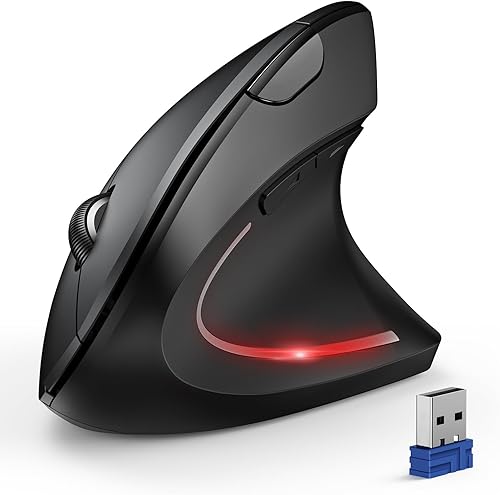
Anker 2.4G Wireless Ergonomic Mouse: Best for budget Mac setups
- Right hand vertical design
- 2.4 GHz USB receiver, not Bluetooth
- 800/1200/1600 DPI
- 5 buttons
- 2 AAA batteries required
A right-hand vertical mouse with a USB receiver and 3 DPI settings for Mac users who want a simple upright grip without Bluetooth pairing.
Pros
- Upright handshake position
- 3 DPI settings
- USB receiver stored in the mouse
Cons
- No Bluetooth
- 2 AAA batteries not included
- Key clicks are audible
Anker suits Mac users who want a vertical mouse without Bluetooth pairing. It uses a 2.4 GHz USB receiver, so you plug the receiver into a USB port and start.
That suits an older Mac, a desktop Mac or a desk hub with a free USB port.
Its upright shape promotes a handshake position for the wrist and arm. Anker lists 800, 1200 and 1600 DPI, which covers office work, web browsing and light creative work.
Use a lower setting for careful work and a higher setting for a large display.
It has 5 buttons, including next and previous buttons for web browsing. Key clicks are audible, so it may not suit a very quiet shared room.
It runs on 2 AAA batteries, which are not included.
It sleeps after 8 minutes of inactivity and wakes with a press of the left or right button. The receiver stores in the bottom of the mouse.
It is listed for Windows 10 and macOS hardware support in its specs, but pairing is simple USB plug in use. Pick it for a simple USB setup, and skip it if you want Bluetooth only.
TECKNET Ergonomic Mouse: Best for switching between 3 devices
- Bluetooth 5.0/3.0 and 2.4 GHz USB
- 4800/3200/2400/1600/1200/800 DPI
- 6 buttons
- Right hand only
- 2 AAA batteries required
A Bluetooth vertical mouse that can connect to two devices at once on Bluetooth, plus a USB mode for a third, with 6 DPI levels for Mac desks.
Pros
- Connects to 3 devices in total
- 6 DPI levels up to 4800
- Silent left and right clicks
Cons
- Side buttons not compatible with macOS
- 2 AAA batteries not included
- Right hand only
TECKNET suits Mac users who switch between a MacBook, a tablet and another computer. On Bluetooth it can connect to two devices at the same time.
A 2.4 GHz USB mode adds a third connection option in total.
It lists 6 DPI levels from 800 to 4800. That range helps you match cursor speed to a small laptop screen or a large external monitor.
The light flashes to show which DPI level you picked.
The left and right clicks are silent, which helps in a shared office or library. Other function buttons are not silent.
TECKNET says the mouse is for right-handed use only, and it fits medium to large hands best.
It is compatible with Mac, and the side buttons are not compatible with macOS. That is a key trade-off for Mac users who plan to use back and forward buttons.
It runs on 2 AAA batteries, which are not included. It also enters deep sleep after about 10 to 30 minutes, and a low battery warning light blinks when power runs low.
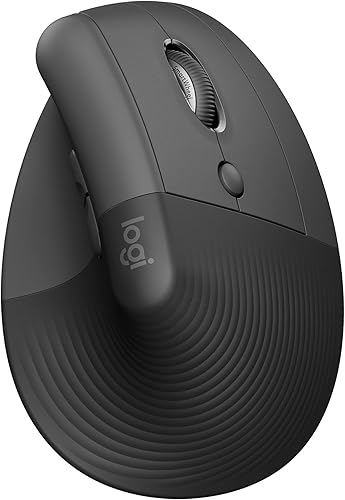
Logitech Lift Vertical Ergonomic Wireless Mouse: Best for small to medium hands
- 57 degree vertical shape
- Bluetooth Low Energy and Logi Bolt USB
- 4000 DPI adjustable
- 6 buttons
- 1 AA battery, up to 2 years
A 57 degree vertical mouse for small to medium right hands, with Bluetooth Low Energy, Logi Bolt USB and macOS support.
Pros
- Made for small to medium hands
- Bluetooth and USB receiver options
- Up to 2 years on 1 AA battery
Cons
- Right hand version in this listing
- Custom buttons need Logi Options+ software
Logitech Lift suits Mac users with small to medium right hands. Its 57 degree vertical shape raises the hand into a more natural forearm posture.
It has a softly textured grip and a snug thumb rest.
It connects by Bluetooth Low Energy or a Logi Bolt USB receiver. Logitech lists support for macOS, iPadOS, Chrome OS, Linux and Windows.
You can connect with up to 3 devices and use Easy-Switch to move between them.
It has whisper-quiet clicks and a SmartWheel for smooth scrolling. Tracking is 4000 DPI and fully adjustable.
Four customizable buttons can be assigned with Logi Options+ software on Windows and macOS.
It runs for up to 2 years on 1 AA battery. The box includes the mouse, 1 AA battery, a Logi Bolt USB receiver and a quick start guide.
Its 125 g weight and 108 by 70 by 71 mm size help explain the small to medium hand fit. Pick it for smaller hands, and skip it if you need a larger body.
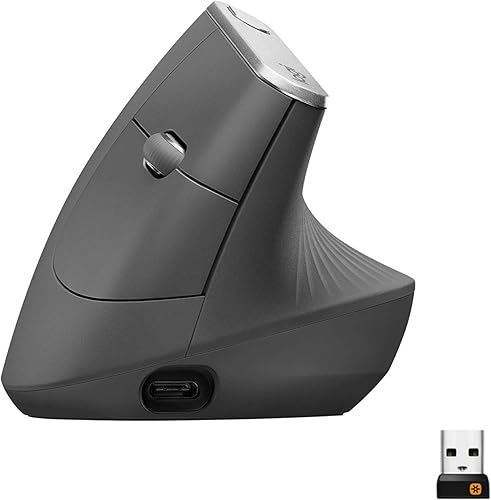
Logitech MX Vertical Wireless Mouse Ergonomic Design: Best for larger hands
- 57 degree vertical angle
- 4000 DPI sensor with cursor speed switch
- Bluetooth or included USB receiver
- 4 buttons
- Rechargeable with USB-C cable
A larger 57 degree vertical mouse with a 4000 DPI sensor, cursor speed switch and Bluetooth or USB receiver connection for Mac.
Pros
- 57 degree angle for wrist posture
- 4000 DPI with speed switch
- Bluetooth and USB receiver included
Cons
- Larger body may not suit small hands
- 4 buttons only
Logitech MX Vertical suits Mac users with larger hands who want a higher DPI sensor. Its 57 degree vertical angle aims to reduce wrist pressure.
Logitech says the handshake position reduces muscular activity by 10 percent compared with a standard mouse.
It has a 4000 DPI high-precision sensor. Logitech says that can mean 4 times less hand movement than a traditional 1000 DPI mouse.
A cursor speed switch lets you change DPI speed and accuracy with one button.
It connects by Bluetooth or the included USB receiver. The list includes the mouse, a quick start guide, a receiver and a USB-C cable.
It is rechargeable, with up to 4 months on a full charge and 3 hours of use from a 1-minute quick charge.
Its textured rubber surface and thumb rest help with grip. It has 4 buttons, which is fewer than the Lift.
It also lists Bluetooth Low Energy support for macOS 10.15 or later and iPadOS 13.4 or later. Pick it for larger hands and sensor control, and skip it if you want more buttons.
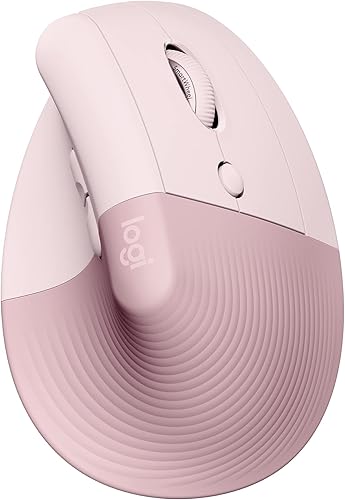
Logitech Lift Vertical Ergonomic Wireless Mouse: Best in rose for small to medium hands
- 57 degree vertical shape
- Bluetooth Low Energy and Logi Bolt USB
- 4000 DPI adjustable
- 6 buttons
- 1 AA battery, up to 2 years
The rose version of the Logitech Lift, with the same 57 degree shape, quiet clicks and macOS support for small to medium right hands.
Pros
- 57 degree shape for small to medium hands
- Quiet clicks and SmartWheel
- Up to 2 years on 1 AA battery
Cons
- Right hand version in this listing
- Custom buttons need Logi Options+ software
This rose version of the Logitech Lift suits the same Mac users as the graphite version. Its 57 degree angle supports small to medium right hands.
Color is the main difference in this listing.
It connects by Bluetooth Low Energy or a Logi Bolt USB receiver. Logitech lists macOS support, along with iPadOS, Chrome OS, Linux and Windows.
It can connect with up to 3 devices.
It has quiet clicks, a SmartWheel and 4 customizable buttons. Tracking is 4000 DPI and fully adjustable.
Logi Options+ software is used for customization on Windows and macOS.
It runs for up to 2 years on 1 AA battery. The included parts list 1 AA battery and a Logi Bolt USB receiver.
The rose finish also uses 54 percent certified post consumer recycled plastic in its plastic parts, according to the listing. Pick this version if you prefer the rose color, and pick the graphite or sand version if color does not matter.
ProtoArc EM11 NL Wireless Ergonomic Vertical Mouse: Best rechargeable option for small hands
- 58 degree vertical design
- Dual Bluetooth and 2.4G USB-A
- 1000/1600/2400 DPI
- 500 mAh rechargeable battery
- 7 buttons
A rechargeable 58 degree vertical mouse for hand lengths under 7.5 inches, with dual Bluetooth, 2.4G USB-A and Mac OS X 10.12 or higher support.
Pros
- Rechargeable 500 mAh battery
- Connects to 3 devices
- Made for small to medium hands under 7.5 inches
Cons
- No USB-C receiver included
- Back and forward buttons not compatible with Mac OS
- Buttons not programmable
ProtoArc EM11 NL suits Mac users with small to medium hands who want a rechargeable mouse. It is designed for hand lengths under 7.5 inches.
Measure your hand before you order, since fit matters more with a vertical shape.
It uses a 58 degree vertical design to keep the wrist more straight. It connects to up to 3 devices with dual Bluetooth and 2.4G USB-A.
ProtoArc lists support for Mac OS X 10.12 or higher, Windows 8 and higher, and Android 4.3 or higher.
It has a built-in 500 mAh rechargeable battery. A Type-C cable is included for charging only.
A USB-C receiver is not included, so Mac users with only USB-C ports need a hub or adapter for the USB-A receiver.
DPI levels are 1000, 1600 and 2400. The left and right clicks are quiet, but the scroll wheel and back and forward buttons are not silent.
Back and forward buttons are not compatible with Mac OS, and buttons are not programmable. It has 7 buttons in total, which is more than most picks here.
Logitech Lift Vertical Ergonomic Wireless Mouse: Best in sand for small to medium hands
- 57 degree vertical shape
- Bluetooth Low Energy and Logi Bolt USB
- 4000 DPI adjustable
- 6 buttons
- 1 AA battery, up to 2 years
The sand version of the Logitech Lift, with a 57 degree shape, quiet clicks and Bluetooth or Logi Bolt USB connection for Mac.
Pros
- 57 degree shape for small to medium hands
- Bluetooth and USB receiver options
- Up to 2 years on 1 AA battery
Cons
- Right hand version in this listing
- Custom buttons need Logi Options+ software
This sand version of the Logitech Lift suits Mac users with small to medium right hands. Its shape and controls match the other Lift versions in this guide.
Color is the main change here.
It uses a 57 degree vertical shape with a textured grip and thumb rest. It connects by Bluetooth Low Energy or a Logi Bolt USB receiver.
Logitech lists support for macOS and other systems.
It has quiet clicks, a SmartWheel and 4 customizable buttons. Tracking is 4000 DPI and fully adjustable.
Logi Options+ software handles customization on Windows and macOS.
It runs for up to 2 years on 1 AA battery. The included parts list 1 AA battery and a Logi Bolt USB receiver.
The sand finish uses 56 percent certified post consumer recycled plastic in its plastic parts. Weight is 125 g and dimensions are listed as 4.3 by 2.7 inches in the specs table.
Pick this version for the sand color, and pick another Lift version if you want the same features in a different finish.
How do these vertical mice for Mac compare?
The main split is connection type and hand size. Anker uses USB only, TECKNET and ProtoArc use Bluetooth plus USB, and the Logitech models use Bluetooth plus Logi Bolt USB.
| Product | Best for | Hand orientation | Connectivity | DPI | Our score |
|---|---|---|---|---|---|
| Anker 2.4G Wireless Ergonomic Mouse | budget Mac setups | Right | 2.4G USB receiver | 800/1200/1600 | 9.7 |
| TECKNET Ergonomic Mouse | switching between 3 devices | Right | Bluetooth and 2.4 GHz | Up to 4800 | 9.6 |
| Logitech Lift Vertical Ergonomic Wireless Mouse | small to medium hands | Right | Bluetooth and Logi Bolt USB | 4000 adjustable | 9.6 |
| Logitech MX Vertical Wireless Mouse Ergonomic Design | larger hands | Right | Bluetooth and USB receiver | 4000 | 9.5 |
| Logitech Lift Vertical Ergonomic Wireless Mouse | in rose for small to medium hands | Right | Bluetooth and Logi Bolt USB | 4000 adjustable | 9.4 |
| ProtoArc EM11 NL Wireless Ergonomic Vertical Mouse | rechargeable option for small hands | Right | Dual Bluetooth and 2.4G USB-A | 1000/1600/2400 | 9.4 |
| Logitech Lift Vertical Ergonomic Wireless Mouse | in sand for small to medium hands | Right | Bluetooth and Logi Bolt USB | 4000 adjustable | 9.3 |
How we compared these picks
We checked specs for connection, DPI, hand orientation, battery type and included parts. We did not test these mice by hand.
We looked at how each model fits Mac use, including macOS support, side button limits and whether a USB receiver is included. Buyer patterns in the data also helped us weigh comfort and switching features.
Scores reflect specs, features and fit for this search. A higher score does not mean a bigger mouse is better for every hand.
What we did not compare
We did not rank these mice by price or by long term durability. Those details were not in the product data for this guide.
We also did not treat DPI alone as a quality score, since comfort depends on hand size and desk setup.
Which hand size should you choose for a vertical mouse for Mac?
Measure your hand length from the base of your palm to the tip of your middle finger. That number helps you choose between small, medium and large vertical mice.
Small to medium hands
The Logitech Lift and ProtoArc EM11 NL are aimed at small to medium hands. The ProtoArc lists hand lengths under 7.5 inches.
The Lift lists small to medium right hands.
Medium to large hands
TECKNET says its design fits medium to large hands best. The Logitech MX Vertical has a larger body for larger hands.
A larger body can feel more supportive, but it can also force a small hand to stretch.
Right hand only
All 7 picks in this guide are right-hand models. If you are left-handed, do not force a right-hand vertical mouse.
Look for a left-hand model instead.
Our best ergonomic vertical mouse guide covers more shapes if these sizes do not fit.
Is Bluetooth or USB better for a Mac mouse?
Bluetooth keeps your Mac ports free. USB receivers can be simpler to set up and may help if Bluetooth is busy with other devices.
Bluetooth options
TECKNET uses Bluetooth 5.0 and 3.0. ProtoArc uses dual Bluetooth.
Logitech Lift and MX Vertical use Bluetooth Low Energy. Bluetooth is a good fit for a MacBook that moves between rooms.
USB receiver options
Anker uses a 2.4 GHz USB receiver only. TECKNET, ProtoArc and Logitech models also offer USB modes.
A receiver may need a USB-C adapter on newer Macs.
Multi-device switching
TECKNET connects to two devices on Bluetooth at once. ProtoArc connects to 3 devices in total.
Logitech Lift connects with up to 3 devices. That helps if you use a Mac and an iPad or a second computer.
For more Bluetooth choices, see our best wireless bluetooth vertical mouse guide.
What DPI settings matter on macOS?
DPI controls how far the cursor moves when you move the mouse. A higher DPI can reduce hand movement, but it can also make fine work harder to control.
Low DPI for careful work
Anker starts at 800 DPI. TECKNET starts at 800 DPI.
Low settings help with photo work, design work and careful clicking on small controls.
Mid DPI for daily work
ProtoArc offers 1000, 1200 and 1600 DPI options in its range. Logitech Lift and MX Vertical offer 4000 DPI.
Mid settings suit most office work and web use.
High DPI for large screens
TECKNET goes up to 4800 DPI. That can suit a large external monitor.
Start lower and raise it in small steps until control feels steady.
Check our best vertical mouse for carpal tunnel guide if comfort during long hours is your main concern. A vertical shape may help some people, but it is not a medical treatment.
How long does the adaptation period take?
Most vertical mice feel strange for the first few days. Your hand has to learn a new angle for clicking, scrolling and moving the cursor.
First week
Keep your sessions short at first. Use the mouse for email and browsing before you use it for detailed work.
Rest your palm and hold the mouse in a relaxed way.
Weeks 1 to 2
ProtoArc says to allow 1 to 2 weeks to get used to the shape. TECKNET also notes about 1 week to adapt.
Give yourself that time before you decide.
When to stop and reassess
Stop and seek advice if pain gets worse. A mouse shape alone cannot treat a medical condition.
Speak with a doctor or qualified professional for ongoing pain.
If you pair a mouse with a new keyboard, our best large print keyboard for mac guide may help you set up the whole desk.
What battery type should you pick?
Battery type affects cost, waste and how often you charge or swap batteries.
Replaceable batteries
Anker uses 2 AAA batteries. TECKNET uses 2 AAA batteries.
Logitech Lift uses 1 AA battery and can last up to 2 years. Replaceable batteries are simple if you keep spares at your desk.
Rechargeable batteries
ProtoArc EM11 NL has a built-in 500 mAh rechargeable battery. Logitech MX Vertical is rechargeable with a USB-C cable.
Rechargeable models reduce battery swaps, but you need to charge them.
Sleep modes
Anker sleeps after 8 minutes. TECKNET sleeps after about 10 to 30 minutes.
Sleep modes help save power when you step away from your Mac.
Are there vertical mice for gaming or small hands?
Yes, but the best fit depends on your hand size and how you use your Mac. A gaming mouse may have different buttons and sensor settings.
For gaming-style use
Our best vertical mouse for gaming guide covers models that suit gaming clicks and movement. Office models in this guide focus on comfort and switching.
For small hands
Our best wireless vertical mouse for small hands guide focuses on smaller bodies. The Logitech Lift and ProtoArc EM11 NL in this guide are also aimed at smaller hands.
Verdict: which vertical mouse for Mac should you buy?
Buy the Anker 2.4G Wireless Ergonomic Mouse if you want a simple USB setup. It has an upright shape, 3 DPI settings and a storage slot for the receiver.
Buy the Logitech Lift if you want Bluetooth and small to medium hand support. Its 57 degree shape, quiet clicks and 2-year battery life suit Mac laptops.
Buy the Logitech MX Vertical if you have larger hands. Its 4000 DPI sensor, speed switch and Bluetooth or USB options suit larger desks.
Buy the TECKNET if you switch between 3 devices. Check the macOS side button limit before you rely on extra buttons.
Buy the ProtoArc EM11 NL if you want rechargeable power for small hands. Measure your hand length first, since it is designed for hands under 7.5 inches.
Our score weighs specs, features and buyer feedback against what you're shopping for. Start with hand size, then pick Bluetooth or USB, then check DPI and battery type.
Our top 3 picks at a glance
-
1
-
2
-
3
Best for small to medium hands
Logitech Lift Vertical Ergonomic Wireless Mouse
9.6/10 our score
See it on Amazon
Frequently asked questions
What is the best vertical mouse for Mac?
The best vertical mouse for Mac for most people is the Anker 2.4G Wireless Ergonomic Mouse for a simple USB setup, or the Logitech Lift for Bluetooth and smaller hands. Pick by hand size first, then by connection type.
Measure your hand length before you order, since a mouse that is too large can feel less comfortable.
Does a vertical mouse work with macOS?
Yes, these picks list macOS or Mac compatibility in their specs or product details. Check the connection method before you buy, since some use Bluetooth and some use a USB receiver.
Side buttons may behave differently on macOS, so do not rely on extra buttons until you check the details for that model.
Is a vertical mouse good for wrist pain?
A vertical mouse holds your hand in a more upright handshake position, which many people find more comfortable for long desk sessions. It does not treat a medical condition.
If pain continues or gets worse, speak with a doctor or a qualified professional.
Bluetooth or USB receiver for a Mac mouse?
Bluetooth keeps a USB port free, while a USB receiver can be a quick plug and play option. The TECKNET and ProtoArc models in this guide offer both types of connection.
The Anker uses a 2.4 GHz USB receiver only, so it is not a Bluetooth mouse.
What DPI should I use on a Mac?
Start with a middle DPI setting and adjust it until the cursor moves across your screen without large hand movements. The models here range from 800 DPI to 4800 DPI.
Higher DPI is not better by itself, since comfort and control matter more for daily work.


