9 Best Dual Monitor Arms (November 2026)
The best dual monitor arms for two monitors include the VIVO STAND-V002F Dual LED LCD Monitor Free-Standing for no-drill desks, the VIVO Dual Monitor Stand for 17 to 32 inch screens, and the ErGear Dual Monitor Arm for fast tool-free setup.
On this page (11 sections)
- The best dual monitor arms for two monitors, by desk type
- How we compared these dual monitor arms
- What size and weight should a dual monitor arm hold?
- Which mounting type fits your desk?
- What motion range do you actually need?
- How do you set up two monitors without neck strain?
- What cable management and desk space do you gain?
- Are there picks for 27 inch, 32 inch and 34 inch screens?
- Which pick should you buy if you want a budget option?
- More guides on this topic
- Verdict: which dual monitor arm is best for you?
The best dual monitor arm for most desks is the VIVO STAND-V002F, because it frees the desk without a clamp or drilled hole and still gives full tilt, swivel and rotation for two screens. Our score weighs specs, features and buyer feedback against what you are shopping for.
A monitor arm for 2 monitors works best when the size, weight and VESA pattern of both screens match the arm first. The arm matters second, because motion range and desk fit only help when the screens can attach safely.
If you use a laptop beside a monitor, compare adjustable laptop stands.
Start with our computer monitor arms guide if you are new to this setup. It explains VESA, clamp and grommet basics in plain terms.
Our picks at a glance
-
1
 Best for no-drill desks
VIVO STAND-V002F Dual LED LCD Monitor Free-Standing
9.7/10 our score
See it on Amazon -
2
-
3

- 4
 Check it
WALI Adjustable Dual Monitor Arm for 13-32
Best for long daily use - 5
 Check it
ErGear Dual Monitor Stand up to 33
Best for screens up to 33 inches - 6
 Check it
MOUNTUP Dual Monitor Stand for Desk
Best for pneumatic adjustment - 7
 Best for gas spring liftingCheck it
- 8
 Check it
Dual Monitor Arm Desk Mount Fits Max
Best for flat screens in white - 9
 Best for premium aluminum armsCheck it
The best dual monitor arms for two monitors, by desk type
The top pick suits desks where you cannot clamp or drill. The other picks trade that free-standing base for a smaller footprint, faster fitting, or a longer reach.
For a one-screen setup, compare freestanding single monitor stands.
Choose by your desk and your screens before you look at extra motion.
VIVO STAND-V002F Dual LED LCD Monitor Free-Standing: Best for no-drill desks
- Free-standing base 13 x 10.5 in
- Fits 13 to 27 in screens up to 22 lb each
- VESA 75x75 and 100x100 mm
- +90 to -90 tilt, 180 swivel, 360 rotation
A free-standing dual mount for desks where drilling or clamping is not an option, with full articulation and cable clips.
Pros
- No clamp or grommet needed
- Full tilt, swivel and rotation
- Detachable VESA plates
Cons
- Large base takes desk space
- Screens must stay within base center
The VIVO STAND-V002F suits renters, glass tops, and desks with a frame or crossbeam that blocks a clamp. Its 13 x 10.5 in base sits on the top and holds two screens from 13 to 27 in, at up to 22 lb each.
Full articulation means +90 to -90 tilt, 180 swivel, and 360 rotation for each screen. You can run side-by-side, one portrait and one landscape, or angle both screens toward you for shared work.
Height adjusts along the center pole, and detachable VESA plates make fitting simpler. Cable clips on the arms and pole keep power and AV cords in lines instead of across the desk.
The trade-off is footprint. That base takes space a clamp mount would not, and VIVO warns against pulling screens too far forward or back unless the stand is bolted down.
Measure the base area first, and keep each screen within the base center for stable use.
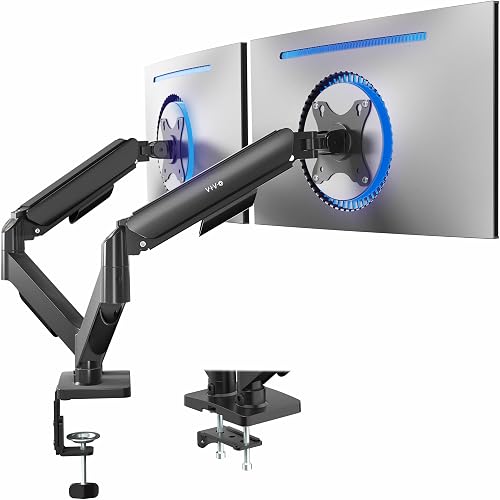
VIVO Dual Monitor Stand: Best for 17 to 32 inch screens
- Fits 17 to 32 in screens
- 4.4 to 19.8 lb per screen
- VESA 75x75 and 100x100 mm
- C-clamp and grommet options
A mechanical articulating clamp mount for larger flat and curved screens, with toolless counterbalance adjustment.
Pros
- Wide 17 to 32 in range
- Toolless spring adjustment
- Clamp fits tops up to 3.1 in
Cons
- Arms extend past desk edge
- Not for screens under 17 in
The VIVO Dual Monitor Stand suits desks with 17 to 32 inch flat or curved screens weighing 4.4 to 19.8 lb each. Its mechanical spring adjustment gives toolless counterbalance, so you can move a screen and have it stay where you place it.
Articulation covers +90 to -90 tilt, 180 swivel, and 360 rotation. That range helps with gaming and office layouts, and it helps when two people share one desk at different times.
Mounting uses a heavy-duty C-clamp for tops up to 3.1 in, or an optional bolt-through grommet mount for tops up to 1.9 in. Open-top VESA plates slide on, which makes fitting faster than plate-and-screw styles.
If your monitor needs a different mounting pattern, see this VESA adapter plate guide.
VIVO notes that the back of the arms extends past the desk edge. That matters on shallow desks and on desks pushed against a wall.
It also means the mount is not for screens under 17 in, so check the 17 in floor before you compare it with the 13 in options here.
ErGear Dual Monitor Arm: Best for fast tool-free setup
- Fits 13 to 32 in screens up to 19.8 lb
- Tool-free VESA plates
- +80/-50 tilt, swivel and 360 rotation
- Height to 17.5 in, extension to 18.1 in
A fast-install dual arm for 13 to 32 inch screens, with tool-free VESA plates and openable cable clips.
Pros
- Tool-free VESA fitting
- Independent height and angle control
- Cable clips open without tools
Cons
- Clamp fits desks 0.39 to 2.56 in
- Wooden desk recommended
The ErGear Dual Monitor Arm suits buyers who want fast fitting on 13 to 32 inch screens up to 19.8 lb. Its tool-free VESA plates fit in three steps, which helps when you move screens or change layouts often.
Independent positioning covers height to 17.5 in and extension to 18.1 in, with +80/-50 tilt, swivel, and 360 rotation. You can set one screen high for reading and keep the other lower for writing, instead of forcing both to match.
Cable clips open without tools, so you can reroute cords after a layout change without removing the arm. ErGear recommends a wooden desk with no crossbeam blocking the underside, and the C-clamp fits desks 0.39 to 2.56 in thick.
Against the VIVO clamp pick, this ErGear gives a wider 13 in starting size and simpler VESA fitting. Against the WALI, it gives a lower 19.8 lb limit.
Check your desk thickness and your screen weight first, because those two numbers decide more than the motion range.
WALI Adjustable Dual Monitor Arm for 13-32: Best for long daily use
- Fits 13 to 32 in screens, 22 lb per arm
- Extension 19.3 in, height to 17.3 in
- Swivel, tilt and 360 rotation
- C-clamp and grommet mounting
A full-motion dual arm with 22 lb per-arm capacity and cable guides, built for repeated daily adjustment.
Pros
- 22 lb per arm capacity
- 19.3 in extension
- Cable guides along arms
Cons
- Wooden desk recommended
- No crossbeam under mount
The WALI Adjustable Dual Monitor Arm suits daily users who move screens often and need 22 lb per arm. It fits most flat or curved screens from 13 to 32 in, with 75x75 and 100x100 mm holes.
Full motion covers extension to 19.3 in and height to 17.3 in, with +90/-90 swivel, +70/-45 tilt, and 360 rotation. That reach helps on deep desks, where a shorter arm would leave screens too far from your chair.
WALI says the core passed more than 20,000 adjustment cycles. That claim matters most if you switch between portrait and landscape, or share the desk with another person who sits at a different height.
Cable guides run along the arms, and mounting uses a C-clamp or grommet base for desks 0.39 to 2.76 in thick. WALI recommends a wooden desk with no crossbeam under the mount.
The trade-off is desk type: if your desk has a blocking frame, a free-standing base like the VIVO STAND-V002F may fit better.
ErGear Dual Monitor Stand up to 33: Best for screens up to 33 inches
- Fits 17 to 33 in screens, 4.4 to 22 lb each
- Height to 17.5 in, extension 17.5 in
- +90/-35 tilt, swivel and 360 rotation
- C-clamp and grommet options
A steel dual mount rated to 33 inches and 22 lb per arm, with cable clips on the arm and pillar.
Pros
- 33 in maximum size
- 22 lb per arm capacity
- Cable clips on arm and pillar
Cons
- Minimum screen is 17 in
- Grommet fits 0.39 to 2.17 in
The ErGear Dual Monitor Stand up to 33 suits buyers with larger screens in the 17 to 33 in range. Each arm holds 4.4 to 22 lb, and each screen needs 75x75 or 100x100 mm VESA holes.
Flexibility covers +/-90 swivel, +90 to -35 tilt, and 360 rotation for portrait and landscape modes. Height rises to 17.5 in above the desk, and arms extend screens 17.5 in toward you.
That helps when a 27 in or larger screen needs to sit close for split-screen work.
Cable clips sit on the arm and along the pillar, so cords stay in a cleaner line than loose desk cables. ErGear also cites 20,000 cycle testing for smooth movement over time.
Mounting uses a C-clamp for 0.39 to 2.56 in tops, or a grommet mount for 0.39 to 2.17 in tops. ErGear recommends wood or iron tops with no beams blocking the underside.
The trade-off is the 17 in minimum size, so small 13 to 16 in screens belong on the 13 in picks instead.
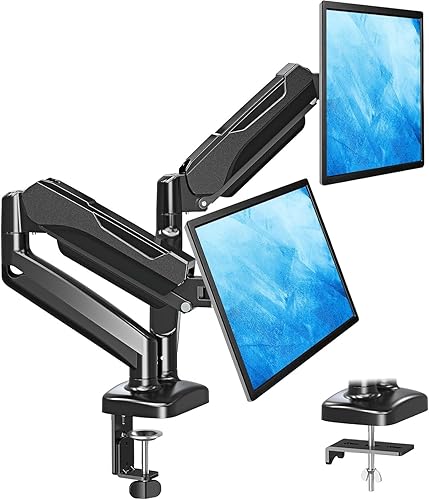
MOUNTUP Dual Monitor Stand for Desk: Best for pneumatic adjustment
- Fits 17 to 32 in screens, 4.4 to 17.6 lb
- 135 tilt, 180 swivel, 360 rotation
- Extension 17.3 in, height range 9.4 in
- C-clamp and grommet base
A pneumatic dual arm for 17 to 32 inch screens, with tension adjustment for different monitor weights.
Pros
- Pneumatic smooth movement
- Tension adjusts by weight
- Cable management in arms
Cons
- Lower 17.6 lb per screen limit
- Tension needs checking after fitting
The MOUNTUP Dual Monitor Stand suits buyers who want pneumatic arms for 17 to 32 inch screens at 4.4 to 17.6 lb each. Pneumatic movement feels smoother than a plain hinge when you raise or lower a screen with one hand.
Motion covers 135 tilt, 180 swivel, and 360 rotation from portrait to landscape. Extension reaches 17.3 in, and height adjusts across a 9.4 in range.
Each joint adjusts on its own, so two screens can sit at different heights or angles.
Cable management hides wires within the arms and opens desk space below. MOUNTUP ships with hardware and instructions for C-clamp or grommet fitting, and the clamp fits desks 0.39 to 2.76 in thick.
Set the pneumatic tension for your screen weight after fitting. If the arm rises, reduce tension for a lighter screen.
If it falls, increase tension for a heavier screen. The lower 17.6 lb limit is the main trade-off, so heavier 19.8 or 22 lb screens need another pick here.
Acer Dual Monitor Arm: Best for gas spring lifting
- Fits 17 to 32 in screens, 4.4 to 19.8 lb
- Gas spring lift
- Height to 18.1 in, extension 21.25 in
- 360 rotation, tilt and swivel
A gas spring dual arm with long reach and tall height range for side-by-side or mixed portrait layouts.
Pros
- Gas spring lift
- 21.25 in extension
- Tall 18.1 in height range
Cons
- Confirm desktop depth first
- Not for glass or plastic tops
The Acer Dual Monitor Arm suits buyers who want gas spring lift for 17 to 32 inch screens at 4.4 to 19.8 lb per monitor. Gas-assisted lift holds a screen in place while you change height, which helps with sit-stand use.
Height adjusts to 18.1 in and extension reaches 21.25 in, the longest reach in this group. Rotation is 360, tilt is +90/-60, and swivel is +/-90.
That range fits dual horizontal, horizontal plus vertical, dual vertical, and cross layouts.
Acer cites more than 20,000 durability tests for the gas spring. Tension adjusts by a screw: increase it for heavier screens and decrease it for lighter screens, so the arm does not creep up or sag down.
Mounting uses C-clamp or grommet base for desktop thickness 0.59 to 3.15 in, and Acer says the mount is not suitable for glass or plastic surfaces. Confirm desktop depth before you order, because the long extension needs room behind the screens.
For a deeper look at this style, see our best dual gas spring monitor arm guide and our best acer dual monitor arm guide.
Dual Monitor Arm Desk Mount Fits Max: Best for flat screens in white
- Fits 13 to 32 in screens, 4.4 to 19.8 lb
- Height to 17.3 in, extension 19.5 in
- Tilt, 180 swivel and 360 rotation
- C-clamp or grommet, 0.39 to 2.76 in
A white dual desk mount for 13 to 32 inch flat screens, with hidden cable management and quick release plates.
Pros
- White finish option
- Hidden cable management
- Quick release VESA plates
Cons
- Not for 1000R, 1500R or 1800R curved screens
- Desk clearance checks needed
The Dual Monitor Arm Desk Mount Fits Max suits buyers with 13 to 32 inch flat screens at 4.4 to 19.8 lb each who want a white finish. It does not fit 1000R, 1500R, or 1800R curved screens, so curved-screen buyers should skip it.
Full motion gives tilt to 70 up and 45 down, 180 swivel, and 360 rotation from landscape to portrait. Height reaches 17.3 in and extension reaches 19.5 in, which helps you pull screens to eye level from a seated position.
Hidden cable management keeps the desktop cleaner, and lifting two screens off the desk frees space for a keyboard, notebook, or dock. Quick release VESA plates make fitting simpler when you work alone.
Mounting uses C-clamp or grommet for tops 0.39 to 2.76 in thick, with hardware included. Check underframe, side panel, and back panel clearances before you clamp, because those parts can block the mount.
Our best dual monitor arm white guide covers more white options for light desks.
MSI MAG MT101DG: Best for premium aluminum arms
- Fits 17 to 32 in screens, 22 lb per screen
- Gas spring dual arm
- Tilt to +80/-45, swivel and rotation
- Clamp and grommet options
An aluminum gas spring dual arm for 17 to 32 inch screens, with quick release VESA plates and clamp or grommet bases.
Pros
- Aluminum arms
- 22 lb per screen capacity
- Quick release VESA plates
Cons
- Clamp fits 10 to 75 mm tops
- Grommet fits 10 to 45 mm tops
The MSI MAG MT101DG suits buyers who want aluminum gas spring arms for 17 to 32 inch screens up to 22 lb per screen. Gas spring lift gives smooth height changes and helps hold position during daily use.
Adjustment covers tilt to +80/-45, swivel to +90/-90, and rotation to +180/-180. That range fits side-by-side work, portrait reading, and angled gaming setups without forcing both screens into the same pose.
Base options include clamp for desktops 10 to 75 mm thick and grommet for 10 to 45 mm thick. Quick release VESA plates make mounting and removal simpler, and VESA 75x75 and 100x100 mm fit covers most screens in the range.
The trade-off is desk range. Thicker tops beyond 75 mm need another mount, and the 17 in floor excludes smaller screens.
MSI backs this model with 3-year coverage. For brand-specific gas spring options, see our best ergotron dual monitor arms guide and our ergotron lx dual monitor arm review.
How we compared these dual monitor arms
We compared size range, weight limit, VESA fit, motion range, desk thickness and mounting type for each pick. We also checked which screens each arm excludes, because an excluded screen matters more than a small extra feature.
Our score weighs specs, features and buyer feedback against what you are shopping for. A high score means the arm fits common two-monitor desks well, not that it fits every desk.
We did not test these arms by hand. We checked the specs for each model and compared them side by side.
Where a brand makes a claim about cycles or durability, we label it as that brand claim.
What size and weight should a dual monitor arm hold?
A dual arm should hold both screens inside its stated size and weight range, with VESA 75x75 or 100x100 mm holes on each back. Check each screen on its own, because two screens can differ in size and weight.
Most picks here start at 17 in. The VIVO STAND-V002F, ErGear EGDMA70B-DS-UK, WALI GSMP002N, and the MOUNT PRO pick also fit 13 in screens.
The ErGear EGDS15B reaches 33 in, which is the largest size here.
Weight limits range from 17.6 lb per screen on the MOUNTUP to 22 lb per arm on the WALI, ErGear EGDS15B, and MSI. A screen at the top of the range needs the tension set for that weight, or the arm may drift.
### How to check VESA on your monitor
Look at the back of each screen for four threaded holes in a square. If the holes measure 75 mm or 100 mm across, the screen fits the VESA plates here.
### How to weigh a screen
Check the screen spec for weight, or weigh the screen with a bathroom scale if you have no spec. Add any adapter or bracket weight if you use one, because the arm carries the total.
Which mounting type fits your desk?
A clamp fits a desk edge with clear space below, a grommet fits a desk with a cable hole, and a free-standing base fits a desk where you cannot clamp or drill. Your desk shape decides this more than your screens do.
The VIVO STAND-V002F is free-standing, with a 13 x 10.5 in base. That base needs flat, clear desk space, and screens must stay within its center for stability.
Clamp ranges vary by model. The VIVO STAND-V002O clamp fits tops up to 3.1 in.
The ErGear EGDMA70B-DS-UK clamp fits 0.39 to 2.56 in. The WALI and MOUNT PRO clamps fit 0.39 to 2.76 in.
The Acer fits 0.59 to 3.15 in. The MSI clamp fits 10 to 75 mm.
### When a grommet mount helps
A grommet mount uses an existing cable hole or a single drilled hole. It gives a firm fixing and frees the desk edge.
It does not help if your desk has no hole and you cannot drill.
### When a clamp is blocked
Clamps fail when a crossbeam, side panel, underframe or back panel blocks the underside. Measure the clear space under the top before you order, and keep the brand advice in mind: several picks here recommend a wooden desk with no blocking beam.
What motion range do you actually need?
Most buyers need tilt, swivel, rotation and height adjustment, with extension matched to desk depth. You rarely need the full range on both arms at once, but independent control on each arm helps a lot.
Tilt ranges from +70/-45 on the WALI to +90/-90 on the VIVO picks. Swivel is usually 180 total, and rotation is usually 360 for portrait mode.
Height ranges from a 9.4 in adjustment range on the MOUNTUP to 18.1 in on the Acer.
Extension ranges from 17.3 in on the MOUNTUP to 21.25 in on the Acer. A deep desk needs more extension to bring screens close.
A shallow desk needs less, and long arms can push screens too far forward.
### Portrait mode for reading and code
Rotation to 360 lets one screen turn vertical for documents, chat, feeds, or code. Check that the screen width in portrait fits your desk depth and wall space.
### Gas spring versus pneumatic versus mechanical
Gas spring and pneumatic arms use assisted lift for smooth height changes. Mechanical spring arms use toolless counterbalance.
Plain hinge arms need manual locking at each joint. Assisted lift suits frequent height changes, including sit-stand desks.
For sit-stand use, see our best dual monitor arms for standing desk guide. For curved screens, see our best dual monitor arm for curved monitors guide.
How do you set up two monitors without neck strain?
Set each screen so its top is at or just below eye level, then tilt it back until glare fades. Start with both screens centered, then move the screen you use most a little closer.
Pair the arm with a chair that fits your height, such as our Best Office Chair For Dual Monitor Desk Setup picks. A chair with adjustable height, like the options in our Best Desk Chair with Adjustable Height guide, helps you keep feet flat while screens sit at eye level.
Raise the arms first with no screens attached, then fit one screen and set tension, then fit the second screen. Route cables through clips as you go, so later moves do not pull cords tight.
Keep heavy items low and close to the desk edge you can reach. If pain persists, talk with a health professional rather than forcing a posture that still hurts.
What cable management and desk space do you gain?
Lifting two screens off the desk frees space below for a keyboard, dock, notebook, or lamp. Cable clips and guides keep power and video cords in a line along the arm and pole.
The VIVO STAND-V002F uses detachable clips on arms and center pole. The ErGear EGDMA70B-DS-UK uses clips that open without tools.
The ErGear EGDS15B uses clips on the arm and pillar. The WALI uses built-in guides along the arms.
The MOUNTUP hides wires within the arms. The Acer uses hidden clips.
The MOUNT PRO uses hidden management.
That gain depends on your old setup. If your screens already sat on small stands, the gain is smaller.
If your screens sat flat on the desk, the gain is larger.
For more cable-focused picks, see our best dual monitor arm with cable management guide. For handle-style arms, see our best dual monitor arm with handle guide.
Are there picks for 27 inch, 32 inch and 34 inch screens?
Yes. Most picks here fit 27 and 32 inch screens, and a few fit larger or curved screens within stated limits.
Check the size and weight range for each screen, not just the headline size.
For 27 inch screens, see our best dual monitor arms for 27 inch monitors guide. For 32 inch screens, see our best dual monitor arm for 32 inch monitor guide.
For 34 inch curved screens, see our best dual monitor arm for 34 inch curved monitor guide.
For Dell screens, see our best dual monitor arm for dell monitors guide. A monitor arm for 2 monitors still needs VESA holes and a weight inside the arm limit, even when the brand matches.
Which pick should you buy if you want a budget option?
Pick the ErGear EGDMA70B-DS-UK if you want tool-free VESA fitting and a 13 to 32 in range, and check the WALI if you need 22 lb per arm. Budget here means fewer extras, not a weak fit, so check desk thickness and screen weight first.
Our best cheap dual monitor arm guide compares more low-cost options. As a rule, you trade assisted lift, longer reach, or a premium finish for a lower price.
Do not save money by ignoring weight limits. A screen above the limit can sag, drift, or stress the arm joints.
If your screens are heavy, keep the 22 lb picks on your short list.
More guides on this topic
- Best Dual Monitor Arms with USB Ports
Verdict: which dual monitor arm is best for you?
Buy the VIVO STAND-V002F if you cannot clamp or drill, the VIVO STAND-V002O if you want a clamp mount for 17 to 32 inch screens, and the WALI if you need 22 lb per arm with long reach. That rule covers most desks and most screen pairs.
Choose the ErGear EGDMA70B-DS-UK for tool-free VESA fitting and 13 in screens. Choose the ErGear EGDS15B for 33 in screens.
Choose the MOUNTUP for pneumatic arms at a lower weight limit. Choose the Acer for gas spring lift and 21.25 in extension.
Choose the MOUNT PRO for flat screens in white. Choose the MSI for aluminum gas spring arms.
Re-check the best dual monitor arm fit for your own screens before you order. Measure screen size, weight, VESA pattern, desk thickness, and clear space under the top.
When those five numbers match one pick here, you have your answer.
Our top 3 picks at a glance
-
1
Best for no-drill desks
VIVO STAND-V002F Dual LED LCD Monitor Free-Standing
9.7/10 our score
See it on Amazon -
2
-
3
Frequently asked questions
What size monitors fit most dual monitor arms?
Most picks here fit 17 to 32 inch screens, and a few also fit 13 inch screens. Check the diagonal size and the weight of each screen before you order, because the weight limit often decides the fit first.
Do I need VESA holes on both monitors?
Yes. Each screen needs 75x75 mm or 100x100 mm VESA holes on the back.
If a screen has no VESA holes, a dual arm cannot attach to it directly.
Can a dual arm hold one large and one small monitor?
Yes, if both screens fall inside the size and weight range for that arm. Set the tension for the heavier screen first, then adjust the lighter arm so it does not drift.
Is a clamp or a grommet mount better?
A clamp suits a desk edge with room underneath and no drilling. A grommet mount suits a desk with a cable hole and gives a firm fixing, but it needs a hole in the top.
How high should dual monitors sit?
Sit so the top of each screen is at or just below eye level. Start with the screens centered, then tilt each screen back a little until glare drops and text stays easy to read.