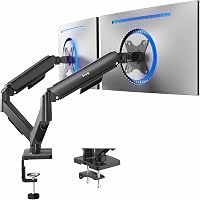
Ergotron LX Dual Monitor Arm Review: Worth It? (November 2026)
The Ergotron LX Dual Monitor Arm suits paired 27 inch screens when you want independent positioning and a 10-year warranty. Choose the VIVO for larger 32 inch screens or the HUANUO single arm for a smaller, budget desk.
On this page (12 sections)
- Ergotron LX Dual Monitor Arm at a glance
- Who the Ergotron LX dual arm suits best
- Specs that matter in daily use
- Independent positioning for paired screens
- Setup: clamp, grommet and desk thickness
- Balance, weight and cable management
- Care and long-term use
- Trade-offs versus the VIVO and HUANUO
- Alternatives you should compare
- How to choose between these three mounts
- Verdict: should you buy the Ergotron LX Dual?
- About this guide
The Ergotron LX Dual Monitor Arm suits paired 27 inch screens with independent movement and a 10-year warranty from Ergotron. This Ergotron LX dual monitor arm review compares its specs, setup and trade-offs with two alternatives so you can match the mount to your desk.
We compared the specs for the Ergotron, the VIVO Dual Monitor Stand and the HUANUO FlowLift Pro. We did not test them, so every claim below ties to a stated spec, feature or buyer pattern.
Our score weighs specs, features and buyer feedback against what you're shopping for. The Ergotron scores 9.7 because it is a true dual mount with wide movement and long warranty coverage.
Ergotron LX Dual Monitor Arm at a glance
The Ergotron LX Dual is a two-arm VESA desk mount for two monitors up to 27 inches. It includes two arms, two extensions, a pole, a T-bracket and a two-piece desk clamp, plus a grommet mount.
Ergotron: Best for paired 27 inch screens

- Two monitors up to 27 inches, 7 to 20 lb each
- VESA 75x75mm and 100x100mm
- 13 inches of lift, 360 degrees rotation, 75 degrees tilt
- Desk clamp for 0.63 to 2.6 inch edges and grommet mount
- Cable management
- 10-year warranty
A dual arm built for two screens up to 27 inches with wide movement and independent positioning. It suits side-by-side work where both displays need frequent adjustment.
Pros
- Two arms included for paired screens
- Wide lift and rotation range
- Desk clamp and grommet mounting options
- Cable management for a cleaner desk
- 10-year warranty from Ergotron
Cons
- Monitor size is capped at 27 inches
- Heavier monitors near 20 lb need careful balance
- Premium price tier compared with budget dual mounts
Its matte black finish and low-profile clamp suit a tidy workstation. Cable management routes cables under the extension and within the arm, which helps keep cords off the desktop.
Our guide to computer monitor arms explains how clamp, grommet and stand mounts differ before you choose a style.
Who the Ergotron LX dual arm suits best
This dual arm suits people running two matching or mixed screens side by side. Think writers with a reference screen, coders with code and preview panes, or analysts with data and notes open at once.
It also suits shared desks and hot-desking setups. You can fold the arms aside to reclaim space for a laptop, notebooks or a keyboard tray when the second screen is not needed.
Skip it if your monitors are larger than 27 inches. The VIVO below covers screens up to 32 inches, and screen size is a hard limit, not a suggestion.
Skip it if you only have one monitor. A single arm is lighter, cheaper and simpler to balance, and the HUANUO below is built for that job.
Your chair matters as much as your mount. Our guide to the Best Office Chair For Dual Monitor Desk Setup helps you match screen height to seat height so you do not strain your neck.
Specs that matter in daily use
The key specs are 27 inches and 7 to 20 lb per monitor, with VESA 75x75mm or 100x100mm. Those three numbers decide fit before anything else.
Measure the diagonal and check the weight of each screen.
Lift is 13 inches, with the arm rising 15.6 inches from the desktop. That lets you raise screens to eye level or lower them for a standing desk.
If you prefer a fixed shelf, compare monitor risers for desks.
Movement includes 360 degrees of rotation and 75 degrees of tilt per screen. You can turn one display toward a colleague for screen sharing, then swing it back.
Ergotron says the design is tested for 10,000 cycles, described as moving the arm three times a day for ten years. Treat that as a maker claim, not a guarantee for your exact use.
The mount is metal, matte black, model 45-245-224, and weighs 6.3 kg as a kit. Ergotron backs it with a 10-year warranty and expert technical support.
Independent positioning for paired screens
Independent positioning is the main reason to buy a dual arm like this. Each screen can sit at its own height, angle and depth.
That helps when one display is for reading and the other is for video calls.
Side-by-side is the default layout. You can also use a low-angle view, pulling one screen closer for detailed work while the other stays back for reference.
The arms fold out of the way when you want an open desk. That matters for people who switch between desk work and laptop-only days, or who need room for paperwork.
Our roundup of the best dual monitor arm options shows how other dual mounts handle the same layout. Compare tilt range, weight limit and clamp size before you decide.
Setting up a side-by-side view
Start with both screens at the same height and center them at eye level. Then pull the secondary screen slightly forward or angle it inward until text stays readable without turning your head.
For a complete setup sequence, see how to use a monitor arm.
Adjust one screen at a time and lock your chair position first. A monitor arm cannot fix a chair that is too low or a desk that is too high.
Setup: clamp, grommet and desk thickness
Setup uses a two-piece clamp for edges 0.63 to 2.6 inches thick, or a grommet mount through a hole. The clamp attaches to the back or side of the desk and needs minimal space in tight spots.
The grommet mount fits a hole up to 2 inches wide and 3 inches deep. It gives a cleaner look because the pole rises through the desk rather than gripping the rear edge.
Measure the desktop thickness at the mounting point. A desk with a thick apron, a drawer or a modesty panel may block the clamp even when the top itself is thin enough.
Assembly is described as straightforward, with a custom position set after the pole and arms are in place. Keep the hardware and manual until both screens are balanced and stable.
If you want the Ergotron brand in a different finish, our list of the best ergotron dual monitor arms covers related models and colors.
Balance, weight and cable management
Each monitor must weigh 7 to 20 lb for the Ergotron to balance correctly. A screen below 7 lb or above 20 lb falls outside the stated range, so check the maker weight for your exact panel.
Heavier screens near the top of the range need more careful tension adjustment. Move the arm slowly and confirm it holds position before you route cables and finish setup.
Cable management routes cords under the extension and within the arm. That keeps power and video cables from dragging on the desk when you rotate a screen.
Plan cable length before you mount. A cable that is just long enough at center position may pull tight when you swing a screen to its farthest angle.
Buyers often mention that cable clips help most when you add them after both screens are in their final positions. Routing cables early can force you to undo them during fine tuning.
Care and long-term use
Care is mostly keeping the clamp tight, the joints clean and the cables slack. Wipe metal parts with a soft dry cloth and avoid harsh cleaners that could mark the matte finish.
Check the clamp and grommet hardware after the first week and again after a month. Desk vibration and repeated arm movement can loosen fittings over time.
Do not overload the arms with accessories. The 20 lb limit is for the monitor itself, not for a camera, light or shelf added on top.
Ergotron's 10-year warranty is the longest in this comparison. Keep your receipt and model number, 45-245-224, in case you need support later.
If you share the desk, agree on default positions for height and angle. That saves daily readjustment and reduces wear on the joints.
Trade-offs versus the VIVO and HUANUO
The Ergotron's trade-off is size: it stops at 27 inches while rivals go to 32 inches. If you plan to upgrade to larger panels later, that cap forces a second purchase.
Its strengths are warranty length, lift range and the included grommet mount. The VIVO offers a 3-year warranty and the HUANUO states a lifetime warranty, so compare coverage terms as well as length.
The Ergotron also sits in a premium price tier. A mount that fits your screens for ten years can cost less per year than a budget mount you replace.
Color is another trade-off. This Ergotron is matte black.
If you need white to match a light desk, check our best dual monitor arm white picks for lighter finishes.
Our budget-focused list of best cheap dual monitor arm options helps if price matters more than warranty length. Compare weight limit and clamp thickness before you choose a cheaper mount.
Alternatives you should compare
These alternatives solve a different problem or fit a different screen size. Use them to check whether the Ergotron is really the right shape for your desk.
VIVO Dual Monitor Stand
The VIVO Dual Monitor Stand supports 17 to 32 inch screens at 4.4 to 19.8 lb each. It uses mechanical spring adjustment for toolless placement and offers 180 degrees of swivel and 360 degrees of rotation.
Its tilt range is plus 90 to minus 90 degrees, wider than the Ergotron's 75 degrees. That helps with portrait use and with screens that need a strong downward angle.
VIVO notes that the back of the arms can extend past the desk edge. Measure the space behind your desk before you order, especially if the desk sits against a wall.
The C-clamp fits tops up to 3.1 inches, and an optional bolt-through grommet fits tops up to 1.9 inches. That grommet option differs from the Ergotron's included grommet mount.
VIVO backs this model with a 3-year warranty. The open-top VESA plates let you slide monitors on, which can make first-time mounting easier.
HUANUO FlowLift Pro Monitor Arm
The HUANUO FlowLift Pro is a single arm for 13 to 32 inch screens at 4.4 to 15.4 lb. It is not a dual mount, so it suits a one-screen desk or a staged upgrade.
Its MechaSpring design aims for steady support without gas pressure loss over time. HUANUO says it lasts up to twice as long as conventional mounts, which is a maker claim to weigh against the warranty.
A tool-free VESA plate snaps the monitor into place with a click. That speeds setup if you move a screen between desks or share an arm.
The maker recommends wood desks 0.59 to 3.54 inches thick and warns against irregular edges. Check your desk material before you choose the clamp.
HUANUO states a lifetime warranty, with details in the user manual. Read the coverage terms, because the exact conditions matter more than the headline length.
How to choose between these three mounts
Start with monitor size, weight and VESA pattern, in that order. All three mounts use 75x75mm or 100x100mm plates, so that pattern rarely separates them.
Choose the Ergotron if both screens are 27 inches or smaller. Choose the VIVO if either screen is larger than 27 inches and you still want two arms.
Choose the HUANUO if you have one screen and want a simpler single arm.
Next, check desk thickness and mounting space. The Ergotron clamp fits 0.63 to 2.6 inches, the VIVO clamp fits up to 3.1 inches, and the HUANUO fits wood desks 0.59 to 3.54 inches.
Then check movement needs. The Ergotron gives 13 inches of lift, the VIVO gives wider tilt, and the HUANUO gives 85 degrees of tilt with spring balance.
Finally, check desk depth behind the mount. Arms that extend past the rear edge need clearance from the wall, and a tight gap can limit how far back you can push a screen.
Verdict: should you buy the Ergotron LX Dual?
Buy the Ergotron LX Dual if you run two screens up to 27 inches and want independent positioning for years. Its lift, rotation and 10-year warranty make it a strong pick for paired-screen work.
Pick the VIVO if your screens are up to 32 inches. Pick the HUANUO if you only need one screen and want tool-free mounting.
For a wider view of Ergotron models, start with our best ergotron dual monitor arms guide. It helps you see whether a different Ergotron arm fits a larger screen or a different desk shape.
Measure your monitors and desk before you order. That one step prevents most returns and ensures the arm you buy matches the screens you actually own.
About this guide
We compared specs, features and buyer feedback for the Ergotron LX dual monitor arm and two alternatives. Our score weighs specs, features and buyer feedback against what you're shopping for.
We did not test these mounts.
If armrests bother you at a dual-screen desk, our guide to Best Office Chair Arm Covers may help you make your chair more comfortable. A stable chair and a stable mount work best together.
Frequently asked questions
What size monitors fit the Ergotron LX Dual Monitor Arm?
It fits two monitors up to 27 inches diagonal, each weighing 7 to 20 lb, with VESA 75x75mm or 100x100mm patterns. Check both diagonal size and weight before you order, because a screen over either limit will not be supported properly.
Can each monitor move independently on the Ergotron LX dual arm?
Yes, the two arms allow independent positioning for side-by-side or angled views. Each screen offers 360 degrees of rotation and 75 degrees of tilt, with 13 inches of lift, so you can set one display for reading and angle the other for reference.
What desks work with the Ergotron LX dual mount?
The included two-piece clamp fits desk edges 0.63 to 2.6 inches thick. A grommet mount fits through a desk hole up to 2 inches wide and 3 inches deep.
Measure your desk thickness and any existing hole before choosing the mounting method.
Is the Ergotron LX Dual better than the VIVO Dual Monitor Stand?
The Ergotron suits two screens up to 27 inches and carries a 10-year warranty. The VIVO suits larger screens up to 32 inches with a 3-year warranty.
Pick by your actual monitor size and weight first, then by warranty and mounting needs.