Monitor Arm vs Stand: Which Should You Choose? (November 2026)
Pick a monitor arm if you need height, tilt and swivel adjustment, and pick a stand if you want simple, fixed support. In this monitor arm vs stand comparison, desk space, screen weight and how often you move the screen decide the winner.
On this page (16 sections)
- Monitor arm vs stand: the quick verdict
- Monitor arm vs stand side by side
- Desk space: floating screen vs occupied platform
- Adjustment: how much motion do you really need?
- Ergonomics: eye level matters more than brand
- Screen size and weight: the limits that decide fit
- Desk fit: clamp, grommet and thickness
- Stability and motion quality
- Setup: clamp vs grommet vs stand placement
- Spring type: gas spring vs mechanical spring
- Cable management and a cleaner desk
- Who should buy which arm
- Monitor riser or arm: when a riser still wins
- Chair and desk partners for a full setup
- The verdict: monitor arm vs stand
- About this guide
Pick a monitor arm if you need height, tilt and swivel adjustment, and pick a stand if you want simple, fixed support. In this monitor arm vs stand comparison, desk space, screen weight and how often you move the screen decide the winner.
A stand holds your screen at one height and angle. Learn how a gas spring arm works if you want to understand one common adjustable design.
An arm lifts it on a jointed mount, so you can raise it, pull it closer, tilt it down and turn it to portrait.
We compared specs, load limits, mounting options and motion ranges for four arms below. We did not test them by hand, so we label maker and buyer claims as such.
Our score weighs specs, features and buyer feedback against what you are shopping for. Higher scores reflect wider fit, stronger load limits and more useful adjustment.

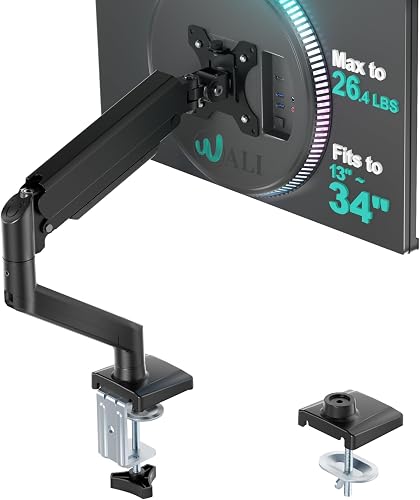 Best for larger single screens
WALI Adjustable Single Monitor Arm for 13-34
Monitor arm vs stand: the quick verdict
The arm wins for flexibility and desk space, while the stand wins for simplicity. An arm frees the surface below and lets you set the screen at eye level.
A stand takes more desk space and locks height in place.
That trade-off is the whole decision. If your screen stays in one spot all day, a stand may be enough.
If you share the screen or switch between work and video, an arm earns its place.
The four arms here all use VESA 75x75mm or 100x100mm mounting. Your monitor needs matching holes on its back.
If it does not, fit is your first blocker, not price or style.
Monitor arm vs stand side by side
An arm gives you motion and reclaimed space, while a stand gives you a fixed platform. Use the table to see which limits apply to your screen and desk before you compare anything else.
| Point | Monitor arm | Stand or riser |
|---|---|---|
| Height | Adjustable, often to eye level | Fixed by the design |
| Angle | Tilt, swivel and rotation | Usually fixed or tilt only |
| Desk space | Screen floats above the desk | Platform sits on the desk |
| Setup | Clamp or grommet to the desk edge | Place it and set the screen on top |
| Fit checks | Size, weight, VESA, desk thickness | Size, weight and platform fit |
| Best for | Changing tasks and shared screens | One fixed workstation |
The table covers the category choice. The product details below cover the exact limits that decide which arm fits your desk.
Desk space: floating screen vs occupied platform
An arm reclaims the space under your screen, while a stand uses that space for its own footprint. That difference matters most on a small desk with a keyboard, notebook and cables.
All four arms lift the screen off the desktop. The HUANUO dual mounts free space under two screens at once.
The WALI and ErGear single arms free space under one screen. Think about what will live under the screen, such as a docking station, notebook or keyboard tray.
A stand can offer storage under a riser, but it still sits on the desk and sets a fixed height. If your desk is already crowded, that footprint may push your keyboard too close.
Adjustment: how much motion do you really need?
Full-motion arms give you height, tilt, swivel and rotation, while stands give you little or none. Pick motion based on how often you change how you view the screen.
The HUANUO FlowLift dual mount gives +85°/-50° tilt, ±90° swivel and 360° rotation. For a different dual-arm option, see the Ergotron LX dual monitor arm review.
It raises each screen up to 15.75 inches.
That range suits side-by-side work, portrait reading and video calls.
The WALI single arm swivels +180°/-180°, tilts +70°/-45° and rotates 360°. It extends 19.3 inches and rises 17.3 inches.
That wide swivel helps when you turn a screen to share content.
The ErGear arm gives +80°/-50° tilt, ±90° swivel and 360° rotation. It reaches 18.1 inches and rises 17.5 inches.
If you set the screen once and leave it, that motion adds parts you will not use.
Ergonomics: eye level matters more than brand
Raising the screen to eye level can reduce the need to look down for long periods. A stand can do that only if its fixed height matches your chair and desk height.
Arms let you adjust height after you set your chair. That matters when you change seats or work at a sit-stand desk.
Rotation to portrait helps with long documents and code. Tilt helps cut glare from a window.
Swivel helps when you turn to a second screen or a visitor.
Proper placement may help reduce neck and shoulder strain for some people, but it does not treat pain. If pain persists, see a doctor or a qualified professional.
Screen size and weight: the limits that decide fit
Check size, weight and VESA pattern together, because one failed check rules out the arm. All four products here need VESA 75x75mm or 100x100mm holes.
The HUANUO FlowLift dual mount fits 13 to 32 inch screens. Each arm holds 4.4 to 19.8 lb.
Both screens must meet all three limits at the same time.
The white HUANUO Dual Monitor Stand uses the same size, weight and VESA limits. It is the same HNDS6 structure in a white finish, with C-clamp or grommet mounting.
The WALI arm fits 13 to 34 inch screens. It holds up to 26.4 lb for flat screens and 19.8 lb for curved screens.
That split limit is easy to miss, so weigh a curved screen before you order.
The ErGear arm fits 13 to 34 inch screens up to 19.8 lb. A heavier screen needs the WALI arm or a different mount.
A useful guide to computer monitor arms will not help if your exact screen misses a limit.
Desk fit: clamp, grommet and thickness
Your desk must match the mount type and thickness range, and its underside must stay clear. This check rules out more arms than any other in small home offices.
The HUANUO FlowLift fits wooden desks from 0.59 to 3.54 inches thick. It needs no cross beams or panels under the desk.
It offers a dual C-clamp or a grommet base.
The WALI arm fits desks from 0.39 to 2.76 inches for both C-clamp and grommet options. WALI recommends a wooden desk with no crossbeam blocking the underside.
The ErGear arm fits C-clamp desks from 0.39 to 2.56 inches. Its grommet option fits desks from 0.39 to 2.95 inches.
That split means the same desk may work with one option and not the other.
Plastic and glass desks are not recommended for the HUANUO dual mount. Follow the thickness and material limits for any arm you choose, because a clamp needs a solid edge to grip.
Stability and motion quality
Wider VESA heads and tighter panels help an arm hold position without sagging. All four products here claim design changes aimed at that goal.
ErGear says its VESA head is 40% wider and its panel fits more tightly. WALI says it uses a wider VESA head and a tighter panel.
Both say the core has passed 20,000+ cycles.
HUANUO says its dual C-clamp uses a larger platform to lock the mount to the desk. The white dual mount uses the same HNDS6 structure.
Cycles and platform claims do not prove how a screen will feel on your desk.
If you game or type hard, a stable clamp matters more. Our list of best monitor arms for gaming can help you narrow the field for that use.
Setup: clamp vs grommet vs stand placement
A stand needs placement only, while an arm needs desk hardware and VESA mounting. Budget time for measuring, not just for tightening screws.
ErGear offers a tool-free VESA mount and says setup takes three steps. Follow this monitor arm setup guide for measuring and positioning tips.
That can cut the fiddliest part of the job.
You still need to fit the desk mount and route cables.
C-clamp mounting grips the desk edge and needs no holes. Grommet mounting uses a desk hole and can sit closer to the back edge.
Both need the thickness range to match.
Stands avoid VESA and desk hardware entirely. That is their strongest point for a quick, low-risk setup.
For a step-by-step walkthrough, see how to use a monitor arm.
Spring type: gas spring vs mechanical spring
Spring type affects how easily the arm holds a screen at a given height. A gas spring uses pressurized gas, while a mechanical spring uses a coil or tension design.
Match spring type to your screen weight. A spring set for a heavy screen may push a light screen upward.
A spring set for a light screen may let a heavy screen sag.
The white HUANUO dual mount mentions a pneumatic spring action for smooth adjustment. Pneumatic here refers to gas-based motion in that design.
Our comparison of spring vs gas monitor arm options explains the trade-offs in more detail. Read it before you buy if your screen sits near a weight limit.
Cable management and a cleaner desk
Built-in cable guides help an arm keep cords off the desk, while a stand often leaves them exposed. That difference shows up daily, not just in photos.
Both HUANUO dual mounts include cable management to route wires along the arms. The WALI arm also includes built-in cable management.
ErGear uses cable clips that open without tools.
Plan cable length before you mount. An arm that pulls a screen closer can also pull a short cable tight.
Leave slack for full tilt and rotation.
A cleaner desk is a side benefit, not the main reason to buy. Choose fit and adjustment first, then treat tidy cables as a bonus.
Who should buy which arm
Dual users should look at the HUANUO mounts, while single-screen users should compare WALI and ErGear by weight and setup. Your screen count is the first filter.
Choose the HUANUO FlowLift Dual Monitor Stand in black for two screens at 13 to 32 inches. It scores 9.7 and gives the widest stated motion range here.
It suits gaming and work setups that need independent screen angles.
Choose the white HUANUO Dual Monitor Stand for the same dual setup in a lighter finish. It scores 9.4 and uses the same limits and mounting options.
Choose the WALI Adjustable Single Monitor Arm for a larger flat screen up to 34 inches. It scores 9.6 and holds 26.4 lb for flat screens.
It also gives the widest swivel range here.
Choose the ErGear Single Monitor Arm for faster VESA mounting. It scores 9.5 and holds up to 19.8 lb for 13 to 34 inch screens.
Its tool-free plate suits a first-time arm setup.
If you use a laptop as your main screen, a vertical laptop stand with docking station may suit you better than an arm.
Monitor riser or arm: when a riser still wins
A riser wins when your screen never moves and your desk has room for a platform. It is simpler, needs no VESA holes and cannot sag.
A riser can also add storage under the screen. That helps when a small desk needs a shelf for a notebook or a small device.
An arm wins when you need height changes, portrait rotation or shared viewing. It also wins when the desk surface under the screen must stay clear.
Many buyers start with a riser and switch later when they add a second screen. Our guide to what is a vesa adapter plate helps if your monitor lacks standard holes.
Chair and desk partners for a full setup
Your chair and desk height shape where an arm must place the screen. Set those first, then choose a mount with enough height and reach.
A low chair needs a lower screen position. A high desk needs more lift.
Arms here reach roughly 15.75 to 17.5 inches of height, so check your own setup against those figures.
Desk depth matters too. A short reach arm may force the screen too close on a deep desk.
A long reach arm may push cables into drawers on a shallow desk.
Small comfort items can help, but they do not fix a poor screen position. Best office chair arm covers are a comfort add-on, not a substitute for eye-level placement.
The verdict: monitor arm vs stand
Choose an arm for adjustment and reclaimed space, and choose a stand for fixed, simple support. That rule covers most desks and most screens.
Pick the HUANUO FlowLift Dual Monitor Stand for dual screens with full motion. Pick the WALI arm for a larger single flat screen.
Pick the ErGear arm for tool-free VESA setup. Pick the white HUANUO dual mount for the same dual flexibility in white.
Before you order, confirm three things: screen size, screen weight and VESA pattern. Then confirm desk material, thickness and underside clearance.
If any check fails, do not force the mount. A stand or riser may fit your screen and desk better than an arm that almost fits.
Our score reflects specs, features and buyer feedback for this exact use. Use it as a shortcut, not as a replacement for your own measurements.
About this guide
We compared specs and features for the four arms above and kept every claim tied to a stated limit or buyer pattern. We do not test products by hand.
Check your screen and desk measurements before you order, and use the links above to plan setup and next steps.
Frequently asked questions
Is a monitor arm better than a stand?
A monitor arm is better when you need to change height, pull the screen closer or turn it to portrait. A stand is better when you want fixed, simple support and will not move the screen often.
Your desk type, weight limit and VESA fit matter more than the category label alone.
Do I need a VESA mount for a monitor arm?
Most arms here need VESA 75x75mm or 100x100mm holes on the back of your screen. Check your monitor's size and weight against the arm limits before you order.
If your screen lacks those holes, an adapter may be needed, so confirm fit first.
Can a monitor arm hold a curved ultrawide?
Some can, within strict size and weight limits. The WALI arm fits curved screens up to 34 inches but caps curved load at 19.8 lb, while flat screens can go to 26.4 lb.
Always check both your screen's shape and its weight.
What desk does a monitor arm need?
Most arms here specify wooden desks within a thickness range, and they need a clear underside. The HUANUO dual mounts fit 0.59 to 3.54 inches, while WALI and ErGear use narrower ranges.
Measure thickness and check for cross beams before ordering.
Is a monitor riser better than an arm?
A riser is simpler and often cheaper, but it fixes height and angle. An arm gives height, tilt, swivel and rotation, and frees the space below.
Choose a riser for a fixed setup and an arm when you reposition the screen often.


