5 Best Quiet Keyboards for Office Work (November 2026)
The best quiet keyboards for office include the Logitech MK335 Full Size Quiet Wireless Keyboard for keyboard and mouse combo, the HP 230 Wireless Keyboard for keyboard-only wireless, and the Logitech Signature Slim K950 Wireless Keyboard with for multi-device quiet typing.
On this page (9 sections)
- Which quiet keyboard for office use fits your desk best
- How we compared these quiet office keyboards
- How do these quiet keyboards compare side by side
- What makes a quiet keyboard for office work actually quiet
- Should you choose wireless or wired for quiet office keyboards
- Is a full-size layout better than a compact one for office typing
- How do you set up a quiet keyboard for office work for less noise
- Are quiet keyboards also good for home offices and shared rooms
- Which quiet keyboard for office use should you buy
The best quiet keyboard for office work is the Logitech MK335 Full Size Quiet Wireless Keyboard, because it pairs whisper-quiet keys with a full-size mouse in one wireless set. That combo suits a shared desk where you want less typing noise and no extra cords.
A quiet keyboard for office use should cut key noise without making typing feel mushy. Low-profile chiclet keys, scissor switches and silent mechanical switches are the three main routes here.
Our score weighs specs, features and buyer feedback against what you are shopping for. We compared key type, layout, connection, battery life and platform support across these five models.
Our picks at a glance
-
1
 Best for keyboard and mouse combo
Logitech MK335 Full Size Quiet Wireless Keyboard
9.7/10 our score
See it on Amazon -
2

-
3
 Best for multi-device quiet typing
Logitech Signature Slim K950 Wireless Keyboard with
9.4/10 our score
See it on Amazon
- 4
 Best for wired quiet typingCheck it
- 5
 Check it
SOLAKAKA KI99 Pro Wireless Mechanical Keyboard with
Best for quiet mechanical feel
Which quiet keyboard for office use fits your desk best
The MK335 leads for a complete combo setup. The HP 230 and Logitech Signature Slim K950 suit keyboard-only wireless desks, the Cherry Stream suits a fixed wired station, and the SOLAKAKA KI99 Pro suits buyers who want a mechanical feel with silent switches.
That split matters because the right pick depends less on brand and more on your setup. A combo saves a separate mouse purchase, a multi-device board saves repeated pairing, and a wired board removes batteries from the routine.
Start with your setup, not the switch
If you already own a mouse you like, a keyboard-only model avoids duplicate hardware. If you are starting from scratch, the MK335 gives you matched wireless peripherals on one receiver.
If you move between a laptop and a tablet, device switching may matter more than battery claims. If you stay at one desktop all day, a wired board may be the simpler route.
How we compared these quiet office keyboards
We checked each model's key type, size, connection and stated battery life against office use. We also noted platform support, because a board that works only on Windows may not fit a Mac desk.
Noise claims were treated as maker claims. Logitech, HP, Cherry and SOLAKAKA each describe their keys as quiet or whisper-quiet, but the switch design tells you more about daily use.
We also compared layout width and weight, since those figures affect whether a board fits under a monitor. A 17.32 inch board and an 18.23 inch board can feel very different on a small desk.
Platform range was checked against spec sheets rather than packaging alone. That includes minimum Windows versions, Mac support, and multi-device lists for tablet and phone use.
Why battery numbers need context
Stated battery life varies with use and conditions, so we treated long claims as relative guides. A board rated at 36 months and a board rated at 16 months sit in different maintenance brackets even if real use differs.
We did not rank solely on battery life. Connection stability, key feel and layout fit carry equal weight for office typing over a full workday.
Logitech MK335 Full Size Quiet Wireless Keyboard: Best for keyboard and mouse combo
- Full size low-profile quiet keys
- 2.4 GHz wireless with nano receiver
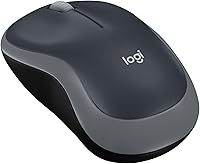
- Ambidextrous contoured mouse
- 11 hot keys and 4 programmable F-keys
- Up to 24 months for the keyboard and 12 months for the mouse
A full-size quiet keyboard paired with an ambidextrous mouse, built for a tidy shared desk with no cord clutter.
Pros
- Whisper-quiet low-profile keys
- Keyboard and mouse in one set
- Long stated battery life
Cons
- Windows focused
- Combo uses one USB receiver
The Logitech MK335 suits a shared office or home workspace where you need a quiet keyboard and mouse in one purchase. Its low-profile whisper-quiet keys keep typing noise down, while the full-size QWERTY layout keeps familiar spacing for touch typists.
The set uses Logitech advanced 2.4 GHz wireless with a plug-and-forget nano receiver. That link aims to give cord-like reliability without a cable across the desk, and the receiver can store in the mouse when you move the set between rooms.
The ambidextrous mouse has rubberized side grips and optical movement detection. Left-handed and right-handed users can share the same contoured shape, which helps in hot-desk offices.
Eleven hot keys plus four programmable F-keys cover media and shortcuts. Logitech states up to 24 months for the keyboard and up to 12 months for the mouse, with two AAA batteries included for the keyboard.
Trade-off: this is a Windows-focused combo for Windows 10, 11 or later. If your main machine is a Mac, the HP 230 or K950 may fit better.
HP 230 Wireless Keyboard: Best for keyboard-only wireless
- Full size low-profile chiclet keys
- Integrated number pad
- 2.4 GHz wireless up to 32.8 ft
- 12 shortcut keys
- Up to 16 months on 2 AAA batteries
A slim quiet wireless keyboard with a number pad and shortcut keys for laptop and desktop use.
Pros
- Low-profile quiet chiclet keys
- Number pad included
- Long stated battery life
Cons
- No mouse in the box
- Plastic enclosure
The HP 230 suits office workers who want a quiet keyboard only, with no mouse bundled in. Its full-size low-profile chiclet keys give accurate typing with minimal noise, and the integrated number pad keeps data entry in reach.
HP uses 2.4 GHz wireless through a USB-A dongle receiver, with use up to 32.8 ft. You can move the board to a kitchen table, library or meeting room table without a cable trailing behind it.
The board measures 17.32 x 5.76 x 1.09 in and weighs 1.1 lb. That slim profile fits under a monitor on many desks, and the light weight makes it easy to carry between rooms in a bag.
Twelve shortcut keys cover popular functions with one press, including full-size F1 to F12 shortcuts. That helps if you use browser, media or system shortcuts often.
HP states up to 16 months of keyboard use on 2 included AAA batteries, backed by a two-year limited warranty in the listing. Actual life will vary with use and conditions.
Trade-off: the enclosure is plastic and there is no mouse in the box. If you need a matched mouse, the MK335 combo covers more ground in one purchase.
Logitech Signature Slim K950 Wireless Keyboard with: Best for multi-device quiet typing
- Quiet laptop-style typing
- Switch between 3 devices
- Bluetooth or Logi Bolt receiver
- Full size with number pad
- Up to 36 months of battery life
A slim full-size keyboard for quiet typing that moves between a computer, tablet and phone with one tap.
Pros
- Quiet typing for shared rooms
- Connects to 3 devices
- Multi-OS support
Cons
- Keyboard only, no mouse
- Custom shortcuts need the Logi Options+ app
The Logitech Signature Slim K950 suits people who type quietly across a computer, tablet and phone. Its quiet laptop-style typing feels familiar if you work on a laptop all day, and the full-size board keeps a number pad for office tasks.
You can switch typing between three devices with a single tap. That helps on a desk where a laptop, tablet for notes and phone for messages all need text entry during the same session.
Connection runs through Bluetooth or the included Logi Bolt USB receiver. Logitech lists support for Windows, macOS, Chrome OS, Linux, iPadOS, iOS and Android.
The board has 108 keys, a QWERTY layout and one-tap functions for work and home, such as mute, volume, media controls and the snipping tool. Custom keys work through the Logi Options+ app on Windows and macOS.
Logitech states up to 36 months of battery life and notes plastic parts include at least 48 percent certified post-consumer recycled plastic. That long interval reduces how often you check for a low battery mid-task.
Trade-off: this is keyboard only, with no mouse included. It also leans on an app for custom shortcuts, so check that step if you plan heavy remapping.
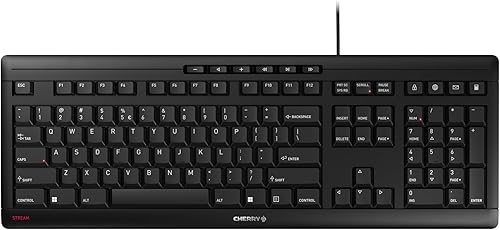
Cherry Stream Keyboard: Best for wired quiet typing
- Wired USB-A slim design
- CHERRY SX scissor switches
- Numeric keypad
- 10 office and multimedia keys
- 8 rubber feet and metal plate
A flat wired keyboard with whisper-quiet scissor keys and a stable non-slip base for frequent typists.
Pros
- Whisper-quiet scissor keys
- Stable metal plate base
- No battery to change
Cons
- Wired only
- Takes more desk depth than slim wireless models
The Cherry Stream Keyboard suits a fixed office desk where a wired board is fine. Its CHERRY SX scissor switches give a precise pressure point with whisper-quiet typing, which suits frequent typists in shared rooms.
The slim wired design uses USB-A and a numeric keypad. Ten extra keys cover office and multimedia tasks such as browser, email, calculator, lock and play or pause, so common actions stay one press away.
A metal plate and 8 rubber feet keep the board stable on the desk. That matters if you type hard, since slipping can break focus and add noise on a hard surface.
The board measures 18.23 x 6.42 x 0.71 in and weighs 2 lb. It is the widest and heaviest pick here, so check desk depth before you slide it under a monitor for the day.
Three status LEDs show Caps Lock, Num and Scroll at a glance. Abrasion-resistant lettering stays legible after prolonged use, and the GS mark for tested safety is noted in the listing.
Trade-off: there is no wireless mode and no battery to manage, which is a plus for reliability but a minus for moving the board.
SOLAKAKA KI99 Pro Wireless Mechanical Keyboard with: Best for quiet mechanical feel
- Silent switches with gasket structure
- 96% layout with control knob
- Bluetooth 5.0, 2.4 GHz and USB-C
- Hot-swappable switches
- 10,000 mAh battery
A compact mechanical keyboard with silent switches, five noise-reducing layers and RGB backlighting.
Pros
- Silent switches for a mechanical feel
- Three connection modes
- Hot-swappable switches
Cons
- Plastic enclosure
- RGB may distract in a shared office
The SOLAKAKA KI99 Pro suits buyers who want a mechanical typing feel without loud clicks. Its silent switches and gasket structure with five noise-reducing layers aim to cut typing noise while keeping a smooth, creamy feel.
The 96 percent layout keeps a number section in a compact frame with 96 keys. A control knob adjusts volume, media and lighting brightness, which can speed up media control during calls or music breaks.
Triple-mode connection covers BT 5.0, 2.4 GHz and Type-C, with a 10 m range stated. It works with Windows, macOS, PC, laptop and smartphone, so you can move it between a desk and a tablet without rewiring.
A 10,000 mAh battery supports long use between charges. That matters if you dislike charging a keyboard every few weeks, and the USB-C link doubles as a wired fallback.
Hot-swappable keys with a 1.2 mm flex-cut PCB allow tool-free switch replacement for 3 or 5 pin switches. PBT keycaps resist wear and fading, and software can program keys, macros and RGB effects.
Trade-off: RGB backlighting with 16.8 million colors can distract in a shared office, and the plastic enclosure feels less rigid than the Cherry metal plate.
How do these quiet keyboards compare side by side
The table below puts key type, layout and connection in one view. Use it to narrow by switch type first, then by wireless or wired needs.
| Product | Best for | Layout | Connectivity | Operating system | Our score |
|---|---|---|---|---|---|
| Logitech MK335 Full Size Quiet Wireless Keyboard | keyboard and mouse combo | Full size QWERTY | USB, wireless 2.4 GHz | Windows 10, 11 or later | 9.7 |
| HP 230 Wireless Keyboard | keyboard-only wireless | Wireless 2.4 GHz | Windows and Mac OS | 9.6 | |
| Logitech Signature Slim K950 Wireless Keyboard with | multi-device quiet typing | Full size, 108 keys | Bluetooth, USB Logi Bolt | Multi-OS including Windows and macOS | 9.4 |
| Cherry Stream Keyboard | wired quiet typing | Wired USB-A | Windows | 9.2 | |
| SOLAKAKA KI99 Pro Wireless Mechanical Keyboard with | quiet mechanical feel | 96%, 96 keys | Bluetooth, 2.4 GHz, USB-C | Windows, macOS and others | 8.9 |
For office use, scan the table for three filters in order. First, confirm the switch type matches your noise tolerance and typing preference.
Second, confirm connection range and receiver needs against your desk. A 32.8 ft wireless claim and a 10 m triple-mode claim both work at a desk, but port use differs.
Third, check layout and weight for portability. A 1.1 lb board moves easily, while a 2 lb board is better left in place.
What makes a quiet keyboard for office work actually quiet
Low-profile membrane and chiclet keys travel a short distance, so they make less noise than tall mechanical keys. Scissor switches add a stable feel under each key, which helps even typing.
Silent mechanical switches use damping to soften the bottom-out sound. A gasket mount and extra layers can also stop the case from ringing against the desk.
Board shape matters as well. A flat, stable base with rubber feet keeps the board from tapping the desk as you type.
Key travel and desk vibration
Short travel means the keycap stops sooner, so the impact sound is smaller. That is why low-profile boards often sound softer even at the same typing speed.
Desk vibration adds a second layer of noise that specs rarely mention. A metal plate, rubber feet and a desk mat can reduce that transfer more than a switch change alone.
Weight also plays a role in stability. A heavier board resists sliding, but a lighter board is easier to reposition during the day.
Should you choose wireless or wired for quiet office keyboards
Wired boards like the Cherry Stream need no batteries and no pairing. That suits a fixed desk with a desktop PC and a USB port nearby.
Wireless boards like the HP 230 and K950 free up cable space and move between rooms. Check battery life and receiver type before you buy, since a USB receiver uses a port.
If you switch devices often, a multi-device board like the K950 saves repeated pairing. That can cut small delays during the workday.
Receivers, ports and moving between rooms
A nano receiver that stores in a mouse helps a combo travel between home and office. A separate dongle needs a free USB-A port on each machine you use.
Bluetooth avoids a dongle but depends on the device having Bluetooth built in. Logi Bolt and 2.4 GHz receivers are useful when a laptop has limited ports.
Battery powered boards need a replacement plan. AAA batteries are easy to find, while a rechargeable board needs a cable and charging time.
Is a full-size layout better than a compact one for office typing
A full-size layout with a number pad suits data entry, spreadsheets and frequent number use. It also keeps F keys and navigation keys in familiar spots.
A compact layout saves desk space for a mouse, notebook or monitor stand. It suits mostly typing, email and shortcuts.
Measure your desk depth and width first. A board like the HP 230 at 17.32 in wide fits differently than the Cherry Stream at 18.23 in wide.
Number pads, F keys and shortcuts
Office work often mixes typing with figures, dates and codes. A number pad can speed that work even if you do not use it for every task.
F keys and media keys matter for browser, volume and window control. Boards with 10 to 12 extra keys put those actions closer to your fingers.
A 96 percent layout tries to keep the number section while saving space. That balance suits smaller desks where a full board feels crowded.
How do you set up a quiet keyboard for office work for less noise
Place the board on a desk mat or a stable surface so the case does not vibrate. Rubber feet help, and a soft desk pad can dampen sound further.
Keep the receiver close if you use 2.4 GHz wireless, since distance and interference can cause dropouts. A short USB extension can move the receiver closer.
Sit with wrists level and elbows near your body. That posture can reduce hard key presses and help with comfort over long sessions.
Small desk habits that cut noise
Typing with a lighter touch is the simplest noise control. Scissor and low-profile keys reward that habit with a shorter travel distance.
Keep the board flat or at a low angle so keycaps meet your fingers evenly. Uneven angles can lead to harder presses on one side.
Clean key gaps regularly, since debris can make a key feel stiff or loud. A quick shake and wipe keeps the feel consistent over months.
Are quiet keyboards also good for home offices and shared rooms
Yes, quiet keyboards for office use work well at home where family members or roommates share space. Low noise helps during calls and focused writing.
Our ergonomic keyboard and mouse guide covers layout and comfort in more depth. It pairs well with the posture tips above.
For wireless options, our best wireless ergonomic keyboard roundup shows more cord-free choices. The best quiet ergonomic wireless keyboard guide focuses on noise plus comfort.
If you want a broader office shortlist, see the best ergonomic office keyboard picks. For a model comparison, see logitech wave keys vs wave keys for business.
Chair choice also affects typing comfort. Our Best Office Chair For Seniors and Best Desk Chair for Office Work guides cover seat fit for long desk days.
If print size matters more than low noise, our best backlit large print keyboard guide covers larger keys and backlighting.
Home office fit and shared rooms
A quiet board helps in a shared room where calls, lessons or media play in the background. Lower key noise keeps your typing from competing with those sounds.
Portability matters at home as well, since a board may move from a desk to a sofa or kitchen table. Light wireless models make that move simple.
Battery life matters more when the board is not plugged in. Check the stated months and keep spare batteries where you work.
Which quiet keyboard for office use should you buy
Pick the Logitech MK335 if you want a quiet keyboard and mouse combo in one set. Pick the HP 230 if you want a slim wireless keyboard with a number pad and no mouse.
Pick the Logitech Signature Slim K950 for quiet typing across three devices. Pick the Cherry Stream for a wired board with a stable base, or the SOLAKAKA KI99 Pro for silent mechanical switches with RGB.
Next, confirm your operating system and desk size before you order. That check prevents most returns on quiet office keyboards.
Match the board to your main device first, then to your desk space. A Windows-only combo and a multi-OS board can both be quiet, but only one will pair cleanly with your machine.
Consider how often you move the keyboard during the week. If it stays in one place, wired stability may win, and if it travels, wireless freedom may win.
Our top 3 picks at a glance
-
1
Best for keyboard and mouse combo
Logitech MK335 Full Size Quiet Wireless Keyboard
9.7/10 our score
See it on Amazon -
2
-
3
Best for multi-device quiet typing
Logitech Signature Slim K950 Wireless Keyboard with
9.4/10 our score
See it on Amazon
Frequently asked questions
What makes a keyboard quiet for an office?
Low-profile membrane or scissor keys and silent mechanical switches reduce key travel noise. A gasket-mounted board with noise-reducing layers can also soften each keystroke.
The full board shape matters too, since a slim frame can carry less vibration to the desk.
Is a quiet keyboard better wired or wireless?
Wired models avoid batteries and pairing steps, while wireless models free desk space and move between rooms. Both can be quiet if the switch type is right.
Choose by your desk layout and how often you move the keyboard.
Do I need a number pad for office work?
A number pad helps if you enter figures, dates or codes all day. It adds width, so measure your desk first.
A compact layout suits mostly typing and shortcuts.